
Disclosure: As an Amazon Associate I earn from qualifying purchases.
A small desk can get crowded surprisingly fast. Add a laptop, monitor, charger, notebook, headphones, and a few everyday essentials, and suddenly there is barely enough room left to actually work.
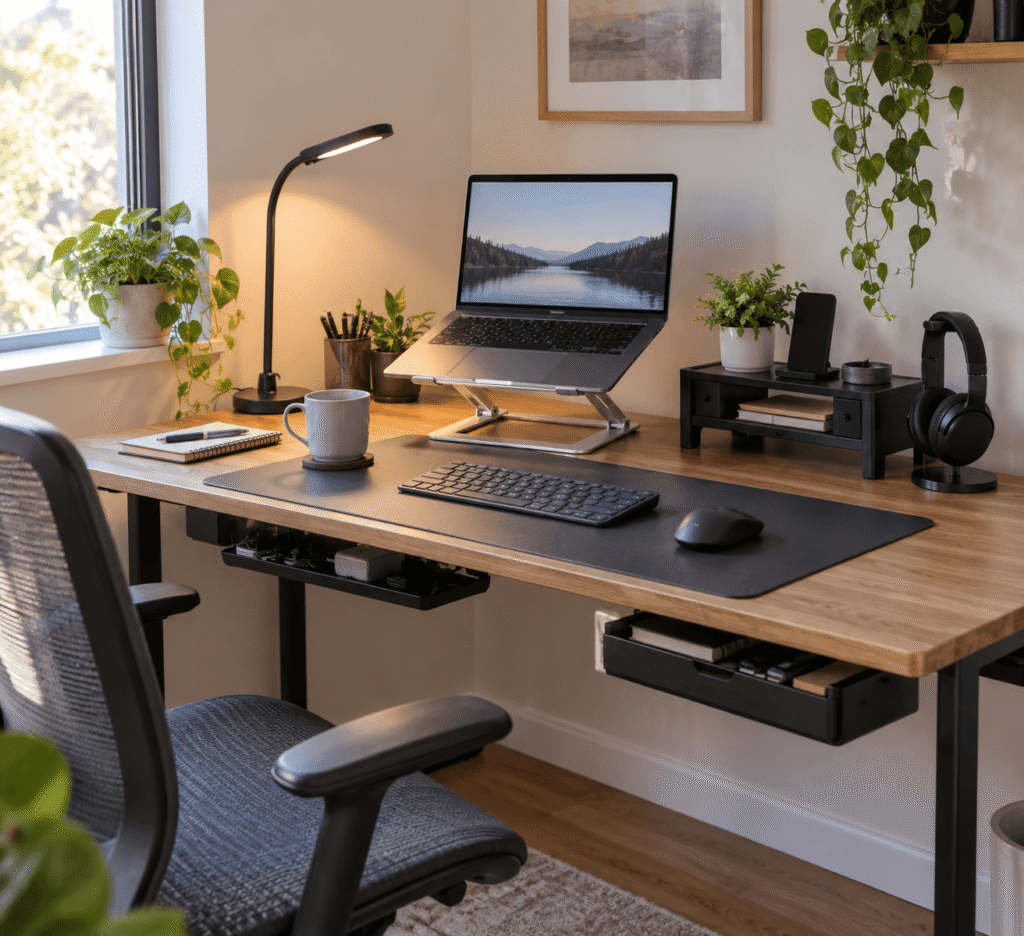
The good news is that improving a cramped workspace doesn’t necessarily mean buying a bigger desk. A few well-chosen space-saving desk accessories can help you use the space you already have more effectively while making your setup more comfortable and easier to keep organized.
Some upgrades free up the surface itself. Others make better use of the space underneath, above, or beside your desk. A few can even improve ergonomics without adding much clutter.
If you’re working with a smaller desk setup, these cheap desk upgrades that make a big difference offer more practical ideas.
Below are 10 upgrades worth considering, from simple cable fixes to accessories that change how your available desk space is used.
Quick Picks
- Best Overall: Amazon Basics Adjustable Laptop Stand — a versatile choice for improving laptop positioning without taking over your desk.
- Best Budget Option: Aothia PU Leather Desk Pad — an inexpensive way to create a cleaner, more defined work area.
- Best for Small Desks: Bostitch Konnect Under-Desk Drawer — adds useful storage underneath your existing work surface.
Prices are approximate and may change. Ratings and review counts reflect current product data.
Make Better Use of Your Desktop
Amazon Basics Adjustable Laptop Stand

Approx. price: ~$29.99 | Rating: 4.6 ⭐ | Reviews: 3,798+
Working directly from a laptop can leave you hunched over a low screen, especially during longer sessions. Ideally, you want better screen positioning without sacrificing half your available workspace.
The Amazon Basics Adjustable Laptop Stand raises your laptop to a more comfortable viewing position while keeping the setup relatively compact. It’s easy to overlook because a laptop already seems perfectly usable sitting flat on a desk.
For remote workers and students, the adjustable height and foldable design make it particularly practical. Pair the Amazon Basics Adjustable Laptop Stand with an external keyboard, for example, and you can create a more comfortable working position without rebuilding your entire setup.
It’s one of those upgrades that feels small until you use it every day.
REFLYING Under-Desk Cable Management Tray

Approx. price: ~$16.99 | Rating: 4.7 ⭐ | Reviews: 5,409+
When power cables, charging cords, and power strips collect around your desk, even an otherwise clean setup can feel messy. Getting that clutter out of sight makes the whole workspace feel more intentional.
The REFLYING Under-Desk Cable Management Tray moves much of that mess underneath the desk. Its clamp-mounted design also means you don’t need to drill into the surface.
This is especially useful for permanent home office setups with several devices. Instead of moving a power strip whenever you clean, the REFLYING Under-Desk Cable Management Tray gives your wiring a dedicated place while keeping it accessible.
Sometimes the simplest improvements are the ones you notice most.
Voncerus LED Desk Lamp

Approx. price: ~$22.99 | Rating: 4.6 ⭐ | Reviews: 9,037+
Limited desk space can make good lighting surprisingly difficult. A traditional lamp may improve visibility but also occupy valuable room that could be used for your keyboard, notebook, or coffee.
The Voncerus LED Desk Lamp solves that problem by clamping onto the desk edge instead of requiring a large base. Its flexible neck also lets you direct the light toward the area where you need it.
Students and evening workers may get the most value here. With the Voncerus LED Desk Lamp, you can illuminate notes or your keyboard without rearranging everything around a bulky lamp.
You might be surprised how much difference this can make.
OMOTON Vertical Laptop Stand

Approx. price: ~$25.99 | Rating: 4.8 ⭐ | Reviews: 9,195+
A closed laptop lying flat can take up a surprising amount of a small desk. If you connect it to an external monitor, that space is essentially being wasted.
The OMOTON Vertical Laptop Stand stores the computer upright while keeping it within easy reach. The adjustable dock is particularly useful if your laptop spends most of the day connected to external peripherals.
After connecting your monitor and keyboard, you can place the computer vertically toward the back of your setup. Using the OMOTON Vertical Laptop Stand this way can reclaim a useful section of the desktop.
A practical improvement that’s easy to appreciate once it becomes part of your routine.
Add Storage Without Adding Clutter
Bostitch Konnect Under-Desk Drawer

Approx. price: ~$14.19 | Rating: 4.5 ⭐ | Reviews: 865+
Pens, sticky notes, charging cables, and other small items have a habit of slowly taking over a desk. You want them nearby, but keeping everything visible creates unnecessary clutter.
The Bostitch Konnect Under-Desk Drawer turns unused space beneath the desktop into storage. The two-pack includes customizable dividers, so smaller accessories don’t have to end up mixed together.
A student could keep pens, highlighters, and charging accessories in the Bostitch Konnect Under-Desk Drawer, then pull them out only when needed. It’s particularly useful for simple desks without built-in drawers.
Small upgrades like this often have a bigger impact than expected.
Aothia PU Leather Desk Pad

Approx. price: ~$9.99 | Rating: 4.6 ⭐ | Reviews: 79,043+
Small desks can feel visually chaotic when every object appears to occupy its own separate space. Creating a defined work zone can make the setup feel more organized without adding another storage accessory.
The Aothia PU Leather Desk Pad creates that dedicated area while providing a consistent surface for your mouse, keyboard, and writing.
It’s often overlooked because it doesn’t technically create more room. On a compact desk, however, the Aothia PU Leather Desk Pad can visually group your everyday tools and help the overall setup feel less scattered.
It’s a simple way to make a small workspace feel more put together.
Klearlook Monitor Stand

Approx. price: ~$32.99 | Rating: 4.7 ⭐ | Reviews: 1,954+
A monitor sitting directly on your desk uses space that could potentially serve two purposes. When storage is limited, making better use of vertical space becomes particularly valuable.
The Klearlook Monitor Stand raises the screen while adding storage underneath, including a drawer for smaller essentials. That combination can help improve screen positioning while reducing clutter.
When you’re finished working, for instance, you can reclaim some surface space by storing accessories around or beneath the riser. The Klearlook Monitor Stand is worth considering if you want both organization and a raised display in one upgrade.
If this is the area you want to improve first, our guide to budget monitor stands explores more options.
APPHOME Foldable Headphone Hanger

Approx. price: ~$16.99 | Rating: 4.8 ⭐ | Reviews: 8,914+
Large headphones are awkward to store. Leave them on the desk and they consume useful space; put them somewhere else and they’re often not where you need them.
The APPHOME Foldable Headphone Hanger uses the underside of the desk to create a dedicated storage spot without adding another object to your work surface.
Gamers, remote workers, and anyone regularly joining calls can benefit most. Finish a meeting, place your headphones on the APPHOME Foldable Headphone Hanger, and they’re out of the way but still within reach.
An easy way to make everyday work feel a little smoother.
Improve Comfort and Use Vertical Space
BlissTrends Foot Rest

Approx. price: ~$31.99 | Rating: 4.4 ⭐ | Reviews: 9,087+
A small workspace shouldn’t force you to ignore comfort. If your feet don’t rest comfortably while sitting, you may find yourself constantly changing position during longer work sessions.
The BlissTrends Foot Rest provides a more supportive place for your feet and offers two adjustable height options. It’s an easy upgrade to overlook because most desk planning focuses on what happens above the desktop.
For someone spending a full workday at home, the BlissTrends Foot Rest can make the area underneath the desk more useful rather than leaving your feet unsupported.
Sometimes better use of space is about comfort rather than simply adding storage.
Gianotter Dual Monitor Stand Riser

Approx. price: ~$23.99 | Rating: 4.5 ⭐ | Reviews: 3,398+
Two monitors can consume most of a compact desktop before you’ve even added a keyboard or notebook. The goal isn’t necessarily to remove a screen, but to make the space underneath your displays useful again.
The Gianotter Dual Monitor Stand Riser uses vertical space to support two monitors while adding a drawer and pen storage underneath.
It’s particularly useful for remote workers who need a dual-screen setup but don’t have a large office desk. Instead of letting the area below both displays go unused, the Gianotter Dual Monitor Stand Riser gives smaller desk essentials a dedicated home.
It’s a practical way to make a busy workstation feel more organized.
What to Look For Before Buying
Start with your desk size. Measure the available surface, edges, and clearance underneath before ordering anything. A space-saving accessory isn’t useful if it interferes with your chair, drawers, or other equipment.
Think about comfort too. Screen height, sitting position, lighting, and access to frequently used items can matter just as much as creating extra room.
Your storage needs should guide what you add. If tiny accessories create most of the clutter, an under-desk drawer may be more useful than another organizer sitting on top.
For cable management, consider where your outlets and devices are located. Aim for a system that controls cables without making your equipment difficult to unplug or rearrange.
Don’t ignore durability, particularly when an accessory will support a laptop or monitor. Stability and suitable materials matter more than squeezing in unnecessary features.
Finally, consider ease of use. The best space-saving upgrades simplify your routine. If something constantly needs to be moved or adjusted before you can work, it may create more frustration than it solves.
Conclusion
You don’t need a huge desk to build a workspace that feels comfortable and organized. Often, the biggest improvement comes from looking differently at the space underneath your desk, around its edges, and above the work surface.
The right space-saving desk accessories can give everyday items a proper place, improve comfort, and reduce the visual clutter that makes compact workspaces feel even smaller.
Start with the problem that bothers you most. If cables are everywhere, organize those first. If you’re uncomfortable, focus on ergonomics. If you’re constantly moving things around to find working space, prioritize storage.
For even more ideas, explore these desk accessories under $50 to find other affordable ways to refine your setup.
A few thoughtful changes are often all it takes to make a small desk work much better for you.