
Disclosure: As an Amazon Associate I earn from qualifying purchases.
A desk doesn’t have to be expensive to be comfortable, organized, and enjoyable to use. In fact, some of the most frustrating workspace problems come from surprisingly small things: a laptop sitting too low, cables everywhere, nowhere to put headphones, or a desk that somehow feels cluttered even when there isn’t much on it.
The good news is that you don’t need to replace your desk or completely redesign your home office.
A few cheap desk upgrades can make everyday work, studying, gaming, or browsing noticeably easier. The best ones solve a specific annoyance without taking up much room or adding more clutter.
Below, I’ve picked 10 practical upgrades that can improve comfort, organization, productivity, and the overall feel of your setup without turning it into an expensive makeover.
If you’re working with a smaller desk setup, our guide to Best Workspace Accessories for Students has even more practical ideas for making limited space work harder.
Quick Picks
Best Overall: Lamicall Adjustable Laptop Stand — A versatile upgrade for improving laptop positioning and making an everyday setup more comfortable.
Best Budget Option: VAMRONE Cable Management Clips — An inexpensive way to stop frequently used cables from disappearing behind your desk.
Best for Small Desks: WALI Monitor Stand — A compact way to create extra usable storage without replacing your desk.
Prices are approximate and may change. Ratings and review counts reflect current product data.
Cheap Desk Upgrades for Better Comfort
Lamicall Adjustable Laptop Stand

Approx. Price: ~$39.99 | Rating: 4.7 ⭐ | Reviews: 10,437+
Working directly from a laptop can feel fine for an hour and surprisingly uncomfortable after an entire afternoon. The screen sits low, your shoulders start creeping forward, and you may find yourself constantly leaning toward the display.
Getting the screen closer to a comfortable viewing height can make the whole setup feel better. The Lamicall Adjustable Laptop Stand offers a straightforward way to raise your computer without replacing your desk.
It’s easy to overlook because a laptop already seems perfectly usable on its own. But once elevated, it can also free some space underneath and make the workspace feel more intentional.
This is especially useful for remote workers, students, and anyone who spends several hours at a laptop. Pair the Lamicall Adjustable Laptop Stand with an external keyboard and mouse, for example, and a basic kitchen-table workspace can start feeling much more like a dedicated workstation.
If you’re building around a notebook computer, you can find more ideas in our guide to Best Laptop Accessories for Students.
It’s one of those upgrades that feels small until you use it every day.
Aothia Leather Desk Pad

Approx. Price: ~$12.59 | Rating: 4.6 ⭐ | Reviews: 78,967+
If your keyboard slides around, your mouse feels inconsistent, or the desktop itself is starting to show wear, the workspace can feel slightly annoying without there being one obvious problem.
A more consistent surface makes everyday desk use feel smoother while also visually defining your main working area. The Aothia Leather Desk Pad is a simple way to create that dedicated workspace while helping protect the desk underneath.
Many people think of a desk pad mainly as decoration, so its practical benefits are easy to overlook. In everyday use, it provides one continuous surface for your keyboard, mouse, notebook, and other frequently used items.
It’s particularly handy for people who switch between typing, writing, and mouse-heavy work. With the Aothia Leather Desk Pad in place, you can move from answering emails to taking handwritten notes without constantly rearranging separate pads.
Just measure your available desktop space first so the pad doesn’t overwhelm a compact setup.
Sometimes the simplest improvements are the ones you notice most.
Quntis Monitor Light Bar

Approx. Price: ~$39.95 | Rating: 4.6 ⭐ | Reviews: 13,764+
Working after sunset can create an awkward choice: keep the room dark and stare at a bright screen, or turn on overhead lighting that may feel unnecessarily harsh.
A softer source of desk lighting can make evening work feel much more comfortable. The Quntis Monitor Light Bar sits around the monitor rather than taking up another chunk of valuable desktop space.
That’s especially useful when a traditional lamp would crowd an already small setup. Lighting is also easy to overlook because it rarely seems urgent until you’ve experienced a workspace with better illumination.
Students, night owls, and remote workers who frequently work in the evening are likely to benefit most. Imagine reviewing notes or writing beside your keyboard at night with the Quntis Monitor Light Bar illuminating the working area instead of relying entirely on your screen.
Its dimming controls also make it easier to adjust the lighting as the room changes throughout the evening.
It’s a small improvement that can make evening desk time noticeably more pleasant.
BlissTrends Foot Rest

Approx. Price: ~$19.99 | Rating: 4.4 ⭐ | Reviews: 9,076+
Sometimes your chair seems fine, yet you still can’t find a comfortable sitting position. Your feet may not rest naturally on the floor, especially when your desk height forces you to raise the chair.
The goal isn’t a complicated ergonomic transformation. It’s simply to give your feet a stable place to rest. The BlissTrends Foot Rest provides that extra support underneath the desk with two adjustable height options.
Foot positioning is one of those details people rarely think about when improving a workspace, which makes this upgrade particularly easy to overlook.
Anyone whose chair height is dictated by a taller desktop may appreciate it. During a long study or work session, having the BlissTrends Foot Rest beneath you can feel more natural than constantly changing position or wrapping your feet around the chair base.
Make sure you have enough under-desk room for both the footrest and comfortable leg movement.
A practical improvement that’s easy to appreciate once it becomes part of your routine.
Cheap Desk Upgrades for Organization
D-Line Cable Management Box

Approx. Price: ~$27.99 | Rating: 4.5 ⭐ | Reviews: 7,312+
Even a clean desk can look messy when power strips, chargers, and excess cable lengths collect underneath or beside it.
Getting that visual clutter under control can instantly make the setup feel calmer and easier to maintain. The D-Line Cable Management Box gives that mess a designated place instead of requiring every wire to be perfectly routed.
Many people overlook this solution because they assume cable management means installing trays and carefully routing every wire beneath the desk. In reality, simply containing a power strip and excess cord length can make a noticeable difference.
It’s particularly helpful if your computer, monitor, lamp, and chargers all connect around the same area. The D-Line Cable Management Box can turn that pile of adapters and cords into something much less visually distracting.
Start with the cable clutter you can actually see rather than trying to create a perfectly hidden setup.
Small upgrades like this often have a bigger impact than expected.
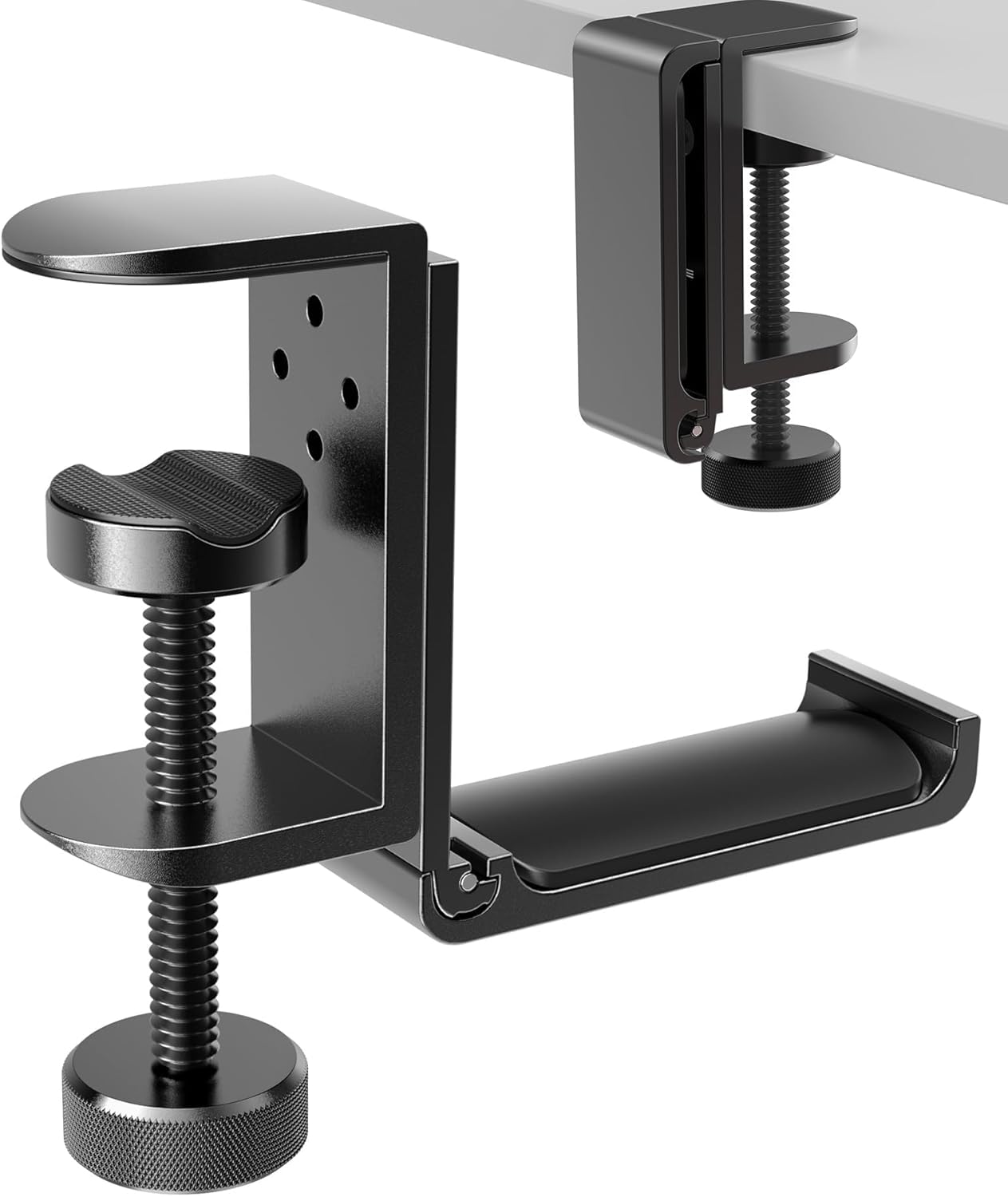
APPHOME Foldable Headphone Hanger
Approx. Price: ~$16.99 | Rating: 4.8 ⭐ | Reviews: 8,913+
Headphones have an annoying habit of occupying far more useful desk space than they deserve. Leaving them on the desktop creates clutter, while putting them away makes them inconvenient to grab.
Ideally, they should stay accessible without being in the way. The APPHOME Foldable Headphone Hanger uses otherwise wasted space underneath the desktop to create a dedicated spot for them.
People often overlook vertical and under-desk space when organizing a workstation, which makes a solution like this especially useful for compact setups.
If you finish a video call and normally drop your headset beside the keyboard, the APPHOME Foldable Headphone Hanger gives you somewhere just as convenient to put it without sacrificing working space.
For students trying to fit everything into one small workspace, our Best College Desk Setup Essentials guide covers other ways to make limited desk space more functional.
An easy way to make everyday work feel a little smoother.
Marbrasse Expandable Desk Drawer Organizer

Approx. Price: ~$20.99 | Rating: 4.6 ⭐ | Reviews: 1,617+
A drawer can hide clutter, but that doesn’t necessarily mean the clutter is organized. Pens, adapters, sticky notes, batteries, and random cables quickly become one pile that you have to search through.
A better setup lets you find everyday items without digging. The Marbrasse Expandable Desk Drawer Organizer divides that hidden storage into adjustable compartments so smaller accessories can have designated places.
It’s hardly the most exciting desk upgrade, which is exactly why many people overlook it.
Students, home office users, and anyone with one drawer doing the job of five may benefit most. Instead of searching for a USB drive before a meeting, for example, the Marbrasse Expandable Desk Drawer Organizer can keep small tech accessories separate from pens, notes, and other supplies.
Measure the inside of your drawer before choosing an organizer rather than relying on the drawer’s exterior dimensions.
Organization doesn’t need to be visible to make your workspace easier to use.
Small Desk Upgrades for Productivity
MGRNPONY 10-Port USB-C Charging Station

Approx. Price: ~$29.99 | Rating: 4.5 ⭐ | Reviews: 2,536+
Running out of convenient charging ports usually becomes a problem at the worst possible moment. Your phone needs power, another device needs connecting, and suddenly you’re moving chargers around just to keep everything running.
Having frequently used charging connections in one accessible location can make those interruptions much less annoying. The MGRNPONY 10-Port USB-C Charging Station provides multiple ports from one central charging point.
It’s easy to overlook this kind of upgrade until your setup starts accumulating phones, tablets, earbuds, laptops, and other rechargeable devices.
Remote workers and students with several devices are likely to get the most value from it. For example, the MGRNPONY 10-Port USB-C Charging Station can give your everyday electronics one charging location rather than spreading separate adapters across multiple outlets.
Check the power requirements of the devices you plan to connect, particularly if you’re charging a laptop.
Convenience becomes surprisingly valuable when you benefit from it several times every day.
WALI Monitor Stand

Approx. Price: ~$9.99 | Rating: 4.7 ⭐ | Reviews: 17,514+
When a small desk feels crowded, the obvious solution seems to be a bigger desk. Often, though, the real problem is that you’re only using the horizontal surface you already have.
Adding another level can create useful storage without increasing the desk’s footprint. The WALI Monitor Stand raises a monitor or laptop while creating usable space underneath.
This is one of those upgrades most people don’t think about until they try it. It’s especially useful for bedrooms, dorms, apartments, and compact home offices where simply buying a larger desk isn’t practical.
A notebook and a few everyday accessories that normally sit scattered around your monitor can suddenly slide underneath the WALI Monitor Stand when you don’t need them.
Before buying, measure your available desk width and think about what you actually want to store underneath.
You might be surprised how much difference a little extra usable space can make.
VAMRONE Cable Management Clips

Approx. Price: ~$9.99 | Rating: 4.5 ⭐ | Reviews: 1,896+
Charging cables that fall behind the desk are a tiny problem—until you’re reaching underneath the desk for the third time that week.
Keeping frequently used wires exactly where you expect them removes one unnecessary interruption from your routine. The VAMRONE Cable Management Clips provide a simple way to secure and route cables around a desk rather than letting them hang wherever they naturally fall.
They’re easy to ignore because cable clips seem almost too simple to matter. But they’re particularly useful for anyone with a computer setup surrounded by charging and peripheral cables.
Picture unplugging a device and having its cable remain neatly routed along the desk instead of dropping onto the floor. With the included clips and ties, the VAMRONE Cable Management Clips can also help tidy longer cable runs behind or underneath the workspace.
Plan where each cable needs to travel before attaching anything so you don’t create unnecessary bends or tension.
For such a small change, it’s remarkably easy to appreciate every day.
What to Look For Before Buying
Start with your desk size. Measure the available surface and under-desk space before adding anything, particularly stands, pads, organizers, and cable accessories. A useful upgrade shouldn’t create a new clutter problem.
Think about comfort next. Prioritize the annoyance you experience most often rather than trying to improve everything at once. If screen height bothers you every day, addressing that probably matters more than buying another organizer.
Consider your storage needs, too. If clutter is mostly small accessories, drawer organization may help more than adding another surface to your desk.
For cable management, look at where your cables actually travel before choosing a solution. Hiding a power strip, routing longer cables, and keeping charging cords accessible are different problems that may require different approaches.
Don’t ignore durability just because you’re looking for affordable upgrades. Items supporting your laptop or monitor should feel stable, while accessories that get moved or adjusted regularly need to hold up to everyday use.
Finally, prioritize ease of use. The best desk accessories tend to disappear into your routine rather than giving you another system you have to maintain.
Conclusion
You don’t need a complete workspace makeover to make your desk noticeably better.
The most useful cheap desk upgrades usually solve small frustrations that happen repeatedly: uncomfortable screen positioning, messy cables, wasted space, poor lighting, or accessories that never seem to have a proper home.
Start with the problem that bothers you most. Improving one or two things can make your workspace feel more comfortable, focused, and organized without filling it with unnecessary accessories.
If you want to keep improving your setup without spending heavily, exploring the Best Workspace Accessories for Students is a useful next step for more practical ideas that work well in everyday spaces.
The goal isn’t to create a perfect desk. It’s to make the desk you already have easier to use.