
Disclosure: As an Amazon Associate I earn from qualifying purchases.
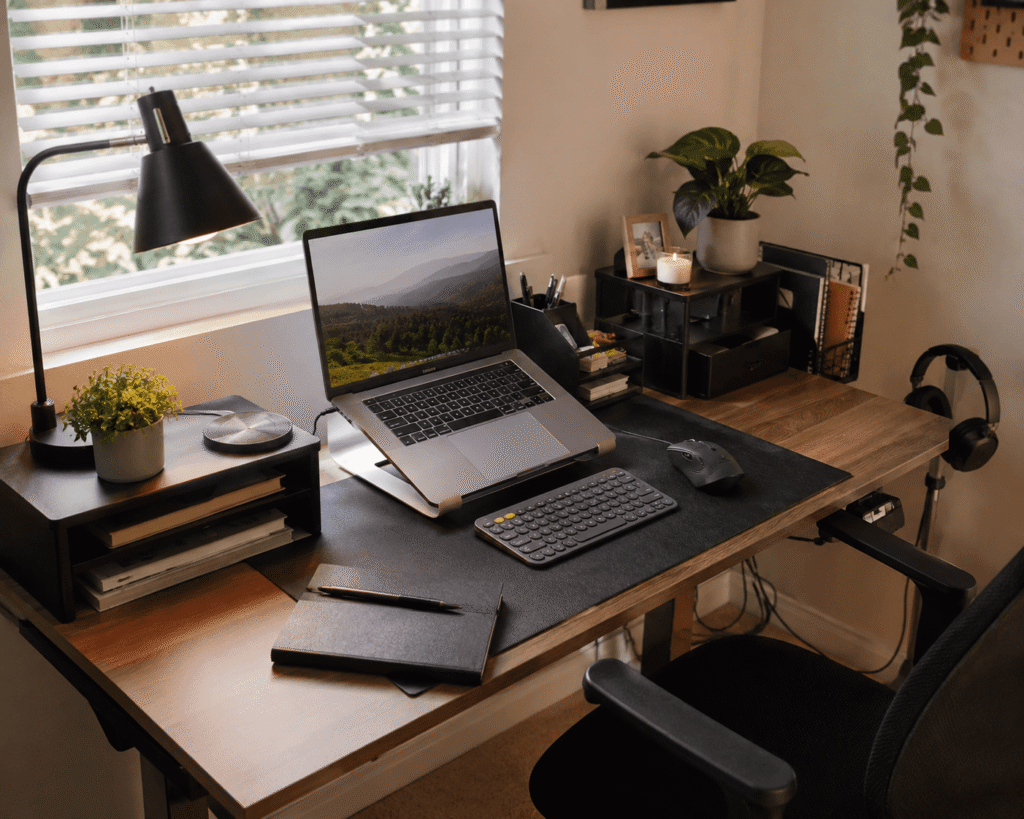
A desk does not have to be filled with expensive gear to feel polished and comfortable. In fact, some home offices feel frustrating simply because of small problems: cables are everywhere, the screen sits too low, there is nowhere to put everyday items, or the lighting makes evening work unpleasant.
The good news is that fixing those issues usually does not require rebuilding your entire workspace.
A few affordable desk accessories can make an ordinary setup feel noticeably more organized, comfortable, and intentional. The key is choosing upgrades that solve an actual problem rather than adding more stuff to your desk.
The ten ideas below focus on practical improvements you can notice during everyday work, studying, gaming, or browsing. Some improve ergonomics, others reclaim valuable desk space, and a few simply make your setup feel much cleaner.
If you’re working with limited room, these student desk accessories for small spaces offer even more ideas for making better use of the space you already have.
Quick Picks
Best Overall: Lamicall Adjustable Laptop Stand — a versatile ergonomic upgrade that can improve screen positioning for everyday laptop setups.
Best Budget Option: EURPMASK Rotating Headphone Stand — an inexpensive way to get bulky headphones off your desktop while keeping them within reach.
Best for Small Desks: REFLYING Under-Desk Cable Tray — a practical way to move cables and power accessories away from valuable desktop and floor space.
Prices are approximate and may change. Ratings and review counts reflect current product data.
Comfort and Ergonomics Upgrades
Aothia Leather Desk Pad

A desk can technically be clean and still feel unfinished. Your keyboard slides around, the mouse crosses different surfaces, and small items seem to move every time you sit down.
Creating one consistent work area makes the whole setup feel more intentional. The Aothia Leather Desk Pad is an easy way to define that space without changing your furniture or adding complicated accessories.
Approx. Price: ~$12.59
Rating: 4.6 ⭐
Reviews: 78,967+
Many people overlook a desk pad because it seems mostly decorative. In everyday use, however, it gives your keyboard and mouse a defined area, protects the desktop, and provides a consistent surface for writing and mouse movement.
It works especially well for remote workers, students, and anyone using a basic desk that could use a little more visual structure. Imagine opening your laptop in the morning and having your keyboard, mouse, and notebook already sitting within one organized work zone.
The Aothia Leather Desk Pad is particularly appealing if you want a noticeable visual upgrade without filling the desk with more objects. Sometimes the simplest improvements are the ones you notice most.
Lamicall Adjustable Laptop Stand

Working directly from a laptop often means spending hours looking slightly downward. It may seem harmless at first, but that position can become uncomfortable during longer work or study sessions.
Getting the screen closer to a natural viewing height can make your workspace feel much better. The Lamicall Adjustable Laptop Stand provides that flexibility while giving your setup a cleaner, more deliberate appearance.
Approx. Price: ~$35.99
Rating: 4.7 ⭐
Reviews: 10,437+
It’s easy to overlook this kind of upgrade because laptops are designed to work perfectly well sitting directly on a desk. Their portability, however, does not always translate into ideal positioning for long sessions.
This stand makes the most sense for people who regularly use an external keyboard and mouse. For example, you could raise your laptop during a full workday, then fold the stand down when you want a more compact setup.
The adjustable design of the Lamicall Adjustable Laptop Stand also gives you more freedom to experiment with a screen position that works for your desk and chair. It’s one of those upgrades that feels small until you use it every day.
BlissTrends Adjustable Foot Rest

If your chair is comfortable but your sitting position still feels slightly wrong, your feet may be part of the problem. This can be especially noticeable when your desk height requires you to raise your chair.
Having somewhere supportive to place your feet can make sitting feel more natural. The BlissTrends Adjustable Foot Rest gives your feet a dedicated surface and offers two height options for different sitting positions.
Approx. Price: ~$19.99
Rating: 4.4 ⭐
Reviews: 9,076+
Footrests are easy to ignore because they sit completely out of sight. Once you start using one, though, having a consistent place for your feet can make a desk feel more thoughtfully arranged.
It can be particularly useful for shorter users, people with fixed-height desks, or anyone whose feet do not rest comfortably on the floor after adjusting their chair.
Picture a long afternoon at your computer where you can reposition your legs without searching for a box, chair rail, or another makeshift surface. The BlissTrends Adjustable Foot Rest provides a simple solution that stays beneath the desk and out of the way.
It’s a practical improvement that’s easy to appreciate once it becomes part of your routine.
Lepro LED Desk Lamp

Poor lighting can make an otherwise good desk surprisingly unpleasant after sunset. You may find yourself turning up screen brightness or relying on harsh overhead lighting just to see your notebook clearly.
Better task lighting makes evening work feel more comfortable, and the Lepro LED Desk Lamp gives you more control over how your workspace is illuminated.
Approx. Price: ~$22.99
Rating: 4.7 ⭐
Reviews: 8,321+
Desk lighting is sometimes treated as decoration, but its usefulness goes well beyond aesthetics. With multiple brightness levels and color modes, you can adjust the light depending on whether you’re reading, studying, writing, or working at a computer.
Students, late-night workers, and anyone whose desk is far from a window will probably notice the biggest difference. You might use softer ambient lighting in the room while keeping focused light exactly where you’re working.
For exam preparation in particular, combining better lighting with other desk accessories for exam season can make long study sessions easier to organize.
The Lepro LED Desk Lamp is one of the simplest ways to make a basic workspace more adaptable. You might be surprised how much difference better lighting can make.
Organization and Space-Saving Upgrades
REFLYING Under-Desk Cable Tray

Even a carefully arranged workspace can look messy when several cables hang underneath it. Power cords and charging cables also have an annoying habit of collecting around your feet.
Getting those cables off the floor immediately makes a setup feel more organized. The REFLYING Under-Desk Cable Tray creates a dedicated place beneath the desktop for cords, excess cable length, and other parts of your power setup.
Approx. Price: ~$16.99
Rating: 4.7 ⭐
Reviews: 5,405+
Many people overlook cable management because the mess is technically underneath the desk. Once it’s cleaned up, though, the difference can be surprisingly noticeable.
This is especially useful for setups with a monitor, laptop charger, speakers, lamp, and several powered accessories. Instead of moving a pile of cables whenever you vacuum or reposition your feet, most of the clutter stays tucked beneath the desktop.
Because the REFLYING Under-Desk Cable Tray uses a clamp-style installation, it can also appeal to people who would rather avoid drilling into their desk.
Check your desk edge and available clearance before choosing where to install it. Small upgrades like this often have a bigger impact than expected.
Simple Houseware Monitor Stand Riser

When desk space starts disappearing, the area directly underneath your monitor often goes completely unused. Meanwhile, notebooks, pens, and small accessories compete for the remaining surface.
A little vertical organization can solve both problems. The Simple Houseware Monitor Stand Riser raises the display while adding a drawer and extra storage around the monitor area.
Approx. Price: ~$26.47
Rating: 4.6 ⭐
Reviews: 25,581+
People often think of monitor risers purely as ergonomic accessories, but the storage benefit can be just as valuable on compact desks.
Students, home office users, and anyone working with limited desktop space can benefit most. At the end of the day, smaller supplies can go into the drawer instead of remaining scattered around your keyboard.
The Simple Houseware Monitor Stand Riser is particularly useful when you want additional organization without adding another separate storage unit beside the desk.
Make sure the riser supports your monitor comfortably and does not raise the screen higher than you need. It’s an easy way to make everyday work feel a little smoother.
Simple Houseware Desk File Organizer

Loose papers, notebooks, pens, sticky notes, and other small supplies can make a desk look cluttered surprisingly quickly. The problem usually isn’t owning too much—it’s having nowhere specific to put everything.
Giving those everyday essentials a defined home makes resetting your workspace much easier. The Simple Houseware Desk File Organizer combines upright sections, trays, a pencil holder, and a drawer so different types of supplies can stay separated.
Approx. Price: ~$25.77
Rating: 4.6 ⭐
Reviews: 35,679+
It’s easy to dismiss organizers as unnecessary until you notice how often you’re searching for the same notebook, cable, pen, or document.
This setup works especially well for students, creative workers, and home office users who regularly deal with both papers and smaller supplies. Instead of leaving everything scattered after a busy afternoon, you have designated places to return things.
The Simple Houseware Desk File Organizer makes the most sense when you actually need several types of storage rather than a single pen cup.
Choose an organizer based on what regularly ends up on your desk. Sometimes better organization is less about owning fewer things and more about giving everything a sensible place.
EURPMASK Rotating Headphone Stand

Large headphones take up an awkward amount of desk space when they’re not being used. Leaving them beside your keyboard works, but they quickly become another object you have to move around.
Moving them off the desktop keeps them accessible without sacrificing usable space. The EURPMASK Rotating Headphone Stand clamps to the desk and creates a dedicated hanging spot underneath or along its edge.
Approx. Price: ~$9.44
Rating: 4.7 ⭐
Reviews: 29,240+
Many people overlook this simple upgrade because placing headphones on the desk seems good enough. On smaller setups, however, reclaiming even a little surface area can matter.
It’s particularly useful for gamers, remote workers, editors, and anyone who switches between headphones and speakers throughout the day. Finish a call, hang the headphones beside the desk, and they’re out of the way but still within reach.
The rotating design of the EURPMASK Rotating Headphone Stand can also help keep the holder tucked away when you’re not using it.
Check the thickness of your desktop before installing a clamp-style accessory. It’s a small improvement that can make a compact setup feel less crowded.
MGRNPONY 10-Port USB-C Charging Station

A phone charger here, an accessory cable there, and suddenly every available outlet seems occupied. Constantly reaching behind furniture or swapping chargers gets annoying surprisingly fast.
Bringing frequently used charging connections into one accessible place can simplify the routine. The MGRNPONY 10-Port USB-C Charging Station provides multiple ports from a single desktop charging unit.
Approx. Price: ~$29.99
Rating: 4.5 ⭐
Reviews: 2,536+
This type of upgrade is easy to ignore until you’re regularly charging a phone, earbuds, tablet, laptop, and other small devices around the same workspace.
It works particularly well for people who use their desk for both productivity and personal tech. Instead of keeping several separate charging blocks around the room, frequently used devices can share a more centralized charging location.
Students with several devices may also find ideas worth combining with this setup in our guide to useful desk gadgets for students.
With ten available ports, the MGRNPONY 10-Port USB-C Charging Station makes the most sense for setups where multiple devices regularly need power. Think about what you actually charge at your desk before deciding how much capacity you need.
It’s a practical upgrade that removes a small but repetitive annoyance.
HUANUO Printer Stand

Printers are useful when you need them, but they can consume a frustrating amount of desk space the rest of the time. On a smaller workstation, dedicating a large section of the desktop to something you only use occasionally rarely feels efficient.
Moving bulky equipment below the main work surface can immediately free up room. The HUANUO Printer Stand creates a separate mobile spot for a printer while adding a storage drawer and cable management.
Approx. Price: ~$39.99
Rating: 4.5 ⭐
Reviews: 6,315+
Printer stands are easy to overlook because putting the printer directly on the desk seems like the obvious solution. The problem becomes more noticeable when you’re trying to fit a laptop, monitor, keyboard, notebook, and other essentials onto the same surface.
This option is particularly useful for home offices, student workspaces, and compact rooms where additional furniture needs to earn its footprint. A printer can stay underneath or beside the desk rather than permanently occupying your main working area.
The wheeled design means the HUANUO Printer Stand can also be pulled out when you need easier access and moved back afterward.
Measure the available space beneath or beside your desk before buying. Reclaiming desktop space from bulky equipment can make a surprisingly large difference in how comfortable the entire setup feels.
What to Look For Before Buying
Start with desk size. Measure the surface, edges, and available space underneath before choosing accessories. An upgrade stops being useful if it makes a compact workspace feel crowded.
Think about comfort next. Accessories such as laptop stands, monitor risers, lighting, and footrests should fit your actual sitting position rather than forcing you into a supposedly perfect setup.
Consider your storage needs realistically. If you only have three loose items, you probably don’t need a large organizer. If your desk regularly disappears beneath notebooks, papers, and accessories, dedicated storage may be more valuable.
For cable management, count the devices that stay connected and consider where their cables need to travel. A tidy setup should still make devices easy to unplug or move when necessary.
Finally, pay attention to durability and ease of use. Accessories that get adjusted, clamped, opened, rolled, or moved frequently need to handle regular use. Simple products that integrate naturally into your routine are usually more useful than complicated upgrades with features you rarely need.
Conclusion
Making a desk feel better does not necessarily mean buying expensive furniture or replacing your entire setup. Often, the biggest improvements come from fixing several small frustrations.
Raise a laptop that sits too low. Give loose cables somewhere to go. Move bulky headphones or a printer away from your main working surface. Improve your lighting. Create dedicated storage for the things you actually use.
Those changes can add up to a workspace that feels more comfortable, focused, and organized without becoming unnecessarily complicated.
The best place to start is with whichever problem annoys you most during a normal day. Pick one practical upgrade, see how it changes your routine, and build from there.
You can also explore our best desk gadgets for students if you want more practical ways to gradually improve a study or home office setup without changing everything at once.