
Disclosure: As an Amazon Associate I earn from qualifying purchases.
A desk doesn’t have to be terrible to make working from home harder than it needs to be. A screen sitting too low, cables getting in the way, nowhere to put small essentials, or poor lighting can slowly turn an otherwise decent workspace into a frustrating one.
The good news is that improving your setup doesn’t necessarily require a new desk, expensive furniture, or a complete home office makeover. A few carefully chosen desk accessories under $50 can solve surprisingly specific problems while making your workspace more comfortable, organized, and easier to use every day.
The key is choosing upgrades that actually address something bothering you instead of filling your desk with more stuff.
If you’re working with a tighter budget, our guide to desk accessories under $25 has even more affordable ideas. Below are 10 practical upgrades worth considering, from ergonomic improvements to clever ways of reclaiming desk space.
Quick Picks
- Best Overall: Nulaxy Adjustable Laptop Stand is a versatile ergonomic upgrade for everyday laptop setups.
- Best Budget Option: Aothia Leather Desk Pad offers an inexpensive way to create a cleaner, more comfortable work surface.
- Best for Small Desks: VIVO 2-Tier Clamp-On Desk Shelf adds vertical storage without occupying more of your main work surface.
Prices are approximate and may change. Ratings and review counts reflect current product data.
Ergonomic and Everyday Comfort Upgrades
Nulaxy Adjustable Laptop Stand

Approx. Price: ~$17.99
Rating: 4.7 ⭐
Reviews: 16,794+
Working for hours with a laptop sitting flat on your desk can leave you constantly looking downward. A more comfortable screen position can make your entire setup feel easier to use.
The Nulaxy Adjustable Laptop Stand raises your laptop closer to eye level while creating some extra room underneath. It’s easy to overlook because laptops already seem perfectly usable on their own, but positioning becomes much more noticeable during longer sessions.
Remote workers, students, and anyone regularly spending hours on a laptop can benefit most. Imagine moving from answering a few emails to spending an entire afternoon writing or studying—the improved screen height becomes much easier to appreciate.
Pair the Nulaxy Adjustable Laptop Stand with an external keyboard when possible for a more flexible setup. It’s one of those upgrades that feels small until you use it every day.
Aothia Leather Desk Pad

Approx. Price: ~$8.99
Rating: 4.6 ⭐
Reviews: 78,967+
If your keyboard, mouse, notebooks, and other essentials constantly slide around, your desk can feel messy even when it isn’t particularly cluttered. Creating one defined work area can make everything feel more intentional.
The Aothia Leather Desk Pad gives your most-used items a consistent surface while providing room for both a keyboard and mouse. Many people overlook this simple upgrade because a desk pad can initially seem mostly decorative.
It’s especially useful for people who switch frequently between typing, writing, and using a mouse. During a busy workday, having your everyday equipment sitting within one defined area can make the desk feel less chaotic.
Choose a size that fits your available workspace rather than automatically covering every inch. The Aothia Leather Desk Pad is a straightforward example of how a relatively simple addition can change how a desk feels in everyday use.
BlissTrends Foot Rest

Approx. Price: ~$19.99
Rating: 4.4 ⭐
Reviews: 9,076+
If your feet don’t rest comfortably on the floor, sitting at a desk can become awkward surprisingly quickly. This is especially common when your chair height needs to match the desk rather than your legs.
The BlissTrends Foot Rest gives your feet a dedicated place to rest and offers two adjustable height options. It’s rarely the first accessory people think about because uncomfortable sitting positions often get blamed entirely on the chair.
It’s particularly useful for anyone whose desk forces them to raise their chair higher than they’d prefer. During a long study session or workday, having somewhere stable to place your feet can make sitting feel noticeably more natural.
Consider the space available beneath your desk before adding one. For long hours at a workstation, the BlissTrends Foot Rest is the kind of comfort upgrade that’s easy to appreciate once it becomes part of your routine.
Lepro LED Desk Lamp

Approx. Price: ~$22.99
Rating: 4.7 ⭐
Reviews: 8,321+
A room can feel bright enough while your actual work surface remains poorly lit. That becomes particularly noticeable during evening work, reading, or handwritten tasks.
The Lepro LED Desk Lamp lets you direct light toward the area where you’re actually working, with multiple brightness levels and color modes available. It’s easy to ignore until you experience the difference between general room lighting and focused desk lighting.
Students, evening workers, and anyone with a desk in a darker corner will probably notice the biggest improvement. If you’re reviewing notes at 9 p.m., for example, having light aimed directly at the page can make the setup much more pleasant.
You don’t need to use every setting to get value from it. The adjustability of the Lepro LED Desk Lamp simply gives you more flexibility as your lighting needs change throughout the day.
Organization and Clutter Control
REFLYING Under Desk Cable Management Tray

Approx. Price: ~$16.99
Rating: 4.7 ⭐
Reviews: 5,405+
A clean desktop can still feel disorganized when charging cables and power cords are hanging everywhere underneath it. Getting those cables off the floor can make the entire setup look more finished.
The REFLYING Under Desk Cable Management Tray provides a dedicated place beneath the desk for excess cable length and other wiring. People often overlook cable management because the mess isn’t directly on the work surface.
It’s especially helpful for desktop PC setups or desks with several powered devices. Instead of kicking cables or accidentally pulling one with your foot, you can keep them in a more predictable location.
The clamp-mounted design is also worth considering if you’d rather avoid drilling into your desk. For more inexpensive organization ideas, explore our guide to cheap desk accessories worth buying. The REFLYING Under Desk Cable Management Tray is a small upgrade that can have a bigger impact than expected.
Simple Houseware Monitor Stand Riser

Approx. Price: ~$26.47
Rating: 4.6 ⭐
Reviews: 25,581+
When a monitor takes up a large section of your desk, the unused area directly underneath it can feel like wasted space. Raising the display can create a more useful setup without requiring a larger desk.
The Simple Houseware Monitor Stand Riser combines an elevated monitor platform with an organizer drawer and additional storage. The organization benefit is easy to overlook because most people initially consider a riser mainly for changing screen height.
It’s useful for anyone combining computer work with writing, studying, or other tasks. When you need room for a notebook, having storage directly beneath your monitor can help keep smaller supplies from spreading across the desk.
Measure your monitor and available space before choosing any riser. With the Simple Houseware Monitor Stand Riser, you’re essentially turning an otherwise unused part of the setup into functional storage.
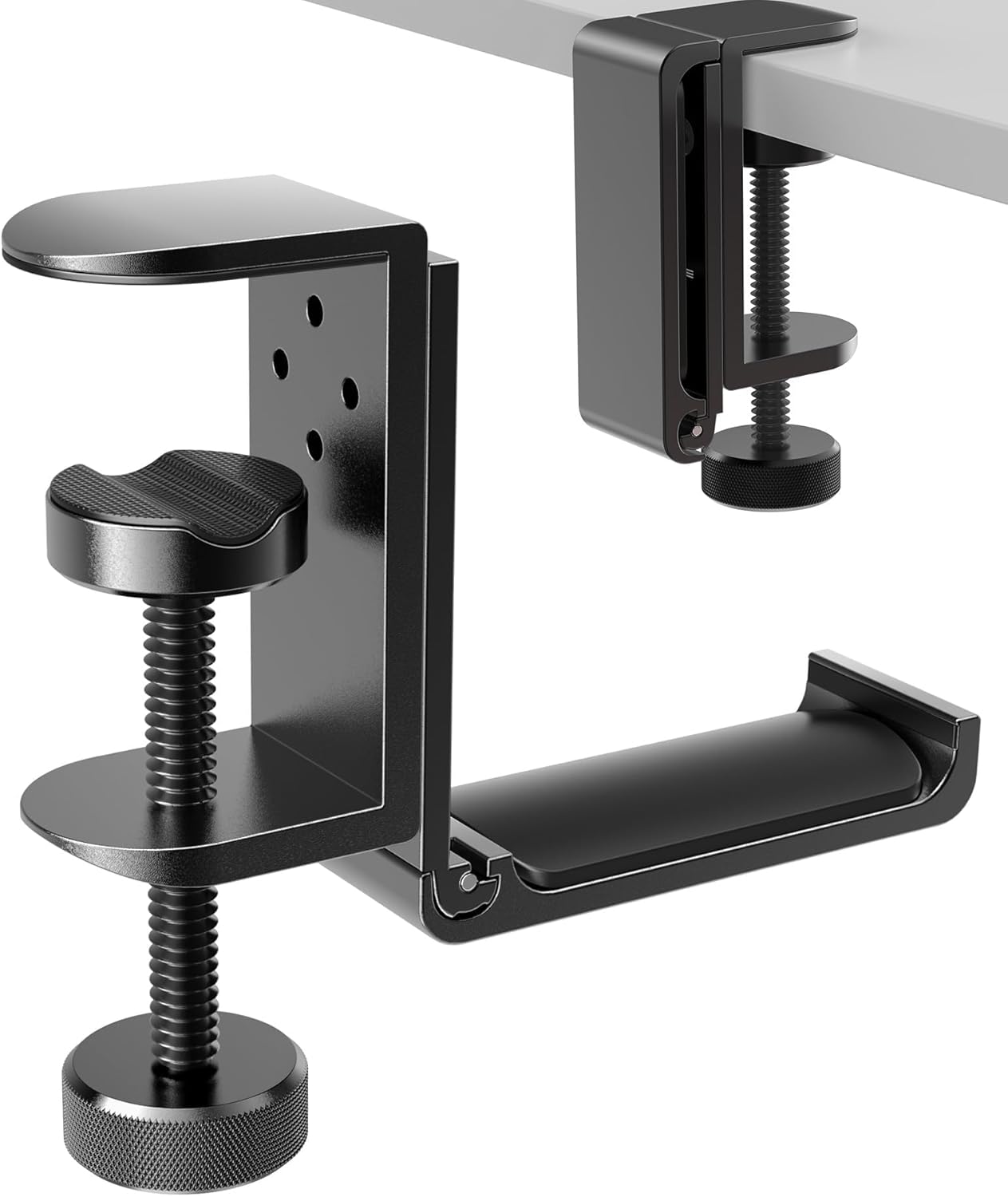
APPHOME Foldable Headphone Hanger
Approx. Price: ~$16.99
Rating: 4.8 ⭐
Reviews: 8,913+
Large headphones have an annoying habit of occupying far more desk space than expected. Leaving them beside your keyboard also makes an otherwise tidy setup look cluttered.
The APPHOME Foldable Headphone Hanger moves your headset off the work surface while keeping it within easy reach. It’s one of those organization upgrades most people don’t think about until they try it.
Gamers, remote workers, and anyone regularly using over-ear headphones can benefit. Finish a video call, place your headphones underneath the desk, and the space beside your keyboard is immediately available again.
Make sure the mounting position won’t interfere with your legs or nearby drawers. The APPHOME Foldable Headphone Hanger is an easy way to make everyday work feel a little smoother.
Marbrasse Desk Organizer

Approx. Price: ~$23.99
Rating: 4.5 ⭐
Reviews: 4,008+
Pens, documents, sticky notes, and other small objects can gradually spread across an entire desk. Giving those everyday essentials a permanent home makes resetting your workspace much easier.
The Marbrasse Desk Organizer combines tiered document storage with a drawer and dedicated pen holders. Many people overlook small-item organization until they’re repeatedly searching for the same pen, note, or document.
It’s especially useful for students and remote workers who regularly deal with papers alongside their computer. Instead of stacking documents wherever there’s room, you can separate them while keeping smaller supplies in the same general area.
The Marbrasse Desk Organizer makes the most sense if you genuinely need both paper and small-item storage. A little structure can make a busy desk feel much calmer.
Small-Space and Productivity Upgrades
MGRNPONY 10-Port USB-C Charging Station

Approx. Price: ~$29.99
Rating: 4.5 ⭐
Reviews: 2,535+
Running out of convenient charging connections can turn powering a phone, headphones, laptop, and other devices into a daily cable-swapping routine. Having one predictable charging location removes some of that friction.
The MGRNPONY 10-Port USB-C Charging Station consolidates multiple charging connections into one unit. It’s often overlooked because swapping a single cable doesn’t seem particularly inconvenient—until you’re doing it repeatedly.
It’s most useful for people juggling several rechargeable devices around the same workspace. You could finish work, connect multiple devices in one area, and know exactly where they’ll be the next morning.
Check the charging requirements and connections of your devices before choosing a multi-port solution. For gadget-heavy setups, the MGRNPONY 10-Port USB-C Charging Station can make a collection of charging cables considerably easier to manage.
VIVO 2-Tier Clamp-On Desk Shelf

Approx. Price: ~$49.99
Rating: 4.6 ⭐
Reviews: 802+
Small desks often run out of usable surface area long before you run out of things you need nearby. Adding storage vertically can be much more practical than squeezing another organizer onto the desktop.
The VIVO 2-Tier Clamp-On Desk Shelf creates two additional storage levels that can be positioned with your existing desk setup. People often overlook vertical space when trying to organize a compact workstation.
It’s particularly useful in apartments, dorm rooms, and smaller home offices. Accessories that previously competed with your keyboard and notebook for space can move onto a separate level while remaining within reach.
Check your desk edge and available clearance before choosing a clamp-mounted accessory. If maximizing a limited workspace is the priority, the VIVO 2-Tier Clamp-On Desk Shelf offers a practical way to gain storage without immediately considering a larger desk.
What to Look For Before Buying
Start with your desk size. Measure available width, depth, edge thickness, and clearance underneath before adding anything, especially monitor risers, cable trays, or clamp-on accessories.
Think about comfort next. If something about your current posture, screen position, or lighting bothers you every day, prioritize an ergonomic improvement before adding accessories purely for appearance.
Consider your storage needs realistically. A desktop organizer makes sense if papers and small supplies are the problem, while a riser or clamp-on shelf can be more useful when the desktop itself is running out of space.
Don’t forget cable management. Check where your outlets and devices sit so a new charging accessory doesn’t simply move cable clutter from one part of the desk to another.
For durability, pay attention to construction, stability, clamps, hinges, and other moving components. An accessory that becomes part of your daily routine should feel secure during normal use.
Finally, prioritize ease of use. The best desk upgrades tend to become almost invisible once they’re part of your routine. If something requires constant adjustment or gets in your way, even an impressive feature list won’t make it particularly useful.
You can also browse our complete guide to the best desk accessories under $50 if you’re comparing more ways to upgrade your workspace within the same budget.
Conclusion
You don’t need to rebuild your entire home office to make it noticeably better. Often, the most useful improvements solve one small frustration you encounter repeatedly.
That could mean raising your laptop, getting cables off the floor, creating more storage, improving lighting, supporting your feet, or simply finding somewhere better to put your headphones. Choosing desk accessories under $50 based on those everyday problems can improve comfort, focus, and organization without filling your workspace with unnecessary gadgets.
Start with the issue you notice most often and look for the simplest upgrade that addresses it. Once that’s solved, you can gradually improve the rest of the setup around how you actually work.
If budget is your main priority, you can also explore our best cheap desk accessories worth buying for more practical ways to improve your setup without overspending.