
Disclosure: As an Amazon Associate I earn from qualifying purchases.
A desk doesn’t have to be expensive to work well. In fact, some of the most frustrating workspace problems—tangled cables, poor screen height, clutter, uncomfortable posture, and nowhere to put everyday essentials—can often be improved with surprisingly simple upgrades.
The challenge is figuring out which accessories will actually make a difference instead of adding more stuff to an already crowded desk.
That’s where smaller, practical upgrades can help. The best desk accessories under $50 tend to solve one specific annoyance and make your workspace a little easier to use every day. You might improve your posture, reclaim valuable desk space, organize charging cables, or simply make long work sessions more comfortable.
If you’re working with a tighter budget, these desk accessories under $30 offer even more ideas for upgrading without overspending.
Below are 10 useful desk upgrades worth considering for remote work, studying, gaming, or everyday home office use.
Quick Picks
- Best Overall: LOXP Adjustable Laptop Stand — A versatile option for raising your laptop and making everyday desk work more comfortable.
- Best Budget Option: JZCreater USB Desk Fan — A simple, inexpensive way to add personal airflow to a warm workspace.
- Best for Small Desks: Voncerus LED Desk Lamp — The clamp design provides adjustable lighting without taking up much valuable desk space.
Prices are approximate and may change. Ratings and review counts reflect current product data.
Ergonomic Upgrades for a More Comfortable Desk
LOXP Adjustable Laptop Stand

Approx. Price: ~$27.99 | Rating: 4.6 ⭐ | Reviews: 2,380+
Working directly from a laptop often means looking downward for hours. Even when you don’t notice it immediately, that position can make a long work or study session feel less comfortable.
Raising the screen closer to eye level creates a more natural viewing position. The LOXP Adjustable Laptop Stand is a practical way to do that without replacing your existing setup.
It’s an easy upgrade to overlook because a laptop already seems perfectly usable sitting on the desk. The adjustable design also lets you change the height and angle, while the rotating base can be handy when you need to turn the screen toward someone else.
Remote workers, students, and anyone regularly using a laptop at home can benefit most. For example, you could raise your laptop during a morning work session, pair it with an external keyboard, then fold the stand down when you need more space. The LOXP Adjustable Laptop Stand can also make sense for shared or flexible workspaces where your setup changes throughout the day.
It’s one of those upgrades that feels small until you use it every day.
Aothia Leather Desk Pad

Approx. Price: ~$12.59 | Rating: 4.6 ⭐ | Reviews: 78,924+
If your keyboard, mouse, notebook, and coffee mug always seem to shift around independently, your workspace can quickly feel messy even when there isn’t much on it.
Creating one defined work area can make the entire desk feel more intentional. The Aothia Leather Desk Pad provides a large surface for everyday essentials while helping protect the desktop underneath.
Many people overlook this simple upgrade because a desk mat can seem mostly decorative. In everyday use, however, the non-slip surface can keep your setup feeling more consistent while the waterproof material makes small spills easier to deal with.
It’s especially useful for home office users who work and study at the same desk. Instead of rearranging everything constantly, your main workspace stays visually contained. The Aothia Leather Desk Pad also doubles as a large mouse surface, which means one less separate accessory competing for space.
Sometimes the simplest improvements are the ones you notice most.
BlissTrends Foot Rest

Approx. Price: ~$19.99 | Rating: 4.4 ⭐ | Reviews: 9,070+
A chair can be comfortable while your sitting position still feels slightly wrong. If your feet don’t rest naturally on the floor, finding a comfortable position throughout the day becomes harder.
Adding a supportive surface underneath your feet can make sitting feel more balanced. The BlissTrends Foot Rest offers two adjustable height options, giving you some flexibility without requiring a new chair or desk.
This upgrade is easy to ignore because it’s hidden underneath the desk. That’s also exactly why it can be useful: you can improve the way your setup feels without sacrificing any work surface.
It’s particularly worth considering for shorter users, people with taller desks, or anyone who likes changing sitting positions throughout the day. During a long afternoon at the computer, the BlissTrends Foot Rest gives your feet a dedicated place to rest, and its washable cover should make regular upkeep easier.
A practical improvement that’s easy to appreciate once it becomes part of your routine.
Organization and Small-Space Upgrades
D-Line Cable Management Box

Approx. Price: ~$22.99 | Rating: 4.5 ⭐ | Reviews: 7,310+
Chargers and power strips have a habit of turning a clean desk into a messy-looking workspace. Even a carefully organized setup can feel cluttered when several cables are piled underneath it.
Getting that mess contained makes the area easier to manage and visually calmer. The D-Line Cable Management Box is designed to hide a compatible power strip and excess cable length while keeping the setup accessible.
People often focus on organizing the top of the desk and forget what’s happening underneath. Cable management can be one of the easiest places to make a visible improvement without changing the rest of your setup.
This is especially useful for desks with a computer, monitor, phone charger, and lamp plugged in nearby. Instead of seeing the entire power strip and a pile of cords, the D-Line Cable Management Box gives that clutter a designated home.
Small upgrades like this often have a bigger impact than expected.
EVOOMI Monitor Stand

Approx. Price: ~$23.99 | Rating: 4.8 ⭐ | Reviews: 5,608+
When desk space is limited, a monitor can occupy a surprisingly large portion of your usable surface. Smaller items then start accumulating around its base, making an already compact workspace feel crowded.
The goal isn’t necessarily a larger desk—it’s making better use of the space you already have. The EVOOMI Monitor Stand raises your display while creating usable room underneath it.
That’s why this kind of upgrade is particularly useful on compact desks. The area beneath a monitor often goes unused even though it can become valuable space for a keyboard, notebooks, or smaller accessories.
Students and remote workers with limited room stand to benefit most. When work is finished, you could slide a few items beneath the riser and immediately clear part of the desk. The EVOOMI Monitor Stand comes as a two-pack as well, making it particularly interesting for multi-monitor setups.
You might be surprised how much difference better use of vertical space can make.
APPHOME Foldable Headphone Hanger
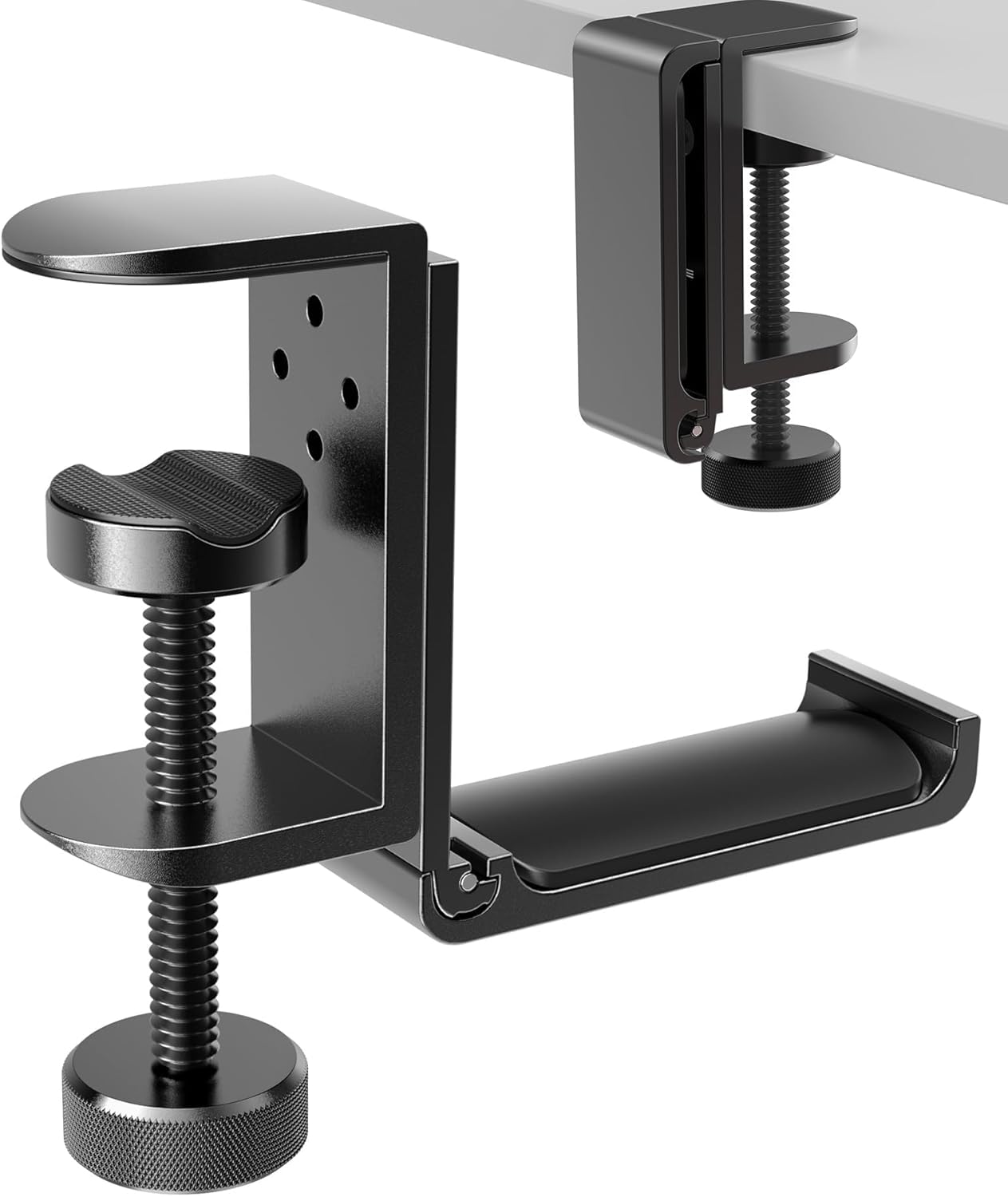
Approx. Price: ~$16.99 | Rating: 4.8 ⭐ | Reviews: 8,913+
Large headphones are awkward to store. Leave them on the desk and they consume valuable space; put them somewhere else and they’re often inconvenient when you need them again.
Keeping them accessible without keeping them on the work surface solves both problems. The APPHOME Foldable Headphone Hanger mounts underneath the desk, turning otherwise unused space into a dedicated storage spot.
It’s one of those organization upgrades most people don’t think about until they try it. The foldable design is particularly useful because the hanger itself can stay tucked away when it isn’t needed.
Anyone who uses headphones for video calls, studying, gaming, or music can benefit. Finish a meeting, place your headset on the APPHOME Foldable Headphone Hanger, and it’s off the work surface but still within easy reach for your next call.
An easy way to make everyday work feel a little smoother.
Marbrasse Expandable Desk Drawer Organizer

Approx. Price: ~$20.99 | Rating: 4.6 ⭐ | Reviews: 1,610+
A drawer can technically hide clutter while still being completely disorganized inside. Pens, adapters, sticky notes, charging cables, and other small items quickly end up mixed together.
Separating those essentials makes them much easier to find. The Marbrasse Expandable Desk Drawer Organizer uses adjustable compartments to create simple categories instead of one miscellaneous pile.
Because drawer clutter is already hidden, organizing it can feel unnecessary. The benefit becomes obvious when you need a specific cable, pen, or adapter and can grab it immediately instead of digging around.
It’s especially useful for students and remote workers with lots of small accessories. The Marbrasse Expandable Desk Drawer Organizer can also be adjusted around different supplies, so you’re not locked into one layout.
Students building a workspace from scratch can find more ideas in our guide to affordable study desk accessories.
A small organizational change can save plenty of everyday frustration.
Productivity and Everyday Comfort
Voncerus LED Desk Lamp

Approx. Price: ~$16.99 | Rating: 4.6 ⭐ | Reviews: 8,998+
Poor lighting can make evening work feel more tiring than it needs to. A room light may illuminate the space without putting enough light exactly where you’re reading, writing, or working.
More focused lighting makes the desk easier to use without requiring changes to the entire room. The Voncerus LED Desk Lamp clamps onto the desk and uses a flexible gooseneck so you can direct the light where it’s needed.
Many people overlook lighting when improving a workspace, but it’s something you interact with every day. Multiple lighting modes and brightness levels also give you more control over how the desk feels at different times.
Students, readers, and anyone working after sunset can benefit. You might use brighter focused light while reviewing notes, then reposition the Voncerus LED Desk Lamp when switching back to computer work. Because it clamps to the desk rather than sitting on a traditional base, it can be particularly useful when surface space is limited.
It’s one of the simplest ways to make your workspace feel more comfortable.
JZCreater USB Desk Fan

Approx. Price: ~$8.99 | Rating: 4.5 ⭐ | Reviews: 21,782+
A workspace that becomes warm and stuffy can make it surprisingly difficult to concentrate. Cooling an entire room isn’t always practical, especially in a shared home, dorm, or small office.
A little airflow directly around your desk can make working more comfortable. The JZCreater USB Desk Fan provides personal cooling in a compact design with three speed settings.
It’s easy to dismiss a small fan as unnecessary until you’re working through a warm afternoon and realize how distracting the heat has become. Since it’s USB powered, it can fit naturally into many computer-based setups without requiring a complicated installation.
This can be especially useful in bedrooms, dorm rooms, or shared spaces where you don’t control the thermostat. Place the JZCreater USB Desk Fan near the edge of your desk, adjust the airflow toward you, and continue working without trying to cool the entire room.
Sometimes comfort improvements have the biggest effect when they’re simple.
Amazon Basics Desktop Dry Erase Whiteboard

Approx. Price: ~$15.74 | Rating: 4.7 ⭐ | Reviews: 290+
Tasks can disappear surprisingly quickly once they’re buried inside apps, browser tabs, and digital calendars. Sometimes you just need the day’s most important reminder directly in front of you.
A visible place for quick notes can make priorities easier to remember. The Amazon Basics Desktop Dry Erase Whiteboard provides a reusable writing surface for tasks, deadlines, ideas, and temporary notes while also including space for small desk essentials.
People often overlook physical planning tools because so much organization happens digitally. Yet having your three most important tasks visible beside your keyboard can be simpler than repeatedly opening another app.
It’s useful for students, remote workers, and anyone trying to keep daily priorities visible. Write down your main tasks in the morning, erase them as they’re completed, and reset the Amazon Basics Desktop Dry Erase Whiteboard before finishing for the day.
For students creating their first dedicated workspace, these desk accessories for first-year students offer additional practical ideas.
A simple tool can sometimes make a busy workspace feel much easier to manage.
What to Look For Before Buying
Start with your desk size. Compact setups benefit most from accessories that use vertical or under-desk space instead of occupying more of the work surface. Check dimensions before buying, particularly with monitor stands, desk mats, and drawer organizers.
Think about comfort next. If posture or long work sessions are your biggest problem, ergonomic upgrades should take priority over accessories that mainly improve appearance.
Consider your storage needs and cable management too. Look at what currently creates clutter and choose something that solves that specific problem. There’s little reason to buy more organization accessories if cables are actually what’s making your desk feel messy.
For anything you’ll use daily, durability matters more than unnecessary extras. Pay attention to materials, adjustment mechanisms, mounting methods, and how frequently you’ll need to move the accessory.
Finally, consider ease of use. Adjustable accessories are helpful only when making those adjustments is straightforward. The best upgrade is one that naturally fits into your routine rather than creating another system you have to maintain.
Conclusion
You don’t need to rebuild your entire home office to make it more enjoyable to use. A few carefully chosen upgrades can noticeably improve comfort, focus, and organization.
Start with whatever bothers you most. If your screen sits too low, consider the LOXP stand. If clutter is the problem, improve storage or cable management. If long sessions feel uncomfortable, lighting, airflow, and better ergonomic support may deserve priority.
The best desk accessories under $50 aren’t necessarily the most complicated ones. They’re the upgrades that quietly solve everyday problems and continue being useful long after the novelty wears off.
If you want to keep improving your setup without spending much at once, you can also explore our best desk accessories under $30 for more budget-friendly ideas.