
Disclosure: As an Amazon Associate I earn from qualifying purchases.
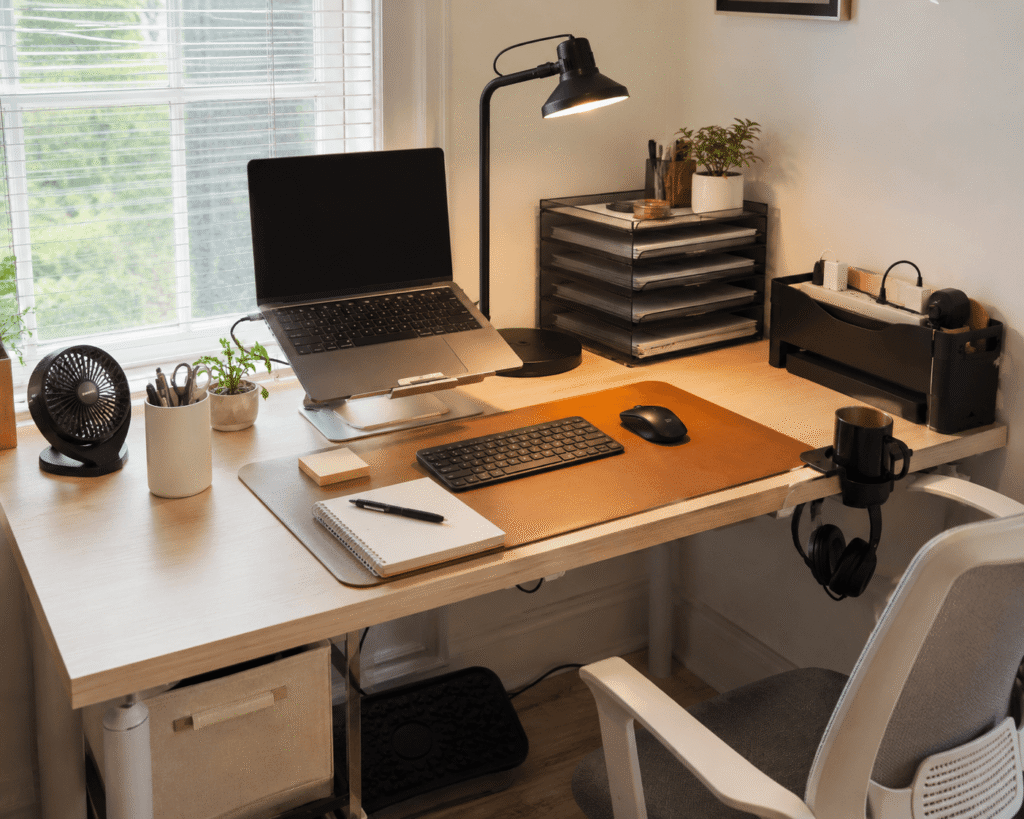
A better desk setup doesn’t have to start with an expensive chair, a new computer, or a complete home office makeover. Sometimes the most annoying workspace problems come from surprisingly small things: cables everywhere, a screen sitting too low, nowhere to put your headphones, or a desk that simply feels cramped.
That’s why some of the best desk accessories under $30 are also among the easiest upgrades to appreciate. A simple accessory can free up valuable desk space, improve comfort, reduce clutter, or make everyday tasks feel a little less frustrating.
The key is choosing upgrades that solve an actual problem rather than adding more stuff to your desk. The ten ideas below cover organization, ergonomics, productivity, and comfort without requiring a major setup overhaul.
If seasonal comfort is also a priority, these summer desk setup ideas offer more practical ways to improve your workspace.
Quick Picks
Best Overall: LOXP Adjustable Laptop Stand — A versatile choice for improving laptop positioning and making everyday desk work more comfortable.
Best Budget Option: Aothia Leather Desk Pad — An affordable way to create a smoother, more comfortable work surface.
Best for Small Desks: Simple Houseware Monitor Stand Riser — A practical option for adding useful storage without taking over your desk.
Prices are approximate and may change. Ratings and review counts reflect current product data.
Everyday Desk and Organization Upgrades
LOXP Adjustable Laptop Stand

Approx. Price: ~$27.99 | Rating: 4.6 ⭐ | Reviews: 2,373+
Working directly from a laptop often means spending hours looking slightly downward. Even when you don’t notice it immediately, that position can make a long study or work session feel less comfortable.
Raising the screen closer to eye level creates a more natural viewing position, and the LOXP Adjustable Laptop Stand is designed to help you make that adjustment without changing your entire setup.
It’s easy to overlook because a laptop already seems perfectly usable sitting flat on a desk. The difference becomes more noticeable once you spend several hours working in the same position.
Remote workers and students who use an external keyboard and mouse are likely to benefit most. Its adjustable design also makes it easier to experiment with different screen heights instead of being locked into one position.
For example, you could raise your laptop for an afternoon of writing or video calls, then fold the LOXP Adjustable Laptop Stand when you want the space back.
It’s one of those upgrades that feels small until you use it every day.
Aothia Leather Desk Pad

Approx. Price: ~$8.99 | Rating: 4.6 ⭐ | Reviews: 78,903+
A desk can feel surprisingly uncomfortable when your keyboard, mouse, notebooks, and other everyday items sit directly on a hard surface.
Creating one consistent work area can make the setup feel more intentional. The Aothia Leather Desk Pad provides a larger surface for your keyboard and mouse while helping protect the desktop underneath.
Many people see a desk mat as mostly decorative, so its everyday usefulness is easy to underestimate. A smoother work surface can make using a mouse, writing notes, and resting your hands at the desk feel more natural.
Students, writers, gamers, and remote workers can all make use of it. If you regularly switch between typing and handwritten notes, for instance, the mat gives both activities a defined work area.
At roughly $9 based on the provided product information, the Aothia Leather Desk Pad is also one of the least expensive upgrades on this list.
Sometimes the simplest improvements are the ones you notice most.
D-Line Cable Management Box

Approx. Price: ~$22.99 | Rating: 4.5 ⭐ | Reviews: 7,311+
Even a tidy desk can look chaotic when a power strip and several charging cables are scattered underneath or behind it.
Containing that clutter can immediately make the surrounding area feel cleaner. The D-Line Cable Management Box gives you a dedicated place to conceal a compatible power strip and the mess of plugs around it.
Cable boxes are easy to overlook because cords seem like an unavoidable part of having a computer setup. The goal isn’t to eliminate every cable, though. It’s simply to keep the busiest part of the wiring contained.
This can be especially useful if your setup includes a monitor, laptop charger, speakers, phone charger, and other powered accessories. Instead of staring at a crowded power strip under your desk, you see one contained unit.
Check the size of your existing power strip first. The D-Line Cable Management Box is designed for power strips up to 10.5 inches long, so measuring before buying matters.
It’s a small organizational change that can make the entire setup look more deliberate.
EURPMASK Rotating Headphone Stand

Approx. Price: ~$11.99 | Rating: 4.7 ⭐ | Reviews: 29,231+
Large headphones have an annoying habit of occupying exactly the piece of desk space you need next.
Moving them off the work surface creates more room without making them harder to reach. The EURPMASK Rotating Headphone Stand clamps underneath the desk and gives your headset a dedicated storage spot.
It’s easy to ignore this problem when headphones normally get dropped beside the keyboard. Once they have somewhere specific to go, however, keeping the desktop clear becomes much easier.
Gamers, remote workers, and students who regularly switch between headphones and speakers will probably get the most value from it. Finish a meeting, hang your headset underneath, and you immediately reclaim that part of the desk.
The rotating design also means the EURPMASK Rotating Headphone Stand can move out of the way when you’re not using it.
An easy way to make everyday work feel a little smoother.
Ergonomic and Space-Saving Improvements
BlissTrends Foot Rest

Approx. Price: ~$19.97 | Rating: 4.4 ⭐ | Reviews: 9,066+
If your feet don’t rest comfortably while you’re sitting, finding a good desk position can be harder than it should be.
Giving your feet a stable surface can make your seated setup feel more supported. The BlissTrends Foot Rest provides two adjustable height options and sits underneath the desk where it won’t consume work surface space.
Footrests are often overlooked precisely because they’re mostly invisible. Yet if your chair needs to sit higher to match your desktop, having somewhere comfortable to place your feet can become surprisingly useful.
This upgrade makes the most sense for anyone whose chair and desk heights don’t quite work together. During a long afternoon at the computer, you can adjust your foot position instead of leaving your feet unsupported.
The washable cover also makes the BlissTrends Foot Rest easier to maintain as an everyday accessory.
A practical improvement that’s easy to appreciate once it becomes part of your routine.
Simple Houseware Monitor Stand Riser

Approx. Price: ~$26.47 | Rating: 4.6 ⭐ | Reviews: 25,582+
When a monitor sits low on your desk, you may find yourself leaning toward it while the area directly underneath the screen goes unused.
A better setup can raise the display while turning that empty area into useful storage. The Simple Houseware Monitor Stand Riser combines both ideas with an elevated platform, organizer drawer, and side storage.
Many people overlook the space underneath their monitor, especially when working with a smaller desk. Using that area for notebooks, office supplies, or other small essentials can reduce the amount of clutter spreading across the desktop.
It’s particularly useful when one desk has to handle work, studying, and personal tasks. At the end of a session, you can put smaller items into the organizer instead of leaving everything around your keyboard.
For compact setups, the Simple Houseware Monitor Stand Riser is one of those accessories that helps existing space work harder rather than simply occupying more of it.
You might be surprised how much difference that can make on a crowded desk.
Voncerus LED Desk Lamp

Approx. Price: ~$16.99 | Rating: 4.6 ⭐ | Reviews: 8,994+
Poor lighting becomes much more noticeable once daylight disappears, particularly when you’re reading, writing, or studying for several hours.
Focused lighting can make the work area easier to use without requiring you to brighten the entire room. The Voncerus LED Desk Lamp uses a clamp and flexible neck, making it especially useful when you don’t want a traditional lamp base occupying valuable desk space.
Dedicated desk lighting often gets postponed because overhead lighting technically works. Being able to position light directly over a notebook, keyboard, or project can be far more practical.
Students, evening workers, and people with darker desk corners are likely to benefit most. Picture working on handwritten notes beside your computer at night and being able to direct the light exactly where you need it.
With multiple lighting modes and brightness levels, the Voncerus LED Desk Lamp also gives you room to adjust the lighting for different tasks.
One of the simplest ways to make your workspace feel more comfortable.
SUPEASY 5-Tray Paper Organizer

Approx. Price: ~$16.99 | Rating: 4.5 ⭐ | Reviews: 4,734+
Loose documents can turn a reasonably clean workspace into a pile of papers surprisingly quickly.
Separating those papers into defined sections makes it easier to find what you need without repeatedly sorting through the same stack. The SUPEASY 5-Tray Paper Organizer uses five vertical trays to give documents their own places.
Paper storage can feel unnecessary in an increasingly digital workspace, which is why many people overlook it. But students, teachers, freelancers, and home office users can still accumulate notebooks, bills, printouts, forms, and other documents.
A simple example is separating current work, documents to file, study materials, and papers that need attention into different trays. Instead of clearing the same pile every morning, you already know where everything belongs.
For anyone regularly dealing with paperwork, the SUPEASY 5-Tray Paper Organizer can turn unused vertical space into practical storage.
For more ways to keep a warm-weather workspace functional, explore these summer desk essentials for remote workers.
Everyday Comfort Upgrades
Air Circulator Desk Fan

Approx. Price: ~$15.97 | Rating: 4.3 ⭐ | Reviews: 72,561+
A warm workspace can become distracting surprisingly quickly, especially in a bedroom or small home office with limited airflow.
Adding personal airflow near your desk can make working more comfortable without trying to cool the entire room. The Air Circulator Desk Fan offers three speed settings and a tilting head so you can direct airflow toward your work area.
A desk fan is easy to ignore until the room becomes warm enough to affect your concentration. That’s when having something nearby becomes much more useful.
It can be a good fit for dorm rooms, bedrooms, and compact home offices. During a hot afternoon, for example, you can keep air moving around your desk rather than repeatedly leaving the workspace to cool down.
The adjustable tilt on the Air Circulator Desk Fan also lets you experiment with placement instead of having airflow fixed in one direction.
If heat is a recurring issue in your workspace, our guide to home office accessories for summer has more ideas worth considering.
KDD 4-in-1 Desk Cup Holder

Approx. Price: ~$20.95 | Rating: 4.6 ⭐ | Reviews: 2,521+
Coffee, water, and electronics sharing the same crowded surface isn’t always an ideal combination. On a small desk, one accidental bump can turn an ordinary drink into a much bigger problem.
Moving your cup away from the main work area creates extra room while keeping drinks within reach. The KDD 4-in-1 Desk Cup Holder clamps onto the desk and combines drink storage with spaces for a phone, pens, and headphones.
It’s easy to overlook because keeping a mug beside your keyboard feels completely normal. On a compact desk, though, using the edge rather than the main surface can free up surprisingly useful space.
Students, gamers, and remote workers with crowded setups are likely to appreciate it most. You could keep your drink, phone, and headphones along the desk edge while leaving the central surface available for actual work.
Because the KDD 4-in-1 Desk Cup Holder combines several storage functions, it can be particularly practical when there isn’t room for multiple separate accessories.
A small improvement like this can make a cramped workspace feel noticeably easier to use.
What to Look For Before Buying
Start with desk size. Measure the available surface, edges, and clearance underneath before ordering anything. A large accessory that works beautifully on one desk can make a compact workspace feel even more crowded.
Think about comfort next. Prioritize upgrades that address something you already notice. If your laptop sits too low, screen positioning deserves attention. If your feet never feel properly supported, an under-desk solution may matter more.
Consider your storage needs realistically. Don’t add a large organizer simply because you have a few loose items. The goal is to reduce clutter rather than introduce another object that needs space.
Cable management matters too, especially if you’re adding powered accessories. Think about where cables and power strips will go before adding another device.
Finally, consider durability and ease of use. Accessories you clamp, adjust, move, or handle every day should feel suitable for regular use. Check dimensions, materials, weight limits, and adjustment options when relevant.
The best choice usually isn’t the accessory with the longest feature list. It’s the one that fixes a problem you regularly notice.
Conclusion
Improving a workspace doesn’t necessarily require replacing the expensive parts of your setup. Small, carefully chosen accessories can make a noticeable difference in comfort, focus, and organization.
The easiest approach is to identify what bothers you most. If you’re constantly looking down, consider raising your screen. If clutter keeps returning, improve storage. If your desk feels cramped, look for accessories that use vertical, under-desk, or edge space more effectively.
You certainly don’t need all ten upgrades. Even one or two that address genuine problems can make your workspace easier to use every day.
If you’re still looking for practical improvements, these best summer desk setup ideas offer more ways to make a home workspace comfortable and functional without rebuilding the entire setup.