
Disclosure: As an Amazon Associate I earn from qualifying purchases.
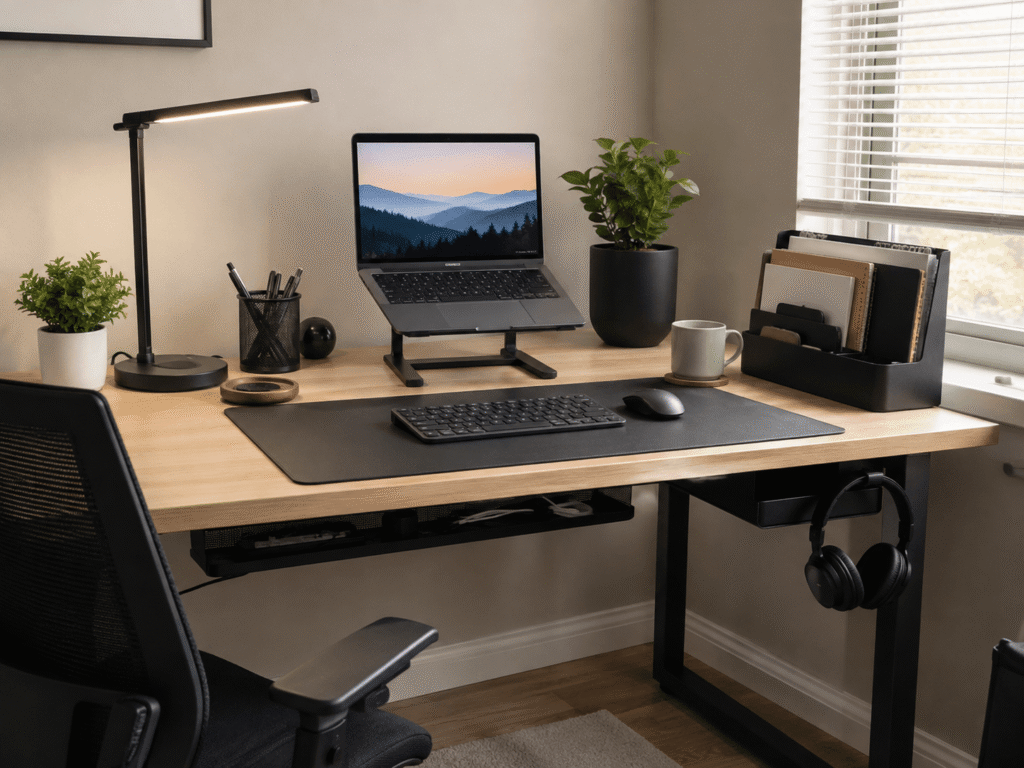
A desk doesn’t have to be expensive to be comfortable, organized, and genuinely useful. In fact, some of the most frustrating workspace problems—messy cables, poor screen positioning, clutter, uncomfortable posture—can often be improved with surprisingly simple upgrades.
That’s especially useful if you work from home, study at a small desk, or simply don’t want to spend hundreds of dollars rebuilding your entire setup.
The best budget desk gadgets for productivity aren’t necessarily complicated pieces of technology. They’re usually small additions that remove everyday annoyances and make it easier to sit down and get things done.
Some help reclaim valuable desk space. Others improve comfort or keep frequently used items within reach. A few are upgrades you might not appreciate until you’ve used them for a week.
If you’re working with limited space, these dorm room organization products offer more ideas for making a compact workspace easier to manage.
Quick Picks
Best Overall: JOIOT Adjustable Laptop Stand — A versatile choice for improving laptop positioning without taking over your desk.
Best Budget Option: Aothia Leather Desk Pad — An inexpensive way to create a cleaner, more comfortable work surface.
Best for Small Desks: EVOOMI Monitor Stand — A simple way to raise your screen while making better use of the space underneath it.
Prices are approximate and may change. Ratings and review counts reflect current product data.
Better Ergonomics and Everyday Comfort
JOIOT Adjustable Laptop Stand

Approx. Price: ~$24.99
Rating: 4.6 ⭐
Reviews: 558+
Working directly from a laptop often means looking down at the screen for hours. Even when the desk itself is comfortable, that low viewing position can make a long work session feel less natural.
Raising the screen closer to eye level creates a more desktop-like setup without requiring a separate monitor. The JOIOT Adjustable Laptop Stand offers adjustable height and a foldable design, making it practical for both permanent and flexible workspaces.
It’s easy to overlook because a laptop already works perfectly well sitting flat on a desk. The difference becomes more noticeable when you’re writing, studying, or joining video calls for several hours.
This upgrade makes the most sense for remote workers and students who pair their laptop with an external keyboard and mouse. For example, you could raise your laptop during the workday, then fold the stand away when you need the desk for something else.
The open design also helps avoid completely blocking airflow underneath your computer. If screen height is one of the weak points in your setup, the JOIOT Adjustable Laptop Stand is worth a closer look. It’s one of those upgrades that feels small until you use it every day.
REFLYING Under-Desk Cable Tray

Approx. Price: ~$16.99
Rating: 4.7 ⭐
Reviews: 5,400+
When chargers, power cords, and extension cables pile up behind a desk, even an otherwise clean workspace can feel unfinished.
Getting those cables off the floor and out of sight makes the entire setup easier to manage. The REFLYING Under-Desk Cable Tray gives loose cords and power accessories a dedicated place underneath the desk instead of leaving them around your feet.
Many people overlook cable management because tangled cords don’t directly stop them from working. But they become annoying whenever you clean, unplug a device, or move something around.
This is especially useful for setups with a monitor, laptop charger, speakers, and several accessories. Instead of having a power strip and five cables scattered underneath your desk, you can keep much of the mess contained in one area.
The clamp-mounted design is also useful if you’d rather avoid drilling holes. For anyone tired of looking at a nest of cables, the REFLYING Under-Desk Cable Tray can make the entire workspace feel more intentional.
Aothia Leather Desk Pad

Approx. Price: ~$8.99
Rating: 4.6 ⭐
Reviews: 78,921+
A desk covered with a keyboard, mouse, notebooks, and small accessories can quickly start to feel visually chaotic.
Creating one defined work area can make everything feel more cohesive. The Aothia Leather Desk Pad provides a large surface for everyday desk essentials while helping protect the desktop underneath.
It’s easy to dismiss a desk pad as decoration, but it can also make everyday mouse movement more comfortable and reduce the visual clutter created by several separate accessories.
Students, gamers, and remote workers can all benefit. Imagine switching between your laptop, notebook, keyboard, and mouse throughout the day without constantly rearranging a small mouse pad or worrying about marks on the desk.
At roughly 23.6 by 13.7 inches, this particular version is worth measuring against your available workspace first. If it fits, the Aothia Leather Desk Pad is one of the simplest ways to make a basic desk feel more put together.
EVOOMI Monitor Stand

Approx. Price: ~$23.99
Rating: 4.8 ⭐
Reviews: 5,608+
A monitor sitting too low can leave you constantly adjusting your posture, while the empty space underneath it often goes completely unused.
Raising the display can create a more comfortable viewing position and give you useful room underneath. The EVOOMI Monitor Stand uses a raised steel platform to accomplish both without requiring a more complicated monitor arm.
That’s particularly useful on compact desks, where every few inches matter. Instead of allowing the monitor base to dominate the workspace, you gain an area underneath where smaller desk essentials can be tucked away.
Someone working from a bedroom desk, for example, could use the extra clearance to keep accessories out of the main working area when they’re not needed.
The EVOOMI Monitor Stand comes as a two-pack, which may also suit dual-monitor setups. For the right desk, it’s a small improvement that can have a bigger impact than expected.
Lepro LED Desk Lamp

Approx. Price: ~$26.99
Rating: 4.7 ⭐
Reviews: 8,310+
Poor lighting becomes especially noticeable when you’re working early in the morning or late in the evening. A dim workspace can make reading notes, writing, and switching between paper and a bright screen less comfortable.
Adding controllable task lighting lets you illuminate the area you actually use rather than relying entirely on the room’s main light. The Lepro LED Desk Lamp provides multiple brightness levels and color modes, so the lighting can change with what you’re doing.
This is easy to overlook until you experience the convenience of directing light exactly where you need it.
Students, readers, and anyone working after sunset will probably appreciate it most. You might use brighter light while taking handwritten notes, for example, then lower it when most of your attention shifts to the monitor.
If your current setup relies on one ceiling light for everything, the Lepro LED Desk Lamp offers more control without requiring a major workspace change. It’s an easy way to make everyday work feel a little smoother.
Smarter Organization and Productivity
APPHOME Foldable Headphone Hanger
Approx. Price: ~$16.99
Rating: 4.8 ⭐
Reviews: 8,913+
Large headphones have an annoying habit of taking up exactly the desk space you want to keep clear.
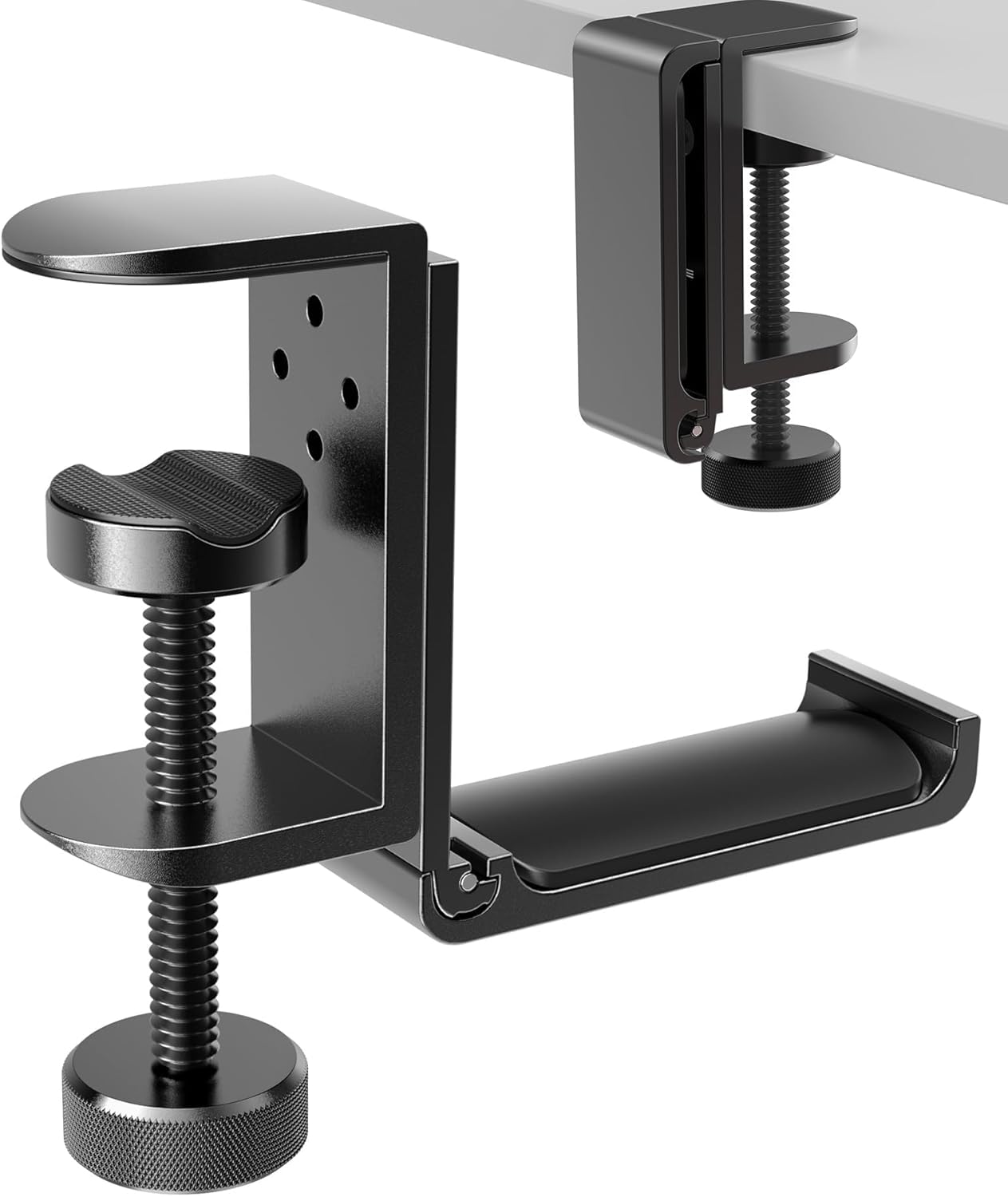
Moving them underneath the desktop keeps them nearby without adding another object to your work surface. The APPHOME Foldable Headphone Hanger uses a clamp-style design to turn otherwise unused desk space into a convenient storage spot.
It’s often overlooked because leaving headphones beside the keyboard seems harmless. On a compact desk, though, reclaiming even a small amount of space can help.
It’s particularly useful for gamers, remote workers, and anyone who switches between headphones and speakers. Finish a video call, hang your headset underneath the desk, and it’s immediately out of the way while remaining within reach.
The hanger can also fold when you don’t need it sticking out. If headphones are constantly getting shuffled around your desk, the APPHOME Foldable Headphone Hanger is a straightforward solution that’s easy to appreciate once it becomes part of your routine.
BlissTrends Foot Rest

Approx. Price: ~$19.99
Rating: 4.4 ⭐
Reviews: 9,070+
Sometimes your chair feels almost right, yet you still can’t find a comfortable sitting position. Your feet may not rest naturally on the floor, especially when the desk height forces you to raise your chair.
A more supportive position can make sitting at your workspace feel noticeably better. The BlissTrends Foot Rest provides a dedicated surface under the desk with two adjustable height options.
People often focus on upgrading the chair first and forget about everything happening below the desk.
It’s particularly worth considering if your feet don’t sit comfortably when your chair is positioned correctly for the desktop. During a long writing or study session, having a dedicated place to rest them can feel better than constantly shifting around.
The washable cover is another practical detail for something that lives on the floor. If the dimensions work with your setup, the BlissTrends Foot Rest could be a useful comfort upgrade without replacing your existing chair or desk.
TSJ OFFICE Desktop Whiteboard

Approx. Price: ~$19.99
Rating: 4.7 ⭐
Reviews: 2,513+
Digital task lists are useful, but opening another app just to remember one small thing can sometimes create more distraction than it solves.
Keeping your most important tasks visible can make it easier to remember what actually needs your attention. The TSJ OFFICE Desktop Whiteboard provides a reusable writing surface directly in front of your workspace, along with a drawer for smaller items.
Many people overlook this simple upgrade because sticky notes already seem good enough. The advantage is having one consistent place for temporary information instead of covering your monitor with scraps of paper.
A student might write down upcoming assignments, while a remote worker could keep three priorities visible during the day and erase them as they’re completed.
If you’re building a study-focused workspace, our guide to desk accessories for online learning has more ideas for keeping everyday tools within reach.
For someone who prefers seeing tasks physically in front of them, the TSJ OFFICE Desktop Whiteboard can provide a simple alternative to yet another productivity app.
Space-Saving Extras
JZCreater USB Desk Fan

Approx. Price: ~$8.99
Rating: 4.5 ⭐
Reviews: 21,782+
A workspace can become uncomfortable quickly when a room gets warm, especially in a small home office where airflow isn’t ideal.
Having a little air moving directly around your desk can make working there more pleasant without changing the temperature of the entire room. The JZCreater USB Desk Fan provides three speed settings in a compact design intended for personal airflow.
It’s one of those accessories people rarely consider until they’re trying to concentrate on a hot afternoon.
It’s most useful for small rooms, dorm desks, and workspaces that tend to get stuffy. You could keep it beside your monitor during warmer months, adjust the airflow as needed, and store it away once temperatures drop.
Desk space is still worth considering, especially on very narrow surfaces. But if heat regularly makes your workspace uncomfortable, the JZCreater USB Desk Fan is a simple upgrade you might notice more than expected.
Bostitch Konnect Under-Desk Drawer

Approx. Price: ~$14.19
Rating: 4.5 ⭐
Reviews: 852+
Small accessories tend to accumulate surprisingly fast. Pens, charging cables, adapters, sticky notes, and other useful items can eventually occupy a large portion of the desk.
The goal isn’t necessarily to own fewer things—it’s to give those things somewhere convenient to go. The Bostitch Konnect Under-Desk Drawer creates slide-out storage underneath the work surface instead of adding another organizer on top.
That’s particularly useful if you work from a simple table or desk without built-in drawers. The included dividers also let you separate smaller items rather than tossing everything into one compartment.
For example, you could keep charging accessories in one section and pens or sticky notes in another, then slide everything out of sight when you’re finished working.
If you’re looking for more student-friendly workspace ideas, these desk accessories for students can help you identify other useful additions.
The Bostitch Konnect Under-Desk Drawer is easy to overlook because the unused space beneath a desktop isn’t immediately obvious. Sometimes reclaiming space you already have is better than adding more storage around it.
What to Look For Before Buying
Before adding anything to your setup, start with desk size. Measure the available surface and under-desk space rather than assuming an accessory will fit. This matters even more with compact desks.
Think about comfort next. If your biggest frustration is posture or screen height, prioritize ergonomic improvements before smaller convenience accessories.
Your storage needs should also guide what you choose. A monitor stand or under-desk drawer makes more sense when clutter is the main problem, while a headphone hanger may be enough for an already minimal setup.
Don’t ignore cable management. Consider where your outlets are located, where cables currently run, and whether a new desk accessory introduces another wire you’ll need to manage.
Durability matters too. Something used every day should feel stable enough for its intended purpose, particularly when it’s supporting a laptop or monitor.
Finally, consider ease of use. A clever desk gadget isn’t particularly helpful if it’s awkward to adjust, difficult to access, or constantly needs to be moved.
The best upgrade is usually the one that addresses a problem you already notice in your workspace.
Conclusion
You don’t need to rebuild your entire workspace to make it better.
A few carefully chosen budget desk gadgets can improve comfort, reduce clutter, and make it easier to focus on whatever you’re doing. The key is identifying the small frustrations you encounter every day and choosing upgrades that directly address them.
If your laptop feels too low, start there. If cables are driving you crazy, organize them first. If your small desk constantly feels crowded, look for accessories that take advantage of vertical or under-desk space.
You also don’t need all ten upgrades. Even one or two well-chosen additions can make a desk noticeably easier to use.
For more ideas, explore our guide to the best desk accessories for online learning and look for improvements that solve a specific problem in your own setup.
Small changes can noticeably improve comfort, focus, and organization—and once you know what’s bothering you about your current desk, choosing the right upgrade becomes much easier.