
Disclosure: As an Amazon Associate I earn from qualifying purchases.
If you’re a student balancing classes, assignments, and maybe even a part-time job, your desk might feel more like a clutter zone than a productive workspace. Textbooks pile up. Cables tangle into an impossible knot. And by the time you actually sit down to study, you’ve already lost momentum just trying to find a clear spot for your laptop.
For students working with limited space and even tighter budgets, a few thoughtful upgrades can completely change how your desk works for you. The right tools help reduce distractions, improve your posture, and make those long study sessions noticeably easier. If you’re working with a smaller desk setup, the options below are designed to maximize every inch without adding clutter. You can also explore other simple desk setup improvements to keep things organized.
Here are some of the most practical improvements you can make — each one chosen because it actually solves a real problem students face every day.
Quick Picks
Best Overall: Amazon Basics Laptop Stand — an adjustable stand that brings your screen to eye level and helps improve posture during long study sessions.
Best Budget Option: COYACOOL Under-Desk Cable Management Tray — keeps cords hidden and out of the way without taking up any surface space.
Best for Small Desks: iZELL Clip-On LED Desk Lamp — frees up valuable workspace while providing focused, adjustable lighting where you need it.
Ergonomic Upgrades That Protect Your Posture
Amazon Basics Laptop Stand

If you’ve ever hunched over your laptop to study for an exam, you already know how uncomfortable that position gets after about thirty minutes. Students often work in awkward postures because their screen is too low, leading to neck strain and back fatigue that makes it harder to concentrate.
Having your screen at eye level changes everything. This stand gently elevates your device so you can look straight ahead instead of down. This one change can make several hours of studying feel much more manageable.
For students who work in libraries, coffee shops, or anywhere without a proper setup, the Amazon Basics Laptop Stand is especially useful because it folds easily into your bag. Before a long research session, prop your laptop up, plug in an external keyboard, and suddenly your temporary workspace feels customized for you.
One of those upgrades most people don’t think about until they try it. With over 3,500 ratings and a strong 4.6-star average, it’s a favorite for good reason. It’s surprisingly simple, but once you use one regularly, it’s hard to go back.
~$29.99 | 4.6 ⭐ | 3,562+ reviews
Simple Trending 2-Tier Monitor Riser

Many students bring their laptop from class to class, but if you also have a secondary monitor in your dorm room, stacking displays without the right support can become a mess of cables and awkward angles.
A riser with storage underneath solves two problems at once. First, it lifts your screen to a comfortable viewing height, which reduces the temptation to slouch forward. Second, it creates an extra shelf where you can store notebooks, a calculator, or even your laptop when it’s closed and charging.
You might be surprised how much this can clean up the visual clutter on your desk. Everything stays within reach but no longer competes for surface space. For students who switch between typing notes and reviewing printed materials, having storage right where you need it makes transitions feel seamless.
Sometimes the simplest improvements are the ones you notice most. At under $40, the Simple Trending 2-Tier Monitor Riser also includes USB ports for easy charging.
~$39.97 | 4.5 ⭐ | 225+ reviews
Gorilla Grip Keyboard Wrist Rest and Mouse Pad Set

Typing essays and discussion posts adds up fast. If you’re spending hours on your keyboard but your wrists are resting at an uncomfortable angle against the edge of your desk, you may start noticing soreness or fatigue.
This set provides a cushioned surface that keeps your hands in a neutral position while you type. Instead of bending your wrists upward, you maintain a straighter alignment, which requires less effort from your hands and forearms over time.
Students who write long papers or manage heavy note-taking schedules tend to notice the difference almost immediately. It’s a small and affordable upgrade, but it can be especially helpful during midterms or finals when typing volume spikes.
One of the simplest ways to make your workspace feel more comfortable — especially when you’re spending more time at your desk than usual. With nearly 7,000 ratings, this Gorilla Grip set is a reliable choice for students on a budget.
~$11.99 | 4.5 ⭐ | 6,947+ reviews
Organization and Cable Management
COYACOOL Under-Desk Cable Management Tray

If your dorm room or apartment desk has a tangle of chargers, USB cables, and power strips creating visual noise, you’re not alone. Messy cables aren’t just annoying — they can interfere with focus and even make your desk feel smaller than it actually is.
A cable management tray mounted underneath your desk collects excess wiring so it stays hidden and organized. By routing cords through this tray, you can keep your work surface clean and distraction-free.
For students sharing a space with roommates, clear cable management also makes it easier to identify your own chargers and prevents accidental disconnections. It’s one of those practical fixes that makes a bigger difference than you’d expect.
Many people overlook this simple upgrade until they see a clean desk and wonder how they ever managed without it. The sturdy COYACOOL tray comes in a 2-pack, making it a great budget-friendly option.
~$24.99 (for 2) | 4.6 ⭐ | 373+ reviews
Lamicall Adhesive Cord Clips

Even with a cable tray, the cords that need to reach your devices can still wander across your desk surface. These clips attach to the back or underside of your desk to hold individual cables securely in place.
The clips guide charging cables exactly where they need to go — like your phone, tablet, or headphones — without letting them slide around or fall behind your desk. Since they’re adhesive, you can reposition them easily if your setup changes.
Students who switch between multiple devices throughout the day will appreciate being able to grab the correct cable without searching under piles of notes. It keeps your workspace looking intentional and organized.
A practical improvement that’s easy to appreciate once it becomes part of your routine. The Lamicall clips are affordable and highly rated for their simple, effective design.
~$7.98 (6-pack) | 4.6 ⭐ | 3,471+ reviews
Simple Houseware Drawer Organizer

Pens, highlighters, sticky notes, charging bricks, and earbuds have a way of taking over flat surfaces if you don’t contain them. And when your desk is buried under small items, it’s surprisingly hard to think clearly or focus on your work.
This organizer with 9 adjustable compartments gives every small item a designated home. The difference is immediate — you always know where to find a specific pen, and your work surface stays available for what actually matters.
This is especially helpful for students taking multiple courses, because you can dedicate a drawer per subject or keep active materials within easy reach. At the end of the day, just a minute of tidying restores order before your next study session.
Easy to ignore until you experience the difference. The Simple Houseware organizer is incredibly popular, with over 6,000 positive reviews, and it’s one of the most affordable upgrades you can make.
~$15.87 | 4.7 ⭐ | 6,066+ reviews
Lighting and Comfort for Long Study Sessions
iZELL Clip-On LED Desk Lamp

Poor lighting is one of those subtle productivity killers that’s easy to overlook. When your workspace is dim, your eyes work harder, and fatigue builds more quickly. Glare or shadows can also make reading and writing feel more difficult than it should be.
This lamp attaches directly to your desk edge and directs light exactly where you need it. Because it clamps, it uses virtually no surface space — a huge advantage for compact setups.
The adjustable neck and multiple brightness settings also give you control over warmth and intensity, so you can adapt to the time of day or the task at hand. Students who study late at night or in shared spaces with overhead lighting will find this especially useful. It’s the kind of upgrade that works quietly in the background but makes a noticeable difference during long sessions.
Sometimes the simplest improvements are the ones you notice most. Over 15,000 reviewers have given the iZELL lamp a 4.6-star rating, making it a trusted choice for students.
~$14.39 | 4.6 ⭐ | 15,240+ reviews
Comfort Zone Clip-On Desk Fan

Stuffy dorm rooms and warm apartments are a reality for many students. When your space gets too hot, concentration takes a hit, and it becomes much harder to stay productive for extended periods. If you want to create a more comfortable environment, you might also explore some of the best desk fans for home offices for more ideas.
This fan attaches to the edge of your desk and provides a gentle, targeted breeze to keep you cool. Unlike larger standing fans, it takes up minimal room and can be angled precisely where you feel the most heat.
Students who live in older buildings without great ventilation often say this simple addition makes the difference between an unproductive afternoon and a focused work session. For those dealing with temperature fluctuations between seasons, having a small fan on hand is a practical solution.
An easy way to make everyday work feel a little smoother. With thousands of positive reviews, the Comfort Zone fan is a popular and reliable choice for students.
~$17.09 | 4.2 ⭐ | 10,626+ reviews
Gorilla Grip Mouse Pad with Wrist Support
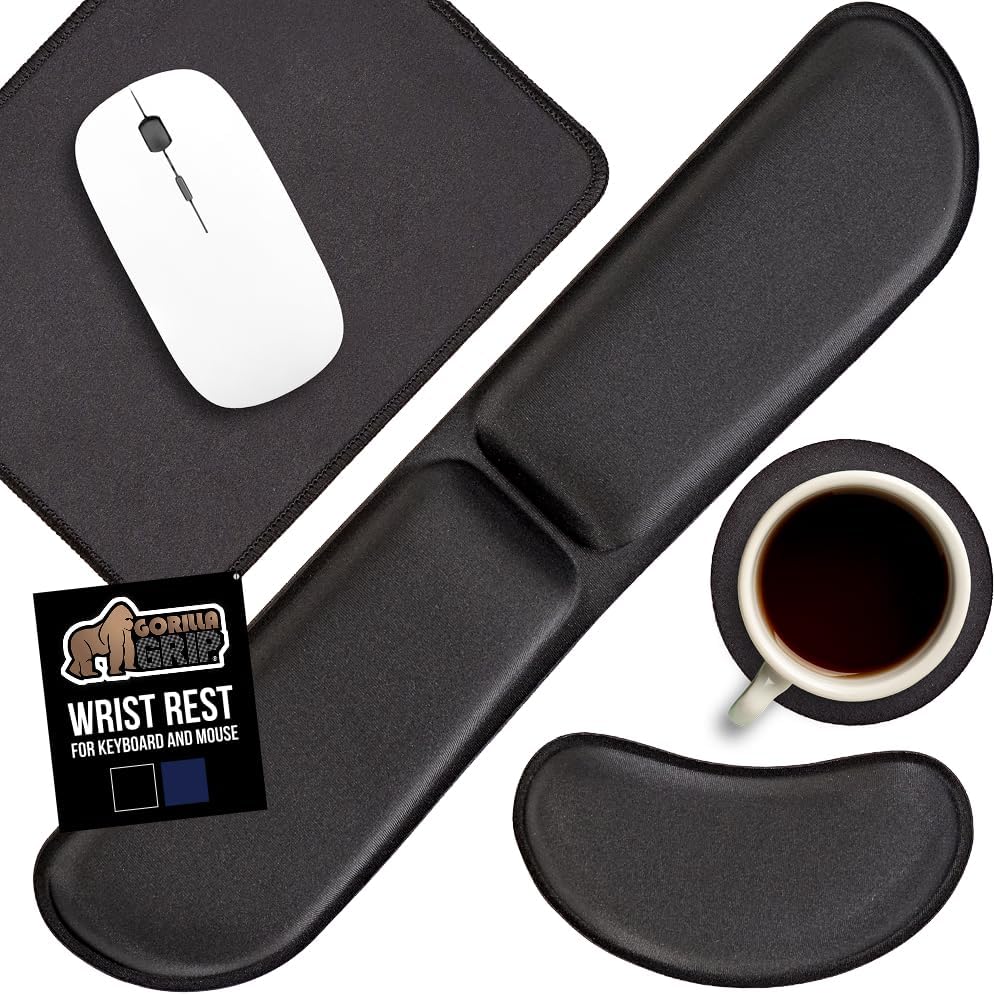
Even if you use a laptop trackpad for most tasks, a mouse can make scrolling through long documents or selecting text much less tedious. But using a mouse without proper support can cause wrist discomfort after a while.
This mouse pad with a built-in padded wrist rest gives you both a smooth tracking surface and cushioning for your wrist. The non-slip base keeps it in place, so you’re not repositioning it every time you reach for a drink or grab a highlighter.
Students working on research papers, group projects, or data-heavy assignments often spend long stretches mousing across spreadsheets and web pages. A little extra support can reduce strain and make that time feel less physically draining.
Small upgrades like this often have a bigger impact than expected. For a few dollars more, you can also get the Gorilla Grip set that includes a keyboard wrist rest for complete ergonomic support.
~$12.99 | 4.5 ⭐ | 6,947+ reviews
What to Look For Before Buying
When choosing desk accessories, take a moment to consider the specifics of your own setup. The size of your desk matters — measure your available surface and height clearance before committing to a riser or a lamp. If you’re in a dorm, look for items that can be packed away easily when you need the desk for something else.
Think about how you work best. Do you need storage within reach or do you prefer as little clutter as possible? Since students often have limited time, prioritize items that are simple to install and maintain. Pay attention to cable management, durability, and how each item will affect your day-to-day routine.
The goal is to find the balance between comfort, functionality, and the space you actually have available. And remember, even the best accessories won’t help if they don’t fit your specific needs.
Conclusion
Making your study space more comfortable and organized doesn’t require a huge budget or a complete room redesign. Small, targeted improvements can noticeably improve your comfort, focus, and overall productivity during long days of classes and assignments. The key is choosing upgrades that actually solve the problems you encounter most often. For more inspiration on creating a workspace you truly enjoy, check out our guide on how to make your desk setup more enjoyable.
Take it one step at a time, start with the area that bothers you the most, and build a workspace that makes studying feel a little easier.