
Disclosure: As an Amazon Associate I earn from qualifying purchases.
Introduction
A desk setup can be functional and still feel unpleasant to use.
Maybe your chair feels uncomfortable after an hour. Maybe cables are always in the way. Maybe your desk feels cluttered before the workday even starts. Over time, those small annoyances can make working, studying, or creating content feel heavier than it needs to be.
The good news is that you do not need to rebuild your entire workspace. A few simple upgrades can make your desk feel cleaner, more comfortable, and easier to use every day.
If your workspace feels messy, you may also want to check these desk setup mistakes that make your space feel cluttered before adding anything new.
The goal is simple: make your desk feel like a place you actually want to sit down and use.
Quick Picks
- Best overall: Amazon Basics Monitor Stand Riser
- Best budget option: Aothia Leather Desk Pad
- Best for small desks: EURPMASK Headphone Stand
Prices are approximate and may change. Ratings and review counts reflect current product data.
Comfort Upgrades That Make Your Desk Easier to Use
Everlasting Comfort Seat Cushion

A simple option like this can make a basic chair feel much more comfortable during long work sessions.
The Everlasting Comfort Seat Cushion is a memory foam cushion designed to add support while sitting. It is especially useful if your current chair feels too firm, flat, or uncomfortable after a few hours.
This is best for remote workers, students, and anyone using a dining chair or budget office chair instead of a full ergonomic chair.
In real life, this helps most when you sit down for a long writing session, class, editing block, or focused work period and do not want your chair to become the thing distracting you.
If replacing your chair is not realistic right now, something like this is a much simpler upgrade.
One of those upgrades you notice almost immediately.
BlissTrends Foot Rest

A tool like this helps make your sitting position feel more natural.
The BlissTrends Foot Rest gives your feet a dedicated place to rest under the desk. This can help if your chair is slightly too high, your feet do not sit flat on the floor, or you often shift around while working.
It is best for people who spend several hours at a desk and want a more relaxed setup without buying new furniture.
A simple real-life scenario: you are working from home, your chair height is decent, but your legs never feel fully comfortable. A foot rest can make your posture feel more stable without changing your whole setup.
If you just want a quick comfort upgrade, a no-fuss option like this is easy to add.
Easy to add without changing your entire setup.
Amazon Basics Monitor Stand Riser
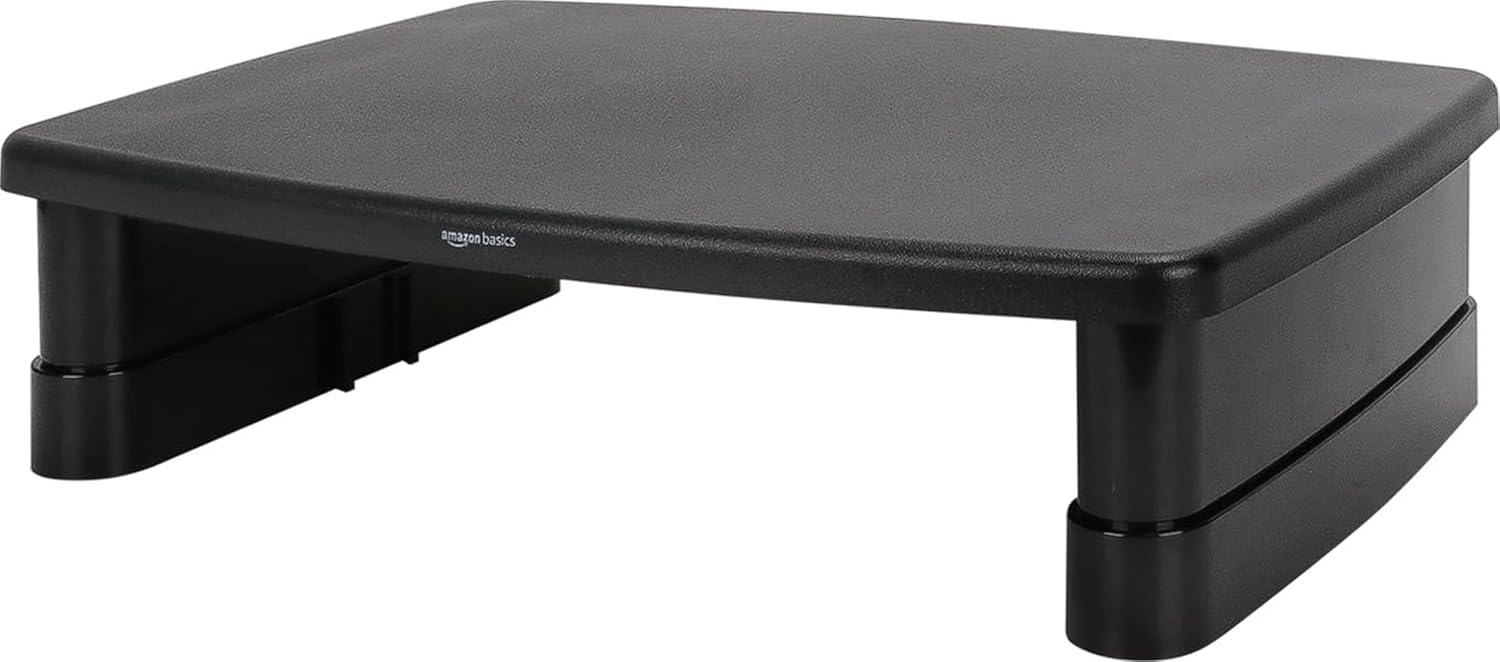
A simple option like this can improve both comfort and organization at the same time.
The Amazon Basics Monitor Stand Riser raises your monitor or laptop to a better viewing height. It also creates extra space underneath for a keyboard, notebook, small organizer, or other desk essentials.
This is best for people who feel like their screen sits too low or their desk surface always feels crowded.
For example, if you constantly look down at your laptop or monitor, raising the screen can make your setup feel more comfortable during daily work. It also makes the desk look cleaner because you gain usable storage space underneath.
For more complete setup improvements, you can also read this guide on how to create a productive desk setup at home.
A solid, no-fuss addition to most desks.
Organization Upgrades for a Cleaner Workspace
Aothia Leather Desk Pad

A budget-friendly option like this can instantly make a desk feel more polished.
The Aothia Leather Desk Pad creates a defined work area for your keyboard, mouse, laptop, notebook, or daily tools. It also helps protect the desk surface from scratches and small spills.
This is best for anyone whose desk feels visually messy, unfinished, or too plain.
In real life, a desk pad helps when your workspace has too many small items and no clear “work zone.” Once the mat is down, the setup often feels more intentional right away.
If you do not want to overthink your first upgrade, this type of upgrade is simple and affordable.
A simple addition that makes your desk feel more organized right away.
COYACOOL Cable Management Tray

A tool like this solves one of the most annoying desk problems: visible cables.
The COYACOOL Cable Management Tray mounts under the desk and gives power strips, chargers, and loose cables a place to go. Instead of having cords hanging behind your setup, you can keep them grouped and out of sight.
This is best for people using monitors, laptops, chargers, lamps, speakers, or multiple devices at the same desk.
A real-life example is cleaning your desk, only to realize the cables still make everything look messy. A tray helps hide that clutter so the whole setup feels calmer.
If you are trying to build a clean workspace, something like this is one of the easiest ways to start.
One of the easiest ways to improve your setup.
Deco Brothers Desk Organizer

A simple option like this helps keep small desk items from spreading everywhere.
The Deco Brothers Desk Organizer gives you dedicated storage for pens, sticky notes, scissors, paper clips, small notebooks, and everyday office supplies.
It is best for students, home office users, and anyone who likes having essentials nearby without leaving them scattered across the desk.
In real life, this helps when your desk gets messy not because of big items, but because of all the tiny things that never seem to have a place.
If you are working with limited space, you may also like these best desk organizers for small workspaces.
A simple addition that makes your desk feel more organized right away.
EURPMASK Headphone Stand

A no-fuss option like this is great if your headphones are always sitting on the desk.
The EURPMASK Headphone Stand clamps under the desk, so your headset stays accessible without taking up surface space. It also includes a cable clip, which is useful if you want to keep charging cables or headset cables under control.
This is best for remote workers, gamers, students, and anyone who uses headphones daily.
A realistic scenario: you finish a call, drop your headphones on the desk, and they slowly become part of the clutter. A dedicated holder gives them a home without using extra desk space.
For small desks, something like this is especially practical.
Easy to add without changing your whole setup.
Focus and Atmosphere Upgrades
Airlonv LED Desk Lamp

A tool like this can make your desk feel better during early mornings, late nights, or cloudy workdays.
The Airlonv LED Desk Lamp uses a clamp design, so it attaches to the desk instead of taking up much surface space. The flexible gooseneck makes it easier to direct light where you need it.
This is best for people who read, write, study, draw, or work in rooms where overhead lighting feels too harsh or too dim.
In real life, better lighting can make a desk feel less tiring. Instead of squinting at notebooks or working under dull room light, you get a more focused area for tasks.
If your setup feels flat or uncomfortable in the evening, this type of upgrade can make a noticeable difference.
One of those upgrades you notice almost immediately.
Briful Artificial Bonsai Tree

A simple option like this adds a little warmth without requiring maintenance.
The Briful Artificial Bonsai Tree is a small decorative plant that can sit on a desk, shelf, or side table. It gives your workspace a softer, more relaxed look without needing light, watering, or care.
This is best for people who want their desk to feel less plain but do not want to manage a real plant.
A realistic scenario: your setup is functional, but it feels cold because it is only a laptop, monitor, keyboard, and cables. A small plant can make the space feel more personal without adding much clutter.
If you want an easy visual upgrade, something like this is simple to place almost anywhere.
Easy to add without changing your entire setup.
Amazon Basics Digital Alarm Clock

A budget-friendly option like this helps you check the time without reaching for your phone.
The Amazon Basics Digital Alarm Clock gives you a clear time display, nightlight, snooze function, and battery backup. On a desk, it can be useful as a simple time reference during work blocks.
This is best for people who want fewer phone distractions while working or studying.
A real-life example: you only pick up your phone to check the time, then suddenly lose ten minutes to notifications. A dedicated clock removes that small trigger.
If you want a more focused desk setup, a simple tool like this can help keep your phone out of reach.
A simple addition that makes your desk feel more functional every day.
What to Look For Before Buying
Start with the problem you actually feel every day.
If your chair feels uncomfortable, choose a comfort upgrade first. If your desk feels messy, start with organization. If your workspace feels dull, improve the lighting or add one small visual detail.
Do not buy five items that solve the same problem. One desk organizer, one cable solution, and one comfort upgrade are usually more useful than a random pile of accessories.
Also consider your desk size. Small desks benefit most from vertical storage, clamp-on accessories, under-desk solutions, and items that serve more than one purpose.
For comfort, look for upgrades that improve how your body feels during daily work. For productivity, look for items that reduce friction, distractions, or clutter.
You do not need to overthink this. The best desk upgrades are usually the ones that solve one obvious annoyance.
Conclusion
Making your desk setup more enjoyable does not require a large budget or a complete redesign.
Small upgrades can make a real difference. A better seat cushion can make long sessions easier. A desk pad can make the surface feel cleaner. A monitor stand can improve both posture and storage. A cable tray can make the whole setup look calmer.
The best approach is to choose one problem and fix it first.
If you want to keep improving your workspace, these small desk setup ideas can help you build a cleaner and more comfortable desk without overcomplicating the process.