
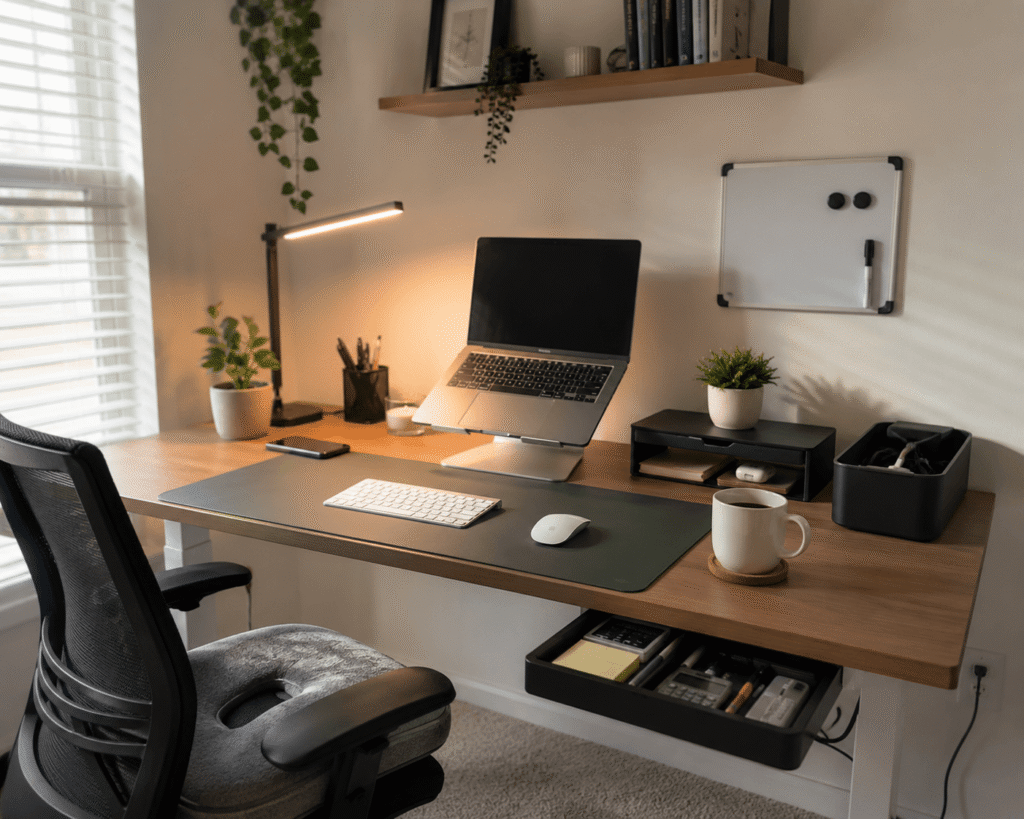
Disclosure: As an Amazon Associate I earn from qualifying purchases.
Working from home can feel convenient until your desk starts working against you.
A cramped surface, bad lighting, messy cables, and an uncomfortable chair can make it harder to focus than it needs to be. The good news is that you do not need a full office makeover to fix it.
With a few simple upgrades, you can make your setup cleaner, more comfortable, and easier to use every day. If you want to go deeper into focus and workspace habits, this guide on creating a focus-friendly desk environment is a helpful next read.
Quick Picks
- Best overall: Adjustable Laptop Stand
- Best budget option: Small Magnetic Dry Erase Whiteboard
- Best for small desks: Bostitch Konnect Under Desk Drawer
Prices are approximate and may change. Ratings and review counts reflect current product data.
Comfort Upgrades That Improve Focus
Adjustable Laptop Stand

A simple option like this can make a laptop setup feel much more comfortable.
It raises your screen closer to eye level, which can help reduce neck strain during long work sessions. It also frees up a little space underneath your laptop, which is useful if your desk is already crowded.
This is best for remote workers, students, or anyone using a laptop as their main work device.
If you spend hours writing, studying, or joining video calls, better screen height can make your setup feel more natural. You do not need to overthink this. This type of upgrade is easy to add without changing your whole desk.
A simple addition that makes your setup feel more comfortable right away.
CushyOasis Seat Cushion

A tool like this can help if your current chair starts feeling uncomfortable after a few hours.
The CushyOasis Seat Cushion adds extra support for your hips and tailbone, which can make long sitting sessions more manageable. It is especially useful if you are using a basic office chair, dining chair, or shared workspace chair.
This is best for people who work or study from home for long stretches.
For example, if you usually shift around during meetings or feel uncomfortable halfway through the day, a cushion can make your chair feel more supportive. Something like this is a low-risk comfort upgrade before replacing your entire chair.
One of those upgrades you notice almost immediately.
Organization Tools for Cleaner Desks
Naeety Cable Management Box

A simple option like this helps hide one of the biggest desk problems: cable clutter.
The Naeety Cable Management Box keeps power strips, chargers, and loose cords contained instead of scattered around the floor or desk. It is a practical fix if your setup includes a laptop, monitor, lamp, phone charger, or other daily devices.
This is best for anyone who wants a cleaner workspace without constantly rearranging wires.
A real-life example is finishing your workday and not seeing tangled cables under the desk. It makes the whole area feel calmer. Something like this is especially useful if you are trying to build a more organized home office setup.
Easy to add without changing your entire setup.
Bostitch Konnect Under Desk Drawer

A tool like this is helpful when your desk surface keeps filling up with small items.
The Bostitch Konnect Under Desk Drawer adds hidden storage under your desk for pens, sticky notes, chargers, clips, and other everyday accessories. Since it slides out, you can keep things close without leaving them visible all day.
This is best for small desks where drawer space is limited or missing completely.
If you work from a compact desk in a bedroom or apartment, this can free up surface space fast. A budget-friendly option like this helps you keep the essentials nearby without making the desk look crowded.
A simple addition that makes your desk feel more organized right away.
Marbrasse Drawer Organizer

A simple organizer like this can make drawers easier to use instead of turning them into clutter zones.
The Marbrasse Drawer Organizer has adjustable compartments for pens, paper clips, sticky notes, cables, and small supplies. It is useful because it gives every small item a place.
This is best for people who already have a drawer but cannot keep it organized.
For example, instead of digging around for a charger or pen before a meeting, you can open the drawer and find what you need quickly. Something like this works well with other minimal desk accessories that improve your setup without adding clutter.
One of those upgrades you notice almost immediately.
gianotter Monitor Stand Riser
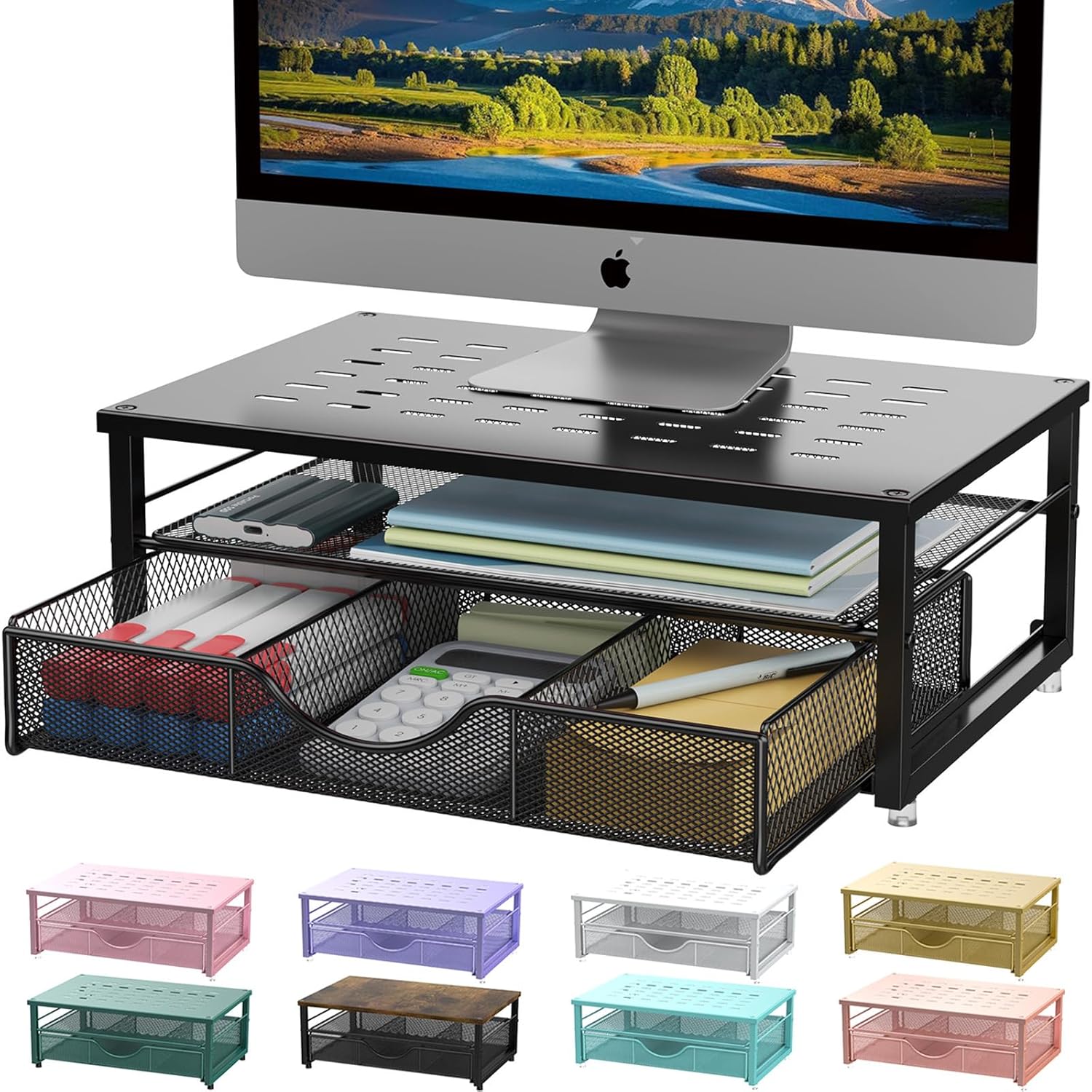
A setup upgrade like this helps with both comfort and storage.
The gianotter Monitor Stand Riser raises your monitor while giving you extra space underneath for notebooks, accessories, or small office items. It can make your desk feel more structured without taking up much extra room.
This is best for desktop monitor users who want better screen height and cleaner storage.
If your monitor sits too low and your desk feels crowded, this solves two problems at once. A no-fuss option like this is especially useful for small desk setup ideas where every inch matters.
Easy to add without changing your whole workspace.
Simple Productivity Tools for Daily Workflow
TECKNET Wireless Keyboard and Mouse

A simple option like this can make your desk feel cleaner almost instantly.
The TECKNET Wireless Keyboard and Mouse removes extra cables and gives you more flexibility with your typing and mouse position. That can make your setup feel less cramped, especially on smaller desks.
This is best for laptop users, students, and remote workers who want a cleaner daily workflow.
For example, you can push the keyboard aside after work and instantly create space for writing, reading, or planning. This type of upgrade is practical if you want your desk to feel more flexible without buying a new desk.
A solid, no-fuss addition to most desks.
Small Magnetic Dry Erase Whiteboard

A budget-friendly option like this is great for keeping important tasks visible.
The Small Magnetic Dry Erase Whiteboard gives you a simple place to write reminders, priorities, deadlines, or quick notes without opening another app. It is small enough for compact desks but useful enough for daily planning.
This is best for people who get distracted easily or manage several tasks at once.
For example, writing your top three tasks before starting work can help you stay focused instead of jumping between tabs. A simple tool like this keeps your priorities in front of you without adding digital clutter.
Easy to add without changing your entire setup.
What to Look For Before Buying
Before buying anything for your desk, focus on the problem you are actually trying to solve.
If your neck hurts, start with screen height. If your desk feels messy, start with storage or cable management. If you feel distracted, improve lighting and reduce visual clutter.
Keep these simple rules in mind:
- Measure your desk before buying larger items
- Choose upgrades that solve one clear problem
- Avoid oversized products if your space is limited
- Prioritize comfort if you work long hours
- Pick items that are easy to use every day
- Start with one or two upgrades instead of buying everything at once
The best productive desk setup is not the most expensive one. It is the one that makes your daily routine easier.
Conclusion
Creating a productive desk setup at home does not have to be complicated.
Small upgrades like a laptop stand, cable box, desk lamp, storage drawer, or whiteboard can make your workspace feel cleaner, calmer, and more useful. You do not need to redesign the entire room to feel the difference.
Start with the thing that annoys you most. Fix that first. Then add small improvements as your routine becomes clearer.
For more simple workspace improvements, you can also explore these minimal desk accessories that make a big difference without overwhelming your setup.