
Disclosure: As an Amazon Associate I earn from qualifying purchases.
A lot of desk setups look fine at first glance, but after a few hours, your neck and shoulders start telling a different story.
One of the biggest reasons is monitor height. If your screen sits too low, you naturally lean forward, round your shoulders, and strain your neck without even noticing it.
The good news is that fixing this usually doesn’t require a full office makeover. A simple monitor stand can instantly improve posture, create more desk space, and make your setup feel cleaner and easier to use.
If you’re trying to create a more comfortable home office setup, these small upgrades can make a surprisingly big difference over time. You can also check out minimal desk setup ideas for better focus for more ways to simplify your workspace.
Quick Picks
- Best overall: Amazon Basics Adjustable Monitor Stand
- Best budget option: HUANUO Adjustable Monitor Riser
- Best for small desks: ARES WING Clamp-On Desk Shelf
Prices are approximate and may change. Ratings and review counts reflect current product data.
Amazon Basics Adjustable Monitor Stand

A simple option like this is one of the easiest ways to improve posture without changing your entire desk setup.
The Amazon Basics Adjustable Monitor Stand gives you flexible height adjustment while also creating storage space underneath for a keyboard or small accessories. It’s sturdy, simple, and works well for most monitors and laptops.
This is a great fit for remote workers, students, or anyone spending long hours at a desk.
For example, if you constantly find yourself leaning toward your screen during work sessions, a tool like this can help you sit more naturally without thinking about it.
Something like this also works well if you want a cleaner setup without adding bulky furniture.
A solid, no-fuss addition to most desks.
LICHIL Bamboo Monitor Stand

A tool like this combines ergonomics with organization, which makes it especially useful for cluttered workspaces.
The LICHIL Bamboo Monitor Stand includes built-in storage drawers, a keyboard tray, and a phone holder while still keeping a clean, minimalist look.
This type of upgrade works well for students, home office users, or anyone trying to create a more organized workspace.
Imagine finishing work and not seeing cables, pens, and random accessories spread across the desk. Something like this can instantly make the setup feel calmer and easier to use.
If you’re trying to build a cleaner workspace, this type of setup upgrade fits naturally into minimal desk setup ideas for better focus.
One of those upgrades you notice almost immediately.
HUANUO Adjustable Monitor Riser

If you just want a quick upgrade, this is a simple option that gets the job done.
The HUANUO Adjustable Monitor Riser offers multiple height levels and built-in airflow vents while staying compact enough for smaller desks.
This works especially well for apartment setups, dorm rooms, or compact desks where space is limited.
For example, if your current monitor position causes neck tension after a few hours, a no-fuss option like this can noticeably improve comfort right away.
Something like this also helps create extra space underneath for keyboards or notebooks.
Easy to add without changing your whole setup.
Hemudu Dual Monitor Risers

A simple tool like this works well if you use multiple screens or devices throughout the day.
The Hemudu Dual Monitor Risers come as a two-pack and offer adjustable height settings, making them useful for dual-monitor setups, laptops, gaming accessories, or even printers.
This type of setup upgrade works especially well for content creators or remote workers balancing multiple devices at once.
For example, you can elevate both monitors evenly while freeing up extra space underneath for accessories or desk organization ideas.
Something like this makes a desk feel cleaner and more intentional almost immediately.
gianotter Monitor Stand with Drawer
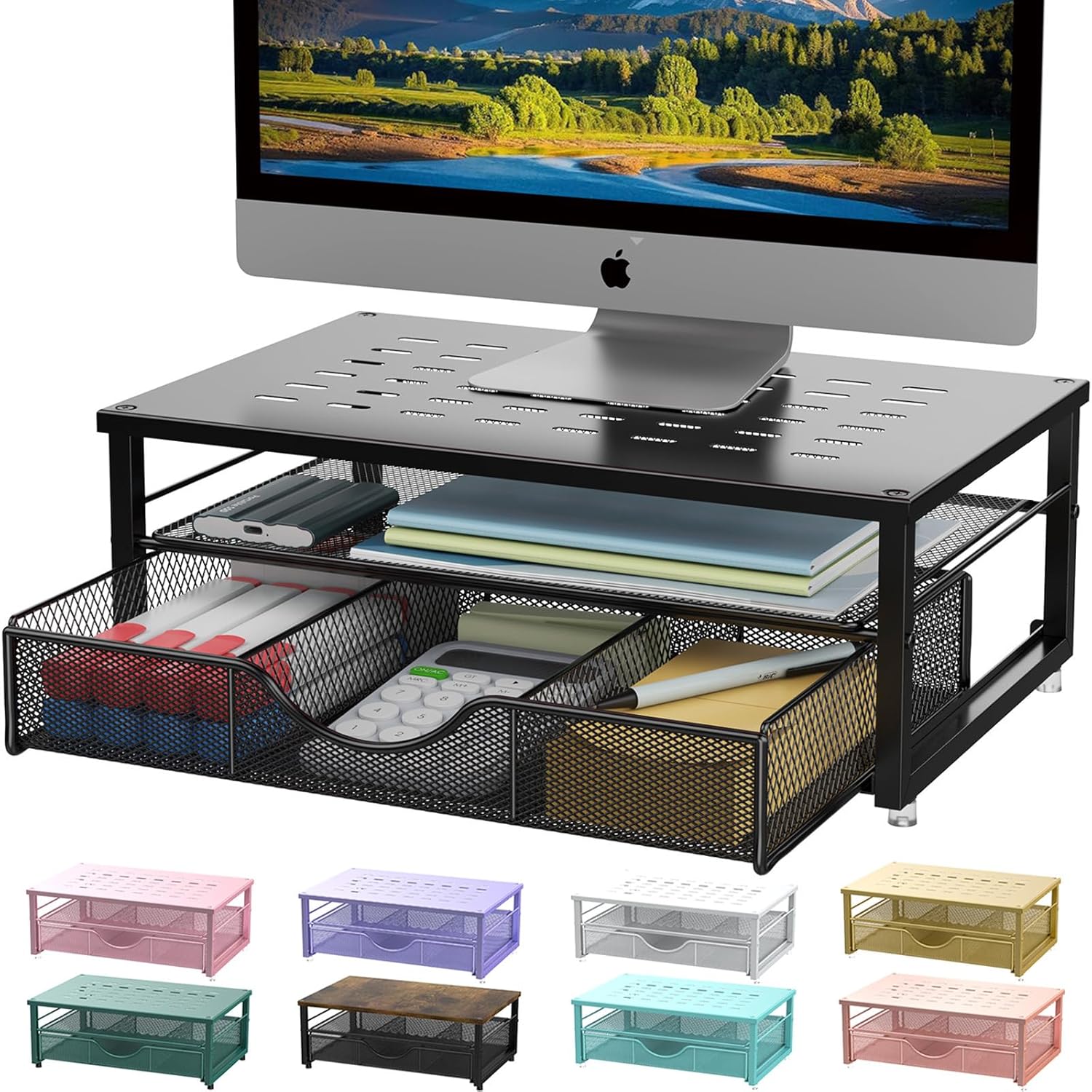
A simple option like this gives you both better posture and hidden storage at the same time.
The gianotter Monitor Stand includes a built-in drawer and extra compartments for organizing small desk essentials without needing additional organizers.
This is a great fit for smaller desks that tend to collect clutter throughout the week.
If your setup usually ends up covered in sticky notes, chargers, and random accessories, a tool like this can help create a cleaner workflow with minimal effort.
Something like this also pairs nicely with simple desk changes that improve your workflow.
Easy to add without changing your entire setup.
BONTEC Dual Monitor Stand

If you use multiple devices during the day, this is one of the more flexible options under $40.
The BONTEC Dual Monitor Stand includes adjustable sections, storage space, and even a smartphone holder, making it useful for productivity-focused desk setups.
This works especially well for remote workers who switch between a laptop, monitor, tablet, or phone throughout the day.
For example, something like this can help separate devices more cleanly while improving monitor height at the same time.
A simple addition that helps your workspace feel more functional right away.
ARES WING Clamp-On Desk Shelf

A simple tool like this can free up more desk space than people expect.
The ARES WING Clamp-On Desk Shelf attaches directly to the edge of the desk, creating additional elevated storage without taking up valuable surface area.
This is especially useful for small desks, gaming setups, or compact home offices where every inch matters.
For example, if your workspace already feels crowded, something like this can instantly create more usable room without buying a larger desk.
If you’re working with a smaller desk setup, this type of upgrade can make the entire workspace feel more open and organized.
Easy to add without changing your whole setup.
Egchi Acrylic Monitor Stand

Acrylic monitor stands like this are popular because they visually “disappear” into the setup while still improving monitor height.
The Egchi Acrylic Monitor Stand has a clean minimalist design with extra storage space underneath, making it ideal for modern desks that already feel visually busy.
A budget-friendly option like this works especially well for minimalist setups, creative workspaces, or lighter desk aesthetics.
For example, something like this can help maintain a cleaner visual look without adding bulky furniture or dark materials.
One of those upgrades that quietly improves the entire desk.
HUANUO Monitor Arm with Laptop Mount

If you want maximum flexibility, this type of upgrade can completely change how your desk feels.
The HUANUO Monitor Arm with Laptop Mount lifts both your monitor and laptop off the desk surface entirely, creating a much more open workspace.
This is especially useful for productivity desk setups where space and ergonomics both matter.
For example, a tool like this makes it easier to adjust screen position throughout the day while also improving posture and reducing desk clutter.
Something like this is one of the easiest ways to make a desk feel more premium without rebuilding the entire setup.
KKTONER Single Monitor Mount

A no-fuss option like this is great if you want adjustable monitor positioning without spending too much.
The KKTONER Single Monitor Mount supports a wide range of monitor sizes while offering height adjustment and swivel movement for better viewing angles.
This works especially well for work-from-home users who want more ergonomic flexibility on a budget.
For example, if your current setup feels too rigid or uncomfortable during long sessions, something like this can make screen positioning much easier.
A simple addition that helps your desk feel more comfortable and organized right away.
What to Look For Before Buying
Height Adjustment
The best monitor stand is one that raises your screen close to eye level. You shouldn’t have to tilt your head downward constantly while working.
Desk Size
Measure your desk before buying. Some monitor stands look compact online but take up more space than expected.
Storage Features
If your workspace gets cluttered easily, built-in drawers or shelves can make a big difference.
Weight Capacity
Make sure the stand can safely support your monitor size and weight, especially for larger screens.
Material and Style
Metal and bamboo are usually more durable, while acrylic works better for minimalist setups.
Cable Space
Some stands include space underneath for cables or accessories, which helps keep the desk cleaner overall.
For more ways to stay focused while working, it also helps to build a setup that feels visually calm and easy to maintain.
Conclusion
Improving posture doesn’t have to mean rebuilding your entire workspace or spending a lot of money.
Sometimes a small upgrade like a monitor stand is enough to make your desk feel more comfortable, organized, and easier to use every day.
Whether you want better ergonomics, extra storage, or a cleaner setup, there are plenty of affordable options that fit small desks and simple workspaces.
You don’t need to overthink this. Even a basic monitor stand can noticeably improve how your setup feels during long work sessions.
If you’re trying to keep your workspace clean and practical, you can also explore other simple productivity-focused desk upgrades that work well in smaller home offices.