
Disclosure: As an Amazon Associate I earn from qualifying purchases.
A cluttered desk does more than just look messy—it slows you down. You lose time searching for things, your posture slips, and distractions build up without you noticing.
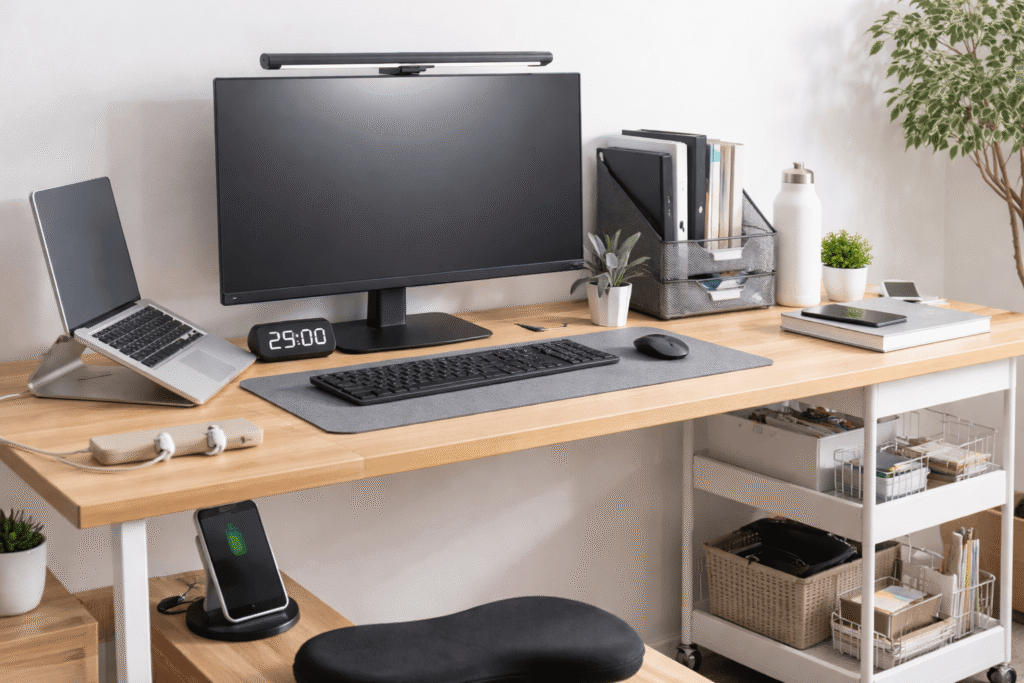
The good news is you don’t need a full office overhaul to fix it. A few simple desk changes can make your workspace feel cleaner, more focused, and easier to use every day.
Prices are approximate and may change. Ratings and review counts reflect current product data.
This guide focuses on practical upgrades that improve productivity, especially if you’re working with a small setup or spending long hours at your desk.
Simple Upgrades That Improve Focus
Quntis Monitor Light Bar PRO+

Quntis Monitor Light Bar PRO+
A monitor-mounted light bar that sits on top of your screen and illuminates your desk without glare.
If you’ve ever worked at night with uneven lighting, you’ve probably felt eye strain or fatigue. This light spreads evenly across your desk while keeping your screen clear.
Best for: Remote workers or students working late hours
Real-life use: You’re editing, writing, or studying at night without turning on a harsh overhead light. Your desk is visible, but your eyes stay relaxed.
Benefit: Helps reduce eye strain and distractions, making it easier to stay focused for longer periods
Smartish Magnetic Cord Holder

Smartish Magnetic Cord Holder
A compact cable organizer with magnetic clips that keep your charging cables in place.
Loose cables constantly falling behind your desk might seem minor, but they interrupt your flow more than you think.
Best for: Small desks with multiple devices
Real-life use: You unplug your phone, and the cable stays right where you left it—no reaching under the desk.
Benefit: A small change that makes a big difference in reducing clutter and keeping your workspace predictable
AVINIA Digital Visual Timer

AVINIA Digital Visual Timer
A simple digital timer with a large display for countdown or count-up sessions.
Unlike phone timers, this sits in your line of sight without pulling you into notifications or distractions.
Best for: Anyone trying to improve focus or time-block work
Real-life use: You set a 30-minute session and stay locked into one task without checking your phone.
Benefit: Helps reduce distractions and supports a more structured workflow
Smart Organization for Small Desks
Simple Houseware 3-Tier Rolling Utility Cart

Simple Houseware 3-Tier Rolling Utility Cart
A compact rolling cart that adds extra storage space next to your desk.
When your desk is small, the problem isn’t always what’s on it—it’s where everything else goes. This cart solves that.
Best for: Small setups or shared workspaces
Real-life use: Your notebooks, chargers, and accessories move off your desk and onto the cart, freeing up space instantly.
Benefit: Creates a cleaner workspace and reduces visual clutter without needing a bigger desk
Simple Houseware Mesh Desk Organizer with Drawer

Simple Houseware Mesh Desk Organizer with Drawer
A multi-compartment organizer for papers, notebooks, and small accessories.
Stacks of paper and random items can build up fast. Having a defined place for each category keeps things under control.
Best for: Students or paperwork-heavy workflows
Real-life use: Instead of searching through piles, you know exactly where everything is.
Benefit: Helps maintain a clean workspace and improves efficiency during busy work sessions
Lamicall Adjustable Laptop Stand

Lamicall Adjustable Laptop Stand
An aluminum laptop stand that raises your screen and improves ergonomics.
Working directly on a desk with a laptop often leads to poor posture and wasted space.
Best for: Laptop users in small setups
Real-life use: You raise your laptop to eye level and free up space underneath for a keyboard or notebook.
Benefit: Improves posture while making your desk feel more open and organized
Comfort Improvements for Long Work Sessions
Everlasting Comfort Memory Foam Seat Cushion

Everlasting Comfort Memory Foam Seat Cushion
A supportive seat cushion designed to reduce pressure during long sitting sessions.
Even a decent chair can become uncomfortable after hours. This is a simple upgrade that adds immediate comfort.
Best for: People working 6–8+ hours daily at a desk
Real-life use: You notice fewer adjustments and less discomfort during long work blocks.
Benefit: Improves comfort and helps you stay focused without constant repositioning
Logitech Pebble Keys 2 K380s Wireless Keyboard

Logitech Pebble Keys 2 K380s Wireless Keyboard
A slim, compact keyboard designed for multi-device use.
Full-size keyboards can take up more space than necessary, especially on smaller desks.
Best for: Minimal setups and multi-device users
Real-life use: You switch between your laptop and tablet without rearranging your desk.
Benefit: Saves space and supports a cleaner, more efficient workflow
GORILLA GRIP Memory Foam Wrist Rest Set

GORILLA GRIP Memory Foam Wrist Rest Set
A soft wrist rest for your keyboard and mouse that reduces strain during typing.
Wrist fatigue builds slowly, especially if your setup isn’t ideal. This is one of those small upgrades that you feel over time.
Best for: Anyone typing for extended periods
Real-life use: You finish your workday without that dull wrist tension you used to ignore.
Benefit: A simple change that improves comfort and reduces strain during long sessions
What to Look For Before Buying
When improving your desk setup, keep things practical.
Focus on real problems
Start with what actually slows you down—clutter, discomfort, or lack of space.
Choose space-saving designs
For small setups, every item should either free up space or use it more efficiently.
Avoid unnecessary duplicates
One well-chosen tool is better than multiple similar ones.
Look for flexibility
Adjustable or multi-use products adapt better as your workflow changes.
Keep your setup simple
The goal is a clean workspace that supports focus—not one filled with gadgets.
Conclusion
Improving your workflow doesn’t require big changes. Most of the time, it’s a few small upgrades that remove daily friction.
Better lighting, organized cables, and improved comfort can quietly transform how your desk feels—and how you work at it.
Start with one or two changes that solve your biggest problem. That’s usually enough to notice a real difference.