
Disclosure: As an Amazon Associate I earn from qualifying purchases.
A cluttered desk doesn’t just look messy—it quietly drains your focus.
You sit down to work, but your eyes bounce between cables, random papers, and things you don’t even remember putting there. Before you even start, your attention is already split.
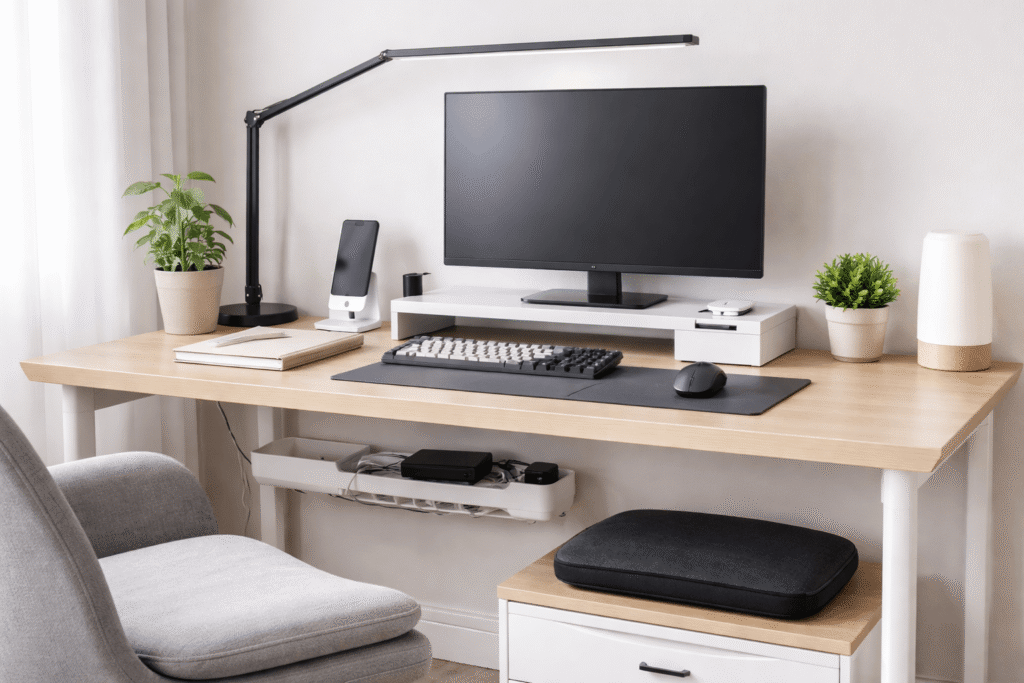
A minimalist desk setup isn’t about having less just for aesthetics. It’s about removing friction—so your brain can lock into one task at a time.
The goal is simple: cleaner space, clearer thinking, better work sessions.
Prices are approximate and may change. Ratings and review counts reflect current product data.
Below are practical, real-world upgrades that help transform your desk into a focused, distraction-free environment.
Simple Upgrades That Improve Focus
Lamicall Adjustable Laptop Stand (Aluminum, Foldable)

If you work on a laptop daily, your screen is probably too low.
The Lamicall Adjustable Laptop Stand lifts your laptop to eye level, helping you sit upright without thinking about it. It’s lightweight, foldable, and works well in both permanent and temporary setups.
Best for remote workers or students using laptops as their main device.
Real-life use case:
You open your laptop in the morning, place it on the stand, and instantly avoid that forward hunch. Your posture stays neutral without effort.
Benefit:
Better posture, less neck strain, and a simple upgrade that makes long sessions easier to maintain.
ASUS ROG Strix Scope II 96 Wireless Mechanical Keyboard

A large keyboard can take over your entire desk.
The ASUS ROG Strix Scope II 96 Wireless Keyboard keeps a near full layout but in a more compact footprint, giving you extra space without sacrificing usability. Wireless connectivity also reduces cable clutter.
Best for people who type a lot but still want a clean, minimalist layout.
Real-life use case:
You remove your old full-size keyboard and suddenly your desk feels more open. There’s space for a notebook—or just empty space that helps reduce distractions.
Benefit:
Cleaner layout, more usable desk space, better flow between tasks.
Micomlan LED Desk Lamp with Clamp (24W, Auto Dimming)

Lighting can either support your focus—or slowly wear it down.
The Micomlan LED Desk Lamp mounts to your desk with a clamp, freeing up surface space. It offers adjustable brightness and auto-dimming, which helps maintain consistent lighting throughout the day.
Ideal for small desks or setups with limited natural light.
Real-life use case:
Instead of relying on overhead lighting, you create a focused light zone exactly where you work. Your desk feels more intentional, especially at night.
Benefit:
Reduced eye strain and fewer distractions during long sessions.
Smart Organization for Small Desks
Cinati Under Desk Cable Management Tray (No Drill)

Cables are one of the biggest sources of visual clutter.
The Cinati Under Desk Cable Management Tray clamps onto your desk without drilling and hides power strips and cables underneath.
Perfect if you use multiple devices but want a clean surface.
Real-life use case:
You sit down and don’t see cables hanging or tangling anymore. Everything is still there—just out of sight.
Benefit:
Cleaner workspace, less visual noise, easier to focus.
Marbrasse Expandable Desk Drawer Organizer (10 Compartments)

Small items scattered across your desk create constant micro-distractions.
The Marbrasse Expandable Drawer Organizer keeps everything—pens, cables, accessories—organized inside a drawer instead of on your desk.
Best for people who want a minimalist look without losing functionality.
Real-life use case:
Instead of grabbing random items from your desk surface, everything has a place inside the drawer.
Benefit:
Less mental clutter and faster access to essentials.
eVoomi FlowMax Monitor Stand with Storage

A monitor stand isn’t just about height—it’s about reclaiming space.
The eVoomi FlowMax Monitor Stand lifts your screen while adding built-in storage for papers, accessories, and small tools.
Great for compact desks that need more structure.
Real-life use case:
You slide your notebook and keyboard under the stand when not in use, keeping your main workspace clean.
Benefit:
More space without upgrading your desk.
Aothia PU Leather Desk Pad (Non-Slip, Waterproof)

A desk mat helps define your workspace visually.
The Aothia PU Leather Desk Pad creates a clean surface for your keyboard and mouse while protecting your desk. It’s easy to clean and gives your setup a more intentional look.
Best for minimalist setups aiming for a clean, uniform feel.
Real-life use case:
You place your devices on the mat and everything suddenly feels aligned instead of scattered.
Benefit:
Cleaner look, reduced friction, and a more focused work zone.
Comfort Improvements for Long Work Sessions
ComfiLife Gel & Memory Foam Seat Cushion

Even a decent chair can become uncomfortable after a few hours.
The ComfiLife Seat Cushion adds a layer of support using gel and memory foam, helping reduce pressure during long sessions.
Best for remote workers sitting multiple hours daily.
Real-life use case:
After a few days, you notice you’re shifting less in your chair and staying focused longer.
Benefit:
More comfort, fewer interruptions caused by discomfort.
MEKASS Ergonomic Wrist Rest Set (Keyboard + Mouse)

Typing without support can lead to subtle strain over time.
The MEKASS Wrist Rest Set supports your wrists in a neutral position, making typing feel smoother and more relaxed.
Ideal for writing, coding, or any keyboard-heavy work.
Real-life use case:
Your hands rest naturally instead of hovering, reducing tension during long typing sessions.
Benefit:
Less strain, more consistent workflow.
ComfiLife Adjustable Foot Rest (Memory Foam)

Posture isn’t just about your back—it starts from your feet.
The ComfiLife Foot Rest helps align your legs and supports your lower body, especially if your chair height isn’t perfect.
Best for people working long hours at a desk.
Real-life use case:
You place your feet on the rest and feel more stable immediately, without constantly adjusting your position.
Benefit:
Improved posture and reduced fatigue over time.
What to Look For Before Buying
Not every product improves your desk.
Here’s what actually matters:
Keep it simple
If it adds complexity or takes up too much space, it works against a minimalist setup.
Prioritize function over looks
A clean design is great—but it should solve a real problem like clutter, discomfort, or poor lighting.
Fit your desk size
Small desks need compact, multi-use items. Avoid oversized accessories.
Reduce before adding
Minimalism isn’t about buying more—it’s about removing distractions.
Think in systems
Lighting, posture, and organization all work together. One smart upgrade can improve your entire workflow.
Conclusion
A minimalist desk setup isn’t about having the perfect setup.
It’s about making your space easier to use, easier to think in, and easier to return to every day.
You don’t need a full overhaul.
A few intentional upgrades—a cleaner surface, better lighting, improved comfort—can completely change how you work.
Cleaner desk. Clearer focus.
And that’s where real productivity starts.