
Disclosure: As an Amazon Associate I earn from qualifying purchases.
A desk doesn’t have to be terrible to make working from home frustrating. A screen that’s slightly too low, cables taking over the floor, nowhere to put your headphones, or a coffee mug constantly competing for space can make an otherwise decent setup feel surprisingly uncomfortable.
The good news is that improving your workspace doesn’t require replacing your desk or spending hundreds of dollars. Some of the best desk accessories under $25 solve very specific everyday annoyances, and those small fixes can make a bigger difference than you might expect.
The key is choosing upgrades that actually address a problem instead of filling your desk with more stuff. The ten ideas below cover ergonomics, organization, productivity, comfort, and space-saving improvements for different types of setups.
If you’re working with limited space, our guide to the best small home office accessories has more ideas for getting extra usefulness from the desk you already have.
Quick Picks
- Best Overall: Nulaxy Adjustable Laptop Stand — A practical choice for improving laptop positioning in an everyday work or study setup.
- Best Budget Option: YSAGi Leather Desk Protector — An affordable way to create a more comfortable and consistent work surface.
- Best for Small Desks: OOKUU Desk Cup Holder — Keeps your drink within reach without giving up valuable desktop space.
Prices are approximate and may change. Ratings and review counts reflect current product data.
Ergonomic and Comfort Upgrades
Nulaxy Adjustable Laptop Stand

Approx. Price: ~$16.99 | Rating: 4.7 ⭐ | Reviews: 16,789+
Working directly from a laptop often means spending hours looking slightly downward. It may not seem like a big deal at first, but a better screen position can make a long work or study session feel much more natural.
That’s where the Nulaxy Adjustable Laptop Stand becomes useful. Raising your laptop closer to eye level can create a more comfortable viewing position while also opening up some space underneath the computer.
It’s especially practical for remote workers, students, and anyone who regularly pairs a laptop with an external keyboard and mouse. The adjustable, foldable design also makes it easier to adapt the stand to different workspaces instead of being locked into one fixed position.
Imagine moving from the kitchen table back to your office and adjusting the screen to a comfortable height in seconds. You haven’t changed your computer or furniture, but the setup feels more intentional.
For laptop-heavy workspaces, the Nulaxy Adjustable Laptop Stand is a simple upgrade that can noticeably improve everyday comfort.
YSAGi Leather Desk Protector

Approx. Price: ~$13.99 | Rating: 4.7 ⭐ | Reviews: 22,209+
If your keyboard slides around, your mouse feels inconsistent, or you’re constantly worried about scratching your desktop, the work surface itself may be part of the problem.
The YSAGi Leather Desk Protector creates a large, consistent area for your laptop, keyboard, and mouse while helping protect the desk underneath. Many people overlook a desk mat because it seems mostly decorative, but the practical benefits become obvious during daily use.
It’s particularly useful for people who spend hours using a keyboard and mouse or want an easy way to make an older desk feel more polished.
Place your everyday equipment on the YSAGi Leather Desk Protector, and separate objects suddenly feel more like one organized workstation. Its waterproof PU leather surface can also make everyday spills easier to deal with.
It’s a small improvement that can make the whole desk feel more put together.
BlissTrends Foot Rest

Approx. Price: ~$19.99 | Rating: 4.4 ⭐ | Reviews: 9,070+
If your feet don’t sit comfortably on the floor, finding a relaxed sitting position can be surprisingly difficult.
A more supported position can make extended desk sessions feel better, which is where the BlissTrends Foot Rest comes in. It’s easy to ignore because it sits underneath the desk, but that’s exactly where some everyday comfort problems begin.
With two adjustable height options and a washable cover, it’s particularly useful for people whose chair and desk heights don’t naturally line up.
For example, you might need to raise your chair to reach your keyboard comfortably, only to find that your feet no longer rest naturally. The BlissTrends Foot Rest gives them a dedicated surface instead of leaving them unsupported.
Sometimes the improvements you can’t see are the ones you notice most.
Voncerus LED Desk Lamp

Approx. Price: ~$22.99 | Rating: 4.6 ⭐ | Reviews: 8,998+
A workspace that feels perfectly fine during the afternoon can become unpleasant once the room gets darker.
Better task lighting makes reading, writing, studying, and keyboard work easier without requiring you to brightly illuminate the entire room. The Voncerus LED Desk Lamp provides focused lighting with multiple modes and brightness levels, while its clamp design avoids occupying much desktop space.
This is particularly helpful for students, evening workers, and anyone whose desk isn’t close to a good source of natural light.
During a late study session, for example, the flexible neck lets you direct light toward your notebook or keyboard instead of lighting everything around you. The Voncerus LED Desk Lamp can also remember your previous setting, which is a nice convenience when you use it regularly.
If lighting is one of your main concerns, you can also explore our guide to the best compact desk lamps for more space-conscious options.
Better lighting is one of the simplest ways to make your workspace feel more usable throughout the day.
Organization and Space-Saving Upgrades
D-Line Cable Management Box

Approx. Price: ~$22.99 | Rating: 4.5 ⭐ | Reviews: 7,310+
A desk can look organized from the front while hiding a chaotic pile of adapters and cables underneath.
Getting that mess contained makes cleaning easier and gives the entire workspace a calmer appearance. The D-Line Cable Management Box offers a simple place to conceal a power strip and excess cable length without requiring a complicated installation.
It’s especially useful for setups with a monitor, laptop charger, phone charger, speakers, and other powered accessories.
Instead of moving five tangled cables whenever you vacuum, you can keep much of the clutter contained in one spot. A setup using the D-Line Cable Management Box can also make it easier to identify which cables actually need to remain accessible.
Many people overlook cable management, but it’s one of the easiest ways to make a workspace look intentionally organized rather than temporarily tidy.
APPHOME Foldable Headphone Hanger
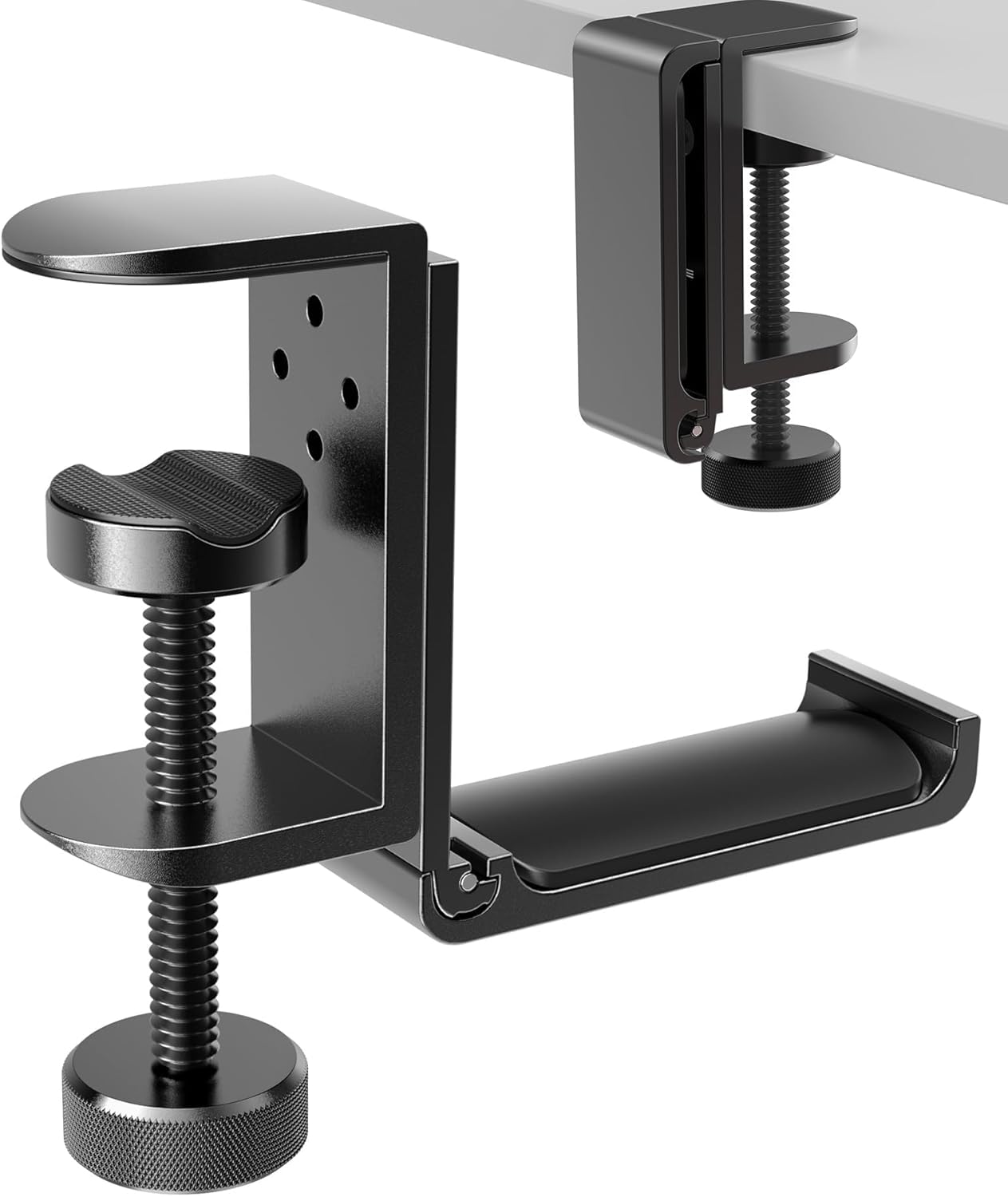
Approx. Price: ~$16.99 | Rating: 4.8 ⭐ | Reviews: 8,913+
Large headphones are awkward desk companions. Leave them on the surface and they consume space; put them in a drawer and they’re inconvenient to grab.
The APPHOME Foldable Headphone Hanger solves that tiny problem by using the otherwise wasted area underneath your desk. It’s an easy upgrade to overlook because the solution is almost invisible.
Gamers, remote workers, students, and anyone using headphones every day can benefit from having a dedicated storage spot within reach.
Finish a video call and you can place your headset on the APPHOME Foldable Headphone Hanger instead of dropping it beside the keyboard. Its foldable design also means the hanger can stay tucked away when it isn’t needed.
A practical improvement that’s easy to appreciate once it becomes part of your routine.
OPNICE Monitor Stand Riser

Approx. Price: ~$19.99 | Rating: 4.7 ⭐ | Reviews: 5,706+
Sometimes the problem isn’t that your desk is too small. It’s that you’re only using its horizontal surface.
Creating another level can make a cramped workstation easier to organize. The OPNICE Monitor Stand Riser raises your screen while adding storage underneath and around it, including a drawer and dedicated holders for smaller items.
This works especially well for home offices where one desk needs to handle both computer work and paperwork.
When you’re finished working, for example, you can use the space underneath to clear items away and immediately regain some working room. The extra storage built into the OPNICE Monitor Stand Riser can also keep frequently used supplies from spreading across the desk.
For compact workspaces, making better use of vertical space can be surprisingly effective.
Marbrasse Expandable Desk Drawer Organizer

Approx. Price: ~$20.99 | Rating: 4.6 ⭐ | Reviews: 1,610+
A drawer full of pens, charging cables, sticky notes, adapters, and random office supplies isn’t really organized storage if you have to dig through everything.
Separating those small items makes them easier to find and helps keep clutter away from the desktop. The Marbrasse Expandable Desk Drawer Organizer uses adjustable compartments to give everyday accessories their own places.
It’s most useful for anyone with limited storage or a tendency to collect small desk essentials in one drawer.
Instead of searching for a USB adapter five minutes before a meeting, you can create a specific compartment for it. Because the Marbrasse Expandable Desk Drawer Organizer can be adjusted with dividers, you aren’t stuck with compartments that don’t match what you actually store.
Sometimes the simplest improvements are the ones you notice most.
Productivity and Everyday Convenience
OORAII Rotating Productivity Timer
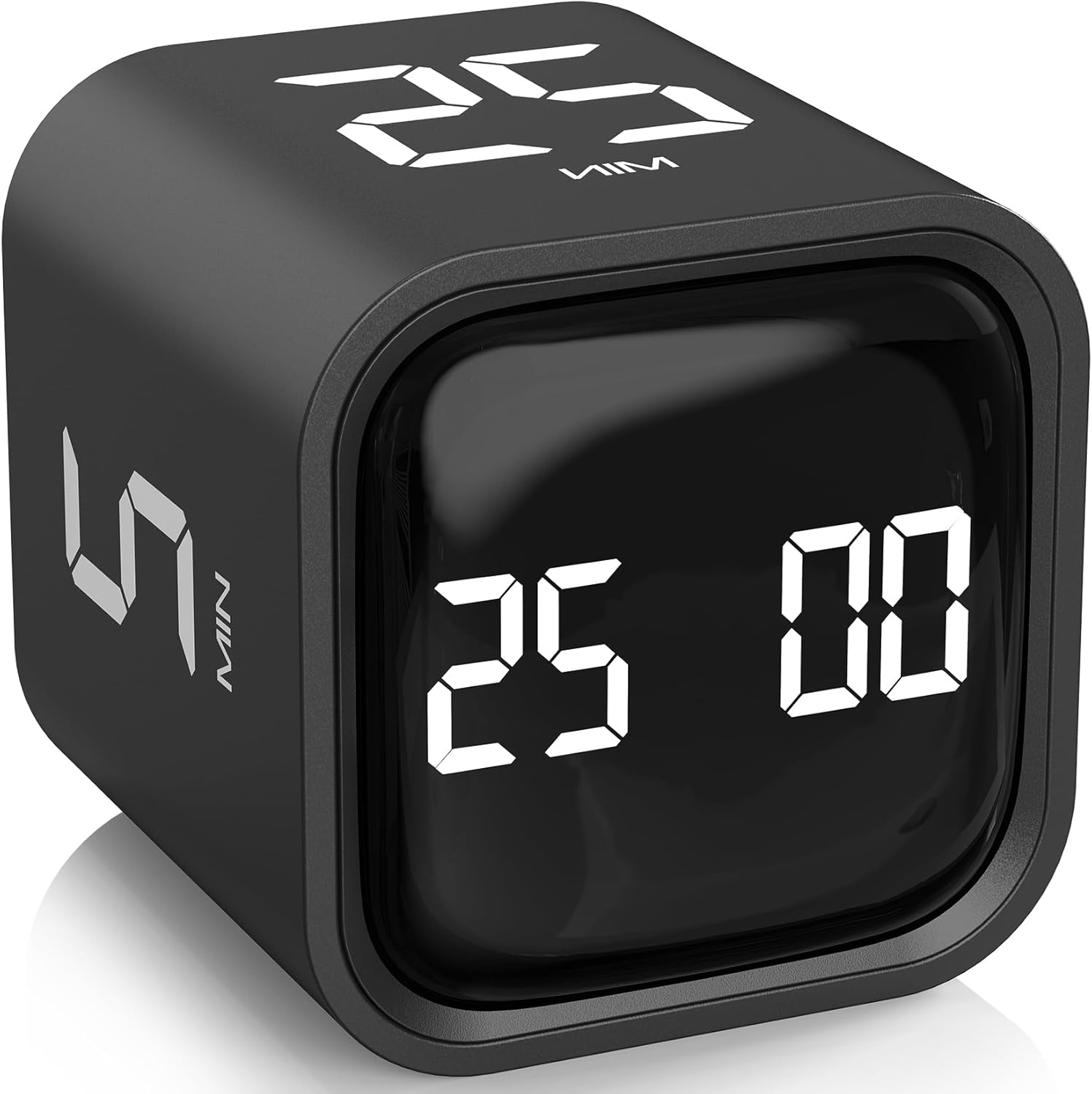
Approx. Price: ~$16.99 | Rating: 4.6 ⭐ | Reviews: 1,250+
Phones are useful productivity tools until checking a timer turns into checking messages, notifications, and social media.
A separate timer gives you a simple way to structure focused work without reaching for another distracting screen. The OORAII Rotating Productivity Timer includes preset 5-, 10-, 25-, and 50-minute intervals alongside customizable timing options.
Many people overlook dedicated timers because their phone already has one. The advantage isn’t simply having another clock; it’s removing one reason to touch the device that’s most likely to distract you.
Students, writers, remote workers, and anyone who likes working in focused blocks can benefit. Set the OORAII Rotating Productivity Timer for a 25-minute session, place your phone somewhere else, and concentrate on one assignment until the timer ends.
It’s a simple way to create a little more separation between focused work and everything competing for your attention.
OOKUU Desk Cup Holder

Approx. Price: ~$16.99 | Rating: 4.6 ⭐ | Reviews: 1,230+
On a crowded desk, one accidental elbow can turn a cup of coffee into a very expensive problem.
Keeping drinks nearby without placing them beside your keyboard or laptop gives you both convenience and extra breathing room. The OOKUU Desk Cup Holder clamps onto the edge of the desk, moving your drink away from valuable desktop space.
It’s especially useful for compact desks, gaming setups, dorm rooms, and anyone who always keeps water or coffee nearby.
Imagine having a laptop, notebook, mouse, and phone on a small desk while your drink sits safely off to the side instead of competing for the remaining space. The OOKUU Desk Cup Holder can make that arrangement possible without adding another object to the work surface.
It’s one of those upgrades that feels unnecessary until you use it every day.
What to Look For Before Buying
Start with your desk size. Measure available surface area, edge thickness, and clearance underneath before choosing accessories, especially clamp-on or under-desk options.
Think about comfort next. An ergonomic accessory should help your setup fit you rather than forcing you into an awkward position. Screen height, chair position, and where your feet naturally rest are good places to start.
Consider your storage needs realistically. If clutter is mostly cables, focus on cable management. If small office supplies are the problem, drawer organization may be more useful than adding another desktop accessory.
Look at cable management before adding more powered equipment. A cleaner charging and power setup can sometimes improve a workspace more than another gadget.
Pay attention to durability, particularly for accessories that support your laptop, monitor, headphones, or drinks. Stable construction and an appropriate weight capacity matter more than decorative extras.
Finally, consider ease of use. The best desk upgrades tend to disappear into your routine. If something takes too much effort to adjust, install, or store every day, you’re less likely to keep using it.
Conclusion
You don’t need a complete office makeover to build a better workspace. A few carefully chosen desk accessories can improve comfort, reduce clutter, create more usable space, and make it easier to stay focused.
The best choice depends on what currently annoys you most. If your laptop sits too low, start with ergonomics. If your desk constantly looks messy, tackle storage and cables. If space is limited, look for upgrades that use vertical, under-desk, or edge space.
Start by solving one real problem rather than buying accessories simply because they look good. You might be surprised how much difference one small improvement can make.
And if seasonal comfort is becoming part of the problem, our guide to the best summer desk essentials for remote workers covers a few more practical ways to make long workdays at home more comfortable.