
Disclosure: As an Amazon Associate I earn from qualifying purchases.
Sharing a workspace can make even a decent desk feel cramped surprisingly quickly. Cables cross into someone else’s space, small items seem to migrate across the desk, and finding a permanent spot for everything becomes difficult when more than one person uses the area.
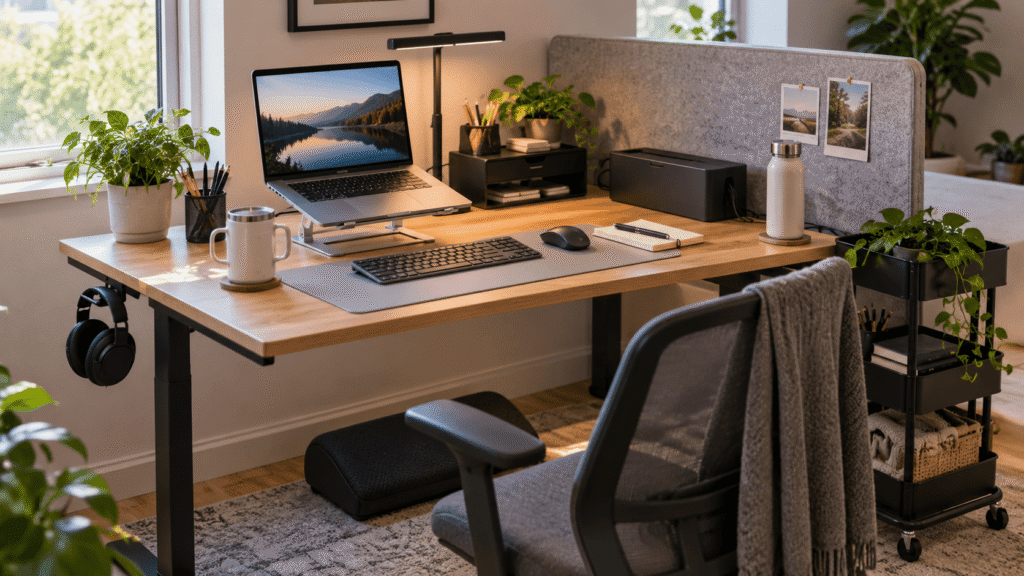
The good news is that improving a shared desk doesn’t necessarily mean buying a bigger one. A few carefully chosen accessories can help define personal space, reduce clutter, improve comfort, and make switching between users much easier.
The key is choosing upgrades that earn the space they occupy. Instead of filling the desk with more stuff, the best desk accessories for shared spaces make the existing area easier to use.
If you’re working with a smaller setup, these desk accessories under $25 offer more ideas for improving your workspace without adding unnecessary clutter. Below are 10 practical upgrades worth considering.
Quick Picks
Best Overall: LOXP Adjustable Laptop Stand — A versatile choice for improving laptop positioning while keeping a shared setup flexible.
Best Budget Option: Aothia Leather Desk Pad — An inexpensive way to create a cleaner, more defined personal workspace.
Best for Small Desks: APPHOME Foldable Headphone Hanger — Keeps bulky headphones underneath the desk instead of using valuable surface space.
Prices are approximate and may change. Ratings and review counts reflect current product data.
Space-Saving Organization
APPHOME Foldable Headphone Hanger

Headphones can take up an awkward amount of room when two people are already competing for limited desk space. Moving them off the surface gives you more room for the things you’re actually using.
The APPHOME Foldable Headphone Hanger clamps underneath the desk, creating a dedicated storage spot without adding another object on top. The foldable design also helps keep the hanger out of the way when it isn’t needed.
Approx. price: ~$16.99 | Rating: 4.8 ⭐ | Reviews: 8,914+
It’s particularly useful for gamers, remote workers, or anyone who regularly uses a headset for calls. Finish a meeting, hang your headphones underneath the desk, and your work area is immediately clear again.
For a compact shared workspace, the APPHOME Foldable Headphone Hanger is one of those upgrades most people don’t think about until they try it.
LOXP Adjustable Laptop Stand

Working from a laptop often means looking downward for hours, and sharing a desk can make it tempting to simply use whatever position happens to fit.
A more comfortable setup keeps the screen higher while still allowing the workstation to change throughout the day. The LOXP Adjustable Laptop Stand raises the laptop and includes a rotating base, making it easier to reposition the screen when needed.
Approx. price: ~$31.99 | Rating: 4.6 ⭐ | Reviews: 2,402+
Remote workers and students who frequently switch between tasks should get the most value from it. You could raise your laptop during a work session, rotate the screen to show something to the person beside you, then fold the stand down when you’re finished.
The flexibility of the LOXP Adjustable Laptop Stand makes particular sense on a desk that isn’t used by just one person. It’s a small ergonomic improvement that can quickly become part of your everyday routine.
Aothia Leather Desk Pad

Shared desks can sometimes feel like temporary workspaces rather than somewhere that’s actually yours. Your keyboard moves around, your mouse has no defined area, and everyone’s belongings start blending together.
Creating a simple personal work zone can make the space feel much more organized. The Aothia Leather Desk Pad gives your keyboard, mouse, and everyday essentials a consistent area while also protecting the surface underneath.
Approx. price: ~$9.99 | Rating: 4.6 ⭐ | Reviews: 79,043+
It’s easy to dismiss a desk pad as mostly decorative, but the practical benefit becomes clearer on dining tables and multipurpose desks. Put down your work essentials at the beginning of the day, and everything immediately has a more intentional place.
For anyone wanting an inexpensive improvement, the Aothia Leather Desk Pad is an easy way to make a shared surface feel more like a proper workstation.
D-Line Cable Management Box

Nothing makes a shared workspace feel chaotic faster than several chargers and power cables running in different directions.
Keeping those connections contained makes the area easier to clean and reduces visual clutter. The D-Line Cable Management Box provides a simple place to conceal a power strip and gather loose cords rather than letting them spread around the floor or desk.
Approx. price: ~$27.99 | Rating: 4.5 ⭐ | Reviews: 7,317+
Many people organize everything they can see on the desktop while ignoring the cable mess underneath. If two people regularly connect laptops, phones, monitors, or other devices, keeping those connections in one predictable location can make daily setup easier.
The D-Line Cable Management Box won’t make cables disappear entirely, but it can make them much easier to live with. Sometimes controlling one messy area is enough to make the whole workspace feel cleaner.
Focus and Everyday Productivity
SAMPHON Monitor Light Bar

Shared workspaces aren’t always located where the lighting is ideal. One person may need extra light while the other would rather not have a large desk lamp illuminating the entire room.
More targeted lighting can make evening work much easier. The SAMPHON Monitor Light Bar sits above the monitor and provides adjustable lighting without requiring space for a traditional lamp base.
Approx. price: ~$13.99 | Rating: 4.2 ⭐ | Reviews: 318+
This type of lighting is easy to overlook until desk space becomes limited. It’s especially useful for remote workers sharing a room with a partner or students working later in the evening.
You could illuminate your keyboard and notebook while keeping the surrounding room relatively undisturbed. For smaller setups, the SAMPHON Monitor Light Bar combines useful lighting with a very small footprint.
Simple Trending Monitor Stand with Drawer

Small office supplies tend to become permanent clutter when they don’t have a designated home. Add a monitor to a shared desk and even more of the available surface disappears.
The Simple Trending Monitor Stand with Drawer tackles both problems by raising your screen while adding storage underneath. Its drawer and additional storage areas give frequently used items somewhere to go without requiring a separate organizer.
Approx. price: ~$19.99 | Rating: 4.7 ⭐ | Reviews: 13,783+
It makes the most sense for someone with a permanent monitor on a desk that still needs to stay organized for other users. Pens, sticky notes, charging cables, and small accessories can stay close without being scattered around the keyboard.
For more inexpensive workspace ideas, these budget desk gadgets for productivity are worth exploring too. The Simple Trending Monitor Stand with Drawer is a good example of an accessory earning its footprint by doing more than one job.
SKUTCHI Escape Desk Divider

Sharing a desk isn’t only about sharing physical space. Movement, conversations, and visual distractions can make it harder to concentrate when someone is sitting directly beside you.
Creating even a modest boundary can help each person feel like they have their own work zone. The SKUTCHI Escape Desk Divider creates that visual separation while using an acoustic panel designed to absorb some nearby sound.
Approx. price: ~$29.99 | Rating: 5.0 ⭐ | Reviews: 2
It’s important to keep expectations realistic here: a divider isn’t going to soundproof a shared room. It can, however, reduce visual distractions and provide more separation between neighboring work areas.
Students, roommates, and couples working side by side may find that particularly useful during calls or focused work sessions. With only a small number of reviews so far, the SKUTCHI Escape Desk Divider has less buyer feedback than most options on this list, but the concept itself makes practical sense for shared desks.
Comfort and Flexible Storage
Lamicall Headphone Stand

If you’d rather keep your headphones within easy reach, leaving them loose beside the keyboard isn’t the most organized solution. They can quickly end up occupying space needed for notebooks, a mouse, or another person’s equipment.
The Lamicall Headphone Stand gives a headset a permanent place on the desktop. Unlike an under-desk hanger, this approach makes more sense when easy access matters more than maximizing every inch of surface space.
Approx. price: ~$15.99 | Rating: 4.8 ⭐ | Reviews: 8,211+
Someone who moves between video meetings, music, and focused work throughout the day can simply place the headset back on the stand between uses. That small habit helps prevent it from migrating around a shared workspace.
The Lamicall Headphone Stand is a straightforward option for people who want their frequently used gear visible but organized. A dedicated place for one bulky item can make a desk surprisingly easier to reset.
BlissTrends Foot Rest

A shared desk and chair rarely fit everyone equally well. If the desk height works perfectly for one person, someone else may find that their feet don’t rest comfortably on the floor.
Supporting your feet can make a fixed workstation easier to adapt without changing the entire desk. The BlissTrends Foot Rest offers two adjustable heights and can be moved whenever a different person uses the setup.
Approx. price: ~$31.99 | Rating: 4.4 ⭐ | Reviews: 9,087+
People often think about the chair and monitor first while overlooking what happens underneath the desk. For shorter users or anyone who simply prefers additional foot support, that missing piece can matter during longer work sessions.
One person can slide it into position for an afternoon of remote work and move it aside afterward. The adjustability of the BlissTrends Foot Rest is especially useful when the workstation needs to accommodate more than one person.
Sywhitta 3-Tier Rolling Utility Cart

When a shared workspace handles work, studying, hobbies, and everyday household tasks, there may simply be too much equipment to store permanently on the desk.
Instead of trying to squeeze everything onto the surface, mobile storage lets you keep supplies nearby and move them away when they’re no longer needed. The Sywhitta 3-Tier Rolling Utility Cart provides three levels of movable storage that can sit beside the desk rather than on it.
Approx. price: ~$23.37 | Rating: 4.2 ⭐ | Reviews: 14,823+
This approach is particularly useful in multipurpose rooms. A student could keep notebooks and supplies on the cart during class, then roll everything away when someone else needs the desk for work.
The Sywhitta 3-Tier Rolling Utility Cart won’t suit every compact room, so check the available floor space first. Where it does fit, though, movable storage can make one workstation much easier to share.
What to Look For Before Buying
Start with desk size. Measure the usable surface, the area underneath it, and the surrounding floor space before adding anything. Accessories that use vertical or under-desk space are often better choices when room is limited.
Think about comfort next. Screen position, seating posture, lighting, and legroom matter more during long sessions than decorative extras. If several people use the same desk, adjustable accessories can be particularly helpful.
Consider your actual storage needs instead of simply adding more organizers. Frequently used items should stay accessible, while occasional supplies can live underneath or beside the desk.
Don’t forget cable management, especially if multiple people charge devices in the same area. A clear system makes switching between users much easier.
Look for reasonable durability, particularly with accessories that will be adjusted, moved, folded, or shared regularly. Ratings and review counts can provide useful context, but they shouldn’t replace checking whether an accessory actually fits your setup.
Finally, prioritize ease of use. The best shared-desk upgrades shouldn’t require a complicated routine. If something can be moved, stored, or adjusted in seconds, it’s much more likely to remain useful.
Conclusion
A shared workspace doesn’t have to feel crowded or temporary. Small changes to storage, ergonomics, lighting, and organization can make the same desk noticeably more comfortable and easier to use.
You also don’t need every item on this list. Start with whatever creates the most frustration right now. If cables are everywhere, organize them first. If long sessions feel uncomfortable, focus on ergonomics. If clutter keeps returning, give frequently used items a permanent home.
Small improvements tend to work best when they solve a specific everyday annoyance rather than simply adding more stuff to the desk.
If you’re still deciding where to start, you can explore more desk accessories under $25 for simple upgrades that can improve comfort, focus, and organization without completely changing your workspace.