
Disclosure: As an Amazon Associate I earn from qualifying purchases.
Putting together a better desk setup can get expensive surprisingly fast. You start looking for one small improvement, and suddenly it seems like you need a new chair, monitor, keyboard, lighting, and half a dozen organizers just to have a comfortable workspace.
Fortunately, you don’t need to rebuild your entire home office.
A few affordable desk accessories can solve the everyday annoyances that make a workspace feel cluttered, uncomfortable, or difficult to use. The right upgrades can raise your screen, clear cables off the floor, create extra storage, improve lighting, and make a small desk feel much more intentional.
The key is choosing accessories that fix problems you actually have instead of filling your desk with gadgets.
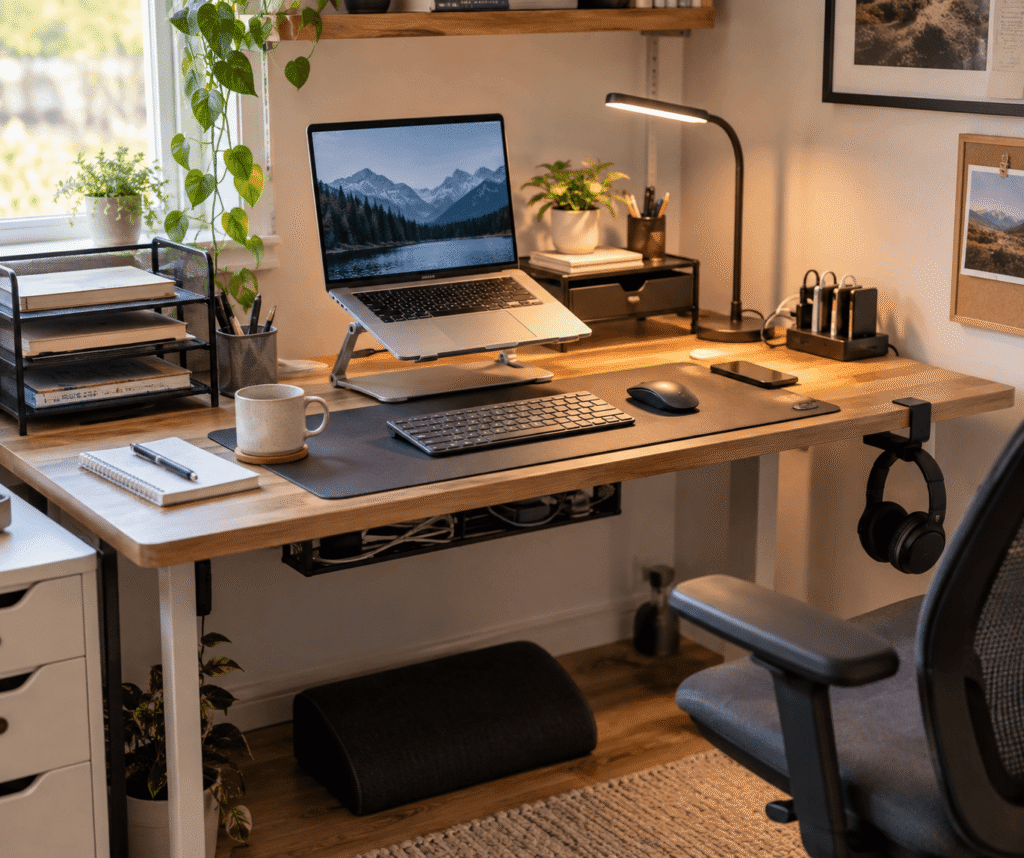
If you’re working with limited space, these compact desk accessories can offer even more ideas for making every inch count. Below are 10 practical places to start, including options for comfort, organization, and productivity.
Quick Picks
- Best Overall: Amazon Basics Ergonomic Laptop Stand — a practical starting point for improving laptop positioning and everyday comfort.
- Best Budget Option: Aothia Leather Desk Pad — an inexpensive way to create a smoother, more defined working surface.
- Best for Small Desks: Simple Trending Monitor Stand with Drawer — combines screen elevation with useful storage in the same footprint.
Prices are approximate and may change. Ratings and review counts reflect current product data.
Start With Comfort and Everyday Usability
Amazon Basics Ergonomic Laptop Stand

Approx. Price: ~$29.99 | Rating: 4.6 ⭐ | Reviews: 3,796+
Working directly from a laptop often means spending hours looking down at a screen. It might feel fine for a quick email, but longer study or work sessions can make the setup noticeably less comfortable.
Getting the display closer to a natural viewing position can make your workspace easier to use, yet many beginners focus on keyboards and other accessories before thinking about screen height.
The Amazon Basics Ergonomic Laptop Stand offers a straightforward way to raise your laptop while giving you some control over its position. The adjustable design is particularly useful for remote workers and students who regularly use a laptop as their primary screen.
Imagine moving from the kitchen table to your desk and being able to adjust the display instead of balancing your computer on a stack of books. Because the stand also folds, it’s easier to put away when you need the desk for something else.
Pair the Amazon Basics Ergonomic Laptop Stand with an external keyboard and mouse when possible for a more practical long-term arrangement. It’s one of those upgrades that feels small until you use it every day.
Aothia Leather Desk Pad

Approx. Price: ~$13.99 | Rating: 4.6 ⭐ | Reviews: 79,026+
If your keyboard slides around, your mouse runs out of room, or the desktop surface simply feels unpleasant, even basic computer tasks can become slightly irritating.
A more consistent surface can make the entire working area feel calmer and more comfortable. The Aothia Leather Desk Pad creates one large working zone for your keyboard, mouse, and other everyday essentials while helping protect the desk underneath.
It’s easy to overlook a desk pad because it can seem mostly decorative. In practice, having one consistent surface can make a mismatched, scratched, or basic desktop noticeably nicer to use.
For students and remote workers, the large surface also gives notebooks and computer accessories a more defined place. On a basic desk, the Aothia Leather Desk Pad can make the working area feel more intentional without requiring any major changes.
Sometimes the simplest improvements are the ones you notice most.
Voncerus LED Clamp Desk Lamp

Approx. Price: ~$22.99 | Rating: 4.6 ⭐ | Reviews: 9,034+
Poor lighting becomes difficult to ignore once you’re working after sunset. A dim desk can make reading notes, writing, and switching between a screen and paperwork less comfortable than necessary.
Adding focused light gives you more control over your workspace without needing to brighten the entire room.
The Voncerus LED Clamp Desk Lamp is especially useful when you don’t want a traditional lamp base consuming desktop space. Its clamp design attaches at the edge of the desk, while the flexible neck lets you direct the light toward your actual working area.
Students working from textbooks and remote workers with darker desk corners may benefit most. Picture finishing an evening assignment and simply repositioning the lamp toward your notebook rather than relying entirely on a ceiling light behind you.
With multiple brightness levels available, the Voncerus LED Clamp Desk Lamp also gives you room to adjust the lighting as conditions change. It’s a small improvement that can make evening work noticeably more comfortable.
BlissTrends Adjustable Foot Rest

Approx. Price: ~$31.99 | Rating: 4.4 ⭐ | Reviews: 9,086+
A desk and chair can look perfectly fine while still leaving you constantly shifting position. If your feet don’t rest comfortably, sitting for longer periods may start to feel awkward.
Creating stable support underneath your desk can help you settle into a more comfortable working position.
The BlissTrends Adjustable Foot Rest adds a cushioned surface beneath your feet with two available height positions. It’s easy to overlook because most attention goes toward the chair itself, but foot positioning is another part of making a workstation comfortable.
This can be particularly useful when you’ve raised your chair to get a better arm position at the desk but no longer have comfortable support underneath.
Being able to change the height gives the BlissTrends Adjustable Foot Rest some flexibility between different desks and seating positions. A practical improvement that’s easy to appreciate once it becomes part of your routine.
Make a Small Desk Feel More Organized
REFLYING Under-Desk Cable Management Tray

Approx. Price: ~$16.99 | Rating: 4.7 ⭐ | Reviews: 5,408+
Cables have a habit of making even a fairly clean workspace look unfinished. Power cords and charging cables can collect behind the desk, hang near your feet, and become annoying whenever you need to unplug something.
Moving that clutter away from the working area can make the whole setup feel more organized.
The REFLYING Under-Desk Cable Management Tray provides a dedicated place beneath the desktop for cables and related clutter. Its clamp-mounted design is also appealing if you’d rather avoid drilling holes into your desk.
For a setup with a monitor, laptop charger, lamp, and several other devices, keeping excess cable length underneath the desk can make an immediate visual difference.
Instead of seeing cords every time you sit down, the REFLYING Under-Desk Cable Management Tray helps move much of that mess out of sight while keeping it accessible.
Small upgrades like this often have a bigger impact than expected.
Simple Trending Monitor Stand with Drawer

Approx. Price: ~$19.99 | Rating: 4.7 ⭐ | Reviews: 13,781+
When a monitor takes up a large portion of a small desk, notebooks and everyday supplies quickly end up competing for whatever space remains.
Using vertical space can make the desk feel less crowded without requiring a larger piece of furniture.
The Simple Trending Monitor Stand with Drawer raises your screen while creating additional storage around the same area. The built-in drawer and small accessory holders give everyday items somewhere to go instead of leaving them scattered beside the monitor.
It’s particularly useful for compact home offices, dorm rooms, and bedroom desks. You could finish working, move smaller supplies into the drawer, and immediately regain part of your desktop for studying or another activity.
If storage is your biggest problem, these desk storage solutions for small spaces offer more ways to use limited room efficiently.
The Simple Trending Monitor Stand with Drawer is one of those upgrades that can solve two annoyances at once. You might be surprised how much difference creating another layer of usable space can make.
SUPEASY 5-Tier Paper Organizer

Approx. Price: ~$18.99 | Rating: 4.5 ⭐ | Reviews: 4,751+
Loose notebooks, folders, printouts, and papers don’t take long to become a pile. The problem gets worse on a compact desk because horizontal stacks consume the exact surface you need for working.
Separating those items into dedicated levels can make paperwork easier to reach without spreading it across your desk.
The SUPEASY 5-Tier Paper Organizer uses stacked trays to create several storage zones within a relatively small footprint. It’s particularly useful for students juggling different classes or home office users who regularly handle documents.
Instead of digging through one large stack, you could assign individual trays to active paperwork, notebooks, mail, or documents you need to file later.
With the SUPEASY 5-Tier Paper Organizer, frequently used papers can stay visible without taking over the entire working surface. It’s an easy way to make everyday organization feel a little smoother.
Clear the Clutter and Simplify Your Routine
MGRNPONY 10-Port USB-C Charging Station

Approx. Price: ~$29.99 | Rating: 4.5 ⭐ | Reviews: 2,556+
A phone cable plugged into one outlet, another charger behind the desk, and several devices competing for available connections can turn basic charging into unnecessary cable juggling.
Having one predictable charging location can make a tech-heavy workspace much easier to manage.
The MGRNPONY 10-Port USB-C Charging Station brings multiple charging connections into a single unit. With 10 ports available, it makes the most sense for people who regularly keep several devices around their workspace.
Imagine sitting down with a laptop, phone, earbuds, tablet, and another rechargeable accessory and having one central place to connect them rather than several separate charging bricks.
Before buying, check the charging requirements of your individual devices rather than assuming every port will provide the same output. For the right setup, however, the MGRNPONY 10-Port USB-C Charging Station can simplify a surprisingly annoying part of everyday desk use.
One of the simplest ways to make a device-heavy workspace easier to manage.
APPHOME Foldable Headphone Hanger

Approx. Price: ~$16.99 | Rating: 4.8 ⭐ | Reviews: 8,914+
Headphones are awkward desk accessories when they’re not being used. Leaving them beside the keyboard consumes space, while putting them in a drawer isn’t particularly convenient.
The better solution is often to use space that’s currently doing nothing.
The APPHOME Foldable Headphone Hanger clamps onto the desk and gives your headset a dedicated place underneath the working surface. It can also fold away when you’re not using it, which helps keep the accessory unobtrusive.
This is particularly useful for small setups and anyone who switches between headphones and speakers throughout the day. Finish a video call, hang your headphones underneath the desk, and they’re immediately out of the way but still within reach.
The APPHOME Foldable Headphone Hanger is easy to ignore when planning a setup, but reclaiming even a small section of desktop can make a compact workspace feel cleaner.
Marbrasse Desk Drawer Organizer

Approx. Price: ~$17.99 | Rating: 4.6 ⭐ | Reviews: 366+
A drawer doesn’t automatically create organization. Pens, adapters, sticky notes, flash drives, and charging cables can easily turn it into a box of miscellaneous items.
Dividing that space into smaller sections makes everyday essentials much easier to find.
The Marbrasse Desk Drawer Organizer uses adjustable compartments to give smaller desk supplies dedicated places. It’s ideal for anyone who already has drawer space but isn’t using it efficiently.
Instead of searching through a pile for a USB drive before class or a meeting, you can keep it in the same compartment every time. Adjustable dividers also let you change the layout around the supplies you actually own rather than working around fixed sections.
For a cleaner home office, the Marbrasse Desk Drawer Organizer can make the storage you already have much more useful.
It’s a simple finishing touch that helps the entire workspace stay organized.
What to Look For Before Buying
Before adding anything to your desk, start with its actual size. Measure the available surface and the space underneath it, particularly when considering stands, lighting, storage, or cable-management accessories. An inexpensive upgrade isn’t useful if it makes an already small workspace feel cramped.
Comfort should come next. Adjustable accessories are particularly helpful when positioning matters because everyone’s desk, chair, and body proportions are different. Look for solutions that let you adapt your setup rather than forcing yourself into one position.
Think about your storage needs as well. If papers create most of your clutter, prioritize vertical organization. If cables are the bigger problem, tackle cable management before buying additional desktop storage.
Cable management also deserves some planning before you buy. Count the devices that stay on your desk and consider where their power cables actually need to travel. A good solution should make those connections easier to manage, not harder to access.
Durability matters even with budget accessories. Look for stable construction and materials appropriate for everyday use, especially for anything supporting a laptop, monitor, or other equipment.
Finally, consider ease of use. The best desk accessory is usually one that quietly becomes part of your routine. If an organizer, stand, lamp, or charging solution makes a common task more complicated, it probably isn’t solving the right problem.
Conclusion
Building a better workspace doesn’t have to begin with expensive equipment. Small changes can noticeably improve comfort, focus, and organization when each accessory solves a specific problem.
Start with whatever bothers you most about your current setup. That might mean raising your laptop, getting cables off the floor, improving evening lighting, organizing paperwork, or simply finding somewhere convenient to put your headphones.
You also don’t need all 10 upgrades at once. Choosing one or two accessories that address your biggest frustrations is a practical way to improve your desk without creating more clutter.
If you’re still deciding where to start, exploring more compact desk accessories can help you find improvements that make sense for the amount of space you actually have.
A good desk doesn’t need to be complicated. It just needs to make everyday work a little easier.