
Disclosure: As an Amazon Associate I earn from qualifying purchases.
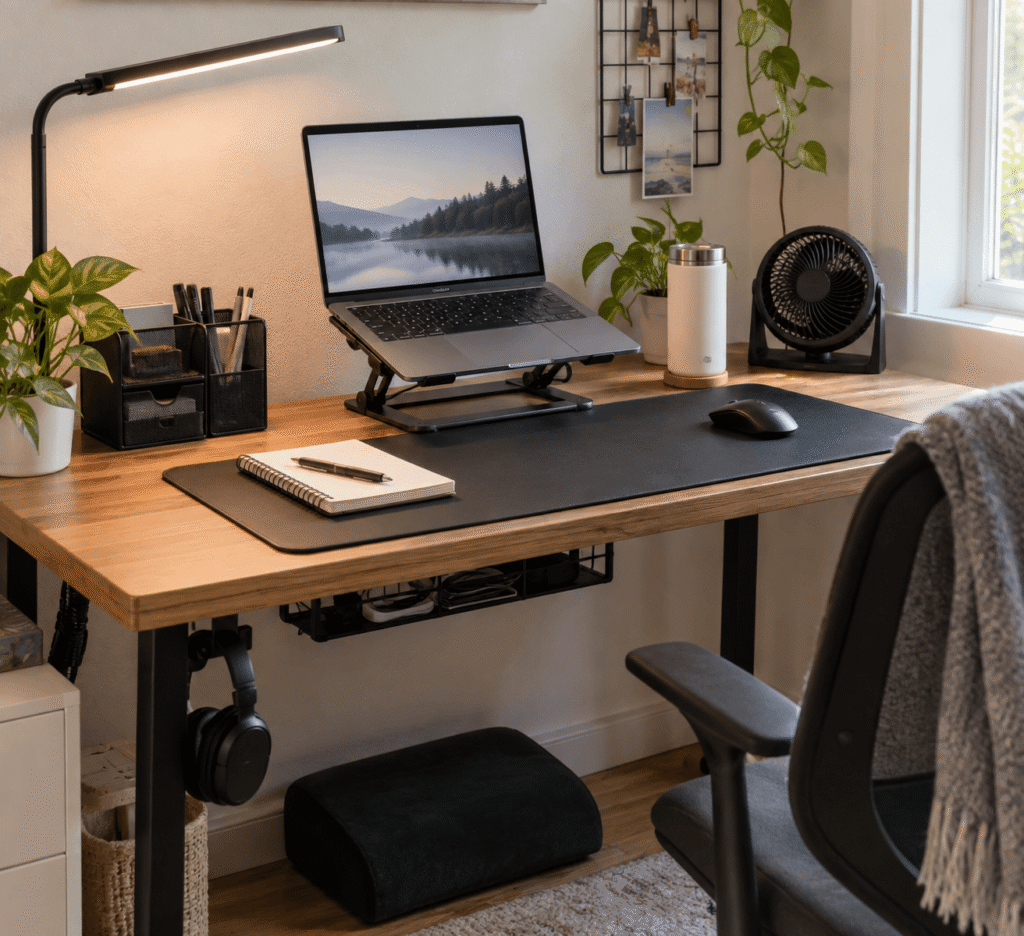
A desk doesn’t have to be expensive to be comfortable, organized, and genuinely pleasant to work at. In fact, some of the most frustrating workspace problems—tangled cables, poor screen height, clutter, uncomfortable posture—can often be improved with surprisingly simple accessories.
That’s especially useful if you’re working from a small home office, studying in a bedroom, or trying to upgrade a basic desk without replacing everything you already own.
The best budget workspace accessories aren’t necessarily the most complicated ones. They’re the upgrades that quietly make everyday tasks easier: giving your laptop a better position, clearing space around your keyboard, or keeping the things you reach for constantly within easy access.
If you’re working with limited space, these desk organizers for small desks can also help you make better use of the surface you already have. Below are 10 practical upgrades worth considering, starting with the ones that can make the biggest everyday difference.
Quick Picks
- Best Overall: Urmust Adjustable Laptop Stand for improving screen positioning while freeing up useful desk space.
- Best Budget Option: Aothia Leather Desk Pad for creating a more comfortable everyday work surface without adding clutter.
- Best for Small Desks: Airlonv LED Desk Lamp for focused lighting without sacrificing much usable desk space.
Prices are approximate and may change. Ratings and review counts reflect current product data.
Ergonomic Upgrades for a More Comfortable Desk
Urmust Adjustable Laptop Stand

Approx. Price: ~$24.99 | Rating: 4.6 ⭐ | Reviews: 16,432+
Working directly from a laptop often means spending hours looking slightly downward. It might not seem like a major problem at first, but that position can become uncomfortable during longer work or study sessions.
Raising the screen closer to eye level creates a more natural viewing position and can also make the desk feel less cramped. The Urmust Adjustable Laptop Stand offers a straightforward way to do both without changing your entire setup.
It’s one of those upgrades people often overlook because a laptop already seems perfectly usable sitting flat on a desk. The difference becomes much easier to appreciate after several hours of work.
It’s particularly useful for remote workers and students who use an external keyboard and mouse. Imagine turning a basic laptop desk into something that feels closer to a proper workstation simply by repositioning the screen.
The aluminum construction is foldable, while the open design helps avoid trapping heat underneath the laptop. Check that the stand works comfortably with your laptop size and preferred viewing height. For a simple ergonomic upgrade, the Urmust Adjustable Laptop Stand can make a surprisingly noticeable difference.
Aothia Leather Desk Pad

Approx. Price: ~$13.99 | Rating: 4.6 ⭐ | Reviews: 79,026+
If your keyboard slides around, your mouse keeps reaching the edge of its usable area, or your desktop simply feels a little uncomfortable, even routine tasks can become unnecessarily annoying.
A larger, more consistent work surface can make everything feel more settled. The Aothia Leather Desk Pad creates that surface underneath your keyboard and mouse while also helping protect the desk itself.
Many people treat desk mats as purely decorative, which makes their practical benefits easy to overlook. A good-sized mat can define your main working area and make everyday mouse and keyboard use feel smoother without adding another bulky object.
It’s especially useful for students and remote workers using a keyboard-and-mouse setup. On a basic wood desk, for example, one mat can create a noticeably more comfortable area for several hours of typing and browsing.
Its PU leather surface is also designed to be water resistant, which can be handy around coffee and other everyday desk spills. Measure your available surface before choosing, since the Aothia Leather Desk Pad takes up a substantial portion of a typical desk. Sometimes the simplest improvements are the ones you notice most.
BlissTrends Foot Rest

Approx. Price: ~$31.99 | Rating: 4.4 ⭐ | Reviews: 9,086+
When your chair is adjusted correctly for the desk but your feet don’t rest comfortably on the floor, finding a relaxed sitting position can be surprisingly difficult.
Giving your feet stable support can make sitting feel more natural, particularly during long sessions. The BlissTrends Foot Rest provides a dedicated surface underneath the desk instead of leaving you constantly repositioning your legs.
This upgrade is easy to ignore because most attention goes toward the chair itself. But your overall sitting position matters too.
The two adjustable height options can be useful for finding a position that better matches your chair and desk. It’s especially relevant for shorter users or anyone whose desk height forces them to raise their chair. If you’ve ever ended up resting your feet on a random box underneath the desk, you’ve already discovered the problem it solves.
The removable washable cover is also practical for something that spends its life near the floor. Make sure you have enough under-desk space for the BlissTrends Foot Rest without restricting your chair movement. A practical improvement that’s easy to appreciate once it becomes part of your routine.
Organization and Small-Space Upgrades
REFLYING Under-Desk Cable Tray

Approx. Price: ~$16.99 | Rating: 4.7 ⭐ | Reviews: 5,408+
A setup can be perfectly organized on top and still look chaotic because of everything hanging underneath it. Charging cables and power cords have a habit of spreading wherever there’s available space.
Getting those cables off the floor creates a cleaner setup and makes the area easier to maintain. The REFLYING Under-Desk Cable Tray gives power strips and excess cable length somewhere specific to go.
Cable management is often postponed because it doesn’t seem urgent. Then you move your chair, unplug the wrong cable, or try to vacuum underneath the desk.
This is particularly useful for setups with a monitor, laptop charger, speakers, and several peripherals. Instead of five cables dropping independently toward the outlet, most of the mess can stay contained underneath the desktop.
Its clamp-mounted design also means you can organize cables without drilling directly into the desk. For a setup where permanent modifications aren’t ideal, the REFLYING Under-Desk Cable Tray is worth considering. Small upgrades like this often have a bigger impact than expected.
Airlonv LED Desk Lamp

Approx. Price: ~$20.98 | Rating: 4.5 ⭐ | Reviews: 8,120+
Poor lighting can make an otherwise comfortable desk surprisingly tiring to use, especially when daylight disappears during an evening study or work session.
Adding focused light makes the workspace easier to use without needing to brighten the entire room. The Airlonv LED Desk Lamp is particularly useful because it clamps onto the desk edge rather than occupying precious desktop space.
Many people overlook this simple upgrade until they experience the difference between general room lighting and light positioned specifically around their workspace.
The flexible gooseneck lets you reposition the light depending on what you’re doing, while adjustable brightness and color temperature make it easier to adapt between daytime work and evening sessions.
It’s a strong option for small desks, dorm rooms, and shared spaces. If you’re writing notes beside your laptop at night, for example, you can illuminate that area without adding a traditional lamp base to an already crowded surface.
Check that the clamp fits your desktop before choosing it. For space-conscious setups, the Airlonv LED Desk Lamp is one of the simplest ways to make a workspace feel more comfortable.
Marbrasse Mesh Desk Organizer

Approx. Price: ~$13.99 | Rating: 4.7 ⭐ | Reviews: 974+
Pens, charging cables, sticky notes, and other small items rarely seem like clutter individually. Once they’re all scattered around the keyboard, however, the available workspace disappears quickly.
Keeping everyday essentials together creates more room without forcing you to hide everything in a drawer. The Marbrasse Mesh Desk Organizer gives frequently used items a predictable place while keeping them within reach.
It’s easy to underestimate because organizing a few pens hardly sounds transformative. The real benefit is reducing the small interruptions caused by constantly searching for things.
Its combination of compartments and drawers works particularly well for smaller supplies that would otherwise end up scattered across the desk. Students and anyone working at a multifunction surface can benefit most.
When the same desk is used for studying, eating, and working, gathering small items into one organizer makes switching between activities much easier. If clutter is your main problem, the Marbrasse Mesh Desk Organizer is a simple place to start.
For more compact organization options, our guide to the best desk organizers for small desks covers additional ways to reclaim working space.
APPHOME Foldable Headphone Hanger

Approx. Price: ~$16.99 | Rating: 4.8 ⭐ | Reviews: 8,914+
Large headphones can consume an awkward amount of space when they’re not being used. Leaving them beside your keyboard creates clutter, while tossing them into a drawer isn’t always convenient.
Moving them underneath the desktop keeps them accessible without sacrificing work surface. The APPHOME Foldable Headphone Hanger solves the problem with almost no additional desktop footprint.
It’s one of those upgrades most people don’t think about until they try it because headphones don’t initially seem like an organization problem.
The clamp-style design can be especially handy for gamers, remote workers, and anyone switching between headphones and speakers throughout the day. Finish a video call, hang the headphones underneath the desk, and your workspace is immediately clear again.
It also folds away when you’re not using it, helping keep the area around your chair relatively unobstructed. Position the APPHOME Foldable Headphone Hanger somewhere your knees and chair won’t bump into it. It’s a tiny organizational change that can make a compact setup feel noticeably tidier.
BEYGORM Monitor Stand Riser

Approx. Price: ~$34.99 | Rating: 4.6 ⭐ | Reviews: 835+
A monitor sitting directly on the desktop can create two problems at once: the screen may feel too low, and the area underneath it becomes wasted space.
Raising the monitor can create a more comfortable viewing position while opening useful storage below. The BEYGORM Monitor Stand Riser handles both jobs without requiring a larger desk.
People often focus on the ergonomic benefit and overlook how useful that extra layer of storage can be, particularly on shallow or narrow desks.
Its two-tier design provides room underneath the monitor for a keyboard and smaller accessories. It’s ideal for anyone using a fixed-height screen or struggling to find space for notebooks and everyday supplies.
At the end of the day, you might slide your keyboard underneath the riser and instantly regain working space for writing or studying.
Before buying, check your monitor base against the available shelf space. On a crowded workstation, the BEYGORM Monitor Stand Riser could make better use of space that’s otherwise doing very little.
Productivity and Everyday Comfort
Amazon Basics Air Circulator Desk Fan

Approx. Price: ~$15.97 | Rating: 4.3 ⭐ | Reviews: 72,620+
A workspace can become uncomfortable quickly when the room gets warm, and staying focused is harder when you’re constantly thinking about the temperature.
A little direct airflow can make your immediate working area more pleasant without requiring a large floor fan. The Amazon Basics Air Circulator Desk Fan provides a relatively compact option for keeping air moving around your workspace.
It’s easy to dismiss a desk fan as unnecessary until you’re working through a hot afternoon in a bedroom, dorm, or home office without ideal cooling.
The fan offers three speed settings and a tilting head, so you can adjust the airflow rather than having it blow in one fixed direction. That can be useful when the fan is sitting beside a monitor or on a nearby shelf.
It’s particularly practical for smaller rooms that tend to heat up during the day. If summer temperatures regularly make your desk uncomfortable, the Amazon Basics Air Circulator Desk Fan can provide a simple source of direct airflow without taking over the room.
OORAII Rotating Productivity Timer

Approx. Price: ~$16.99 | Rating: 4.6 ⭐ | Reviews: 1,265+
When your phone is sitting beside you, checking the time can easily turn into checking messages, notifications, and everything else competing for attention.
Having a separate way to structure focused work periods removes one reason to reach for your phone. The OORAII Rotating Productivity Timer gives work sessions and breaks a clear beginning and end without relying on another distracting app.
Many people overlook dedicated timers because every phone already includes one. That’s exactly why the separate device can be useful.
Preset 5, 10, 25, and 50-minute periods make it easy to structure different types of sessions, while custom timing provides flexibility when the presets don’t fit.
Students, writers, and remote workers who struggle with long, unstructured sessions may benefit most. Set a focused work period, put the phone out of reach, and concentrate on one task until the timer ends.
If productivity is your main priority, our guide to the best study accessories under $50 has more practical upgrades for focused work. The OORAII Rotating Productivity Timer is a simple way to give your workday a little more structure.
What to Look For Before Buying
Start with your desk size. Measure the available surface and under-desk clearance rather than assuming an accessory will fit. This matters especially when you’re adding stands, mats, risers, lamps, or anything that clamps onto the desktop.
Think about comfort next. An ergonomic accessory should work with your actual chair, desk height, and equipment rather than forcing you into a supposedly ideal position.
Your storage needs matter too. If clutter is your biggest problem, prioritize accessories that move items off the main working surface instead of simply adding more containers to it. Students working with particularly limited space can also explore these dorm desk accessories for more compact ideas.
For cable management, consider where your outlets and power strip are located before deciding how cables should be routed.
Also pay attention to durability and ease of use. A simple accessory that stays securely in place and takes seconds to use will usually be more helpful than something complicated you eventually stop using.
Most importantly, identify the problem you’re trying to fix first. The right budget upgrade is the one that removes a real annoyance from your daily routine.
Conclusion
Improving a workspace doesn’t have to mean replacing your desk, buying expensive furniture, or rebuilding your entire home office.
A better screen position can improve comfort. Smarter storage can make a small desk feel larger. Better cable management and simple productivity tools can reduce the little distractions that accumulate throughout the day.
Start with whichever problem bothers you most and explore the accessory that directly addresses it. You can always build from there rather than buying everything at once.
If you want a cleaner home office setup, the best desk organizers for small desks are another useful place to look for simple improvements that make better use of limited space.
A few carefully chosen upgrades can make your desk noticeably more comfortable, focused, and organized—and help it feel like a workspace designed around how you actually use it.