
Disclosure: As an Amazon Associate I earn from qualifying purchases.
A messy desk can make it harder to focus, but messy cables are usually the part that makes a setup feel completely out of control.
Charging cords fall behind the desk. Monitor cables hang everywhere. Power strips sit on the floor collecting dust. Even if your desk is technically clean, visible cable clutter can make the whole workspace feel unfinished.
The good news is that you do not need a full desk makeover to fix it. With a few simple cable management accessories, you can make your setup look cleaner, feel calmer, and work better every day.
If you are trying to create a more organized workspace overall, these clean desk setup ideas can also help you build a desk that feels easier to use.
Quick Picks
- Best overall: COYACOOL Under Desk Cable Management Tray
- Best budget option: XHF Adhesive Cable Clips
- Best for small desks: Yecaye Cable Management Box
Prices are approximate and may change. Ratings and review counts reflect current product data.
Under-Desk Cable Management Essentials
COYACOOL Under Desk Cable Management Tray

The COYACOOL Under Desk Cable Management Tray is designed to hold power strips, adapters, and extra cable length underneath your desk.
If you just want a quick upgrade, a simple option like this is one of the easiest ways to hide hanging wires without changing your entire setup.
It is especially useful for remote workers with monitors, laptop chargers, speakers, and docking stations. Instead of letting everything hang behind the desk, the tray gives your cables a dedicated place to sit.
A real-life example: if your desk looks fine from the top but messy underneath, this can clean up the visual chaos fast.
For most home office setups, this type of upgrade is a solid, no-fuss addition that makes the desk feel more organized right away.
Jgstkcity Desk Clamp Power Strip

The Jgstkcity Desk Clamp Power Strip attaches to the edge of your desk and gives you easier access to outlets and USB charging ports.
A tool like this is helpful if you hate crawling under the desk every time you need to plug in a charger, lamp, or laptop.
It works well for students, remote workers, and anyone using a smaller desk where outlet access matters. Because it clamps to the desk edge, it can also reduce the need for extra cables running across the floor.
For example, if you switch between a laptop, phone charger, and desk lamp throughout the day, having power at desk level makes the setup feel smoother.
A no-fuss option like this is easy to add without rebuilding your workspace.
HUANUO Single Monitor Arm

The HUANUO Single Monitor Arm helps lift your monitor off the desk while also making cable routing cleaner.
If you are working with a compact setup, this type of upgrade can improve both comfort and cable management at the same time.
A monitor arm frees up desk surface space, helps position your screen more comfortably, and keeps monitor cables from spreading across the desk. It is a good fit for home office users who spend long hours at a screen.
A real-life scenario: if your monitor stand takes up too much room and your cables are visible behind it, a monitor arm can make the whole setup feel lighter and cleaner.
For more compact workspace inspiration, these small desk setup ideas can help you make better use of limited space.
A setup upgrade like this is one of those changes you notice almost immediately.
Simple Cable Organizers for Everyday Use
XHF Adhesive Cable Clips

XHF Adhesive Cable Clips are small cord holders that stick to surfaces like desk edges, walls, or the underside of a desk.
A simple option like this is perfect for keeping charging cables from falling behind your desk.
They are best for phone chargers, USB cables, headphone cords, and small desk accessories. You do not need to overthink this one. If cables keep slipping out of reach, clips are an easy fix.
For example, you can place one near the edge of your desk so your phone charger is always ready when you sit down.
A budget-friendly option like this is easy to add without changing your whole setup.
Alex Tech Split Cable Sleeve
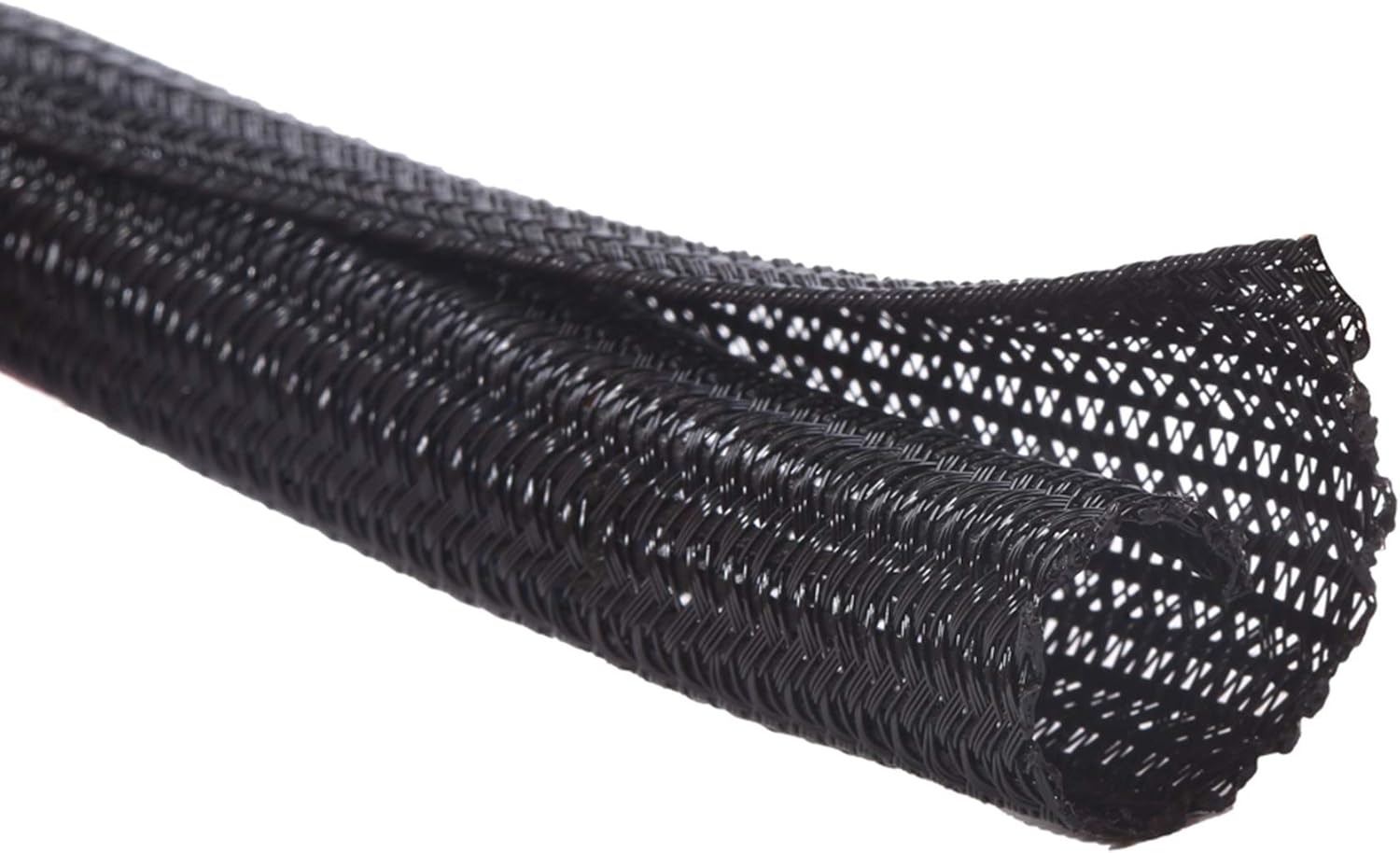
The Alex Tech Split Cable Sleeve wraps around multiple cables and turns them into one cleaner bundle.
A tool like this is useful when your setup has several wires running in the same direction, such as monitor cables, power cords, and speaker wires.
It is best for people who want their desk to look cleaner without hiding every cable completely. Instead of several loose cords, you get one more controlled cable path.
A real-life example: if you have a monitor, keyboard, mouse, and speakers connected to your desk, a sleeve can make the back of the setup look much less chaotic.
Something like this works especially well when you want cleaner cables but still need easy access later.
Nettbe Reusable Cable Ties

Nettbe Reusable Cable Ties are adjustable straps that help bundle cords together without making anything permanent.
A simple tool like this is ideal if you change your setup often or want cable management that stays flexible.
They work well for laptop chargers, monitor cables, extension cords, and storage drawers full of extra wires. Unlike single-use ties, you can open and adjust them whenever needed.
For example, if you move your desk around seasonally or change devices often, reusable ties keep your cables organized without locking you into one layout.
A budget-friendly option like this is one of the easiest ways to reduce cable clutter fast.
Trilancer Cable Cord Labels

Trilancer Cable Cord Labels help you identify which cable belongs to which device.
A tool like this is useful if you have multiple chargers, monitor cables, or power cords that all look the same.
Cable labels are especially helpful for people using docking stations, external drives, gaming consoles, or several desk devices at once. They do not make your desk look dramatic by themselves, but they make your setup easier to manage long-term.
A real-life example: instead of unplugging the wrong cable behind your desk, you can quickly see which one belongs to your monitor, lamp, or charger.
A small upgrade like this makes your desk easier to maintain after you clean it up.
Cable Hiding Accessories for a Cleaner Look
Yecaye Cable Management Box

The Yecaye Cable Management Box is designed to hide power strips, plugs, and extra cable length inside a clean-looking box.
If you want a cleaner floor area, something like this can make a messy power strip look much more intentional.
It is a good choice for small desks, shared spaces, and setups where the power strip is visible. It can also help keep cords more contained if you have pets or children around.
A real-life scenario: if you look under your desk and see a pile of plugs and cables, a cable box can make that area look calmer in a few minutes.
For anyone refreshing their workspace seasonally, this can pair well with other ideas from this guide on how to refresh your desk setup.
A no-fuss option like this is easy to add without changing your entire setup.
Delamu Cable Raceway Kit

The Delamu Cable Raceway Kit helps route cables along walls, baseboards, or furniture edges.
A setup upgrade like this works well when your desk is not close to an outlet or when cables need to travel across a visible area.
It is best for home offices, TV areas, standing desks, and workspaces where long cords are hard to hide. Instead of letting wires run loosely across the floor or wall, raceways create a cleaner path.
A real-life example: if your power outlet is several feet from your desk, a raceway can help keep the cable route neat and safer to walk around.
Something like this is a good option when you want a more finished-looking cable management setup.
15W Wireless Charging Pad

A 15W Wireless Charging Pad can reduce the number of charging cables you reach for every day.
A simple option like this is useful if your phone supports wireless charging and you want a cleaner desktop surface.
It is best for people who charge their phone while working, studying, or streaming. Instead of plugging and unplugging a cable repeatedly, you can place your phone on the pad and keep your main charging cable out of the way.
For example, if your phone charger always ends up tangled with your keyboard or mouse cable, a wireless pad can simplify that part of your setup.
A desk upgrade like this is easy to add without changing your entire workspace.
What to Look For Before Buying
Before choosing cable management accessories, keep it simple.
First, look at where the mess actually is. If the clutter is under the desk, start with a cable tray or cable box. If the problem is cables falling behind the desk, start with adhesive clips.
Second, consider how often you change your setup. If you move devices around often, reusable cable ties and cable sleeves are easier to adjust than more permanent solutions.
Third, think about your desk size. Small desks usually benefit from vertical or hidden storage, like monitor arms, under-desk trays, and compact cable boxes.
Fourth, do not buy too many accessories at once. Start with the most annoying cable problem and fix that first. You can always add more later.
Finally, choose products that make your workspace easier to maintain. The best cable management setup is not just clean once. It stays easy to keep clean.
Conclusion
Clean cable management can make a desk feel calmer, more focused, and easier to use every day.
You do not need to overthink this. A cable tray, a few clips, reusable ties, or a cable box can make a visible difference without requiring a full workspace rebuild.
Start with the area that bothers you most. Hide the power strip, keep your charging cable in place, bundle loose wires, or lift your monitor off the desk. Small upgrades can make your setup feel much more intentional.
For more practical workspace improvements, you can also explore these desk organization ideas to keep building a cleaner and more comfortable home office.