
Disclosure: As an Amazon Associate I earn from qualifying purchases.
A desk can look fine and still feel uncomfortable after an hour or two.
Maybe your shoulders start to hurt halfway through the day. Maybe your desk feels crowded, your lighting is harsh, or you keep getting distracted because there’s barely any space left to work.
This is especially common in small home offices, bedroom desks, and apartment setups where every inch matters.
The good news is that you do not need a complete office makeover to create a more comfortable desk setup. A few simple upgrades can make a small change that makes a big difference.
Prices are approximate and may change. Ratings and review counts reflect current product data.
The right products can help reduce distractions, free up desk space, improve posture, and make long work sessions feel much easier.
Simple Upgrades That Improve Focus
Use a Clamp-On Desk Lamp Instead of a Regular Lamp

A regular desk lamp often takes up valuable space and can create awkward shadows on your desk.
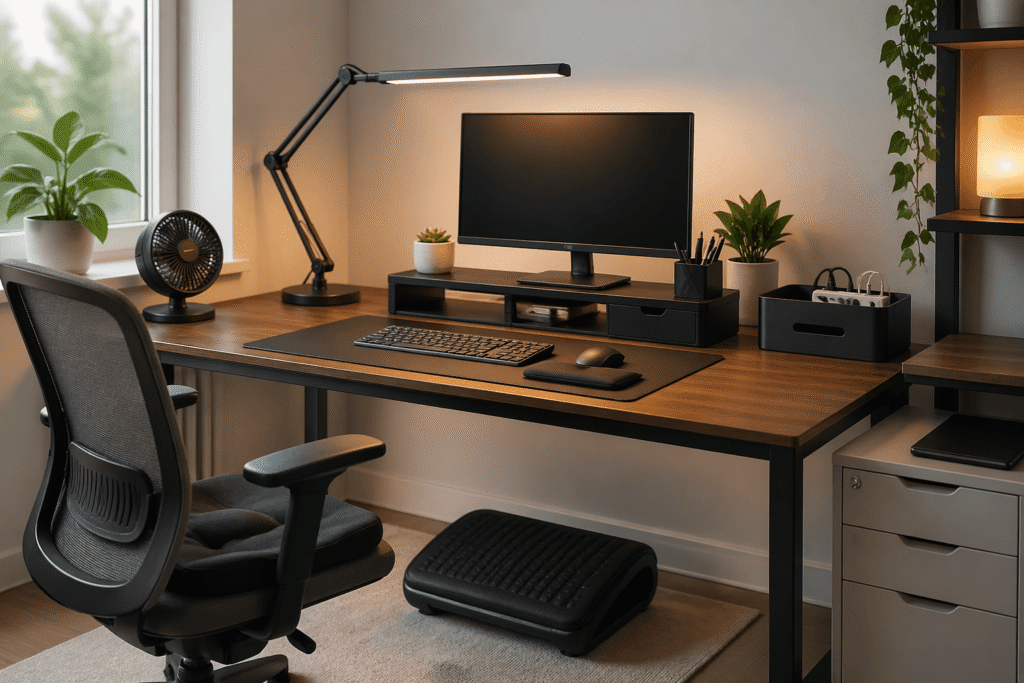
A clamp-on desk lamp attaches to the edge of your desk, which instantly frees up room. Models like the Micomlan Architect Desk Lamp are especially useful for small desk setups because they have adjustable arms and multiple brightness settings.
This is a simple upgrade if you work late, study in a darker room, or deal with eye strain during the day.
For example, if you work at a desk in your bedroom, a clamp-on lamp lets you keep your notebook, keyboard, and coffee in front of you instead of sacrificing part of the desk for lighting.
The biggest benefit is better focus. Good lighting helps reduce distractions and makes your desk feel more organized and easier to work at.
Add a Monitor Stand With Storage Underneath

If your monitor sits directly on the desk, it is probably lower than it should be.
That often leads to looking down all day, which can make your neck and shoulders feel tight after a few hours.
A monitor stand raises your screen closer to eye level and creates storage space underneath. The OPNICE 2-Tier Monitor Stand is a good example because it raises your screen while giving you a drawer and built-in pen holders for small items that normally clutter the desk.
This works especially well if you have a small setup and need extra storage without adding another organizer.
Imagine finishing work and sliding all of your loose desk clutter into one drawer instead of leaving everything scattered around your keyboard.
You get a cleaner workspace, better posture, and more room to focus.
Use a Desk Mat to Make the Whole Space Feel Better

A desk mat might seem like a small detail, but it changes how your desk feels every day.
Instead of resting your wrists on a hard desk surface, you have a softer area for your keyboard, mouse, and hands. A large desk pad like the Aothia PU Leather Desk Pad also helps visually organize your setup while giving your keyboard and mouse a softer surface to rest on.
This is useful if your desk feels cold, cluttered, or unfinished.
For example, if you have a small desk with different items spread around, a desk mat creates one defined work zone. Suddenly the space feels cleaner and more intentional.
It is a small change that makes a big difference because it helps your desk feel less chaotic without taking up extra space.
Smart Organization for Small Desks
Hide Cables With a Cable Management Box

Messy cables make even a clean desk feel cluttered.
If you have a power strip, laptop charger, phone cable, and monitor cords sitting under or behind your desk, they can quickly make the whole area feel stressful.
A cable management box keeps all of that hidden in one place. The D-Line Cable Management Box works well because it hides your power strip and extra cable length inside one simple box under the desk.
This is especially useful if your desk is in your living room, bedroom, or another visible space.
For example, if you work from a dining table or small apartment desk, hiding your cables can make the setup look much cleaner when the workday is over.
The result is less visual clutter and a workspace that feels calmer.
Add an Under-Desk Drawer for Small Items

One of the easiest ways to make your desk setup more comfortable is to remove unnecessary things from the surface.
An under-desk drawer gives you a place for pens, headphones, chargers, sticky notes, or random small items that normally stay scattered around.
If you need more storage than a small drawer can offer, the Laura Davidson Stockpile 3-Drawer File Cabinet fits neatly under or beside a desk and gives you a place for paperwork, chargers, notebooks, and office supplies without making the workspace feel crowded.
This works well if you do not have space for a filing cabinet or extra shelves.
For example, if you constantly move your notebook or headphones around just to make room to work, an under-desk drawer solves that problem immediately.
A cleaner desk helps reduce distractions and gives you more room to actually use the space.
Use a Laptop Stand If You Work on a Laptop All Day

Working directly on a laptop often causes you to hunch forward without realizing it.
A laptop stand raises the screen, which helps you sit in a more natural position. It also creates extra space underneath where you can keep a notebook, keyboard, or small accessories.
The Amazon Basics Adjustable Laptop Stand is a useful option because it folds flat, raises your screen to a better height, and does not take up much space.
This is best for students, remote workers, and anyone using a laptop at a kitchen table or small desk.
For example, if you spend most of the day leaning toward your screen, raising the laptop just a few inches can make your neck and back feel noticeably better.
It is one of the simplest ways to improve comfort without changing your entire setup.
Comfort Improvements for Long Work Sessions
Add a Footrest Under the Desk

A footrest is one of those things people usually ignore until they try one.
If your feet do not rest comfortably on the floor, you may end up sitting awkwardly, crossing your legs, or putting extra pressure on your lower back.
The ComfiLife Memory Foam Foot Rest helps support your legs and improve your sitting position, especially if your chair sits slightly too high.
This is useful if your chair is slightly too high or if you work long hours.
For example, if you spend most of the day at your desk and notice that your legs or lower back feel tired by the afternoon, a footrest can make sitting feel much more natural.
It is a small upgrade that makes long work sessions more comfortable.
Use an Ergonomic Mouse Pad With Wrist Support

If your wrist feels sore after using a mouse all day, your desk setup may need more support.
An ergonomic mouse pad with a built-in wrist rest helps keep your wrist in a more natural position. The Hokafenle Ergonomic Mouse Pad with Wrist Support is a good option because the memory foam wrist rest adds support without taking up much extra space on the desk.
This is especially useful if you spend hours editing, working in spreadsheets, or doing detailed computer work.
For example, if you work from home and spend most of your day clicking and scrolling, adding wrist support can help reduce discomfort by the end of the day.
The benefit is simple: less strain and a more comfortable workspace.
Add a Seat Cushion If Your Chair Is Not Comfortable

Not everyone wants to replace their desk chair.
If your chair feels too hard or uncomfortable after a few hours, a memory foam seat cushion can make a noticeable difference.
The Everlasting Comfort Memory Foam Seat Cushion is popular because it adds extra support without making your chair feel bulky or awkward to sit in.
This is useful if you work from a dining chair, budget office chair, or older chair that still works but is not very comfortable.
For example, if you start shifting around after an hour because your chair feels uncomfortable, a seat cushion is an easy fix.
It helps you stay focused longer because you are not constantly adjusting your position.
What to Look For Before Buying
Before buying anything for your desk, think about the actual problem you want to solve.
If your desk feels crowded, prioritize products that save space, like a clamp-on lamp, under-desk drawer, or monitor stand.
If you feel uncomfortable after long work sessions, focus on posture and support. A laptop stand, footrest, wrist rest, or seat cushion will usually help more than another organizer.
For small desk setups, look for products that do more than one thing. A monitor stand with storage or a desk mat that also organizes your workspace gives you more value without taking up extra room.
It also helps to measure your desk before buying. A product that looks small online can still take up too much space in a compact setup.
Finally, try to improve one problem at a time.
You do not need to buy everything at once. One simple upgrade often makes the rest of your desk setup easier to improve.
Conclusion
A more comfortable desk setup is not about buying more things.
It is about removing the small frustrations that make work harder than it needs to be.
Better lighting, less clutter, more support, and a cleaner workspace can make a small desk feel much easier to use.
Even one or two simple upgrades can help you feel more focused, more comfortable, and more productive during the day.
When your desk works better, it becomes easier to work better too.