
Disclosure: As an Amazon Associate I earn from qualifying purchases.
A lot of desk discomfort starts with little habits you barely notice.
Leaning toward a laptop screen. Letting your feet dangle under the desk. Reaching awkwardly for a mouse all day. A cluttered workspace that forces bad posture.
Over time, those small things can turn into neck tension, lower back pain, and fatigue that makes focused work harder than it should be.
The encouraging part is that fixing it often doesn’t mean replacing your whole setup.
Prices are approximate and may change. Ratings and review counts reflect current product data.
A few smart ergonomic upgrades can make your workspace feel cleaner, more supportive, and far more comfortable to use every day. Whether you work in a small apartment corner or a dedicated home office, these ideas can help reduce strain while improving productivity.
Simple Upgrades That Improve Posture and Focus
Lamicall Adjustable Laptop Stand

If you work from a laptop, screen height is often the first problem.
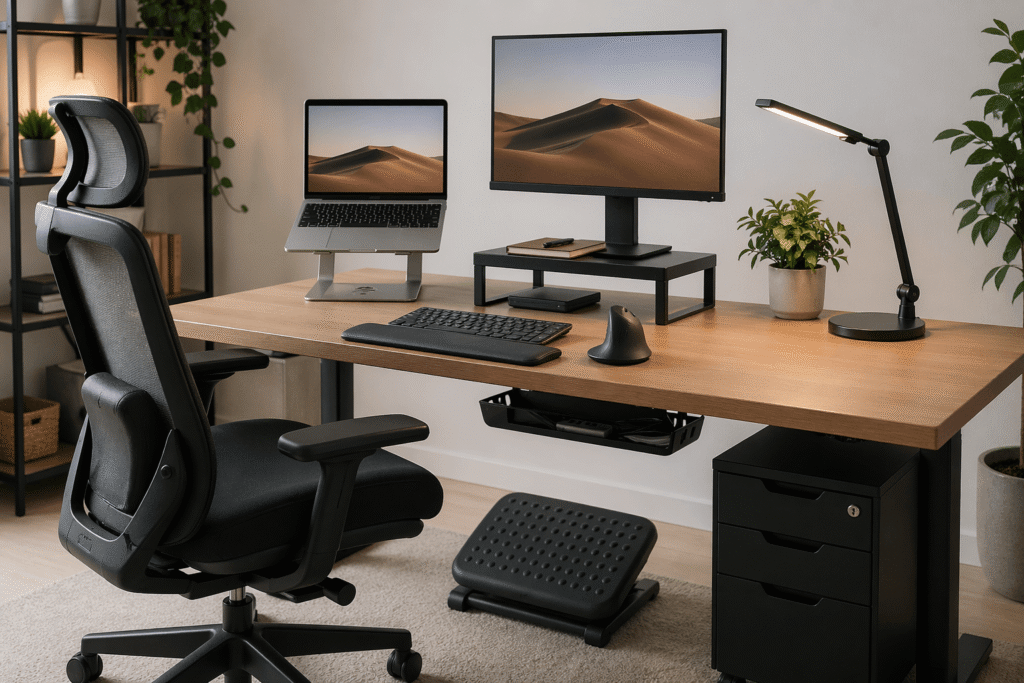
The Lamicall Adjustable Laptop Stand raises your display closer to eye level so you’re not constantly looking down. That alone can help reduce neck strain and rounded shoulders.
It’s especially useful for students, remote workers, or anyone working from a compact desk.
Picture writing for three hours at a kitchen table. Without realizing it, your shoulders creep forward. Raising the screen changes that immediately.
It folds away when not in use too, which makes it practical for smaller setups where every inch matters.
This is one of those simple upgrades that often improves both posture and focus at once.
EVOOMI Back Saver Monitor Stand

For desktop users, monitor height matters just as much.
The EVOOMI Back Saver Monitor Stand lifts monitors into a more comfortable viewing position while freeing up storage underneath for notebooks or accessories.
That extra space helps reduce clutter, which can quietly reduce distractions.
If your monitor sits too low and you tend to lean in while working, this small change can make a big difference over long sessions.
VIVO Height Adjustable Desk Converter

Sometimes the problem isn’t just posture. It’s staying in one position too long.
The VIVO Stand Up Desk Converter gives you a way to alternate between sitting and standing without replacing your whole desk.
That movement can help relieve lower back pressure and reduce stiffness that builds during long workdays.
Useful if you work long hours or feel sluggish by afternoon.
Even standing for meetings or email blocks can break up the strain of static posture.
Comfort Improvements for Long Work Sessions
ComfiLife Premium Gel and Memory Foam Seat Cushion

An uncomfortable chair can throw off your posture all day.
The ComfiLife Seat Cushion adds support where many budget office chairs fall short, especially if your lower back starts aching after long stretches at the desk.
It’s especially useful if you work from a dining chair or a basic office chair without much support.
For someone sitting through long editing or study sessions, this can be a small change that makes a big difference in comfort.
HUANUO Adjustable Footrest

Foot support is often overlooked, but it affects your whole posture chain.
The HUANUO Adjustable Footrest helps support your legs and encourages better alignment through the hips and lower back.
Its tilt and massage surface also encourage subtle movement, which helps reduce stiffness.
If your desk feels slightly too high or your feet never sit comfortably, this solves a real problem fast.
Especially useful for smaller setups where chair adjustments may be limited.
Arteck Split Ergonomic Keyboard

Typing posture can quietly create tension through wrists, shoulders, and even the neck.
The Arteck Split Ergonomic Keyboard encourages a more natural hand position while adding cushioned wrist support.
For writers, coders, or anyone typing all day, it can reduce strain you may not realize is affecting focus.
It’s less about instant dramatic change and more about making long work sessions feel easier.
TECKNET Vertical Ergonomic Mouse

A traditional mouse can pull your wrist and shoulder into awkward positions.
The TECKNET Vertical Mouse promotes a more neutral hand posture that may help reduce tension traveling up into the shoulder and neck.
If your right shoulder often feels tight after editing or spreadsheet work, this is a practical fix.
It’s one of those useful upgrades people often wish they tried sooner.
Smart Organization Upgrades for Small Desks
Scandinavian Hub Under Desk Cable Management Tray

Messy cables may not seem related to back pain, but clutter often forces awkward positioning.
The Scandinavian Hub Cable Management Tray clears cords off the floor and opens legroom under the desk.
That extra space can improve posture while making the workspace feel calmer.
For small desks especially, reducing visual clutter often helps reduce distractions too.
Clean workspace, cleaner focus.
Micomlan LED Desk Lamp with Clamp

Lighting affects posture more than people expect.
Poor light often makes people lean toward the screen or hunch over notes.
The Micomlan LED Desk Lamp solves that while saving desk space thanks to the clamp design.
Its adjustable lighting is useful if you work long hours or switch between screen work and reading.
Sometimes comfort starts with reducing eye strain, not just changing furniture.
Laura Davidson 3-Drawer Mobile File Cabinet

Not every ergonomic improvement sits on the desktop.
The Laura Davidson Mobile File Cabinet helps move paperwork and supplies off your work surface so your desk stays open and functional.
That matters more in small setups than people realize.
If your desk constantly fills with papers, chargers, and notebooks, having storage nearby can make your workspace feel dramatically less cramped.
And less clutter often supports better working posture naturally.
What to Look For Before Buying
Prioritize adjustability.
Height, angle, and support options matter more than extra features.
Think in systems, not isolated products.
A laptop stand paired with an ergonomic keyboard often helps more than either one alone.
Choose upgrades based on your main pain point.
Neck discomfort often starts with screen position.
Lower back pain may point to seating support or foot positioning.
For small setups, look for products that save space while improving comfort.
Multifunctional pieces tend to work best.
And avoid buying too many things at once.
One or two thoughtful changes often improve a workspace more than a desk full of gadgets.
Final Thoughts
A more comfortable desk setup usually comes from small adjustments, not dramatic overhauls.
Better posture, less clutter, improved support, and a few smart ergonomic tools can make everyday work feel much easier on your body.
The goal isn’t chasing a perfect setup.
It’s creating a workspace that helps you stay focused, comfortable, and productive for hours at a time.
And often, those improvements start with one simple upgrade.