
Disclosure: As an Amazon Associate I earn from qualifying purchases.
A messy desk doesn’t just look bad—it quietly drains your focus.
Loose cables get tangled, fall behind your desk, or sit right in your line of sight. You adjust them constantly, they collect dust, and somehow they always end up in the way when you’re trying to work.
If your setup feels more chaotic than it should, cables are usually the reason.
Prices are approximate and may change. Ratings and review counts reflect current product data.
The good news is you don’t need a full reset. A few small upgrades can turn your workspace into something cleaner, calmer, and easier to use—especially if you’re working with a small desk.
Simple Upgrades That Instantly Reduce Cable Clutter
D-Line Cable Management Box

The D-Line Cable Management Box is designed to hide your power strip and all the extra cable length inside a clean, enclosed container.
If your setup currently has a power strip on the floor with cables going in every direction, this is one of the easiest fixes.
Real-life use: You plug in your laptop, monitor, and phone charger. Instead of seeing a messy cluster on the floor, everything disappears into one neat box.
Who it’s for: Anyone with multiple devices plugged into a single strip.
Benefit: A simple upgrade that instantly reduces visual clutter and makes your workspace feel more organized.
XHF Adhesive Cable Clips (120-Pack)

The XHF Adhesive Cable Clips help you keep frequently used cables exactly where you need them.
They stick to your desk edge, wall, or under-desk surface and prevent cables from falling or shifting around.
Real-life use: Your phone charger stays right at the edge of your desk instead of slipping behind it every time you unplug it.
Who it’s for: People who constantly deal with loose or falling cables.
Benefit: Small change that removes daily friction and helps reduce distractions.
Cinati Under Desk Cable Management Tray (No Drill)

The Cinati Under Desk Cable Tray clamps onto your desk and holds cables and power strips underneath—no drilling required.
This is especially useful if your cables are currently hanging or touching the floor.
Real-life use: You sit down and notice your feet aren’t hitting cables anymore, and cleaning under your desk becomes easier.
Who it’s for: Small setups where floor space matters.
Benefit: Keeps cables out of sight and frees up legroom, which improves comfort during long work sessions.
Smart Organization for Small Desk Setups
Petutu 2-Inch Metal Desk Grommets (2-Pack)

These Petutu Metal Desk Grommets create a clean path for cables to pass through your desk.
Instead of cables hanging randomly off the back, they’re guided through a single, controlled opening.
Real-life use: Your monitor and charger cables go through one spot instead of draping across the desk edge.
Who it’s for: Anyone trying to create a cleaner, more minimal desk layout.
Benefit: Makes your setup look structured and intentional, especially in small spaces.
Trilancer Cable Cord Labels (35-Pack)

The Trilancer Cable Labels help you quickly identify every cable in your setup.
It sounds simple, but when you have multiple devices, this becomes extremely useful.
Real-life use: You unplug your laptop charger without accidentally disconnecting your monitor or dock.
Who it’s for: Multi-device setups or shared workspaces.
Benefit: Saves time and avoids unnecessary frustration when managing cables.
Jgstkcity Desk Clamp Power Strip

The Jgstkcity Desk Clamp Power Strip attaches directly to the edge of your desk, keeping outlets within reach.
Instead of cables running down to the floor, everything stays at desk level.
Real-life use: You plug in your charger without bending down or reaching behind your desk.
Who it’s for: People who want a more accessible and ergonomic setup.
Benefit: Reduces cable sprawl and keeps your workspace more efficient.
Comfort Improvements That Also Improve Cable Flow
VIVO Dual Monitor Desk Mount (STAND-V002)
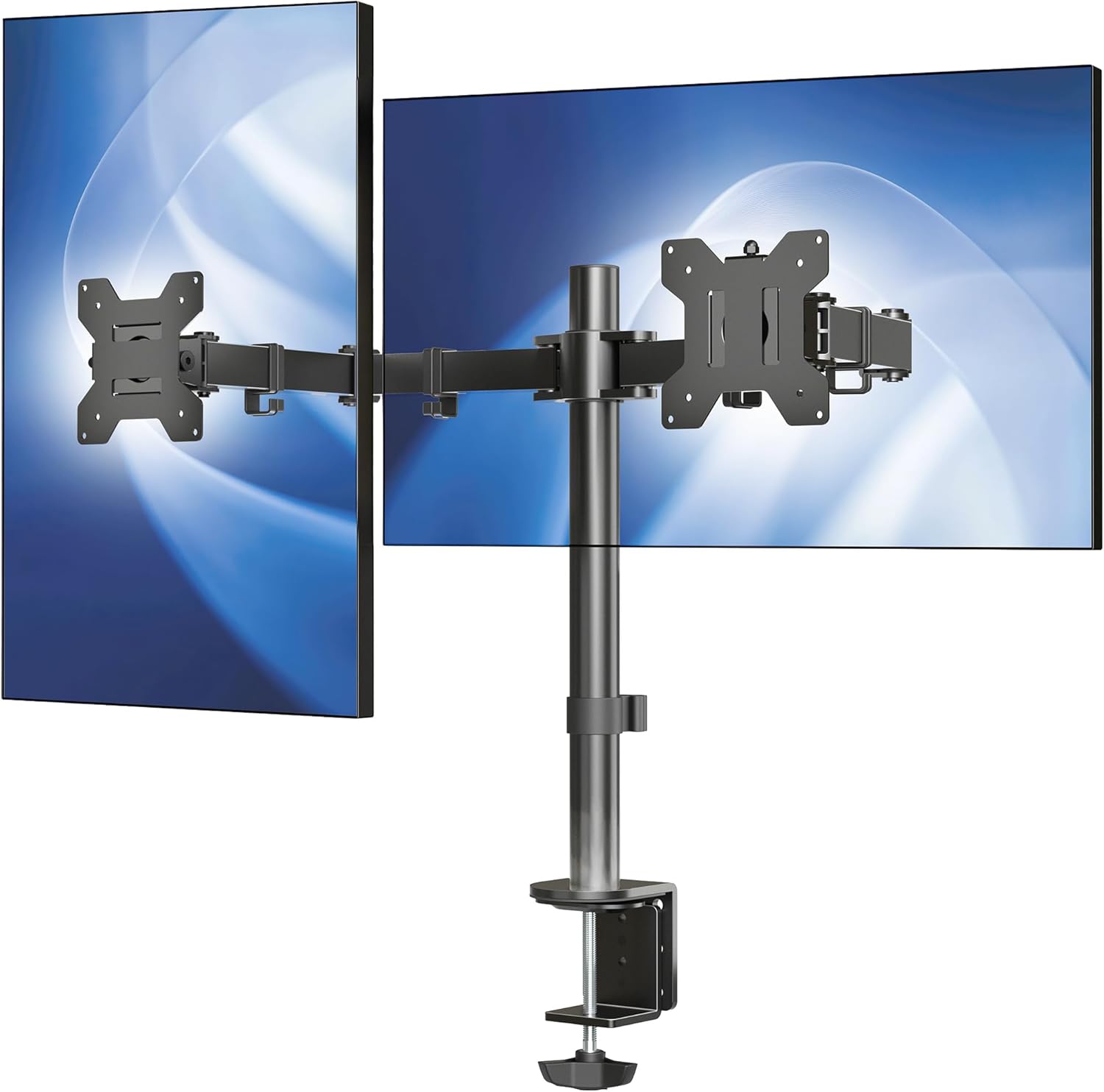
The VIVO Dual Monitor Desk Mount lifts your screens off the desk and includes built-in cable management along the arms.
It’s both an ergonomic upgrade and a cable management solution.
Real-life use: Your monitors are at eye level, and the cables run neatly along the mount instead of hanging behind your desk.
Who it’s for: Anyone using two monitors or looking to improve posture.
Benefit: Improves comfort and removes a large portion of visible cables at the same time.
Amazon Basics 15W Wireless Charging Pad

The Amazon Basics 15W Wireless Charging Pad removes the need for a phone charging cable on your desk.
Instead of plugging and unplugging constantly, you just place your phone down.
Real-life use: While working, you drop your phone on the pad and keep your desk surface free of extra wires.
Who it’s for: Anyone who charges their phone multiple times a day.
Benefit: One less cable on your desk, which helps maintain a cleaner workspace.
Selore 14-in-1 USB-C Docking Station

The Selore USB-C Docking Station consolidates multiple connections into one central hub.
Instead of plugging several cables directly into your laptop, everything connects through a single docking point.
Real-life use: You sit down, plug in one cable, and your monitors, keyboard, and accessories all connect instantly.
Who it’s for: Laptop users with multi-device setups.
Benefit: Reduces cable chaos and simplifies your daily workflow.
What to Look For Before Buying
Not every solution works for every setup. A few practical checks can help you choose better:
Desk size
If you’re working with limited space, prioritize under-desk or edge-mounted solutions.
Number of devices
More devices mean more cables. Look for products that group or hide multiple cords at once.
Installation type
Clamp or adhesive options are ideal if you don’t want to modify your desk permanently.
Daily workflow
Focus on the cables you use most often. Fix those first for the biggest impact.
Visibility
Start with cables that are in your direct line of sight—those affect focus the most.
Final Thoughts
A cleaner desk isn’t about perfection—it’s about removing friction.
When your cables are under control, your workspace feels calmer, more functional, and easier to focus in. You spend less time adjusting things and more time actually working.
Start with one simple upgrade. That small change can make a bigger difference than you expect.