
Disclosure: As an Amazon Associate I earn from qualifying purchases.
Working from home as a creative sounds ideal—until your desk starts slowing you down.
Whether you’re editing videos, designing graphics, writing, or working with audio, your environment directly affects your output. Poor ergonomics, clutter, or the wrong tools don’t just feel uncomfortable—they reduce focus and creative flow.
The goal isn’t to build a perfect aesthetic desk. It’s to create a setup that supports long sessions, reduces friction, and helps you stay in the zone.
Prices are approximate and may change. Ratings and review counts reflect current product data.
Below are practical, budget-friendly upgrades using real, widely available tools that can genuinely improve your workflow.
Core Setup Upgrades for Focus and Comfort
These are the foundational pieces that affect how you feel during long work sessions.
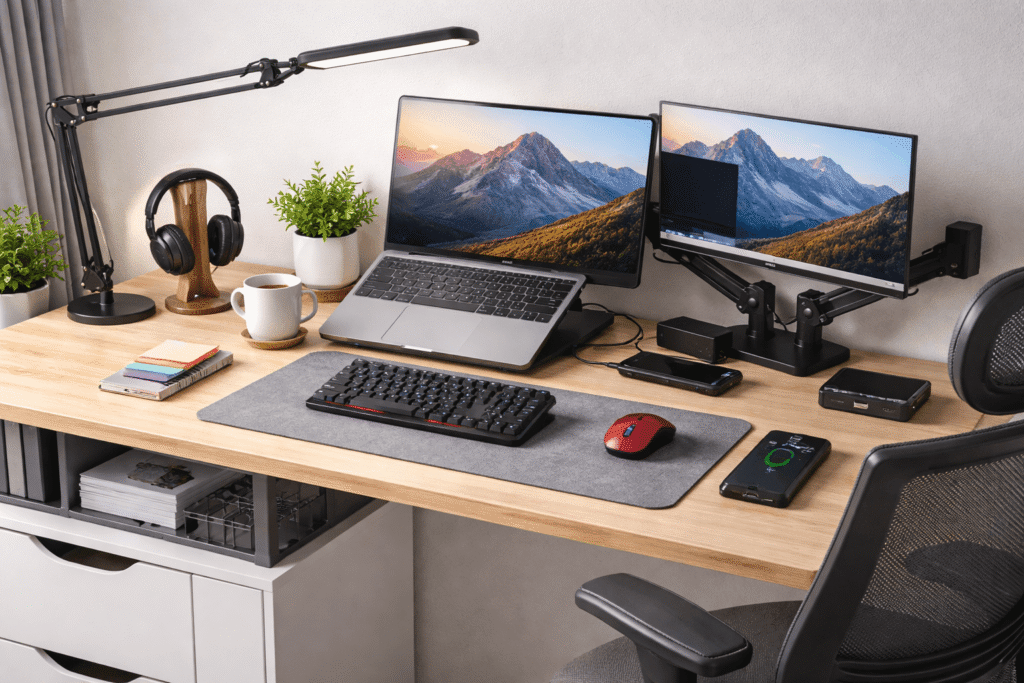
LOXP Adjustable Laptop Stand with 360° Rotating Base

This adjustable laptop stand is a simple but powerful upgrade for any laptop-based setup.
It raises your screen to eye level and includes a 360° rotating base, which makes it easier to reposition your laptop during calls or collaborative work. It’s also foldable and portable, so you can move it around easily if your workspace changes.
Best for: laptop users, freelancers, and anyone working long hours at a desk.
It improves posture immediately and frees up space underneath, making your setup feel cleaner and more functional.
cocopar 15.6″ Portable Monitor (1080p IPS)

This portable monitor adds a second screen without requiring a full desktop setup.
It’s a 15.6-inch Full HD display with solid color coverage (around 85% sRGB), making it suitable for most creative tasks like editing, writing, or light design work. It connects via USB-C or HDMI and includes a built-in stand.
Best for: remote creatives, digital nomads, or anyone working from a laptop.
It reduces constant window switching and gives you more room to think and create.
SIHOO M18 Ergonomic Office Chair

This is a practical, budget-friendly ergonomic chair with real adjustability.
It features lumbar support, a mesh back for airflow, adjustable headrest, and armrests. For long work sessions, these features matter more than aesthetics.
Best for: anyone spending 4–8 hours daily at their desk.
It helps reduce fatigue and back strain, making it easier to stay consistent with your work routine.
Tools That Improve Workflow and Precision
Once your base is solid, these tools help you move faster and work more accurately.
HyperX Alloy Origins 60 Mechanical Keyboard

This ultra-compact 60% mechanical keyboard is ideal for clean, minimal setups.
It uses durable PBT keycaps and responsive linear switches, giving you a consistent typing feel. Its smaller size also frees up desk space for mouse movement or drawing tools.
Best for: writers, developers, and creatives who prefer a compact setup.
It keeps your desk uncluttered while improving typing comfort and speed.
memzuoix Wireless Mouse (1400 DPI)

This is a simple, affordable wireless mouse that gets the job done without overcomplicating things.
It offers reliable tracking, a lightweight design, and multiple buttons for basic productivity. It’s especially useful if you want something portable and low-maintenance.
Best for: general creative work, everyday use, and backup setups.
It’s a solid upgrade from trackpads and helps reduce hand fatigue during longer sessions.
HUANUO FlowLift Dual Monitor Arm

This dual monitor arm is one of the most impactful desk upgrades you can make.
It supports two screens and allows full motion adjustments—height, tilt, rotation, and distance. It mounts to your desk using a clamp or grommet system.
Best for: multi-monitor users or anyone optimizing a small workspace.
It clears desk space instantly and lets you position screens exactly where you need them for comfort and productivity.
Sokiwi M.2 NVMe SSD Enclosure (USB 3.2)

This tool-free SSD enclosure turns your internal drive into fast external storage.
It supports NVMe and SATA drives and offers high transfer speeds via USB 3.2. This makes it ideal for moving large creative files or maintaining backups.
Best for: video editors, photographers, and anyone working with large files.
It keeps your main system fast while giving you flexible, portable storage.
Environment and Setup Optimization
These upgrades improve how your workspace feels—not just how it functions.
Micomlan LED Desk Lamp with Clamp

This adjustable desk lamp is designed for focused, eye-friendly lighting.
It features multiple brightness levels and color temperature modes, along with a dual light design and swing arm for precise positioning. The clamp mount saves desk space.
Best for: late-night work sessions or dim environments.
It reduces eye strain and helps maintain consistent focus throughout the day.
Swihauk Heavy-Duty Metal Stapler

This might seem like a small addition, but it adds real utility to a creative desk.
A reliable stapler keeps documents, notes, and printed materials organized without frustration. This one handles larger stacks and includes a staple remover.
Best for: hybrid workers, writers, or anyone dealing with physical documents.
It supports a more organized workflow, especially if you mix digital and paper-based work.
Cinati Under Desk Cable Management Tray

This no-drill cable tray mounts under your desk and keeps wires out of sight.
It uses a clamp system, so you don’t need to damage your desk during installation. It’s especially useful if you have multiple devices connected.
Best for: anyone dealing with cable clutter.
It creates a cleaner visual environment, which can surprisingly improve focus and reduce distraction.
What to Look For Before Buying
Start with ergonomics first.
If your chair, screen height, or posture is off, it will affect everything else. Fix comfort before adding new tools.
Then look at your workflow.
Identify what slows you down daily—limited screen space, poor lighting, slow file transfers—and prioritize those upgrades.
Avoid overbuying.
You don’t need everything at once. Start with one or two high-impact changes, then build your setup gradually.
Finally, think about your space.
A smaller, well-organized desk is always better than a crowded one full of unnecessary gear.
Conclusion
A strong work-from-home setup for creative professionals isn’t about aesthetics—it’s about removing friction.
Better posture, cleaner layouts, and the right tools can significantly improve how you work and how long you can stay focused.
You don’t need a full overhaul to see results. Even a few practical upgrades—like a laptop stand, better lighting, or improved storage—can change your daily workflow.
Build your setup around your actual habits, not trends.
That’s what leads to consistent, sustainable creative work.