
Disclosure: As an Amazon Associate I earn from qualifying purchases.
Long hours at a desk can slowly create problems you barely notice at first.
A stiff neck from looking down at a laptop. Wrist fatigue halfway through the day. Cables gathering under your desk. A chair that feels fine for an hour, then uncomfortable by lunch.
Those little friction points add up.
The good news is you don’t need to rebuild your workspace to fix them. A few well-chosen ergonomic desk accessories can make a messy, tiring setup feel cleaner, more comfortable, and much easier to work in.
Prices are approximate and may change. Ratings and review counts reflect current product data.
If your goal is better focus, less strain, and smarter use of a small desk, these are practical upgrades worth considering.
Simple Upgrades That Improve Focus and Posture
EVOOMI Back Saver Monitor Stand

A monitor riser is one of the easiest ergonomic upgrades to feel right away, and the EVOOMI Back Saver does more than just raise your screen.
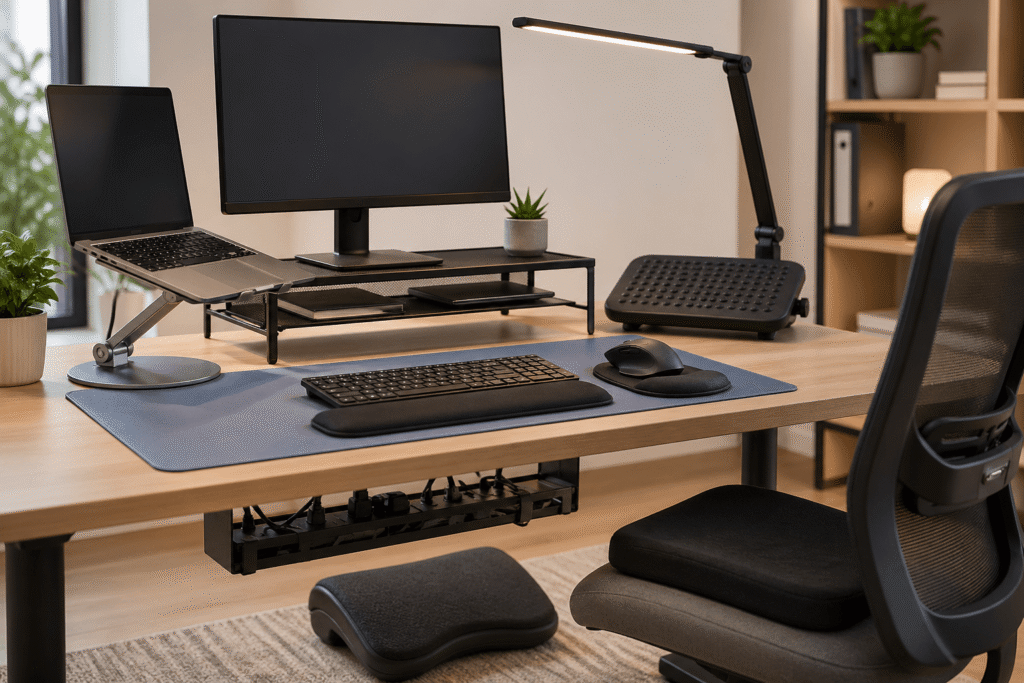
Its steel mesh platform lifts your monitor to a more natural viewing height, which can help reduce neck strain during long work sessions. The open space underneath is also useful for storing a keyboard, notebook, or small accessories, which matters on compact desks.
If you spend most of your day in front of spreadsheets or writing documents, that extra elevation can be a small change that makes a big difference.
The included cable ties are a nice bonus too, especially if you’re trying to keep a clean workspace.
Best for: Remote workers, dual-monitor setups, and small desks that need both ergonomics and storage.
tounee Telescopic Laptop Stand

If you work directly from a laptop, this is one of those upgrades that can instantly improve posture.
The tounee stand raises your screen to eye level while giving you flexibility to adjust height and angle throughout the day. The swivel base is especially practical if you shift positions or collaborate occasionally.
For people working long hours at a laptop, it helps reduce the “leaning forward” posture that often causes shoulder and upper back tension.
Real-life use case: If you move between focused work, video calls, and occasional standing sessions, this kind of setup can make the desk feel far more flexible.
Benefit: Better posture and a more adaptable workstation.
VIVO Adjustable Keyboard Tray

Desk depth matters more than people realize.
This under-desk keyboard tray can improve wrist and arm positioning while freeing up surface space. If your desk feels cramped or your shoulders stay tense while typing, this solves a real ergonomic problem.
It’s especially useful for smaller setups where every inch matters.
For writing-heavy work or long editing sessions, having a lower typing position often feels noticeably more comfortable.
Benefit: Better typing posture and less desk clutter.
Smart Organization Upgrades for Small Desks
VIVO Under Desk Cable Management Tray

Cables are easy to ignore until they start becoming visual noise.
This under-desk tray hides power strips and cords while freeing up floor and desk space. It’s a simple upgrade that helps reduce distractions and makes a setup feel much cleaner.
If your feet constantly bump chargers or power bricks under the desk, this solves an everyday annoyance.
For small setups, that hidden organization can make the whole workspace feel calmer.
Benefit: Less clutter, cleaner visuals, fewer distractions.
Aothia Leather Desk Pad

A desk mat can quietly improve both organization and comfort.
The Aothia desk pad creates a dedicated work surface while protecting the desk, smoothing mouse movement, and visually tying everything together.
If your workspace often feels scattered, this helps create structure.
It’s also useful if you switch between laptop work, handwritten notes, and a mouse throughout the day.
Real-life use case: If your desk always looks busy even when you’ve cleaned it, a desk mat often makes it feel more intentional.
Benefit: Cleaner workflow and better focus.
Pzloz LED Desk Lamp

Lighting can affect energy and concentration more than most people expect.
The Pzloz desk lamp is especially useful for long hours because it lights the desk without taking up much surface area, and the adjustable color settings help you tune brightness for different tasks.
That’s useful if you do focused work during the day but still use your desk at night.
For small desk setups, the clamp design also saves room.
Benefit: Less eye fatigue and a more comfortable work environment.
Comfort Improvements for Long Work Sessions
ComfiLife Foot Rest

A footrest can seem optional until you use one.
This memory foam footrest helps support a more natural sitting position and can reduce lower-body tension during long desk sessions.
If your feet don’t sit flat or you shift constantly while working, this can help stabilize posture.
Useful if you work long hours and want one of those simple upgrades that improves comfort without changing your whole setup.
Benefit: Better lower-body support and less fidgeting.
Hokafenle Ergonomic Mouse Pad Wrist Support

For anyone using a mouse all day, wrist strain can creep up slowly.
This wrist support pad combines memory foam cushioning with a contoured shape that helps reduce pressure during long sessions.
The massage texture is a nice touch, but the bigger win is simply giving your wrist better support.
Real-life use case: If your wrist feels fatigued after editing, design work, or admin-heavy days, this is a small change that often helps right away.
Benefit: Less wrist fatigue and smoother daily comfort.
ComfiLife Seat Cushion

If your chair starts feeling uncomfortable after a few hours, a seat cushion can make a surprising difference.
This gel and memory foam cushion is especially useful if you use a budget office chair, dining chair, or spend long blocks sitting.
It adds support without replacing your chair, which makes it one of the more practical ergonomic upgrades.
Useful if discomfort is quietly pulling attention away from work.
Benefit: More comfort, fewer distractions.
What to Look For Before Buying
Solve Daily Friction First
Start with what bothers you most.
Neck strain? Consider monitor or laptop elevation.
Clutter? Look at cable management.
Long sitting discomfort? Focus on support upgrades.
The best accessories solve actual problems, not hypothetical ones.
Choose Multi-Use Products
In small setups, products that do two jobs often make more sense.
A monitor riser with storage.
A clamp lamp that saves desk space.
A keyboard tray that improves ergonomics and frees up room.
That approach keeps a clean workspace from becoming overcrowded.
Prioritize Adjustability
Height adjustments, tilt options, and flexible positioning often matter more than premium materials.
The more adaptable a product is, the longer it usually stays useful.
Build Gradually
You don’t need everything at once.
Often one or two upgrades improve productivity more than buying five accessories at once.
Start with what removes the biggest daily annoyance.
Final Thoughts
A better desk setup rarely comes from one dramatic change.
It usually comes from fixing the small things that interrupt focus, create discomfort, or make work feel harder than it should.
A monitor riser that improves posture.
A cable tray that reduces clutter.
A footrest or seat cushion that makes long hours easier.
Those are the kinds of upgrades that quietly improve a workspace over time.
And often, that’s what makes a desk feel not just ergonomic, but easier to do good work at.