
Disclosure: As an Amazon Associate I earn from qualifying purchases.
A cluttered desk doesn’t just look messy—it slowly chips away at your focus.
You sit down to work, and instead of getting started, you’re adjusting things, moving items around, or getting distracted by everything in your line of sight. Over time, that turns into lost time and mental fatigue.
The goal isn’t to have an empty desk. It’s to create a clean, functional workspace where everything has a purpose.
Prices are approximate and may change. Ratings and review counts reflect current product data.
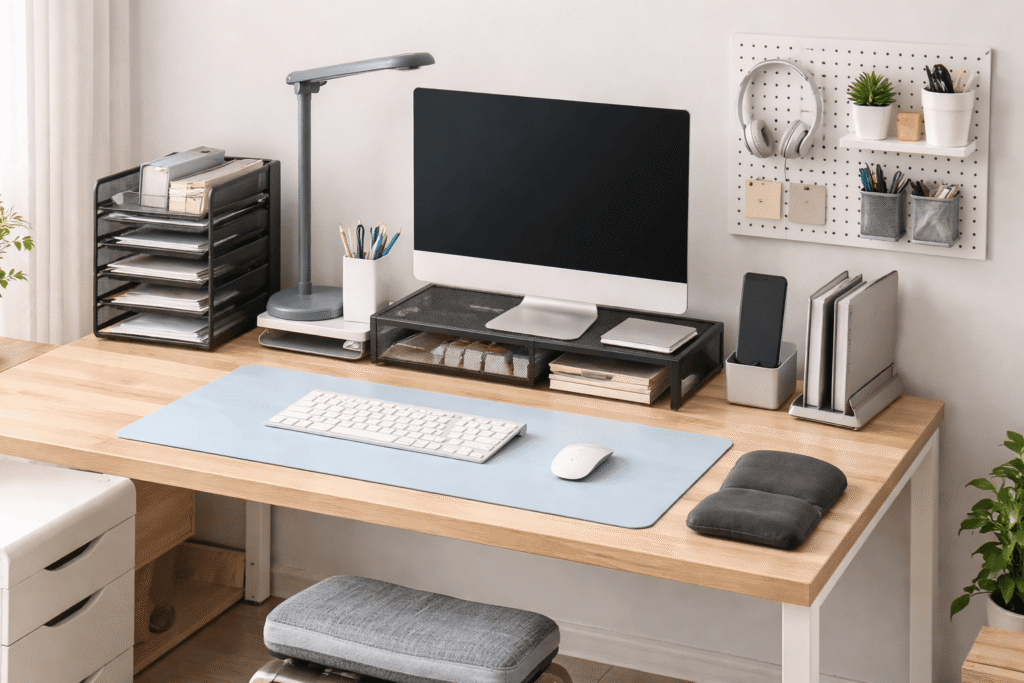
Below is a practical, step-by-step way to declutter your desk using real, useful upgrades that actually improve how your setup works.
Simple Upgrades That Improve Focus
Marbrasse 6 Tier Paper Organizer Letter Tray

This is a multi-level paper tray designed to sort documents vertically instead of stacking them across your desk.
If you deal with notes, printed documents, or random papers, they tend to pile up fast. This organizer gives each category its own space.
Real-life use case:
You finish a task and instead of leaving papers in a messy stack, you drop them into labeled tiers—“to do,” “in progress,” “done.”
Best for:
Students, freelancers, or anyone handling physical paperwork.
Benefit:
Keeps your desk surface clear and helps reduce visual clutter immediately.
Aothia Leather Desk Pad Protector

This large desk mat creates a clean foundation for your entire setup.
Instead of multiple textures and scattered items, everything sits on one smooth surface, which makes your desk feel more organized—even before you change anything else.
Real-life use case:
If your desk feels chaotic even after cleaning, placing this down instantly makes the setup feel structured and intentional.
Best for:
Minimal setups or shared desks where you want a defined workspace.
Benefit:
A small change that makes a big difference in how clean and focused your desk feels.
Honeywell Sunturalux LED Desk Lamp with USB Charging

This adjustable desk lamp gives you controlled lighting and reduces reliance on harsh overhead lights.
It also includes built-in USB ports, which helps reduce cable clutter on your desk.
Real-life use case:
Instead of plugging your phone charger into a wall outlet across the room, you charge directly from your lamp—fewer cables, less mess.
Best for:
People working long hours or in low-light environments.
Benefit:
Helps reduce eye strain and simplifies your setup at the same time.
Smart Organization for Small Desks
madesmart 8-Piece Interlocking Drawer Organizer Bin Pack

These modular drawer bins turn a messy drawer into a structured storage system.
Instead of a “junk drawer,” you get clearly separated sections for cables, adapters, stationery, and small tools.
Real-life use case:
When you open your drawer, you don’t have to dig around for a charging cable—it’s always in the same spot.
Best for:
Anyone with clutter hidden inside drawers.
Benefit:
Out-of-sight organization that supports a cleaner overall workspace.
EVOOMI Back Saver Monitor Stand (2-Pack)

This metal monitor riser lifts your screen while creating usable space underneath.
You can store notebooks, keyboards, or small accessories below it, freeing up your main desk area.
Real-life use case:
Instead of stacking items randomly, everything slides neatly under the stand.
Best for:
Small desks or multi-device setups.
Benefit:
Improves posture and adds extra storage without taking up more space.
AboveTEK Vertical Laptop Stand (3 Slots)

This vertical stand holds your laptop (and even a tablet or phone) upright, instead of flat on your desk.
It instantly clears a large chunk of your workspace.
Real-life use case:
If you use an external monitor, your laptop no longer needs to stay open all day—it can sit neatly in the stand.
Best for:
Remote workers with hybrid setups.
Benefit:
Maximizes desk space and keeps your setup clean.
Keepo Peg Board Wall Organizer

This modular pegboard moves storage off your desk and onto your wall.
You can hang headphones, cables, tools, or accessories—keeping everything visible but not in your way.
Real-life use case:
Instead of leaving your headphones on your desk after every session, they go on the pegboard—same spot every time.
Best for:
Small setups where desk space is limited.
Benefit:
Turns vertical space into practical storage and reduces surface clutter.
Comfort Improvements for Long Work Sessions
GORILLA GRIP Memory Foam Wrist Rest Set

This wrist rest supports your hands while typing and using a mouse.
It’s especially helpful if you spend hours at your desk without breaks.
Real-life use case:
If your wrists start to feel tired or sore after long sessions, this adds support without changing your setup.
Best for:
Writers, editors, or anyone typing daily.
Benefit:
Helps reduce strain and keeps your workflow comfortable.
HUANUO Adjustable Desk Footrest

This footrest supports your legs and improves posture while sitting.
It has adjustable height and tilt, so you can find a comfortable position.
Real-life use case:
If your feet don’t sit flat on the ground or you constantly shift positions, this stabilizes your posture.
Best for:
Long desk sessions and standard office chairs.
Benefit:
Helps reduce lower back discomfort and keeps you focused longer.
OMCOZY Gel Seat Cushion (Cooling Honeycomb Design)

This breathable gel cushion adds comfort to your chair without needing a full upgrade.
It distributes weight more evenly and reduces pressure points.
Real-life use case:
If your chair feels uncomfortable after an hour, this extends how long you can sit without needing breaks.
Best for:
Budget-friendly comfort improvement.
Benefit:
Makes long work sessions more manageable and less distracting.
What to Look For Before Buying
Decluttering isn’t about adding more—it’s about choosing better.
Focus on problem-solving
Only add items that fix a specific issue: cables, posture, or lack of storage.
Think in terms of space gained
Every product should either clear your desk or organize something that’s currently messy.
Avoid over-accessorizing
Too many items—even useful ones—can bring clutter back.
Choose simple designs
Clean, neutral products help maintain a distraction-free workspace.
Upgrade gradually
Start with one or two changes that solve your biggest problem first.
Conclusion
Decluttering your desk setup doesn’t require a complete overhaul.
It’s about removing friction—less searching, less adjusting, fewer distractions.
When everything has a place and your setup feels comfortable, your focus improves naturally. Work becomes smoother, and your desk starts supporting you instead of slowing you down.
Start with one simple upgrade. Then build from there.