
Disclosure: As an Amazon Associate I earn from qualifying purchases.
Long workdays can make even a decent desk setup feel uncomfortable.
At first, everything seems fine. Then your wrists start to feel tired, your neck gets stiff, your desk looks messy, and your cables slowly take over the space under your feet.
The good news is that you do not need a full home office makeover to make your desk feel better.
A few simple desk accessories can improve comfort, reduce clutter, and help your workspace feel easier to use every day. If your setup already feels uncomfortable, this guide pairs well with this article on how to fix an uncomfortable desk setup.
Quick Picks
- Best overall: Gogoonike Adjustable Laptop Stand
- Best budget option: EURPMASK Rotating Headphone Stand
- Best for small desks: Airlonv LED Clamp Desk Lamp
Prices are approximate and may change. Ratings and review counts reflect current product data.
Comfort Upgrades for Long Work Sessions
BlissTrends Adjustable Foot Rest

The BlissTrends Adjustable Foot Rest is a soft under-desk footrest designed to support your feet during long sitting sessions.
A simple option like this can help make your sitting position feel more natural, especially if your feet do not rest comfortably on the floor.
It is useful for remote workers, students, and anyone who spends several hours sitting at a desk. The adjustable height also makes it easier to find a position that feels comfortable.
A real-life example: you are sitting through back-to-back meetings, and by mid-afternoon your legs feel restless. A footrest gives your feet a dedicated place to land instead of constantly shifting around.
If you want a no-fuss comfort upgrade, something like this is easy to add without changing your chair or desk.
A simple addition that makes your desk feel more comfortable right away.
GORILLA GRIP Memory Foam Wrist Rest

The GORILLA GRIP Memory Foam Wrist Rest is a two-piece set for your keyboard and mouse area.
A budget-friendly option like this can make typing, scrolling, and daily computer work feel more comfortable.
It is best for people who type a lot, including writers, students, remote workers, and anyone who spends most of the day using a keyboard and mouse.
A real-life scenario: you start the morning fine, but after a few hours your wrists feel tired from typing. A wrist rest gives your hands softer support during repetitive work.
You do not need to overthink this. If wrist comfort is one of your main problems, a tool like this is one of the easiest upgrades to try.
One of those upgrades you notice almost immediately.
Amazon Basics Desk Fan

The Amazon Basics Desk Fan is a compact air circulator with adjustable tilt and multiple speed settings.
A simple option like this can make your workspace feel more comfortable during warm afternoons or long work sessions.
It is useful for home offices, bedrooms, dorm rooms, and small work areas where airflow is limited.
A real-life example: your room gets warm in the afternoon, but you do not want to cool the entire house. A small desk fan can help you stay more comfortable without taking over your setup.
For people who get distracted by heat or stale air, something like this can make long hours feel easier.
Easy to add without changing your entire setup.
Productivity and Lighting Improvements
Airlonv LED Clamp Desk Lamp

The Airlonv LED Clamp Desk Lamp is a flexible gooseneck desk light that clamps to the edge of your desk.
A tool like this is useful because it gives you direct lighting without taking up much desktop space.
It is best for small desks, study setups, and home offices where a traditional lamp would feel too bulky.
A real-life scenario: you are working late, reviewing notes, or writing by hand, but your room lighting is too dim. A clamp lamp gives your work area better visibility without adding clutter.
If lighting is one of your main issues, you can also compare more desk lighting for long work hours before deciding.
For most small setups, this type of upgrade is practical, affordable, and easy to use every day.
A simple addition that improves comfort and productivity at the same time.
Gogoonike Adjustable Laptop Stand

The Gogoonike Adjustable Laptop Stand raises your laptop closer to eye level and helps create a more ergonomic work position.
A simple option like this can reduce the habit of looking down at your screen all day.
It is best for remote workers, students, and anyone who uses a laptop as their main computer.
A real-life example: you work from your laptop for eight hours and keep leaning forward without noticing. A laptop stand can help bring the screen up, making your setup feel more comfortable and intentional.
It also creates extra space underneath the laptop, which can help smaller desks feel less crowded.
If you just want a quick upgrade, a no-fuss option like this is one of the easiest ways to improve your setup.
One of the easiest ways to improve your desk setup.
MINJIESI 10-Port USB Charging Station

The MINJIESI 10-Port USB Charging Station gives you one central place to charge multiple devices.
A tool like this is useful if your desk is crowded with phones, earbuds, tablets, watches, and other small devices.
It is best for people who work with multiple devices throughout the day and want to avoid hunting for chargers.
A real-life scenario: your phone, tablet, and wireless accessories all need charging, but your outlets are already full. A charging station keeps things more controlled and easier to manage.
For a cleaner setup, something like this can reduce cable frustration and make your desk feel more organized.
Easy to add without changing your whole setup.
Organization and Space-Saving Accessories
Aothia Leather Desk Pad

The Aothia Leather Desk Pad is a large desk mat that creates a smoother work surface for your keyboard, mouse, laptop, and notes.
A simple option like this can make your desk feel more polished and easier to use.
It is best for anyone who wants a cleaner workspace without adding another bulky accessory.
A real-life example: your desk feels visually messy even after you clean it. A desk pad can define your work zone and make the whole setup feel more intentional.
It also helps protect the desk surface from daily wear, spills, and mouse movement.
If you are trying to create a more comfortable home office setup, this type of setup upgrade is simple and low-risk.
Easy to add without changing your entire setup.
REFLYING Under Desk Cable Tray

The REFLYING Under Desk Cable Tray helps move cords, power strips, and cable clutter off the floor and out of sight.
A simple tool like this can instantly make your desk area feel cleaner.
It is best for setups with messy wires, power adapters, and cables hanging behind or under the desk.
A real-life scenario: your chair keeps rolling over cables, or your feet keep touching power cords under the desk. A cable tray gives everything a proper place.
For anyone trying to maintain a cleaner workspace, something like this is a practical upgrade that solves a very common problem.
A simple addition that makes your desk feel more organized right away.
EURPMASK Rotating Headphone Stand

The EURPMASK Rotating Headphone Stand is an under-desk headset holder that clamps onto your desk.
A budget-friendly option like this gives your headphones a dedicated spot instead of leaving them on your keyboard, monitor, or chair.
It is best for remote workers, gamers, students, and anyone who uses headphones daily.
A real-life example: you finish a call, put your headphones on the desk, and they stay in the way for the rest of the day. A headphone stand keeps them accessible but out of your main work area.
For smaller setups, a no-fuss option like this helps free up space without adding clutter.
A small change that helps create a cleaner setup.
WALI Monitor Stand Riser

The WALI Monitor Stand Riser lifts your monitor while adding storage underneath.
A tool like this combines better screen height with simple desk organization.
It is best for people who use a monitor, laptop, printer, or compact workstation and need more usable space.
A real-life scenario: your desk always feels full, but you still need a place for notebooks, pens, and small accessories. A monitor riser creates extra storage without requiring a bigger desk.
This is especially helpful for small workspaces where every inch matters.
If your setup feels cramped, something like this can make your desk feel more structured right away.
One of those upgrades that improves both comfort and organization.
What to Look For Before Buying
Before buying desk accessories for long work hours, focus on the problems you actually notice every day.
If your body feels uncomfortable, start with ergonomic upgrades like a footrest, wrist rest, or laptop stand.
If your desk feels messy, start with organization tools like a cable tray, headphone stand, desk pad, or monitor riser.
If your workspace feels hard to use, look at lighting, charging, and airflow first.
You do not need to buy everything at once. One or two simple upgrades can make your desk feel noticeably better.
Also consider your desk size. Small desks benefit most from accessories that save space, clamp onto the desk, or create storage without taking over the surface.
The best desk accessories are the ones you will actually use every day.
Conclusion
Long work hours are easier when your desk supports your body, your focus, and your daily routine.
You do not need a perfect setup. You just need a few practical upgrades that solve the problems you keep noticing.
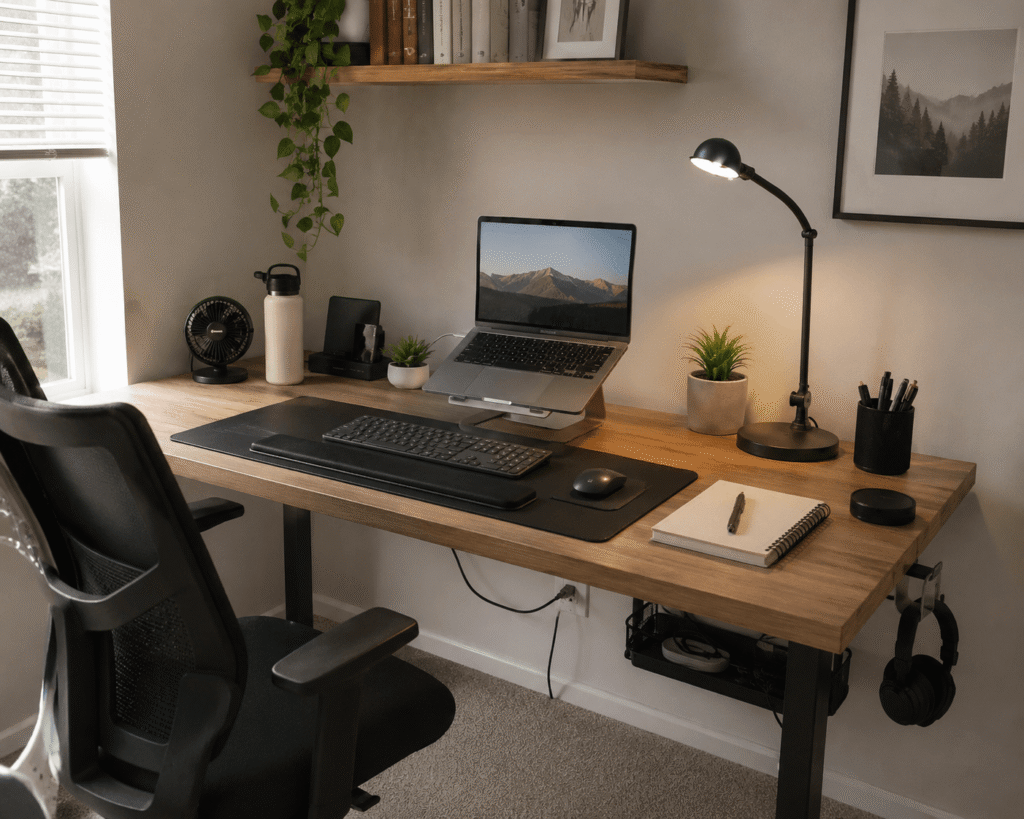
A laptop stand can improve posture. A wrist rest can make typing more comfortable. A cable tray can clean up the space under your desk. A lamp, fan, or charging station can make the workday feel smoother.
Start with the one issue that bothers you most and fix that first. For more practical ideas, you can explore these simple desk upgrades that make working from home better.