
Disclosure: As an Amazon Associate I earn from qualifying purchases.
A desk setup can start feeling messy fast.
Cables pile up behind the monitor. Your laptop sits too low. Your chair feels uncomfortable after a few hours. Small supplies end up scattered everywhere. Before long, your desk feels more distracting than productive.
The good news is that you do not need a full office makeover to fix it.
A few affordable desk upgrades can make your workspace feel cleaner, more comfortable, and easier to use every day. If clutter is your biggest issue, these desk organization ideas for a cleaner workspace can also help you build a setup that feels easier to maintain.
Quick Picks
- Best overall: OUTIOE Dual Monitor Stand
- Best budget option: Aothia Leather Desk Pad
- Best for small desks: Voncerus Clamp Desk Lamp
Prices are approximate and may change. Ratings and review counts reflect current product data.
Easy Organization Upgrades
OUTIOE Dual Monitor Stand
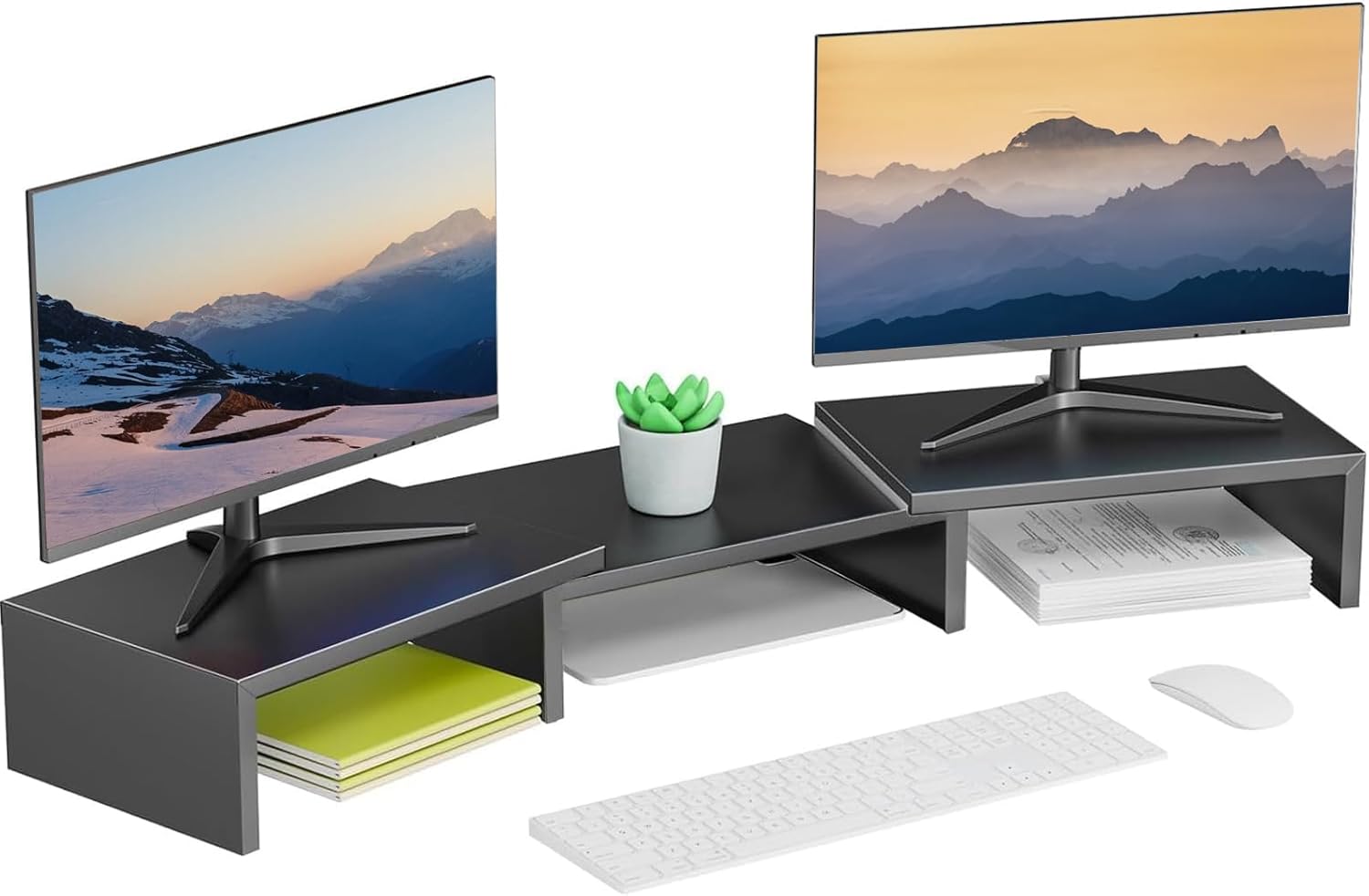
A simple option like this can make your desk feel cleaner almost immediately.
This monitor stand lifts your screens or monitor higher while creating extra space underneath for notebooks, a keyboard, or small desk supplies. It is useful if your desk feels crowded but you do not want to buy bigger furniture.
It is best for remote workers, students, or anyone using a monitor-heavy setup.
Picture a desk where your keyboard, sticky notes, and cables are all fighting for space. A riser gives those items a better place to go and makes the whole setup feel more intentional.
If you just want a quick upgrade, this type of desk riser is a solid, no-fuss addition to most desks.
Litwaro Under Desk Cable Tray

A tool like this helps hide the mess that usually collects under a desk.
The cable tray clamps under the desk and gives your power strip, charging cords, and extra cables a dedicated place. That keeps wires off the floor and makes cleaning easier.
It is best for anyone with a laptop, monitor, lamp, phone charger, or standing desk setup.
If your feet constantly hit cables under the desk, this is one of the easiest ways to improve your workspace without changing how you work.
For a cleaner workspace, something like this is simple, practical, and easy to add.
Simple Houseware Drawer Organizer

A budget-friendly option like this keeps small supplies from turning into clutter.
These drawer bins help organize pens, clips, sticky notes, chargers, and other small desk items. Instead of everything sliding around in one drawer, each item gets its own spot.
It is best for people who want a cleaner desk surface without adding more visible storage.
If you often lose small items right when you need them, drawer bins make your setup feel calmer and more controlled.
A simple drawer organizer like this is easy to add without changing your entire setup.
PEGZONE Desk Side Organizer

A no-fuss option like this adds storage without taking over your desktop.
This side organizer clamps onto the desk and gives you extra space for a laptop, accessories, or small tools. The pegboard-style design also helps keep items visible and easy to reach.
It is best for small desks, shared rooms, and compact home office corners.
If your laptop or tablet keeps sitting in the middle of your desk when you are not using it, this gives it a better home.
For anyone building a compact setup, this type of upgrade can free up space quickly.
Comfort and Focus Upgrades
TushGuard Seat Cushion

A simple option like this can make long sitting sessions feel more manageable.
This memory foam seat cushion adds support to a basic desk chair, dining chair, or older office chair. It is useful if your current chair feels hard or uncomfortable after a few hours.
It is best for remote workers, students, or anyone who sits for long stretches.
If you start shifting around after an hour because your chair feels uncomfortable, a cushion can make your setup feel easier to use.
For more long-session comfort ideas, check out these desk setup essentials for people who work 8+ hours a day.
A seat cushion like this is one of those upgrades you notice almost immediately.
Adjustable Laptop Stand

A tool like this helps raise your laptop to a better viewing height.
That matters because working with a laptop flat on the desk often forces your neck downward. A stand can make your screen easier to see while also helping with airflow.
It is best for students, remote workers, and people who use a laptop as their main computer.
If you move between rooms or work from a small desk, a foldable stand is especially useful because it does not need to stay out all day.
A portable laptop stand like this is easy to add without changing your whole setup.
Voncerus Clamp Desk Lamp

A simple upgrade like this can improve your focus without taking up much desk space.
This clamp desk lamp attaches to the edge of your desk, which keeps the surface clear. The adjustable arm and brightness settings make it useful for reading, writing, studying, or working at night.
It is best for small desks, dorm rooms, and home offices with weak overhead lighting.
If your workspace feels dim in the evening, better lighting can make the whole desk feel more comfortable and less tiring.
A clamp lamp like this is one of the easiest ways to improve a small setup.
Small Productivity Upgrades
Qi Wireless Charging Pad

A simple option like this helps reduce cable clutter while giving your phone a dedicated place.
A wireless charging pad is useful because it turns phone charging into a simple habit. Instead of hunting for a cable, you place your phone down and keep working.
It is best for people who want a cleaner desk and fewer loose cords.
If your phone usually ends up somewhere random on the desk, this creates a small landing zone that feels more organized.
A charging pad like this is a small upgrade that makes daily routines smoother.
BONTEC Keyboard Tray
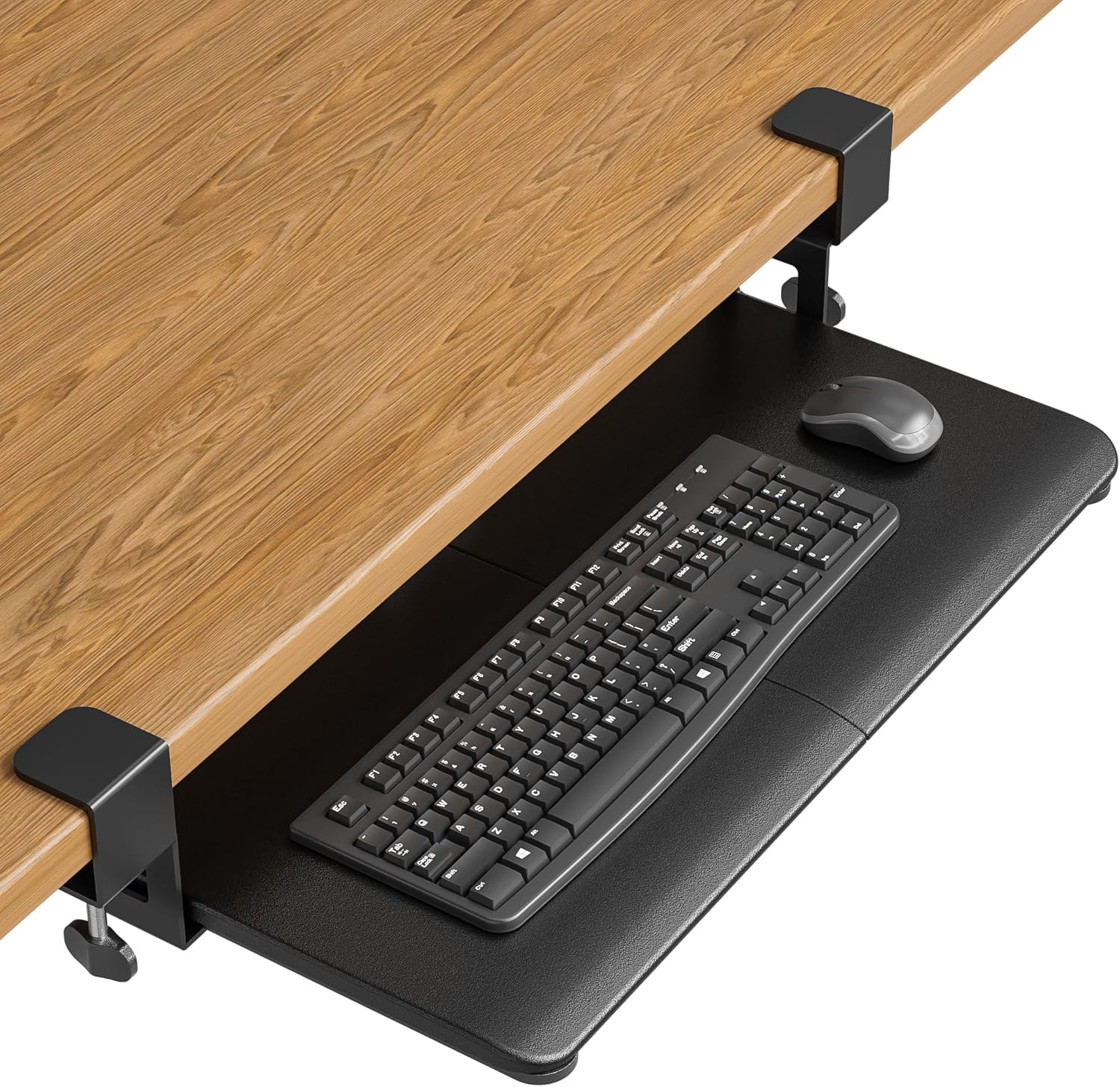
A space-saving upgrade like this helps create more usable desk space.
This pull-out keyboard tray gives your keyboard and mouse a dedicated platform under the desk. It can also improve typing position if your current desk height feels awkward.
It is best for smaller desks, deep workstations, or anyone who wants to keep the main desk surface clear.
If your keyboard takes up most of your desk, a tray lets you slide it away when you are done.
A keyboard tray like this is practical if you want more workspace without buying a new desk.
Aothia Leather Desk Pad

A budget-friendly option like this can make your desk feel cleaner in seconds.
A desk pad protects the surface, gives your mouse a smoother area, and visually pulls the setup together. It is one of the simplest ways to make a desk look more finished.
It is best for anyone who wants a cleaner, more focused workspace without adding bulky accessories.
If your desk surface looks scratched, uneven, or visually messy, a desk pad creates one clean work zone.
For a more polished work from home setup for creative professionals, small visual upgrades like this can make the desk feel more intentional.
A desk pad like this is easy to add and easy to notice.
What to Look For Before Buying
Start with the problem you feel every day.
If your desk feels messy, fix cables or storage first. If your body feels uncomfortable, focus on posture and seating. If your space feels dark or distracting, lighting may be the better upgrade.
Measure your desk before buying anything. Small desks can become crowded quickly, even with useful products.
Look for upgrades that are easy to add. Clamp-on, foldable, stackable, and under-desk products usually work well because they improve the setup without taking over the room.
You do not need to overthink this. One or two smart upgrades can make your desk feel much better right away.
Conclusion
Upgrading your desk does not have to cost much.
A monitor stand, cable tray, lamp, seat cushion, desk pad, or small organizer can make your workspace feel cleaner, more comfortable, and easier to use.
The best upgrades are the ones that solve real problems you deal with every day. Start simple, keep your setup practical, and build from there.
You can also explore more productivity desk setup ideas if you want to keep improving your workspace without making it complicated.