

Disclosure: As an Amazon Associate I earn from qualifying purchases.
A few charging cables can turn into a surprisingly annoying mess once you add a monitor, laptop, speakers, and other everyday desk accessories. Cords end up hanging behind the desk, collecting dust on the floor, or getting tangled around your feet.
A good under desk cable tray moves that clutter somewhere you barely notice it. Instead of rebuilding your entire workspace, you can keep power strips and loose cables tucked beneath the desktop while still having them within reach when needed.
The best option depends on your desk, how many devices you use, and whether you’re comfortable drilling holes. Some trays prioritize capacity, while others work better for renters, standing desks, or very small workspaces.
If you’re building your setup on a tighter budget, our guide to the best desk accessories under $20 has more simple upgrade ideas. Below are 10 cable management options worth considering and where each one makes the most sense.
Quick Picks
Best Overall: Mzmaxy Under Desk Cable Management Tray offers clamp-on installation and plenty of room for an everyday home office setup.
Best Budget Option: REFLYING Under Desk Cable Management Tray is a compact steel option at around $16.99.
Best for Small Desks: Scanfield Under Desk Cable Management Tray keeps cords contained without requiring screws.
Prices are approximate and may change. Ratings and review counts reflect current product data.
Easy Cable Management for Everyday Desks
Mzmaxy Under Desk Cable Management Tray
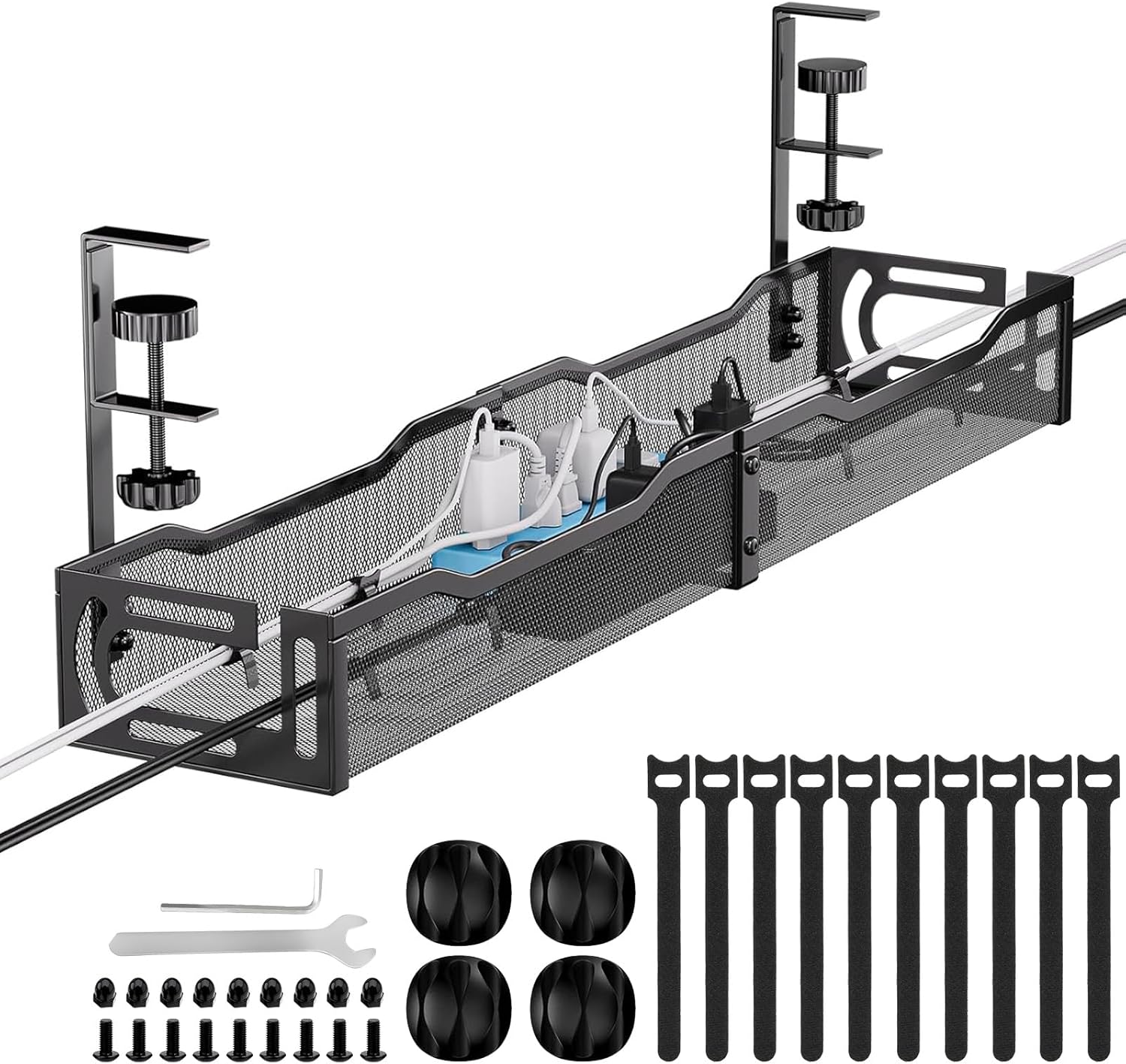
Approx. Price: ~$23.99 | Rating: 4.8 ⭐ | Reviews: 1,238+
Drilling into a desk isn’t always appealing, especially if you rent or frequently rearrange your setup. You still want cables off the floor without permanently modifying your furniture.
The Mzmaxy Under Desk Cable Management Tray provides a practical middle ground. Its clamp-based installation gives cables, adapters, and other clutter a dedicated place beneath the desktop without requiring holes.
People often overlook how useful removable mounting can be. It’s especially practical for renters, students, standing-desk users, and anyone who changes their workspace regularly.
For example, you could reorganize your workstation for a new monitor and reposition the Mzmaxy Under Desk Cable Management Tray rather than drilling new mounting holes.
Practical takeaway: Check your desktop thickness and available clamp clearance first. It’s one of those upgrades that feels small until you use it every day.
DELAMU Under Desk Cable Management Tray

Approx. Price: ~$25.99 | Rating: 4.6 ⭐ | Reviews: 1,140+
Heavy power bricks and multiple cords can overwhelm lightweight cable organizers. On a larger workstation, you may want something more substantial that stays firmly in place.
The DELAMU Under Desk Cable Management Tray comes as a two-pack of metal organizers, giving you more room to separate cables and power accessories underneath your desk.
It’s easy to overlook the advantage of splitting cable storage into two areas. Remote workers with several devices can keep a power strip in one tray while using the other for excess cable length and adapters.
Imagine a dual-monitor desk with several chargers and peripherals. Using the two DELAMU Under Desk Cable Management Trays can make that collection of cords much easier to contain.
Practical takeaway: This option makes the most sense when you need more capacity than a single small tray can provide.
Scanfield Under Desk Cable Management Tray

Approx. Price: ~$31.95 | Rating: 4.5 ⭐ | Reviews: 6,728+
Loose cords tend to become tangled when they’re all pushed into the same narrow space. Ideally, you want them contained while still being able to reach a charger or power strip when necessary.
The Scanfield Under Desk Cable Management Tray provides two 17-inch organizers with an adhesive installation system, so you don’t need screws to get cables away from the floor.
That combination is particularly useful for desks you don’t want to permanently modify. The roomy interior is designed to accommodate power strips, chargers, and bundled cords rather than only individual cables.
For a study desk, the Scanfield Under Desk Cable Management Tray could keep a laptop charger, monitor cord, and phone charger together without creating another pile underneath.
Practical takeaway: If you prefer adhesive mounting, give the adhesive the recommended time to cure before loading the tray.
Scanfield Under Desk Cable Management Tray
Approx. Price: ~$31.95 | Rating: 4.5 ⭐ | Reviews: 6,728+
Cleaning around your desk becomes unnecessarily awkward when power strips, adapters, and excess cable are sitting directly on the floor. Moving that clutter upward can immediately simplify the area.
The Scanfield Under Desk Cable Management Tray offers two open organizers that can hold several parts of your cable setup beneath the desktop.
This approach works particularly well when you have several connected devices but still want relatively easy access. Instead of hiding every wire individually, you create one organized location for the mess.
If your monitor, laptop, lamp, and speakers all converge around the same outlet, the Scanfield Under Desk Cable Management Tray can help keep that collection off the floor.
Practical takeaway: A larger-capacity tray is worth considering when your main problem isn’t one loose cable but an entire cluster of them.
PAMO Under Desk Cable Management

Approx. Price: ~$38.99 | Rating: 4.7 ⭐ | Reviews: 2,770+
Sometimes the problem isn’t simply hiding cables. You want them to stay organized after they’re moved underneath the desk instead of creating the same tangled mess somewhere less visible.
The PAMO Under Desk Cable Management set provides two under-table organizers and includes 10 cable ties, giving you a way to manage both the cables and the space where they’re stored.
Many people overlook that second part. A tray gets cords off the floor, while cable ties can help prevent excess lengths from turning into a bundle.
For a home office with several permanent devices, the PAMO Under Desk Cable Management setup can keep frequently used connections together while the included ties handle longer cords.
Practical takeaway: Think about organization inside the tray as well as simply getting cables off the floor.
Smarter Options for More Complicated Setups
BIWIST Extendable Under Desk Cable Tray

Approx. Price: ~$25.99 | Rating: 4.5 ⭐ | Reviews: 804+
Desk setups have a habit of growing. A cable solution that works for a laptop today can suddenly feel cramped after adding another monitor, speakers, or a few charging accessories.
The BIWIST Extendable Under Desk Cable Tray addresses that problem with an extendable design that reaches up to 31 inches and uses clamps instead of requiring drilling.
That flexibility is easy to underestimate. It makes the organizer especially useful for wider desks or setups likely to change over time.
You might start with a relatively simple workstation and later add more equipment without immediately outgrowing the BIWIST Extendable Under Desk Cable Tray.
Practical takeaway: Consider what you might add to your desk later instead of sizing cable management only for today’s setup.
Cinati Under Desk Cable Management Tray

Approx. Price: ~$29.99 | Rating: 4.6 ⭐ | Reviews: 207+
Bulky metal organizers aren’t ideal underneath every desk. Limited clearance can make a large rigid tray feel like another obstacle competing with your knees.
The Cinati Under Desk Cable Management Tray uses a fabric design and no-drill installation to create a softer storage area beneath the desktop. Its 28.4-inch size also gives longer cable setups room to spread out.
This can be particularly useful on desks where comfort and clearance matter as much as organization. The fabric construction makes it different from the more traditional metal options.
Someone using a desk for eight-hour workdays could place a power strip and bundled cords inside the Cinati Under Desk Cable Management Tray, keeping them away from both the floor and their legs.
Practical takeaway: Check the space beneath your desktop before buying any organizer, especially if legroom is already limited.
DELAMU Under Desk Cable Management Tray
Approx. Price: ~$25.99 | Rating: 4.6 ⭐ | Reviews: 1,140+
A power strip often creates more clutter than the individual cables plugged into it. Once several devices connect in the same place, the floor underneath your desk can quickly become the messiest part of the setup.
The DELAMU Under Desk Cable Management Tray gives larger power and cable setups two metal storage areas beneath the desk rather than leaving everything around your feet.
This works particularly well for multi-device workstations where several plugs converge in one place. Separating equipment between two trays can also make individual connections easier to identify.
For example, your monitor and computer connections could occupy one DELAMU Under Desk Cable Management Tray, while chargers and other accessories use the second.
Practical takeaway: Measure your power strip before choosing a tray if that’s the main item you want to move off the floor.
Flexible Solutions for Smaller Workspaces
Univivi Under Desk Cable Management Tray

Approx. Price: ~$35.99 | Rating: 4.6 ⭐ | Reviews: 867+
Hard trays aren’t ideal for every desk. Unusual frames, limited mounting options, or larger collections of lightweight cables can make a softer solution more convenient.
The Univivi Under Desk Cable Management Tray uses a 36-inch fabric design with clamp or screw mounting options, giving you more flexibility in how you attach it.
People often overlook fabric organizers because metal trays are more familiar. A long fabric tray, however, can provide useful capacity while keeping cables and power accessories away from your legs.
For students building more elaborate workstations, our guide to desk accessories for exam season has additional ideas for making long study sessions easier. Pairing those upgrades with the Univivi Under Desk Cable Management Tray can also keep the growing collection of chargers under control.
Practical takeaway: A flexible tray is worth considering when you want generous cable storage without relying entirely on a rigid metal basket.
REFLYING Under Desk Cable Management Tray

Approx. Price: ~$16.99 | Rating: 4.7 ⭐ | Reviews: 5,411+
A small desk doesn’t leave much room for oversized accessories. The goal is to control the cables you actually use without adding unnecessary bulk underneath.
The REFLYING Under Desk Cable Management Tray takes a more compact approach with a 15.7-inch steel tray and clamp mounting system that doesn’t require drilling.
That makes it especially appealing for laptop desks, student workstations, and smaller home offices. Many people assume cable management only becomes worthwhile with complicated setups, but even three or four dangling cords can make a small desk feel messy.
If you’re putting together your first dedicated study space, you can also explore our desk accessories for first-year students. Adding something as simple as the REFLYING Under Desk Cable Management Tray can help keep a charger, monitor cable, and power cord contained from the beginning.
Practical takeaway: Buy for the setup you actually have rather than automatically choosing the largest organizer available.
What to Look For Before Buying
Start with desk size. Measure the usable area underneath, including any frame pieces, drawers, or crossbars that could interfere with installation. A long tray isn’t necessarily better if it reduces usable space.
Think about comfort as well. Your organizer should keep cables away from your feet without becoming something your knees constantly hit.
Your storage needs determine capacity. A few charging cables require far less room than several power bricks and a power strip. For effective cable management, also consider where cords need to enter and exit the tray.
Mounting method matters too. Clamp-on options are convenient if you don’t want to drill, while screw-mounted designs can make sense for permanent setups. Adhesive organizers require a suitable surface and careful installation.
Pay attention to durability, particularly if you’re storing heavier equipment. Finally, consider ease of use. You should still be able to reach important plugs and replace cables without dismantling your entire setup.
Conclusion
Under desk cable management isn’t the most dramatic workspace upgrade, but that’s partly why it’s so useful. Once loose cords and power accessories stop competing for space, your desk can feel cleaner and easier to use without requiring a major redesign.
The right choice depends on your setup. Compact options work well when space is limited, while longer trays and two-piece systems make more sense for equipment-heavy workstations.
Small improvements like these can noticeably improve organization, comfort, and your ability to focus on the workspace instead of the clutter around it.
If you’re still refining your setup, our guide to the best desk accessories under $20 covers more inexpensive upgrades that can make everyday work a little smoother.