
Disclosure: As an Amazon Associate I earn from qualifying purchases.
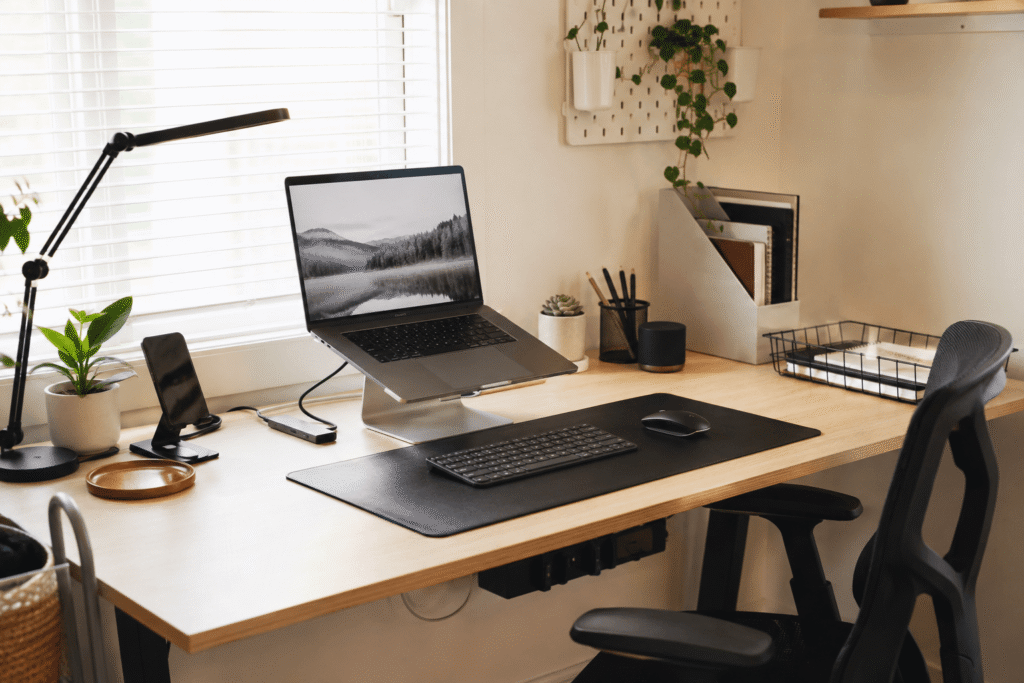
A laptop can be enough for work, school, and everyday productivity, but the setup around it often creates the real problem.
Maybe the screen sits too low. Maybe your desk feels cramped. Maybe every cable ends up tangled behind your laptop. Over time, those small annoyances make your workspace feel less comfortable and harder to use.
The good news is that you do not need a full desk makeover to fix most of this. A few simple laptop accessories can make your setup cleaner, more comfortable, and easier to work from every day.
If you are already looking at practical upgrades, you may also want to check these desk accessories to watch during Prime Day for more setup ideas.
Quick Picks
- Best overall: UGREEN USB-C Hub
- Best budget option: Acer Wireless Mouse
- Best for small desks: Amazon Basics Adjustable Laptop Stand
Prices are approximate and may change. Ratings and review counts reflect current product data.
Comfort and Ergonomic Laptop Upgrades
Amazon Basics Adjustable Laptop Stand

A simple option like this can make your laptop feel much more comfortable to use every day.
The Amazon Basics Adjustable Laptop Stand raises your laptop screen closer to eye level, which can help reduce the hunched-over feeling many people get when working directly from a laptop.
It is useful for remote workers, students, and anyone using a laptop as their main computer.
For example, if you work from a small desk, kitchen table, or bedroom workspace, this stand can make the setup feel more intentional without taking up much extra space.
It also has a foldable design, so it works well if you need something portable. If you want a more comfortable home office setup, this type of upgrade is easy to add without changing your whole desk.
A simple addition that makes your laptop setup feel better almost immediately.
Acer Wireless Mouse

A budget-friendly option like this is one of the easiest upgrades for everyday laptop use.
The Acer Wireless Mouse gives you more control than a laptop trackpad, especially when working with documents, spreadsheets, tabs, editing tools, or online research.
It is best for anyone who spends long hours clicking, scrolling, dragging files, or switching between windows.
For example, if your hand starts feeling cramped from using the trackpad all day, a basic wireless mouse can make the entire setup feel smoother and more natural.
You do not need to overthink this one. Something like this is a solid, no-fuss addition to most desks.
One of those upgrades you notice almost immediately.
Kootek Laptop Cooling Pad

A tool like this can help if your laptop tends to run warm during longer sessions.
The Kootek Laptop Cooling Pad uses multiple fans to improve airflow under your laptop. It is especially useful for people who multitask heavily, take long video calls, edit content, or use their laptop for gaming.
This is best for users who notice heat buildup after a few hours of work.
For example, if your laptop gets hot while connected to a monitor or running several browser tabs, a cooling pad can help make the setup feel more stable and comfortable.
It also works as a raised surface, which gives it a small ergonomic benefit too. This type of setup upgrade is practical if your laptop is your main machine.
Easy to add without changing your entire setup.
Productivity and Connectivity Accessories
UGREEN USB-C Hub

A simple option like this solves one of the most common laptop problems: not enough ports.
The UGREEN USB-C Hub adds useful connections like HDMI, USB-A ports, and power delivery support. That makes it easier to connect a monitor, keyboard, mouse, storage drive, or other desk accessories.
It is best for remote workers, students, and anyone who wants a cleaner laptop docking setup.
For example, instead of plugging several cables into different places every day, you can connect more of your setup through one compact hub.
If you are building a productivity desk setup, a no-fuss option like this can make your laptop much easier to use as a workstation.
A solid upgrade for most modern laptop desks.
Anyuse Portable Monitor

A tool like this gives you extra screen space without needing a full desktop monitor setup.
The Anyuse Portable Monitor is useful for multitasking, research, writing, studying, editing, and remote work. A second screen can make it easier to keep reference material open while working on your main laptop.
It is best for people who want more productivity but do not have room for a large monitor.
For example, you could keep a video call, notes, calendar, or browser window on one screen while working on your laptop display.
This is especially helpful for small setups where a permanent monitor may not fit. Something like this gives you flexibility without taking over the desk.
One of the easiest ways to make a laptop feel more capable.
Lamicall Phone Stand

A simple option like this keeps your phone visible without letting it take over your workspace.
The Lamicall Phone Stand holds your phone upright, which is useful for calls, messages, timers, notes, or quick reference while working.
It is best for people who use their phone during the day but want to avoid constantly picking it up.
For example, you can keep your phone beside your laptop during a meeting without leaving it flat on the desk or buried under papers.
If you are trying to create a cleaner and more focused setup, this type of upgrade is small but useful.
Easy to add without changing your whole setup.
Desk Organization and Small-Space Essentials
Aothia Desk Pad

A budget-friendly option like this can make a desk feel more finished right away.
The Aothia Desk Pad gives you a smooth surface for your laptop, mouse, keyboard, notebook, or daily accessories. It also helps visually define your work zone, which can make a cluttered desk feel more organized.
It is best for students, remote workers, and anyone with a plain or messy desktop surface.
For example, if your desk looks scattered, placing your main tools on a desk pad can make everything feel more intentional.
This is also a simple way to refresh the look of your setup. For more seasonal ideas, you can explore how to refresh your desk setup for summer. Something like this is easy to use on almost any desk.
A simple addition that makes your workspace feel cleaner right away.
Ucanng Under Desk Cable Tray

A tool like this helps clean up the cables that usually pile up behind or under a desk.
The Ucanng Under Desk Cable Tray gives you a place to route cords, chargers, and power strips under the desktop instead of leaving them visible.
It is best for people who want a clean workspace without drilling into the desk.
For example, if your laptop charger, monitor cable, and power strip are all hanging behind your setup, a tray can make the whole area look more controlled.
If you care about desk organization ideas, this type of upgrade can make a bigger difference than it seems.
A simple addition that makes your desk feel more organized right away.
MOSISO Laptop Sleeve

A simple option like this helps keep your laptop and small accessories together.
The MOSISO Laptop Sleeve protects your laptop and includes a pocket for essentials like a charger, cable, mouse, notebook, or small adapter.
It is best for students, hybrid workers, and anyone who moves between rooms, offices, classes, or coffee shops.
For example, instead of carrying loose accessories in your hand or backpack, you can keep the basics in one place and set up faster wherever you work.
If your laptop goes with you often, something like this makes the routine easier and cleaner.
One of those practical upgrades that keeps your setup more organized.
SUPERDANNY LED Desk Lamp

A no-fuss option like this can improve your workspace without taking up much desk space.
The SUPERDANNY LED Desk Lamp uses a clamp design, which is helpful if your desk surface is limited. It provides focused task lighting for reading, writing, studying, and evening work.
It is best for home offices, dorm rooms, and small workstations with poor lighting.
For example, if your room feels dim at night, better desk lighting can make the space feel more comfortable and easier to focus in.
If you are building a more productive workspace, you may also like these budget home office accessories for productivity. This type of upgrade is simple, practical, and easy to fit into most setups.
One of those upgrades you notice almost immediately.
What to Look For Before Buying
Before buying laptop accessories, start with the problem you actually want to solve.
If your neck hurts, start with a laptop stand. If your desk is messy, start with cable management or a desk pad. If your laptop feels limited, a USB-C hub or portable monitor may be more useful.
Keep these simple factors in mind:
- Desk size
- Laptop compatibility
- Daily workflow
- Port needs
- Cable clutter
- Portability
- Comfort
- Lighting
- Long-term usefulness
You do not need to buy everything at once. One or two well-chosen upgrades can make your desk feel much better.
If you just want a quick upgrade, choose the item that removes the most annoying part of your current setup.
Conclusion
The best Prime Day laptop accessories are not always complicated or expensive. Most of the time, the best upgrades are simple tools that improve comfort, reduce clutter, and make your laptop easier to use every day.
A laptop stand can improve posture. A USB-C hub can simplify your connections. A desk pad or cable tray can make your workspace feel cleaner. A portable monitor can make your laptop feel more productive.
Start with the accessory that solves your biggest setup problem first. You can always add more later as your workspace improves.