
Disclosure: As an Amazon Associate I earn from qualifying purchases.
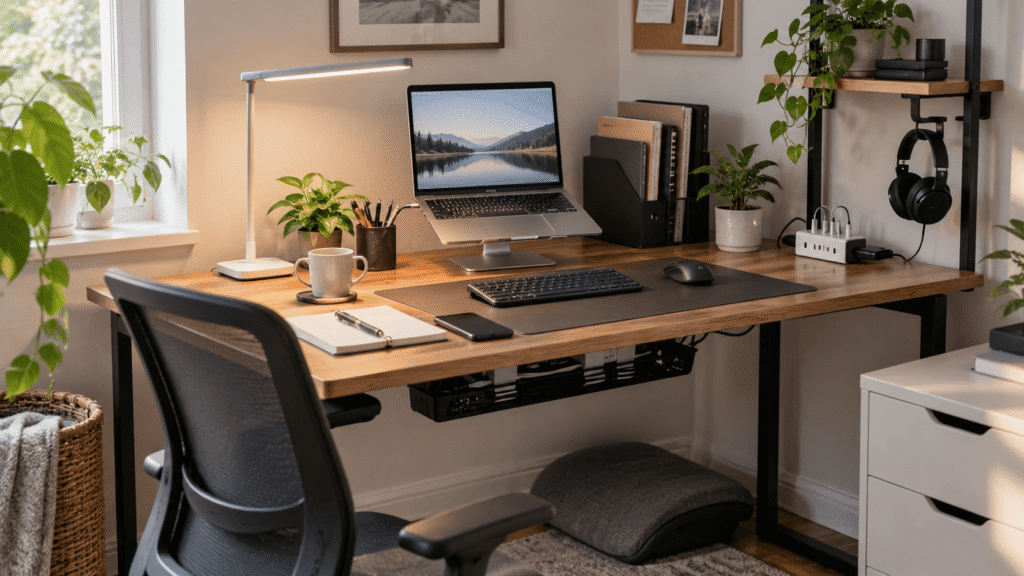
A small desk can feel surprisingly crowded once you add a laptop, charger, notebooks, cables, and everything else you use throughout the day. The problem usually isn’t that the desk is too small—it’s that every item is competing for the same limited space.
A few thoughtful upgrades can make that same workspace feel cleaner, more comfortable, and easier to use without turning it into an elaborate home office.
The best minimalist desk accessories for small spaces earn their place by solving a specific problem. Some free up valuable surface area, while others improve ergonomics, lighting, or organization without adding unnecessary clutter.
If you’re studying or working with limited room, these desk accessories for online learning offer more ideas for creating a practical workspace without filling every available inch.
Below are 10 upgrades worth considering, starting with options that can make an immediate difference to everyday work.
Quick Picks
Best Overall: LOXP 360° Rotating Laptop Stand — a versatile choice for raising your screen while keeping an everyday laptop setup flexible.
Best Budget Option: Aothia Leather Desk Pad — an affordable way to create a cleaner, more defined work surface.
Best for Small Desks: VIVO 2-Tier Clamp-On Desk Shelf — a useful option when you need more storage without sacrificing much of your main work area.
Prices are approximate and may change. Ratings and review counts reflect current product data.
Improve Comfort Without Adding Clutter
LOXP 360° Rotating Laptop Stand

Approx. price: ~$31.99 | Rating: 4.6 ⭐ | Reviews: 2,402+
Working directly from a laptop often means looking downward for hours, especially on a shallow desk where there isn’t much room to reposition your setup. A more comfortable screen position can make longer work sessions feel less cramped.
The LOXP 360° Rotating Laptop Stand raises the display closer to eye level while keeping the setup relatively compact. Its adjustable design also gives you more control over screen positioning instead of leaving the laptop flat on the desk.
Remote workers and students using an external keyboard and mouse are likely to get the most from it. For example, you can raise your laptop while writing or joining a video call, then fold the stand down when you need more room for another task.
The rotating base is also handy if you occasionally need to show something on your screen to someone sitting nearby. That’s where the LOXP 360° Rotating Laptop Stand offers a little more flexibility than a basic fixed riser.
Prioritize a height and angle that feel natural for your sitting position. It’s one of those upgrades that feels small until you use it every day.
Lepro LED Desk Lamp

Approx. price: ~$22.99 | Rating: 4.7 ⭐ | Reviews: 8,347+
If one corner of your desk becomes difficult to see after sunset, working there can quickly feel less inviting. Better task lighting creates a more comfortable workspace without requiring brighter lighting throughout the entire room.
The Lepro LED Desk Lamp provides targeted illumination while keeping its footprint manageable. Adjustable brightness and color temperature settings let you change the lighting depending on whether you’re reading, typing, or working later in the evening.
Students, evening workers, and anyone without strong natural light near their desk can benefit most. Imagine reviewing handwritten notes at night without having to illuminate the entire room just to see the page comfortably.
Because lighting needs can change throughout the day, the adjustability of the Lepro LED Desk Lamp is particularly useful in a workspace that serves several purposes.
Position the lamp where it illuminates your work without creating distracting glare. Sometimes the simplest improvements are the ones you notice most.
Aothia Leather Desk Pad

Approx. price: ~$13.99 | Rating: 4.6 ⭐ | Reviews: 79,043+
A small workspace can start feeling visually messy when the keyboard, mouse, notebooks, and other items seem disconnected. Creating one defined working area can make the entire setup feel more intentional.
The Aothia Leather Desk Pad creates that visual structure while providing one consistent surface beneath your everyday equipment. It’s easy to dismiss a desk pad as mostly decorative, but it can noticeably change how organized a setup feels.
This is especially useful for minimalist desks where only a few objects remain visible. Place your keyboard and mouse within the same defined area, for example, and an otherwise scattered workspace can immediately look more cohesive.
Its large surface can also help protect the desk beneath everyday equipment. If you’re looking for a simple visual reset rather than additional storage, the Aothia Leather Desk Pad is an easy place to start.
Make sure the dimensions leave enough exposed space for anything else you regularly use. A practical improvement that’s easy to appreciate once it becomes part of your routine.
BlissTrends Adjustable Foot Rest

Approx. price: ~$31.99 | Rating: 4.4 ⭐ | Reviews: 9,087+
Even a perfectly organized desk won’t feel comfortable if your sitting position is awkward. This can be especially noticeable when your chair and desk heights don’t match particularly well.
The BlissTrends Adjustable Foot Rest gives your feet a consistent place to rest and offers two height options for finding a position that feels more natural. Because it stays beneath the desk, it adds comfort without creating more visual clutter on top.
People who spend several hours sitting at a desk are likely to appreciate it most. During a long study session or workday, for example, having somewhere comfortable to place your feet can make your seated position feel less awkward.
A washable cover is useful for something that will stay close to the floor, while the adjustable design gives the BlissTrends Adjustable Foot Rest some flexibility between different setups.
Check how much legroom you have before adding anything beneath your desk. Comfort upgrades don’t always need to be visible to make a difference.
Make Better Use of Limited Space
Kuntine.B Desk File Organizer

Approx. price: ~$24.99 | Rating: 4.5 ⭐ | Reviews: 932+
Loose notebooks, folders, and papers can consume a surprising amount of desk space when they’re stacked horizontally. Keeping them upright makes the same collection easier to access while freeing up working room.
The Kuntine.B Desk File Organizer uses five upright sections to separate papers, notebooks, and folders instead of letting them spread across the desktop. Many people overlook vertical storage even though it’s particularly valuable when surface area is limited.
Students, freelancers, and anyone regularly switching between documents can benefit. Rather than lifting an entire pile whenever you need something underneath, you can give frequently used materials their own slots.
If paper clutter is one of your biggest problems, the Kuntine.B Desk File Organizer provides a straightforward way to contain it. You can also explore these desk organizers for students for more ways to manage supplies and study materials.
Only keep documents you actually use within reach. Vertical storage works best when it organizes essentials rather than becoming another place to accumulate clutter.
VIVO 2-Tier Clamp-On Desk Shelf

Approx. price: ~$49.99 | Rating: 4.6 ⭐ | Reviews: 802+
When almost every inch of your desktop already has a purpose, adding traditional storage can make the problem worse. The better solution is often to create usable space above or around the existing surface.
The VIVO 2-Tier Clamp-On Desk Shelf adds two levels of storage while attaching to the desk rather than simply occupying another large section of the work surface. That’s particularly useful when you’re trying to get more from a compact setup.
Small home offices and desks without built-in storage benefit most. You could keep charging accessories, a notebook, or frequently used supplies on the shelves while leaving the main area open for your keyboard and everyday work.
One advantage of the VIVO 2-Tier Clamp-On Desk Shelf is that it makes use of space that might otherwise go unused. Depending on your setup, the shelving can also be positioned above or below the desk.
Measure your desk and check clamp clearance before buying. Small upgrades like this often have a bigger impact than expected.
APPHOME Foldable Headphone Hanger

Approx. price: ~$16.99 | Rating: 4.8 ⭐ | Reviews: 8,914+
Headphones are awkwardly bulky when they’re not being used. Leaving them beside a laptop takes up valuable space, while tossing them elsewhere makes them harder to find.
The APPHOME Foldable Headphone Hanger gives them a dedicated spot beneath the desk, keeping them accessible without sacrificing desktop space. It’s one of those solutions that seems almost too simple to matter until the headphones stop getting in your way.
Remote workers, gamers, and students who use headphones every day can benefit most. Finish a video call, hang your headset beneath the desk, and your work surface immediately has one less bulky object sitting on it.
The foldable design also means the APPHOME Foldable Headphone Hanger can stay tucked away when you’re not using it, which fits particularly well with a minimalist setup.
Install it somewhere that won’t interfere with your knees or chair. It’s an easy way to make everyday work feel a little smoother.
Keep Everyday Tech Under Control
REFLYING Under-Desk Cable Management Tray

Approx. price: ~$16.99 | Rating: 4.7 ⭐ | Reviews: 5,409+
A clean desktop can still feel messy when charging cables and power cords hang underneath it. Getting those cables under control makes the whole workspace feel more intentional and can reduce the tangle around your feet.
The REFLYING Under-Desk Cable Management Tray collects excess wiring beneath the desk instead of letting cords spread across the floor or hang visibly behind your setup. Its clamp mounting system also avoids the need to drill into the desktop.
It’s especially helpful if your workspace includes several powered devices. A laptop charger, monitor, lamp, and other accessories can quickly create multiple cables running toward the same outlet.
Collecting those connections in the REFLYING Under-Desk Cable Management Tray gives them one predictable route and makes future cable changes easier to manage.
Check the thickness of your desk and plan your cable route before installing it. It’s a small improvement that often has a bigger impact than expected.
SAMPHON Monitor Light Bar

Approx. price: ~$13.99 | Rating: 4.2 ⭐ | Reviews: 318+
A traditional lamp isn’t always practical when your monitor already occupies most of a narrow desk. You still need useful lighting, but sacrificing more surface area isn’t ideal.
The SAMPHON Monitor Light Bar places the light above your display rather than requiring another lamp base on the desktop. It offers adjustable brightness and three color temperatures, giving you some control over the lighting throughout the day.
It’s particularly useful for people working at a monitor in the evening or anyone with very little room beside the screen. Imagine typing or checking notes after dark without squeezing another object between your monitor and keyboard.
For extremely compact workstations, the biggest appeal of the SAMPHON Monitor Light Bar is simply that it makes use of space already occupied by your monitor.
Check that the mounting design works with your display before buying. When desk space is limited, using vertical space can be surprisingly effective.
SHANCAO 10-Port USB Charging Station

Approx. price: ~$20.99 | Rating: 4.4 ⭐ | Reviews: 5,791+
Chargers have a habit of multiplying. A phone cable here and another device charger there can quickly turn one corner of a small desk into a permanent charging zone.
The SHANCAO 10-Port USB Charging Station consolidates multiple USB connections into one location. Instead of keeping several separate adapters around the workspace, you can create a predictable charging point for everyday devices.
It’s useful for anyone regularly charging a phone, headphones, tablet, or other USB-powered electronics at their desk. At the end of the day, devices can go to one charging area rather than being connected to outlets around the room.
With ten ports available, the SHANCAO 10-Port USB Charging Station is particularly useful if several devices or household members share the same charging location.
Think about how many ports you realistically need and where the station will sit before adding it. Keeping technology organized is often just as valuable as keeping the desk itself tidy.
What to Look For Before Buying
Start with desk size. Measure the usable surface rather than assuming an accessory described as compact will fit. On a small desk, even an extra few inches can matter.
Think about comfort next. Accessories should improve how you naturally work rather than forcing you to adapt to them. Adjustable options are especially useful when your desk and chair aren’t a perfect match.
Consider your storage needs realistically. If you rarely use paper, you probably don’t need additional document storage. Prioritize the clutter you actually deal with every day.
Don’t forget cable management. Think about where outlets are located and how chargers, lighting, and computer cables will travel through the setup.
Finally, consider durability and ease of use. An accessory that constantly slips, requires awkward adjustments, or is difficult to move can create more frustration than it solves. Minimalist setups work best when every item has a clear purpose.
If you’re building a workspace around studying, these desk accessories for students can also help you narrow down which additions are genuinely useful.
Conclusion
You don’t need a larger desk to create a workspace that feels noticeably better. A few carefully chosen accessories can improve comfort, reduce visual clutter, and make it easier to focus on whatever you’re actually sitting down to accomplish.
Start with the problem you notice most. That might mean improving your laptop position, controlling cables, adding better lighting, or simply moving everyday objects away from your main work surface.
From there, add only what genuinely makes the setup easier to use. That’s ultimately what makes a small desk feel minimalist rather than simply empty.
For more ideas, you can explore our guide to the best desk accessories for online learning and continue building your setup one useful improvement at a time.