
Disclosure: As an Amazon Associate I earn from qualifying purchases.
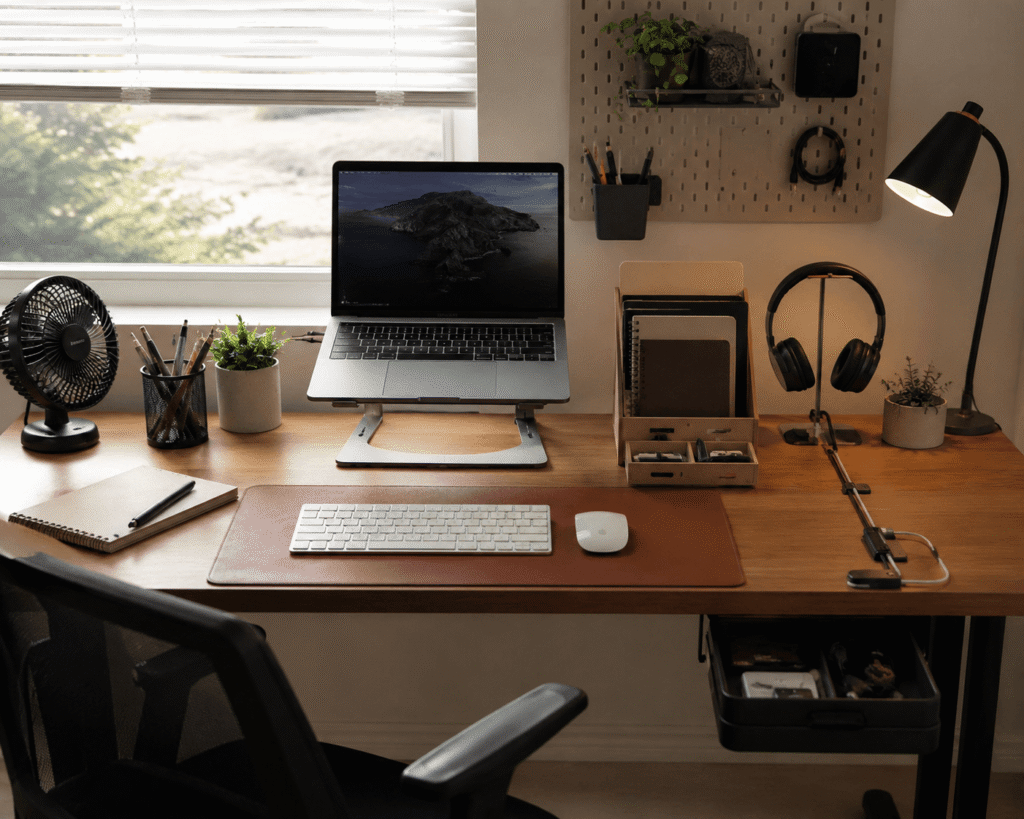
A desk doesn’t have to be expensive to be comfortable, organized, and genuinely pleasant to use. In fact, some of the most annoying workspace problems—tangled charging cables, poor screen positioning, scattered supplies, or uncomfortable wrists—can often be improved with surprisingly simple accessories.
That’s especially useful if you’re working from a small home office, studying in a bedroom, or simply don’t want to spend hundreds of dollars rebuilding your setup.
The best desk accessories under $15 focus on fixing one specific everyday frustration without adding unnecessary clutter. A small change in the right place can make your desk easier to use every single day.
Below are 10 practical upgrades for comfort, organization, productivity, and small spaces. Students can also explore our best student desk setup accessories for more ways to build a functional workspace without overcomplicating it.
Quick Picks
Best Overall: Gogoonike Adjustable Laptop Stand — a practical way to raise your screen and make an everyday laptop setup more comfortable.
Best Budget Option: edooi Monitor Memo Board — an inexpensive way to keep reminders visible without covering your desk in sticky notes.
Best for Small Desks: Bostitch Konnect Under Desk Drawer — useful storage that takes advantage of space underneath your desktop.
Prices are approximate and may change. Ratings and review counts reflect current product data.
Everyday Upgrades for Better Comfort
Gogoonike Adjustable Laptop Stand

Working directly from a laptop for hours often means looking downward without realizing it. By the end of the day, that awkward screen position can make an otherwise comfortable workspace feel less inviting.
Getting the display closer to eye level can create a more natural setup, which is where the Gogoonike Adjustable Laptop Stand becomes useful. At around $12.98 with a 4.7-star rating from 1,230+ reviews, it’s one of those upgrades many people don’t think about until they try it.
The stand is adjustable, foldable, and ventilated, making it particularly helpful for remote workers and students who spend long periods reading, writing, or attending video calls.
Imagine sitting down in the morning and adjusting the screen instead of adjusting your entire posture around the laptop. Pair it with an external keyboard when possible, and even a modest setup can feel more intentional. For students who work primarily from a notebook computer, our guide to the best laptop accessories for students has more ideas.
The Gogoonike Adjustable Laptop Stand is one of those upgrades that feels small until you use it every day.
Aothia Leather Desk Pad

If your keyboard slides around, your mouse constantly reaches the edge of its pad, or your desktop feels like a collection of unrelated objects, the workspace can become distracting.
A more defined work area often makes the entire desk feel calmer. The Aothia Leather Desk Pad creates that boundary while giving your keyboard and mouse a consistent surface. It’s around $8.99 and carries a 4.6-star rating from 78,902+ reviews.
People sometimes overlook desk mats because they seem mostly decorative, but their usefulness goes beyond appearance. This one provides a non-slip, water-resistant surface that can also help protect the desktop from everyday wear.
It’s especially useful on shared desks, inexpensive tabletops, or surfaces that aren’t ideal for a mouse. Put your laptop, keyboard, and mouse within the mat area, and you immediately have a clearer work zone.
The Aothia Leather Desk Pad is a simple improvement you may notice more than expected.
Lamicall Cord Organizer

Charging cables have an annoying habit of disappearing behind the desk the moment you unplug something. Even a relatively clean setup can quickly feel messy when several loose cords are hanging around.
Keeping those cables accessible makes switching between devices much easier. The Lamicall Cord Organizer gives frequently used cords dedicated spots instead of letting them fall behind your workspace. The eight-pack costs around $8.99 and has a 4.7-star rating from 4,115+ reviews.
The spring-powered clips are particularly useful for anyone regularly connecting a phone, laptop, headphones, or other USB-powered devices. Their small footprint also means you don’t need to introduce another bulky organizer.
For example, your charging cable can stay beside your laptop instead of disappearing behind the desk every evening.
The Lamicall Cord Organizer is an easy way to make everyday work feel a little smoother.
Gawerk 5-Section Desktop Organizer

Notebooks, folders, and papers rarely seem like serious clutter individually. Once they start lying flat across a small desk, though, they can consume more usable space than expected.
The goal isn’t to hide everything—it’s to give frequently used materials a predictable home. The Gawerk 5-Section Desktop Organizer uses vertical storage to separate files and other desk essentials. It costs around $13.39 and has a 4.4-star rating from 413+ reviews.
This upgrade can be particularly useful for students, home office users, and anyone who frequently switches between notebooks or documents. Instead of stacking everything across the desktop, you can keep several items upright and within reach.
A student, for example, could separate notebooks by class while still leaving most of the desk available for a laptop.
The Gawerk 5-Section Desktop Organizer is a practical improvement that’s easy to appreciate once it becomes part of your routine.
Small Accessories That Make Work Easier
Gimars Gel Memory Foam Wrist Rest Set

Long typing sessions can become uncomfortable when the edge of the desk or keyboard area puts pressure on your wrists. It’s easy to tolerate at first, but repeated discomfort can make work or study sessions less pleasant.
Creating a softer resting area can make the keyboard zone feel noticeably more comfortable. The Gimars Gel Memory Foam Wrist Rest Set adds cushioning for both keyboard and mouse use. It costs around $13.90 and has a 4.5-star rating from 40,205+ reviews.
It’s particularly useful for people who spend hours typing, editing, studying, or gaming at the same desk. The idea isn’t to force your hands into one position, but to provide a softer place to rest between movements.
During a long writing session, that extra cushioning can make the desk and keyboard area feel less harsh.
The Gimars Gel Memory Foam Wrist Rest Set is a small comfort upgrade that can have a bigger impact than expected.
APPHOME Foldable Headphone Stand

Headphones are surprisingly awkward when they don’t have a dedicated place. Leave them on the desk and they consume useful space; toss them somewhere else and you’re searching for them later.
A dedicated storage spot keeps them accessible without letting them become part of the clutter. The APPHOME Foldable Headphone Stand mounts underneath a desk or on another suitable surface, keeping headphones off the desktop. It costs around $13.99 and has a 4.7-star rating from 2,321+ reviews.
People often treat headphone storage as an afterthought, but this can make sense for anyone who uses a headset daily for meetings, music, studying, or gaming.
Finish a video call, hang the headphones underneath your desk, and they’re ready for the next one instead of sitting on top of your keyboard.
The APPHOME Foldable Headphone Stand is a simple way to reclaim a little desktop space.
edooi Monitor Memo Board

Sticky notes can be useful until they start covering your desk, monitor bezel, and whatever other surface happens to be nearby. Important reminders can quickly disappear into the visual noise.
Keeping a few priorities directly in your line of sight can make reminders easier to manage. The edooi Monitor Memo Board adds dedicated space beside your display for notes and lightweight reminders. The two-piece set costs around $7.59 and has a 4.4-star rating from 3,043+ reviews.
It’s easy to ignore an accessory this simple, but it can be useful for students, busy remote workers, and anyone juggling several small tasks.
You might keep today’s three priorities beside your display rather than opening another productivity app or covering your work surface with sticky notes.
The edooi Monitor Memo Board is a straightforward upgrade for keeping important reminders where you’ll actually see them.
TriPole USB Desk Fan

A warm workspace can become distracting surprisingly quickly, especially in a bedroom office or small room without great airflow. Constantly getting up or changing the room temperature isn’t always convenient.
A little airflow directly around your desk can make the space more comfortable. The TriPole USB Desk Fan provides localized airflow in a compact format. It costs around $8.69 and carries a 4.6-star rating from 3,921+ reviews.
With three speed settings and 360-degree rotation, it can be positioned around your workspace rather than trying to cool the entire room. That’s particularly useful for students in dorms, people working in compact spaces, or anyone whose desk area gets stuffy.
Plug it in during a warm afternoon work session and direct the breeze exactly where you need it.
The TriPole USB Desk Fan shows how a small comfort upgrade can make longer sessions easier to enjoy.
Make Better Use of a Small Workspace
LiFMIRA Clip-On Desk Lamp
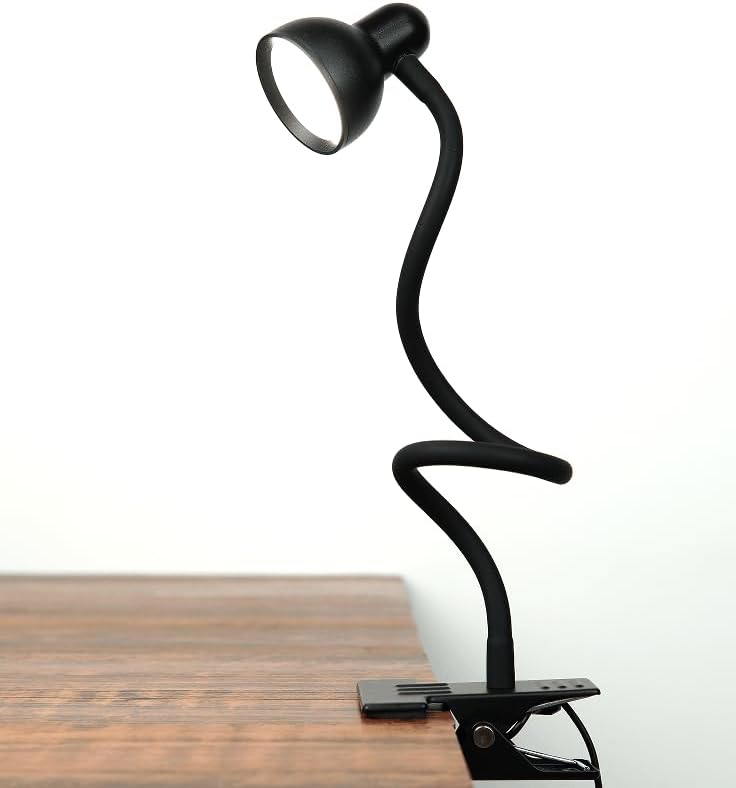
Poor lighting can make evening work unnecessarily tiring, especially when your main room light creates shadows or leaves the desk feeling dim.
Adding focused light gives you more control over the workspace. The LiFMIRA Clip-On Desk Lamp attaches to the edge of a desk and lets you direct light toward your keyboard, notebook, or reading material. It costs around $11.97 and has a 4.5-star rating from 1,636+ reviews.
The flexible gooseneck, three color modes, and multiple brightness settings make it easier to adjust the lighting for different tasks. Because it uses a clamp rather than a traditional lamp base, it can also be useful when desktop space is limited.
During an evening study session, for example, you can illuminate your notes without giving up a large section of your desk.
The LiFMIRA Clip-On Desk Lamp is one of the simplest ways to make a compact workspace more comfortable.
Bostitch Konnect Under Desk Drawer

Small desks become crowded quickly because there’s simply nowhere for little items to go. Even if you own very little, pens, adapters, charging accessories, and other essentials can gradually take over the available surface.
Creating storage without sacrificing desktop space is the ideal outcome. The Bostitch Konnect Under Desk Drawer turns otherwise unused space underneath the desk into accessible storage. The two-pack costs around $13.59 and has a 4.5-star rating from 854+ reviews.
Each slide-out organizer uses adhesive mounting and includes customizable dividers, so smaller accessories can be separated instead of becoming another pile of clutter.
Someone working from a small bedroom desk could keep charging accessories and stationery underneath while leaving the desktop primarily for a laptop and mouse.
The Bostitch Konnect Under Desk Drawer is a smart example of how overlooked space can be more useful than adding another container on top of your desk.
What to Look For Before Buying
Before choosing inexpensive desk accessories, start with the size of your desk. Measure the available surface and check where an accessory will actually sit. A useful organizer can become frustrating if it consumes half of a compact workspace.
Comfort should come next, particularly with stands, wrist supports, lighting, and anything you’ll interact with for several hours at a time. Think about the specific problem you’re trying to fix rather than buying accessories simply because they look good.
Consider your storage needs as well. If the desktop is already crowded, using the space underneath it may make more sense than adding another container on top.
Cable management deserves similar attention. Look at where your power outlet, computer, chargers, and other devices are located before deciding where cables should run.
Finally, consider durability and ease of use. An inexpensive accessory can still be worthwhile if it’s sturdy enough for its intended job and doesn’t create extra work. Simple products that solve one problem well are often more useful than complicated accessories packed with features you won’t use.
Conclusion
Improving a desk setup doesn’t have to mean replacing your furniture or building an expensive home office. Often, the biggest difference comes from fixing the small frustrations you encounter repeatedly.
Better screen positioning can improve comfort. Dedicated places for cables, papers, and supplies can reduce clutter. Better lighting, storage, and simple productivity tools can make it easier to sit down and focus.
The best desk accessories under $15 are ultimately the ones that solve a problem you actually have. Look at your current workspace, identify what annoys you most, and start there.
Even one thoughtful upgrade can make your desk noticeably easier to use. If you want to keep improving your workspace on a modest budget, these study accessories under $50 offer more practical ideas to explore.