
Disclosure: As an Amazon Associate I earn from qualifying purchases.
Introduction
Finding the perfect Christmas gift for a programmer can be surprisingly tricky. They probably already have a computer, a keyboard, and most of the equipment they need. So what can you give them that they’ll actually use?
The answer often lies in the little things that make long coding sessions more comfortable, organized, or enjoyable.
Programmers spend hours switching between windows, typing, debugging code, and solving problems. Even a small improvement to their workspace can make those everyday tasks feel easier.
The best Christmas gifts for programmers don’t have to be expensive or overly technical. Sometimes, a thoughtful desk accessory is more useful than another gadget that ends up sitting in a drawer.
A well-organized workspace also makes a difference. Even something as simple as keeping charging cables accessible with magnetic cable holders can improve a busy desk.
Below are 10 gift ideas that solve real problems, from cluttered desks to uncomfortable work sessions, including a few upgrades programmers might not think to buy themselves.
Quick Picks
- Best Overall: Quntis Monitor Light Bar — A space-saving lighting upgrade for programmers who spend long hours at their desks.
- Best Budget Option: Nettbe Reusable Cable Ties — An inexpensive way to organize tangled cables.
- Best for Small Desks: Quntis Monitor Light Bar — Provides desk lighting without taking up additional desktop space.
Prices are approximate and may change. Ratings and review counts reflect current product data.
Gifts That Make Coding More Comfortable
1. DECOSIS Adjustable Laptop Tripod Stand

Looking down at a laptop for hours can become uncomfortable, especially during long coding sessions.
Raising the screen to a more convenient height can help create a better viewing position. The DECOSIS Adjustable Laptop Tripod Stand offers a height-adjustable platform ranging from 23.5 to 46.5 inches.
Unlike a typical desktop riser, this is a floor-standing tripod design. It also includes a gooseneck phone holder.
That makes it worth considering for programmers who need a separate laptop station or want more flexibility when positioning their equipment.
Imagine using a laptop for reference material beside your main workstation without needing another table.
The DECOSIS Adjustable Laptop Tripod Stand is best suited to setups with enough floor space for a tripod.
Price: ~$34.98
Rating: 4.4 ⭐
Reviews: 6,791+
2. Redragon S101-3 PRO Keyboard and Mouse Combo

Typing for hours on a basic keyboard isn’t always the most enjoyable experience, especially when switching constantly between coding and everyday computer tasks.
A more customizable setup can make those routines feel more personal.
The Redragon S101-3 PRO Keyboard and Mouse Combo includes an RGB-backlit gaming keyboard and mouse, with programmable controls and dedicated macro recording keys.
It’s an interesting option for programmers who enjoy keyboard shortcuts or want to refresh both input devices together.
For example, someone who codes during the day and plays games in the evening could use the same setup for both activities.
The Redragon S101-3 PRO Keyboard and Mouse Combo makes more sense as a complete desk refresh than as a specialized mechanical keyboard upgrade.
Price: ~$39.99
Rating: 4.5 ⭐
Reviews: 51,807+
3. UGREEN Ergonomic Wireless Mouse

Constantly moving between code editors, browser windows, and development tools can make mouse comfort surprisingly important.
A mouse that better suits someone’s hand and working style may make those repeated movements more pleasant.
The UGREEN Ergonomic Wireless Mouse combines an ergonomic design with Bluetooth and 2.4GHz wireless connectivity, quiet clicks, and six buttons.
It also supports connecting to up to three devices, which could be convenient for someone switching between computers.
Picture a programmer moving between a work laptop and personal desktop without needing a separate mouse for each.
The UGREEN Ergonomic Wireless Mouse is a practical gift for someone who values a quieter, more flexible workspace.
Price: ~$18.99
Rating: 4.4 ⭐
Reviews: 2,268+
Practical Gifts for a Cleaner, More Efficient Setup
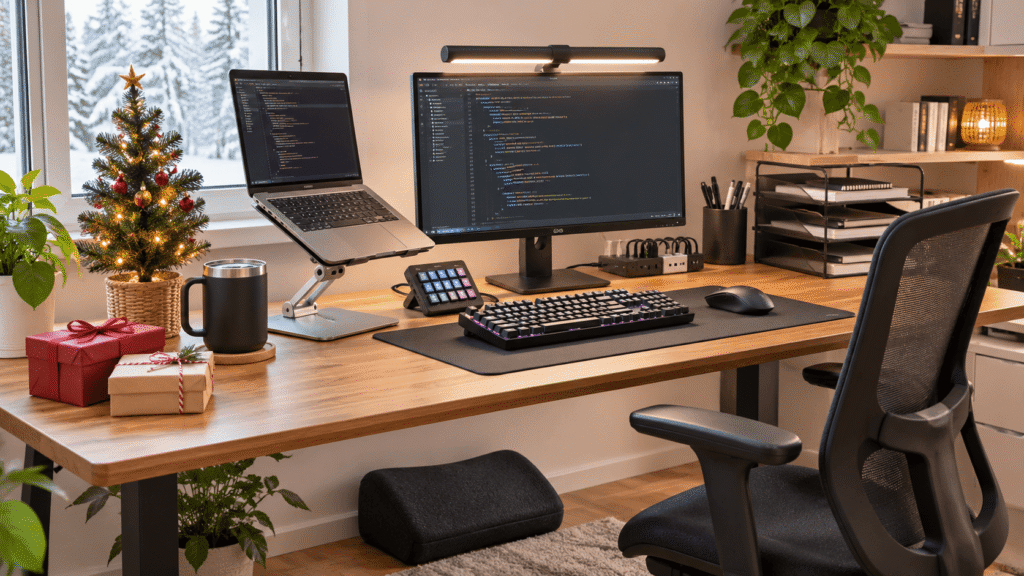
4. Quntis Monitor Light Bar

Late-night coding often means dealing with uneven lighting or a desk lamp occupying valuable workspace.
Better lighting can make a desk more comfortable to use, especially when reading notes or working away from daylight.
The Quntis Monitor Light Bar sits on a monitor and provides USB-powered task lighting with adjustable brightness, auto-dimming, and touch controls.
Its space-saving design makes it particularly appealing for programmers with compact desks.
During an evening coding session, it can illuminate the keyboard area without requiring another lamp on the desktop.
The Quntis Monitor Light Bar is worth considering for anyone who wants more control over their desk lighting without adding clutter.
Price: ~$39.95
Rating: 4.6 ⭐
Reviews: 13,945+
5. Nettbe Reusable Cable Ties

Charging cables, monitor cords, and USB connections can quickly turn a clean programming desk into a tangled mess.
Keeping those cables grouped makes the workspace easier to organize and maintain.
The Nettbe Reusable Cable Ties come in a 60-pack of adjustable hook-and-loop straps designed for cable management.
They’re particularly useful for programmers with multiple connected devices or equipment that gets rearranged occasionally.
Imagine unplugging a monitor or moving a computer without having to untangle several loose cords first.
For more extensive setups, pairing cable ties with under-desk cable trays can help keep larger cable bundles out of sight.
The Nettbe Reusable Cable Ties offer an affordable starting point for a tidier workspace.
Price: ~$6.28
Rating: 4.8 ⭐
Reviews: 14,932+
6. Battony USB-C Multiport Adapter

Running out of convenient connections can become frustrating when a laptop needs to work with an external display and other equipment.
Having essential connections in one place can simplify a workstation.
The Battony USB-C Multiport Adapter provides a multiport connection solution with 4K HDTV output and a USB 3.0 port, according to its product description.
It’s particularly relevant for programmers using compatible USB-C laptops who want to connect an external display.
For example, someone who regularly moves their laptop between different work areas might appreciate having a dedicated adapter ready at their desk.
Check the laptop’s video output support and required connections before choosing it.
The Battony USB-C Multiport Adapter could make a useful addition to a laptop-based programming setup.
Price: ~$18.99
Rating: 4.3 ⭐
Reviews: 11,788+
7. Marbrasse 6-Tier Paper Organizer

Even programmers who work almost entirely digitally can accumulate paperwork, notebooks, printed documents, and study materials.
Without dedicated storage, those items often end up scattered across the desk.
The Marbrasse 6-Tier Paper Organizer provides six mesh letter trays for organizing documents and folders, along with a carrying handle.
It’s especially useful for programming students, remote workers, or anyone who keeps printed reference material nearby.
Imagine separating coursework, project notes, and important documents into different trays instead of stacking everything beside the keyboard.
The Marbrasse 6-Tier Paper Organizer is a practical choice for someone who needs organized paper storage and has room for a desktop tray system.
Price: ~$19.99
Rating: 4.7 ⭐
Reviews: 5,504+
Thoughtful Gifts for Long Coding Sessions
8. ComfiLife Adjustable Memory Foam Footrest

Sitting comfortably isn’t only about having a good chair. Feet that don’t rest properly can make it harder to find a comfortable working position.
Additional support beneath the desk may help make extended sitting more pleasant.
The ComfiLife Adjustable Memory Foam Footrest offers a memory foam design with adjustable height for use beneath office or gaming desks.
It’s particularly relevant for programmers whose chair and desk heights don’t allow their feet to rest comfortably on the floor.
During a long debugging session, having a dedicated place to support the feet can make the workstation feel better suited to the user.
The ComfiLife Adjustable Memory Foam Footrest is worth exploring when comfort is the main gift priority.
Price: ~$39.99
Rating: 4.6 ⭐
Reviews: 14,131+
9. BrüMate Müv Insulated Coffee Mug

A hot drink can cool down quickly when someone gets absorbed in solving a complicated programming problem.
Keeping coffee or tea at a more enjoyable temperature is a small convenience that can make winter workdays nicer.
The BrüMate Müv Insulated Coffee Mug is a 15-ounce, double-walled stainless steel mug with a handle, lid, and leakproof design.
It’s a thoughtful choice for programmers who enjoy having a drink nearby while coding.
Imagine making coffee before starting a difficult task and being able to return to it without finding it completely cold.
The BrüMate Müv Insulated Coffee Mug combines everyday usefulness with a little extra comfort during long desk sessions.
Price: ~$32.99
Rating: 4.4 ⭐
Reviews: 2,958+
10. VSDINSIDE VSD M18 Macro Pad

Repeating the same commands or switching between applications throughout the day can become tedious.
Having dedicated controls for frequently used actions can make a personalized computer setup more convenient.
The VSDINSIDE VSD M18 Macro Pad features customizable LCD keys and programmable shortcuts, with support for Windows and Mac.
Its listed capabilities include triggering actions in OBS and working with streaming platforms, making it particularly interesting for programmers who also create content or stream.
Picture someone coding during the day and using customized controls to manage a livestream in the evening.
The VSDINSIDE VSD M18 Macro Pad is a more specialized gift, but it could be especially enjoyable for someone who likes customizing their workflow.
Price: ~$54.99
Rating: 4.4 ⭐
Reviews: 819+
What to Look For Before Buying
The best Christmas gift depends on how the programmer actually works.
Start with desk size. Compact workspaces benefit from accessories that don’t occupy much surface area, while larger organizers and floor stands require more room.
Next, consider comfort. Ergonomic accessories should match the person’s body, existing equipment, and preferences.
Think about storage needs and cable management, especially if their desk has several connected devices. For setups with visible power strips and adapters, cable boxes for home offices offer another organization option worth exploring.
Durability matters too. Stable construction, reliable connections, and materials suited to daily use are more valuable than unnecessary features.
Finally, prioritize ease of use and compatibility. A gift that works with their current equipment is usually more welcome than something requiring complicated installation or additional purchases.
When uncertain, choose an upgrade that solves a visible problem rather than guessing their technical preferences.
Conclusion
Finding the best Christmas gifts for programmers becomes easier when you focus on their everyday workspace rather than trying to impress them with complicated technology.
A more comfortable working position, better lighting, organized cables, or convenient programmable controls can improve how their desk feels during long coding sessions.
The most thoughtful gift is often the one that solves a small frustration they experience regularly.
Whether you’re shopping for a programming student, a remote developer, or someone who simply loves spending time at their computer, focus on the improvements they’ll genuinely appreciate.
Small upgrades can make a workspace more comfortable, focused, and organized without requiring an expensive redesign.