
Disclosure: As an Amazon Associate I earn from qualifying purchases.
Working from home sounds great until your desk starts feeling cramped, cluttered, and uncomfortable.
Many people try to improve their workspace by buying random accessories, only to end up with more stuff taking up valuable space. The good news is that creating a comfortable home office does not require a complete makeover or an expensive desk setup.
A few practical upgrades can make your workspace feel cleaner, more organized, and easier to use every day. Whether you work from a dedicated office, a bedroom corner, or a small desk in your living room, these small home office setup ideas can help you build a space that feels better without overcomplicating things.
If you want seasonal inspiration too, this guide on how to refresh your desk setup for summer has more simple ideas for making your workspace feel cleaner and lighter.
Quick Picks
- Best overall: Amazon Basics Adjustable Monitor Stand
- Best budget option: Lamicall Cable Organizer Clips
- Best for small desks: Airlonv Clamp Desk Lamp
Comfort and Ergonomics Upgrades
Amazon Basics Adjustable Monitor Stand
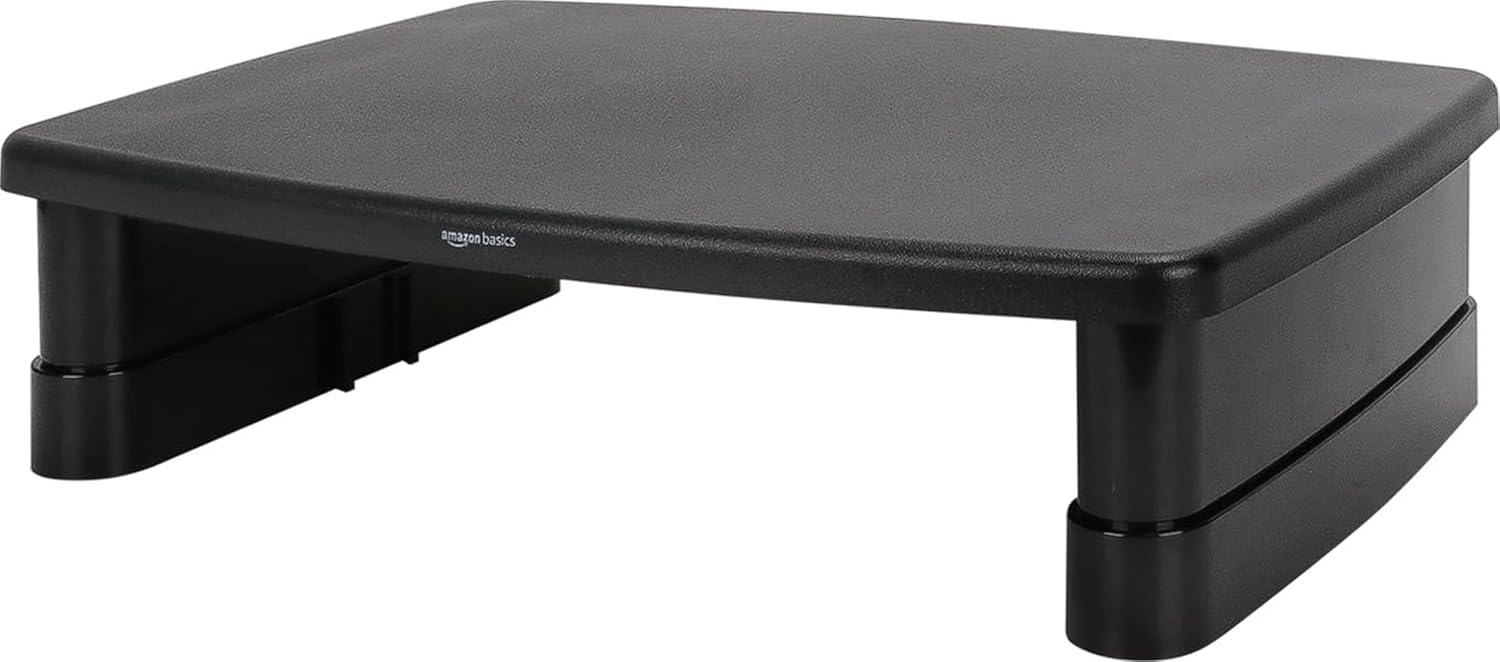
A simple option like this can improve both comfort and organization at the same time.
The Amazon Basics Adjustable Monitor Stand raises your screen closer to eye level, which can help reduce the awkward neck angle that happens when your monitor sits too low. It also creates extra space underneath for a keyboard, notebook, planner, or small accessories.
This is best for remote workers, students, and anyone using a monitor or laptop on a fixed desk.
In real life, this helps when your desk feels crowded but you do not want to buy a bigger desk. You can lift the screen, slide small items underneath, and make the whole surface feel more intentional.
If you just want one easy upgrade that improves comfort and storage, this no-fuss option makes a lot of sense.
A simple addition that makes your desk feel more organized right away.
BlissTrends Adjustable Foot Rest

A tool like this can make long sitting sessions feel more comfortable without changing your whole office setup.
The BlissTrends Adjustable Foot Rest gives your feet a more supportive place to rest while you work. This can help if your chair sits too high, your feet do not rest flat on the floor, or you tend to shift around during the day.
It is best for people who work several hours at a desk and want a small comfort upgrade that does not take up desktop space.
For example, if you often feel pressure in your legs or lower back after a few hours, something like this can make your sitting position feel more stable.
You do not need to overthink this. A simple foot rest is one of those small upgrades that can make your daily setup feel easier to live with.
One of those upgrades you notice almost immediately.
Lamicall Adjustable Laptop Stand

A simple tool like this helps bring your laptop screen closer to eye level.
The Lamicall Adjustable Laptop Stand is useful if your laptop is your main work device. Instead of looking down at the screen all day, you can raise it into a more comfortable viewing position.
It is best for students, remote workers, and anyone who uses a laptop for writing, meetings, studying, or browsing.
In a real setup, this works well when paired with an external keyboard and mouse. Your laptop becomes more like a proper screen, and your desk immediately feels more structured.
If your current laptop setup feels temporary or uncomfortable, this type of upgrade can make it feel more like a real workstation.
Easy to add without changing your entire setup.
Organization Solutions for Smaller Workspaces
Lamicall Cable Organizer Clips

A budget-friendly option like this helps solve one of the most annoying desk problems: loose cables.
The Lamicall Cable Organizer Clips keep charging cords, USB cables, and other small wires in place so they do not constantly fall behind your desk. It is a small product, but it can make your workspace feel much less chaotic.
This is best for anyone who charges multiple devices or has cables running across a small desk.
For example, if your phone charger always slips off the edge of the desk, these clips give it a fixed place to stay. That means less reaching, less searching, and less clutter.
If you are looking for more affordable upgrades, this list of best desk gadgets under $25 is a good place to find other simple add-ons.
A simple addition that makes your desk feel more organized right away.
Yecaye Cable Management Box

A tool like this helps hide one of the biggest sources of visual clutter in a home office.
The Yecaye Cable Management Box is designed to hold power strips and messy cord bundles, keeping them contained instead of exposed on the floor or behind your desk. This can instantly make a workspace look cleaner.
It is best for people with multiple chargers, lamps, monitors, or desk accessories plugged in nearby.
In real life, this is especially helpful if your desk is visible in your room, shows up on video calls, or simply bothers you every time you look at the cables.
If your workspace feels messy even after you clean the surface, something like this can help deal with the clutter underneath.
Easy to add without changing your whole setup.
Bostitch Konnect Under Desk Drawer

A no-fuss option like this adds storage without stealing space from the top of your desk.
The Bostitch Konnect Under Desk Drawer attaches underneath your desk and gives you a place to store small items like sticky notes, pens, charging cables, adapters, and office supplies.
It is best for small desks, shared spaces, and minimalist setups where you want fewer items sitting out.
For example, if your desk always collects random little objects, this drawer lets you hide them while still keeping them easy to reach.
If you are trying to build a cleaner workspace, this under-desk storage upgrade is simple and practical.
One of those upgrades you notice almost immediately.
Productivity and Lighting Improvements
Airlonv Clamp Desk Lamp

A simple option like this improves lighting without taking up much desk space.
The Airlonv Clamp Desk Lamp attaches to the edge of your desk, which makes it useful for smaller workstations. The flexible neck helps you point light where you need it, whether you are reading, writing, studying, or working late.
It is best for people who want better lighting but do not have room for a traditional lamp base.
In real life, this helps when your room lighting feels too dim, especially during early mornings or evening work sessions. Better lighting can make your setup feel more focused and less tiring.
For more practical upgrades like this, you can also check these home office accessories for productivity.
Easy to add without changing your entire setup.
Aothia Leather Desk Pad

A tool like this helps define your workspace and make your desk feel more finished.
The Aothia Leather Desk Pad creates a smooth surface for your keyboard, mouse, laptop, and notebook. It also helps protect your desktop from scratches, spills, and daily wear.
It is best for people who want a cleaner-looking desk without buying lots of decorative accessories.
For example, if your setup feels scattered, a desk pad can visually bring everything together. It creates one clear work zone and makes the desk feel more intentional.
If you want a quick upgrade that improves both comfort and appearance, something like this is easy to add.
A simple addition that makes your desk feel more organized right away.
EURPMASK Rotating Headphone Stand

A no-fuss option like this keeps your headphones off the desk and easy to reach.
The EURPMASK Rotating Headphone Stand clamps underneath your desk, giving your headset or headphones a proper home. It also helps free up desk space and keeps your headphones from getting buried under notebooks, cables, or other accessories.
It is best for remote workers, gamers, students, and anyone who uses headphones daily.
For example, if you take work calls, join online classes, or listen to music while working, having a fixed headphone spot makes your routine smoother.
If your headphones always end up sitting in the way, something like this is a simple fix.
Easy to add without changing your whole setup.
What to Look For Before Buying
When choosing upgrades for a small home office, focus on solving real problems first.
Start with what bothers you most. If your neck hurts, look at screen height. If your desk feels messy, start with cable management or storage. If your space feels dark, improve lighting before buying more accessories.
Keep these simple tips in mind:
- Choose products that solve one clear problem.
- Prioritize comfort before looks.
- Avoid oversized items if your desk is small.
- Look for upgrades that save space.
- Pick items that are easy to add without rearranging everything.
- Start with one or two upgrades instead of buying too much at once.
You do not need to overthink this. A comfortable home office setup is usually built through small, useful improvements.
Conclusion
A small home office can still feel comfortable, clean, and productive.
You do not need a large room, a luxury desk, or a complete redesign. Simple upgrades like a monitor stand, laptop riser, desk lamp, cable clips, or under-desk storage can make your workspace easier to use every day.
The goal is not to create a perfect setup. The goal is to make your desk feel calmer, more organized, and more comfortable so you can focus on the work in front of you.
If you want to keep improving your workspace, explore more productivity desk setup ideas that are practical, affordable, and easy to add.