
Disclosure: As an Amazon Associate I earn from qualifying purchases.
A desk can technically have everything you need and still feel frustrating to use. Your laptop sits too low, charging cables wander across the surface, small items pile up around the keyboard, and after a few hours, finding a comfortable sitting position becomes increasingly difficult.
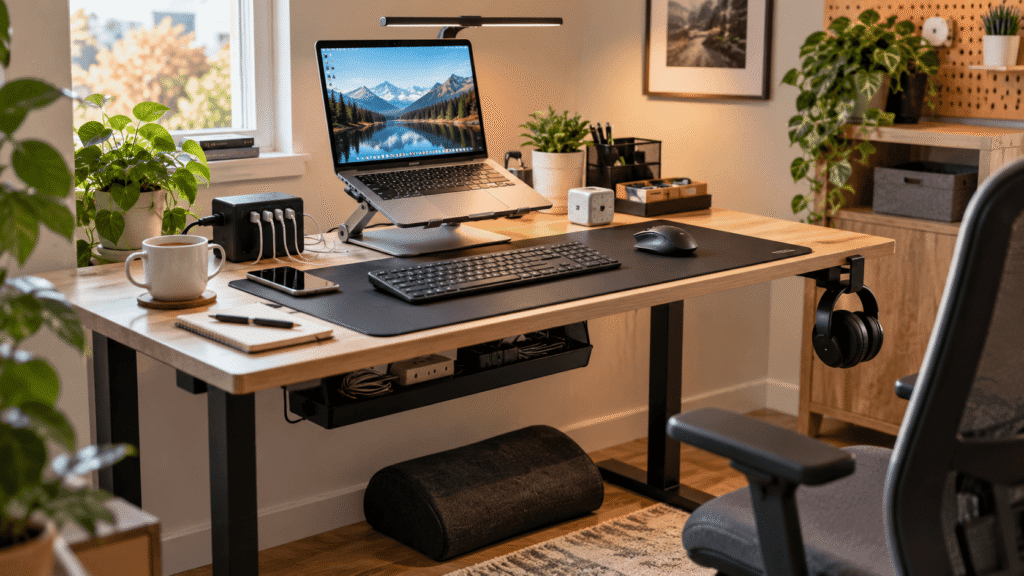
Prime Big Deal Days can be a useful time to look at the small upgrades you’ve been putting off rather than completely rebuilding your workspace. The best desk gadgets aren’t necessarily flashy. They’re the things that quietly remove annoyances you deal with every day.
This list focuses on practical upgrades for remote workers, students, and anyone trying to get more from a small home office. Some improve ergonomics, others reclaim desk space, and a few simply make it easier to stay focused.
If you’re starting from scratch, these budget desk accessories for beginners offer even more practical ideas without requiring a complete desk makeover.
Quick Picks
Best Overall: Lamicall Laptop Stand — a versatile adjustable stand for improving laptop positioning at an everyday desk.
Best Budget Option: EURPMASK Rotating Headphone Stand — an affordable way to move headphones off the desktop while keeping them within reach.
Best for Small Desks: Univivi Under-Desk Cable Management Tray — a practical option for moving cords and power accessories away from limited desktop space.
Prices are approximate and may change. Ratings and review counts reflect current product data.
Ergonomic Upgrades for a More Comfortable Desk
Lamicall Laptop Stand

Working directly from a laptop often means looking down at the screen for hours. It’s easy to tolerate at first, but that position can become uncomfortable during longer work or study sessions.
Getting the display closer to a more comfortable viewing position can change how the entire setup feels. The Lamicall Laptop Stand is adjustable and foldable, giving you more control over where your laptop sits without permanently changing your workspace.
Approx. price: ~$35.99
Rating: 4.7 ⭐
Reviews: 10,462+
It’s particularly useful for remote workers and students who want to raise their computer from the desktop. Picture starting a long writing session with the screen positioned higher instead of sitting flat beside your keyboard.
Because a laptop already works perfectly well on a desk, a riser is easy to overlook. The Lamicall Laptop Stand is the kind of straightforward adjustment that can make an everyday setup feel more intentional.
KTRIO Large Desk Mat

A keyboard sliding around, a mouse reaching the edge of a tiny pad, and small marks appearing on the desktop can make an otherwise good setup feel unfinished.
The KTRIO Large Desk Mat creates a generous work surface for both your keyboard and mouse. Its micro-weave cloth surface, non-slip rubber base, stitched edges, and water-resistant coating are designed for everyday desk use.
Approx. price: ~$12.99
Rating: 4.7 ⭐
Reviews: 40,741+
This makes sense for students, remote workers, and gamers who frequently switch between typing and mouse-heavy tasks. Instead of managing separate little zones around the desk, you get one defined area for the equipment you use most.
At roughly $13, the KTRIO Large Desk Mat is also one of the more accessible upgrades on this list. It’s simple, but you’ll interact with it almost every minute you’re sitting at your desk.
ComfiLife Foot Rest

Sometimes the chair isn’t the entire reason a sitting position feels wrong. If your feet don’t rest comfortably, you may constantly shift around trying to find a better position.
The ComfiLife Foot Rest provides a dedicated place for your feet and uses memory foam with an adjustable-height design. That makes it easier to adapt the footrest to how you actually sit rather than simply adding another fixed object underneath the desk.
Approx. price: ~$34.19
Rating: 4.6 ⭐
Reviews: 14,066+
It’s worth considering when your desk and chair heights leave your feet needing more support. During a long afternoon at the computer, having a consistent place to rest them can be more noticeable than expected.
Before making larger changes to your workstation, the ComfiLife Foot Rest gives you a relatively simple ergonomic variable to experiment with.
DMcore Canvas Foot Rest Hammock

Long sessions at a desk can become uncomfortable simply because your legs stay in essentially the same position for too long. Sometimes you don’t need a completely different chair—you just want another place to put your feet.
The DMcore Canvas Foot Rest Hammock hangs beneath the desk and provides an adjustable resting spot without adding another item to the floor.
Approx. price: ~$15.91
Rating: 4.2 ⭐
Reviews: 2,153+
People who enjoy changing positions while working may appreciate this approach most. During a long editing or study session, you can move your feet onto the hammock rather than keeping them planted in the same position.
The DMcore Canvas Foot Rest Hammock won’t be essential for every workstation, but it’s an interesting comfort upgrade when you prefer a less conventional footrest.
Organization and Small-Space Desk Gadgets
Univivi Under-Desk Cable Management Tray

Nothing makes a small workspace look crowded faster than power cords, chargers, and adapters running in every direction.
Moving that clutter underneath the desk creates a cleaner surface without requiring you to remove anything useful. The Univivi Under-Desk Cable Management Tray offers a 36-inch fabric cable tray with both clamp and screw mounting options.
Approx. price: ~$39.99
Rating: 4.6 ⭐
Reviews: 887+
It’s especially useful for setups where several devices create excess cable length around the desk. Instead of repeatedly moving cords out of the way, you can give them a dedicated area underneath the work surface.
The Univivi Under-Desk Cable Management Tray is especially relevant when desktop space is already limited. For other approaches, our guide to compact cable management solutions covers more ways to control cable clutter in tight setups.
MGRNPONY 10-Port USB-C Charging Station

Running out of convenient charging connections usually becomes annoying at exactly the wrong moment. Your phone needs power, another device needs plugging in, and suddenly you’re swapping chargers around the desk.
The MGRNPONY 10-Port USB-C Charging Station puts 10 charging ports into a single station. The supplied product information lists 320W total output and up to 65W laptop charging, making it particularly relevant to desks with several rechargeable devices.
Approx. price: ~$32.99
Rating: 4.5 ⭐
Reviews: 2,637+
Remote workers and students who regularly charge multiple pieces of tech stand to benefit most. Instead of keeping several separate charging blocks around the workspace, commonly used devices can share one charging location.
The appeal of the MGRNPONY 10-Port USB-C Charging Station is largely about convenience: fewer charging accessories competing for space and fewer small interruptions when something needs power.
EURPMASK Rotating Headphone Stand

Headphones have an annoying habit of occupying far more desk space than expected. Leave them beside the keyboard and they’re always in the way; move them somewhere else and you’ll eventually wonder where you put them.
The EURPMASK Rotating Headphone Stand clamps to the desk and provides a 360-degree swiveling hook underneath it. It also includes cable organization, soft rubber pads, and a clamp designed to avoid leaving residue.
Approx. price: ~$11.99
Rating: 4.7 ⭐
Reviews: 29,282+
This makes particular sense on compact desks where every few inches matter. Finish a call, place your headset underneath the desk, and you’ve immediately reclaimed the space it would otherwise occupy.
At around $12, the EURPMASK Rotating Headphone Stand is a good example of using otherwise wasted desk-edge space instead of adding more storage on top.
Marbrasse Expandable Desk Drawer Organizer

Pens, adapters, sticky notes, and other tiny objects rarely seem like clutter individually. Together, they can turn a desk drawer into a frustrating pile surprisingly quickly.
The Marbrasse Expandable Desk Drawer Organizer uses an expandable mesh tray with 10 adjustable compartments and five dividers, allowing small office supplies to be separated instead of collecting in one space.
Approx. price: ~$20.99
Rating: 4.6 ⭐
Reviews: 1,629+
It’s particularly useful when the same desk handles several activities—work during the day, studying at night, or creative projects on weekends. Instead of digging through a drawer for one small item, frequently used supplies can have predictable places.
The Marbrasse Expandable Desk Drawer Organizer shows why organization doesn’t necessarily mean owning fewer things. Sometimes the biggest improvement comes from giving the little stuff somewhere sensible to go.
Productivity and Lighting Upgrades
Quntis Monitor Light Bar

Even a bright room can leave the immediate desk area feeling dim, especially during evening work. Adding another traditional lamp isn’t always appealing when surface space is limited.
The Quntis Monitor Light Bar sits at the monitor rather than occupying the desktop. It offers auto-dimming, adjustable brightness, touch controls, and USB-powered LED task lighting.
Approx. price: ~$39.95
Rating: 4.6 ⭐
Reviews: 13,811+
Students studying after sunset and remote workers who regularly use their desks in the evening may find this especially useful. Imagine opening a notebook beside your keyboard and having task lighting available without squeezing a conventional lamp into a corner.
The space-saving design is what makes the Quntis Monitor Light Bar particularly interesting for smaller workstations. Better-controlled lighting can be one of those improvements that’s easy to ignore until you experience the difference.
COWVTUJ Pomodoro Timer Cube

The hardest desk problem isn’t always physical clutter. Sometimes you sit down to work, check one notification, open another tab, and suddenly twenty minutes have disappeared.
The COWVTUJ Pomodoro Timer Cube creates a dedicated way to time work sessions without relying entirely on your phone. It includes preset 5-, 10-, 25-, and 50-minute timers, a custom countdown, gravity-sensor controls, and both sound and vibration alarm modes.
Approx. price: ~$21.99
Rating: 4.7 ⭐
Reviews: 684+
It’s a natural fit for students, writers, freelancers, and remote workers who prefer clearly defined work periods. Set a 25-minute session, move your phone out of immediate reach, and give one task your attention until the timer finishes.
The COWVTUJ Pomodoro Timer Cube won’t magically create focus, but it can make structured work sessions easier to start. Sometimes removing the need to check your phone is useful in itself.
What to Look For Before Buying
Start with your desk size. Measure the usable surface and check the space underneath before choosing organizers, stands, or clamp-on accessories. A gadget that creates more clutter defeats the purpose.
Think about comfort next. Ergonomic accessories should make sense with your existing chair, desk height, and normal working position rather than forcing you into an unfamiliar setup.
Your storage needs matter too. If clutter consists mostly of cables, prioritize cable management. If pens, adapters, and smaller objects are the problem, drawer organization may provide a more noticeable improvement.
For powered accessories, consider how they’ll fit into your existing cable management instead of adding another messy wire. If power strips and charging blocks are part of the problem, our guide to the best cable boxes for home offices is another useful place to look.
Finally, consider durability and ease of use. Desk gadgets are handled constantly. An accessory that’s awkward to adjust, mount, clean, or access can quickly become something you stop using.
The best choice is usually the one that solves a specific annoyance you already experience.
Conclusion
A better desk doesn’t require replacing everything at once. Small changes can noticeably improve comfort, focus, and organization when they’re chosen around problems you actually encounter.
Start with whatever bothers you most. That might mean raising your laptop, moving cables underneath the desk, creating a proper place for headphones, improving evening lighting, or simply making focused work easier.
From there, explore the upgrades that fit your available space and daily routine. If you’re building your workspace gradually, our guide to budget desk accessories for beginners has more ideas for prioritizing useful changes.
The goal isn’t to fill your workspace with gadgets. It’s to make the desk you already have easier and more enjoyable to use every day.