
Disclosure: As an Amazon Associate I earn from qualifying purchases.
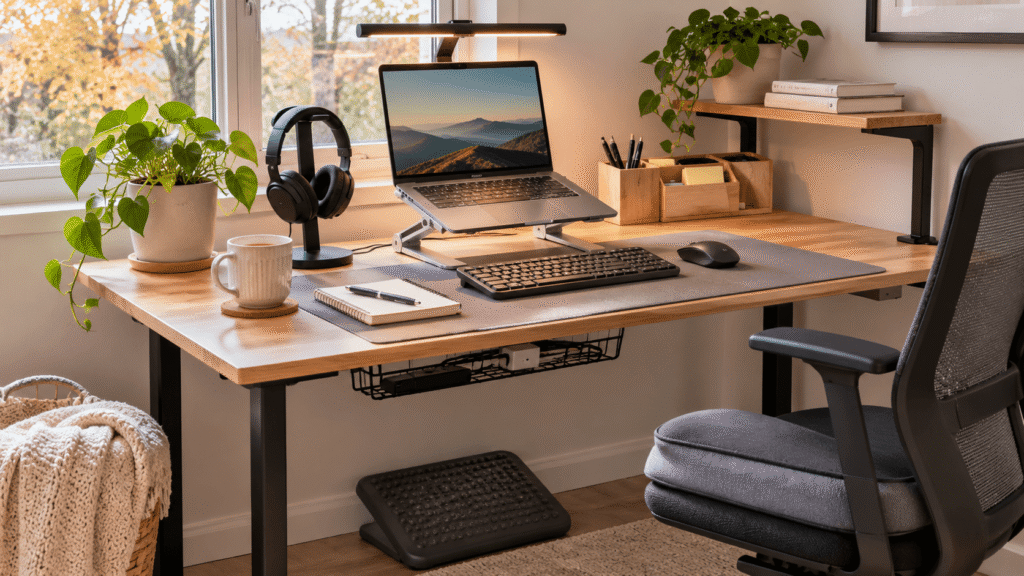
Your desk probably started with good intentions. A laptop, maybe a notebook, a coffee mug. Then the chargers piled up. The cables multiplied. Your neck started complaining after long Zoom calls. Somewhere along the way, working at your desk began to feel like a chore instead of a place where you get things done.
Here’s the good news: you don’t need a whole new office. Most desk problems come down to a handful of small, fixable issues — poor screen height, tangled wires, nowhere to put things, and furniture that doesn’t quite fit your body. Fix those, and the same desk suddenly feels different.
The upgrades in this guide are practical, affordable, and chosen specifically for compact or everyday desk setups. None of them require a redesign. Each one solves a real problem you’ve probably noticed but haven’t gotten around to addressing. If you’re working with a smaller desk setup, these picks were chosen with limited space in mind.
By the end, you’ll know exactly which upgrades are worth your attention — and which ones might surprise you with how much difference they make.
Quick Picks
Best Overall: LOXP Adjustable Laptop Stand — a rotating laptop riser that brings your screen closer to eye level and frees up space underneath.
Best Budget Option: Nettbe Reusable Cable Ties — a 60-pack of cord straps that cleans up visible clutter for very little cost.
Best for Small Desks: VIVO Clamp-on Keyboard and Mouse Tray — a slide-out platform that keeps your main desktop open and usable.
Upgrades That Improve Comfort and Posture
LOXP Adjustable Laptop Stand

Price: ~$27.99
Rating: 4.6 ⭐
Reviews: 2,564+
Laptop screens sit too low. You end up hunching forward hour after hour, and by mid-afternoon your neck and shoulders are letting you know. It’s a problem almost everyone has, and almost everyone ignores — until the discomfort starts cutting into focus.
Raising your screen closer to eye level changes how you sit. Your shoulders relax, your neck straightens, and long work sessions stop feeling like a physical strain. The LOXP Adjustable Laptop Stand is one of the most direct ways to make that happen, with a 360-degree rotating base and a foldable design that fits laptops including MacBook Pro and Air models.
People often skip this upgrade because they assume it’s only for serious gamers or office professionals. In reality, anyone who spends more than an hour a day on a laptop benefits. A student writing papers at a kitchen table and a remote worker on back-to-back calls face the same problem.
Picture this: you set the stand at the angle you like in the morning, slide your laptop onto it, and pair it with an external keyboard. By the afternoon, you notice you’re not rubbing your neck during meetings. That’s the kind of quiet improvement that sticks.
For most people, the rotating base is the detail that makes the LOXP Adjustable Laptop Stand easy to live with — you can swing the screen toward a coworker or angle it away from glare without moving the whole setup. It’s one of those upgrades that feels small until you use it every day.
ComfiLife Foot Rest

Price: ~$39.99
Rating: 4.6 ⭐
Reviews: 14,130+
Hours of sitting add up in subtle ways. Your feet stay flat on the floor, your legs get stiff, and by late afternoon you’re shifting in your chair trying to get comfortable.
An ergonomic footrest lifts your feet to a more natural angle, which can reduce pressure on your lower back and make long sitting sessions feel less draining. The ComfiLife Foot Rest is an adjustable-height memory foam stool designed for exactly this — under a desk, an office chair, or even a gaming chair.
Many people overlook this simple upgrade because the problem builds slowly. It’s easy to blame the chair or the desk when the real issue is that your feet aren’t properly supported.
This suits anyone who works long hours seated — remote workers, students, and home office users alike. It’s especially helpful if your desk is tall enough that your feet dangle or rest uncomfortably.
Picture adjusting the height mid-morning, then noticing by evening that your legs don’t feel as tired as usual. The ComfiLife Foot Rest earns its place because the height adjustment lets you dial in the angle instead of accepting whatever the floor gives you. It’s one of those upgrades that feels small until you use it every day.
ComfiLife Seat Cushion

Price: ~$45.95
Rating: 4.4 ⭐
Reviews: 107,017+
If your chair feels fine for the first hour and unbearable by the third, the problem usually isn’t the chair — it’s the lack of support underneath you. Long sessions on a basic office or dining chair start to show up as back and hip discomfort.
Adding proper cushioning can make a standard chair feel noticeably more supportive. The ComfiLife Seat Cushion combines gel and memory foam in a design aimed at back and sciatica relief, and it’s built to work on office chairs, car seats, and desk chairs alike.
It’s easy to ignore this upgrade until you experience the difference, because most people assume they need a whole new chair. A cushion is a far simpler first step.
This benefits anyone who sits for hours at a stretch — remote workers, students, and home office users who’d rather not replace furniture they already own.
Imagine settling into your chair after lunch and not immediately shifting around looking for a comfortable spot. For a lot of people, that’s the moment the ComfiLife Seat Cushion stops being an accessory and starts being part of the routine. Sometimes the simplest improvements are the ones you notice most.
Upgrades That Tackle Clutter and Organization
VIVO Clamp-on Keyboard and Mouse Tray

Price: ~$54.99
Rating: 4.4 ⭐
Reviews: 14,198+
A cluttered desktop makes everything harder. Your keyboard crowds the space in front of you, your mouse has barely any room, and your wrists hover at an awkward angle because the desk surface sits too high for comfortable typing.
Lowering your keyboard to a position where your arms rest naturally can take pressure off your wrists and shoulders. The VIVO Clamp-on Keyboard and Mouse Tray solves this with a 20″ x 11″ slide-out platform that clamps to your desk and holds up to 11 lbs, then tucks away when you’re done.
Many people overlook this fix because they associate trays with old-fashioned office furniture. But a clamp-on design installs without drilling and keeps your main surface clear.
This one suits anyone whose desk height doesn’t match their body — which is most people, since standard desks are built for averages that don’t really exist. A home office user who types for hours will feel the difference quickly.
Imagine pulling the tray out at the start of your workday, typing with your forearms level, then pushing it back in so your desk looks clean again. The VIVO Clamp-on Keyboard and Mouse Tray is a practical improvement that’s easy to appreciate once it becomes part of your routine.
SUPEASY 5-Tray Paper Organizer

Price: ~$17.99
Rating: 4.5 ⭐
Reviews: 4,853+
Paper has a way of taking over a desk. A few statements, some notes, a stack of mail — and suddenly there’s no clear surface left to actually work on.
A paper organizer gives those stacks a real home. The SUPEASY 5-Tray Paper Organizer uses five mesh letter trays with a handle, so documents stay sorted and within reach instead of drifting across the desktop.
It’s one of those upgrades most people don’t think about until they try it — because the value isn’t in the organizer itself, but in the routine of knowing exactly where things go.
This suits students juggling coursework and home office users who still deal with printed documents. It’s especially helpful on small desks where one vertical stack replaces several loose piles.
Imagine starting work each morning with an uncluttered surface and everything you need right where you left it. With the SUPEASY 5-Tray Paper Organizer, the top tray can hold today’s papers while the rest keeps older documents out of the way. Small upgrades like this often have a bigger impact than expected.
Nettbe Reusable Cable Ties

Price: ~$6.99
Rating: 4.8 ⭐
Reviews: 14,902+
Cables have a way of multiplying. Chargers, monitor cords, keyboard wires — they tangle behind your desk, dangle toward the floor, and make a clean workspace feel impossible.
Getting those wires under control changes how your whole setup looks and feels. The Nettbe Reusable Cable Ties are a 60-pack of adjustable hook-and-loop straps that wrap cords for wire management at home, in the office, or behind an entertainment center.
Many people overlook this because it seems like a cosmetic fix. But tangled cables also make it harder to move equipment, unplug devices, or clean around your desk.
Anyone with more than two devices benefits, but it’s especially useful for small desks where every inch counts. A remote worker juggling a laptop, monitor, and phone charger will notice the difference immediately.
Picture finishing work for the day and your desk looking intentionally tidy — no wires draped over the edge, no mystery cords underfoot. The Nettbe Reusable Cable Ties are an easy way to make everyday work feel a little smoother, and because they’re reusable, you can re-route cords whenever your setup changes.
Upgrades That Support Long Sessions and Focus
Quntis Computer Monitor Lamp

Price: ~$39.95
Rating: 4.6 ⭐
Reviews: 13,921+
Lighting is one of the most overlooked parts of a desk setup. Overhead lights cast shadows on your keyboard, evening light leaves the desk dim, and eye strain creeps in before you notice why you’re tired.
Better lighting can make your workspace noticeably more comfortable. The Quntis Computer Monitor Lamp is a screen-mounted light bar that clips above your monitor and lights your desk without eating up surface space — it includes auto-dimming, touch control, and a glare-reducing design.
Many people overlook this simple upgrade because they assume the room’s lighting is good enough. It usually isn’t — especially for close work like reading or typing.
This benefits students studying in the evening, remote workers with late calls, and anyone on a small desk where a full-size lamp would take up too much room.
Picture turning it on as the afternoon fades, and reading comfortably without squinting or leaning toward the screen. With the Quntis Computer Monitor Lamp, the light goes where you need it and the desk stays clear. An easy way to make everyday work feel a little smoother.
ULSOU Wireless Keyboard and Mouse Combo

Price: ~$34.95
Rating: 4.2 ⭐
Reviews: 2,367+
Wired peripherals add one more cable to manage and one more thing to unplug when you want a cleaner desk. And a flat keyboard with no wrist support starts to feel uncomfortable after a long typing session.
A wireless combo clears the clutter and adds comfort in one step. The ULSOU Wireless Keyboard and Mouse Combo pairs a full-size wave keyboard with a wrist rest and an ergonomic mouse with three-level DPI adjustment, connecting over 2.4G wireless to Windows and Mac systems.
People often skip this kind of upgrade because they assume their current keyboard is fine. It usually is — until the cables and the flat typing angle start to wear on them.
This suits remote workers and students who type for hours and want fewer cables on a small desk. The wave shape and wrist rest are aimed at making long sessions more comfortable.
Imagine clearing the wires off your desktop, setting the keyboard at a natural angle, and typing through an afternoon without your wrists complaining. The ULSOU Wireless Keyboard and Mouse Combo is a practical improvement that’s easy to appreciate once it becomes part of your routine.
BERIBES Bluetooth Headphones

Price: ~$23.99
Rating: 4.5 ⭐
Reviews: 49,076+
Background noise is a quiet productivity killer. A neighbor’s lawnmower, a shared living space, or an open office can pull your focus away every few minutes, and headphones alone don’t always solve it if they’re uncomfortable after an hour.
Comfortable over-ear headphones make it easier to settle into focused work. The BERIBES Bluetooth Headphones are a foldable, lightweight wireless option with a built-in HD mic, fast charging, and up to 120 hours of playback, designed for home office, phone, and PC use.
It’s easy to ignore this upgrade until you experience the difference — most people put up with distracting noise and assume it’s just part of working from home.
This is ideal for remote workers on calls, students in shared spaces, and anyone who needs to block out the room without a bulky headset.
Picture putting them on before a deep-work block, the room going quiet, and finishing a task in half the time it usually takes. The BERIBES Bluetooth Headphones can also switch to calls thanks to the built-in mic, so the same pair covers focus and meetings. Small upgrades like this often have a bigger impact than expected.
Aothia Leather Desk Pad

Price: ~$9.99
Rating: 4.6 ⭐
Reviews: 79,681+
A bare desktop shows every scratch, smudge, and coffee ring. Over time, a well-used desk starts to look worn, and the surface itself doesn’t give your mouse much to work with.
A desk pad protects the surface and gives you a smoother, more consistent work area. The Aothia Leather Desk Pad is a non-slip PU leather mat that doubles as a mouse pad and a waterproof writing surface, sized at 23.6″ x 13.7″ for office and home desks.
Many people overlook this simple upgrade because it seems purely decorative. In practice, it defines your workspace, keeps your mouse tracking consistently, and makes the desk feel more intentional.
This benefits anyone on a small desk who wants one clean zone for keyboard, mouse, and laptop — and anyone who’d rather protect their desk than watch it wear.
Imagine unrolling it across your desktop, setting your keyboard and mouse on top, and getting a workspace that looks put together in about a minute. The Aothia Leather Desk Pad is one of the simplest ways to make your workspace feel more comfortable. If you’re also planning seasonal touches, our fall desk setup ideas for a cozy home office pair well with a fresh desk surface.
What to Look For Before Buying
Before you commit to any upgrade, run through a few quick checks.
Desk size: Measure your available surface first. On small desks, vertical storage and clamp-on options often beat full-size alternatives.
Comfort: Think about where you actually feel strain — neck, wrists, back, or feet — and prioritize the upgrade that addresses it directly.
Storage needs: Match organizers to what you actually keep on your desk, not to what you think you should keep there.
Cable management: Plan where cords will route before adding new devices. One tidy system beats several temporary fixes.
Durability: Look for solid construction and simple mechanisms. Adjustable parts should stay in place once set.
Ease of use: If an upgrade takes effort to set up every day, you probably won’t use it. Choose options that fit naturally into your routine.
Conclusion
None of these upgrades require a new office or a big budget. Each one targets a specific, everyday problem — screen height, clutter, cables, storage, or comfort — and fixes it with something simple.
Start with the issue that bothers you most. If your neck aches, fix screen height first. If clutter drives you crazy, handle storage and cables. You don’t have to do everything at once.
For more workspace organization ideas, explore our best cozy desk accessories for working from home and our best fall desk accessories for a cozy workspace. The best setup isn’t the most expensive one — it’s the one that makes your daily work feel a little easier.