
Disclosure: As an Amazon Associate I earn from qualifying purchases.
A messy desk can make working from home feel harder than it needs to be. Loose cables, poor screen height, bad lighting, and scattered accessories all add small distractions that build up during the day.
The good news is that you don’t need a full office makeover. A few simple desk upgrades can make your workspace feel cleaner, more comfortable, and easier to use.
If you’re building a cleaner setup on a budget, these products are practical, low-risk additions that fit most home offices, study desks, and small workspaces. You can also explore these budget desk setup ideas if you want more ways to improve your space without overcomplicating it.
Quick Picks
- Best overall: Basics Adjustable Monitor Stand
- Best budget option: Alex Tech Cable Sleeve
- Best for small desks: SVNNELP Under Desk Drawer
Prices are approximate and may change. Ratings and review counts reflect current product data.
Desk Organization Accessories
Alex Tech Cable Sleeve
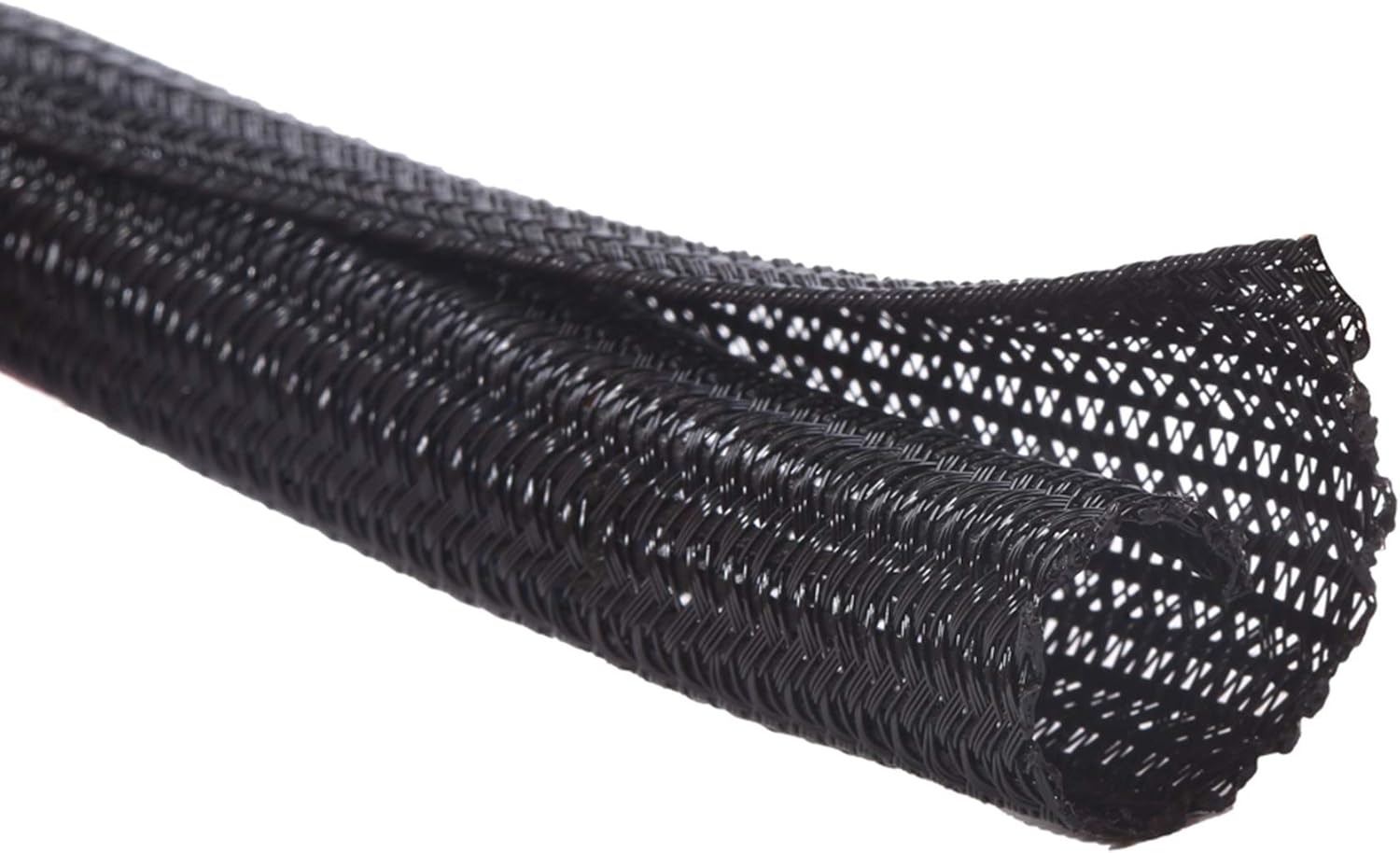
If cables are the first thing you notice when you look at your desk, a simple option like this can clean up the setup quickly.
The Alex Tech Cable Sleeve helps group loose cords together so your desk area looks less messy. It is useful for USB cables, power cords, audio cables, and other wires that usually hang behind a desk.
This is best for remote workers, students, or anyone using a monitor, laptop charger, speakers, and multiple accessories at once. Instead of having wires spread everywhere, you get one cleaner cable line.
A real-life use case is a small bedroom desk where every visible cable makes the space feel more crowded. Something like this helps reduce that visual clutter without changing your whole setup.
A simple addition that makes your desk feel more organized right away.
SVNNELP Under Desk Drawer

For small desks, this type of upgrade is useful because it adds storage without taking up surface space.
The SVNNELP Under Desk Drawer attaches under your desk and gives you a hidden place for pens, sticky notes, chargers, earbuds, and small office supplies.
It is best for people who want a clean workspace but do not have room for a full drawer unit. It works especially well on compact desks, study tables, and minimalist setups.
Imagine sitting down to work and not seeing random items scattered across the desk. That small visual reset can make the whole space feel calmer.
If you want more practical storage ideas, this guide to practical desk accessories is a good next read. A no-fuss option like this is easy to add without changing your entire setup.
Simple Houseware Drawer Organizer

A drawer can still become messy if everything is thrown inside it. A tool like this gives your small supplies a clear place to go.
The Simple Houseware Drawer Organizer has adjustable compartments, which makes it useful for pens, clips, cables, batteries, sticky notes, and everyday office items.
It is best for anyone who already has a desk drawer but struggles to keep it usable. Instead of digging through clutter, you can quickly find what you need.
A real-life scenario is opening your drawer during a meeting and being able to grab a pen or charging cable without searching for it. Something like this keeps your workspace cleaner even when the top of your desk is clear.
One of those small upgrades that makes daily work feel smoother.
Comfort and Ergonomic Upgrades
Basics Adjustable Monitor Stand

A monitor that sits too low can make you lean forward without realizing it. A simple option like this helps raise your screen to a more comfortable height.
The Basics Adjustable Monitor Stand also adds storage space underneath, which is useful for a keyboard, notebook, or small desk accessories.
It is best for remote workers, students, and anyone spending long hours at a screen. Better screen height can make your desk feel more comfortable and less cramped.
For example, if your monitor currently sits flat on the desk, this upgrade can make your setup feel more intentional almost immediately. This type of upgrade is a solid, no-fuss addition to most desks.
Easy to add without changing your whole setup.
Gimars Wrist Rest Set

If your wrists feel tired after typing, a budget-friendly option like this can make your keyboard and mouse area more comfortable.
The Gimars Wrist Rest Set includes support for both keyboard and mouse use. It gives your wrists a softer surface during long writing, studying, gaming, or office sessions.
It is best for people who type daily and want a quick comfort improvement without replacing their keyboard or desk.
A real-life use case is working through a long afternoon of emails, documents, or class notes. Small pressure points become more noticeable over time, and a wrist rest can make the setup feel easier to use.
Something like this is simple, affordable, and easy to place on almost any desk.
One of those upgrades you notice almost immediately.
CloudBliss Foot Rest

A foot rest is easy to overlook, but a no-fuss option like this can make sitting at a desk feel more natural.
The CloudBliss Foot Rest supports your feet and ankles while helping your sitting position feel more stable. It is especially useful if your chair and desk height do not line up perfectly.
This is best for people working from home with basic office chairs, dining chairs, or setups that are not fully ergonomic.
A common scenario is sitting for several hours and constantly shifting because your feet do not rest comfortably. This type of upgrade adds a small layer of comfort without requiring a new chair.
A simple addition that makes long desk sessions feel easier.
Productivity and Small Setup Tools
Basics 7-Port USB Hub

If you constantly run out of ports, a tool like this can make your desk much easier to use.
The Basics 7-Port USB Hub gives you extra connection points for devices and accessories. It is useful for keyboards, mice, flash drives, charging cables, and other small desk tech.
It is best for laptop users, remote workers, and anyone who keeps multiple devices at their desk.
A real-life example is switching between work calls, charging headphones, and plugging in accessories without crawling under the desk or unplugging something else.
For more workspace tech ideas, you can also check these desk gadgets for remote workers. Something like this reduces small daily frustrations quickly.
Easy to add without changing your entire workspace.
Dott Arts LED Desk Lamp

Good lighting can make a desk feel more focused and comfortable. A simple option like this is useful if your room lighting feels too dim or too harsh.
The Dott Arts LED Desk Lamp includes USB ports, multiple color modes, and adjustable brightness. That makes it practical for working, reading, studying, or winding down in the evening.
It is best for students, remote workers, and people using desks in bedrooms or darker corners.
A real-life scenario is working late without wanting to turn on bright overhead lighting. A lamp gives you direct light where you need it while keeping the rest of the room calmer.
This type of upgrade can make your desk feel more comfortable almost immediately.
One of the easiest ways to improve your setup without overthinking it.
Basics Ergonomic Laptop Stand

If you work directly from a laptop, a simple option like this can make the screen easier to view and the desk feel more organized.
The Basics Ergonomic Laptop Stand raises your laptop and helps improve airflow underneath. It is also foldable, which makes it useful for small spaces or hybrid work setups.
It is best for laptop users who want better screen height without buying a full monitor.
A common use case is taking video calls from a laptop that normally sits too low. Raising it can make the camera angle and posture feel better right away.
Something like this works well if you want a cleaner, more comfortable laptop setup.
A solid, no-fuss addition to most desks.
What to Look For Before Buying
Start with your biggest desk problem. If your space feels messy, choose cable management or storage first. If your body feels uncomfortable, start with a monitor stand, wrist rest, foot rest, or laptop stand.
Check your desk size before buying anything. Small setups usually benefit from vertical storage, under-desk storage, and compact accessories.
Prioritize items you will use every day. A desk accessory is only worth it if it solves a real problem in your routine.
Keep the design simple. Neutral, practical accessories are easier to fit into most home office setups and help create a cleaner workspace.
Conclusion
The best desk accessories are not always the most complicated ones. Often, the biggest improvement comes from small upgrades that remove daily friction.
A cable sleeve can clean up visual clutter. A monitor stand can improve comfort. A drawer or organizer can make a small desk feel easier to manage. A lamp or USB hub can make your workspace more practical.
You don’t need to rebuild your entire office. Pick the one problem that bothers you most, fix that first, and build from there.
For more ideas, explore these practical desk accessories every home office needs to keep improving your setup one simple step at a time.