
Working long hours at a computer can slowly take a toll on your body. Many remote workers start the day feeling productive and focused, only to notice stiff shoulders, sore wrists, or lower back fatigue by the afternoon.
The issue usually isn’t the workload itself. It’s the desk setup.
Most home offices start with a simple desk and chair, and over time people adapt their posture to whatever equipment they have. That often leads to awkward angles, unsupported wrists, and screens that sit too low or too high.
The good news is that improving desk comfort doesn’t require a complete office overhaul. A few practical upgrades can dramatically improve posture, reduce strain, and make long work sessions easier on your body.
Prices are approximate and may change. Ratings and review counts reflect current product data.
Below are several affordable and practical upgrades that can make a noticeable difference if you spend many hours at your desk.
Posture Support Upgrades
Better posture is one of the biggest factors in desk comfort. These upgrades help align your body more naturally while you work.
BlissTrends Foot Rest for Under Desk

The BlissTrends Foot Rest for Under Desk is a simple but effective way to improve sitting posture during long work sessions.
It’s a soft ergonomic footrest designed to sit under your desk and support your feet while you work. The cushion-style design includes two adjustable height options, allowing you to raise or lower your feet depending on your chair height.
For many people, their feet don’t rest comfortably on the floor when sitting at a desk. That can lead to leaning forward or putting extra pressure on the lower back.
This footrest helps keep your legs at a more natural angle while supporting the lower body. It can reduce tension in the lower back, hips, and knees during long sitting periods.
The removable washable cover also makes it practical for everyday use in home offices.
It’s particularly helpful for:
- Remote workers sitting most of the day
- Shorter users whose feet don’t reach the floor comfortably
- Anyone experiencing lower back fatigue during long sessions
VIVO Single Monitor Stand (STAND-V001O)

The VIVO Single Monitor Stand is a fully adjustable monitor arm designed to improve screen positioning.
Instead of placing your monitor directly on the desk, this stand mounts to the edge of your desk and allows the monitor to float above the workspace.
The articulating arm makes it easy to adjust height, tilt, and distance from your eyes. This flexibility helps position the screen at proper eye level, which can reduce neck and shoulder strain.
Many people unknowingly work with monitors that sit too low. Over time, that leads to leaning forward and tilting the head downward.
By raising the monitor and allowing better positioning, a monitor arm helps maintain a neutral neck posture throughout the day.
This type of upgrade works best for:
- Desktop computer users
- People working with a single monitor
- Anyone experiencing neck tension during long work hours
Another benefit is that freeing up desk space underneath the monitor can make the workspace feel cleaner and less cluttered.
TushGuard Memory Foam Seat Cushion
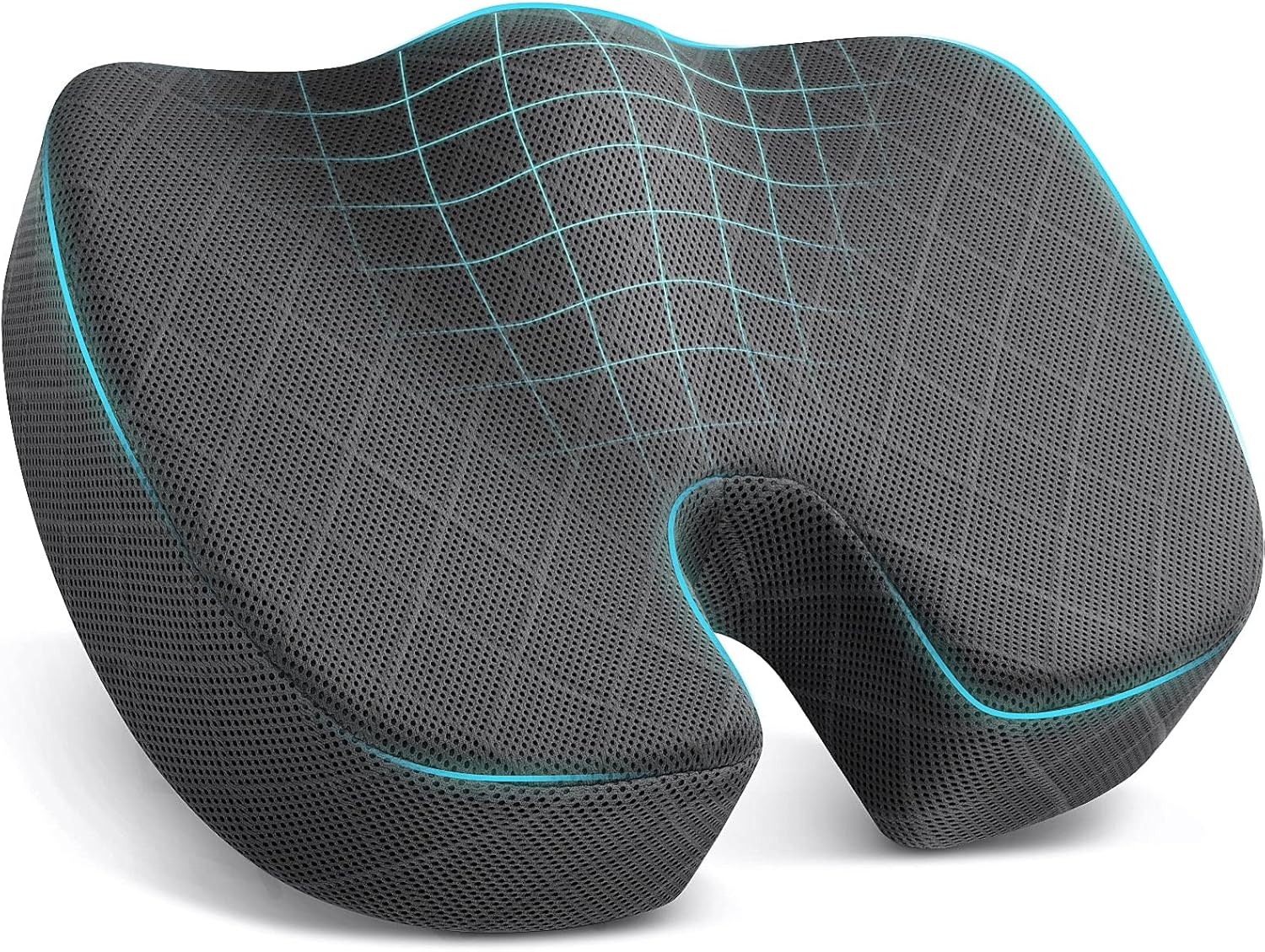
The TushGuard Seat Cushion is designed to improve chair comfort during extended sitting.
Even decent office chairs can become uncomfortable after several hours. Seat padding compresses over time, and pressure can build around the hips and tailbone.
This memory foam cushion helps distribute body weight more evenly across the seat. The ergonomic shape supports the natural curve of the hips while relieving pressure on the coccyx.
For people who sit for most of the day, this type of cushion can noticeably reduce fatigue and discomfort.
It’s a practical upgrade for:
- Remote workers sitting 6–8 hours per day
- Older office chairs that have lost padding
- Anyone dealing with hip or tailbone discomfort
Because it’s portable, it can also be used on car seats or travel chairs when needed.
Hand and Wrist Comfort
Your hands and wrists perform thousands of small movements during the workday. Small ergonomic improvements here can significantly reduce strain.
Vaydeer Memory Foam Wrist and Elbow Rest Pad

The Vaydeer Wrist and Elbow Rest Pad provides extra support for your arms while using a keyboard or mouse.
Unlike traditional narrow wrist pads, this upgraded design is thicker and larger, allowing both the wrist and forearm to rest comfortably on the surface.
Many people unknowingly hold their wrists slightly elevated while typing or using the mouse. Over time, that tension can cause fatigue or discomfort.
This pad helps support the wrist and elbow area with memory foam cushioning, reducing pressure during long typing sessions.
It’s particularly helpful for:
- Writers and programmers
- Gamers or designers using a mouse constantly
- Anyone experiencing wrist strain during long workdays
Adding arm support can make typing feel noticeably more relaxed and stable.
ProtoArc EM11 NL Ergonomic Vertical Mouse

The ProtoArc EM11 NL Vertical Mouse is designed to reduce wrist and forearm strain.
Traditional mice require the hand to sit flat against the desk, which forces the forearm into a rotated position. Over long sessions, this can cause tension in the wrist and arm.
A vertical mouse changes the angle of the hand into a more natural handshake position. This reduces forearm twisting and allows the wrist to remain more relaxed.
The ProtoArc model also includes wireless connectivity and the ability to switch between multiple devices, which can be useful for people working across different computers.
This upgrade is ideal for:
- Designers and editors who rely heavily on mouse input
- Office workers spending hours navigating documents or spreadsheets
- Anyone experiencing wrist fatigue with traditional mice
There may be a short adjustment period, but many users find the ergonomic position much more comfortable over time.
Comfort and Movement During Long Work Sessions
Even with good posture, sitting still for hours can cause stiffness. These upgrades help create a more dynamic and comfortable workspace.
Amazon Basics Adjustable Laptop Stand

The Amazon Basics Adjustable Laptop Stand raises a laptop screen closer to eye level.
When laptops sit flat on the desk, people naturally lean forward to see the screen. This can lead to rounded shoulders and neck strain.
This stand lifts the laptop while allowing airflow underneath through its ventilated design.
It’s also foldable and portable, making it useful for remote workers who occasionally move their workspace.
For the best ergonomic setup, many people pair a laptop stand with an external keyboard and mouse.
This upgrade works best for:
- Laptop-based remote workers
- Hybrid workers using laptops at home and in other locations
- Anyone experiencing neck strain while using a laptop
HUANUO Under Desk Keyboard Tray

The HUANUO Under Desk Keyboard Tray allows your keyboard and mouse to sit slightly lower than the desk surface.
For many desks, the surface is actually too high for comfortable typing. That forces shoulders to lift slightly while typing, which can cause tension in the upper back.
A keyboard tray solves this by lowering the typing position to a more ergonomic level.
The HUANUO tray slides out smoothly and offers adjustable positioning, including rotation for better wrist alignment.
It’s especially useful for:
- Taller desks
- Smaller desks where surface space is limited
- Users who want a more ergonomic typing angle
It can also help declutter the main desk surface by moving the keyboard underneath.
FEATOL Anti Fatigue Standing Desk Mat

For people using standing desks, the FEATOL Anti Fatigue Mat provides cushioning while standing.
Hard floors can quickly cause discomfort in the feet, knees, and lower back during standing sessions.
This thick memory foam mat reduces pressure on joints and encourages small shifts in weight throughout the day.
Those subtle movements improve circulation and make standing work sessions more sustainable.
It’s particularly helpful for:
- Adjustable standing desk users
- Workers alternating between sitting and standing
- Anyone experiencing foot fatigue while standing
Adding a standing mat can dramatically improve comfort for people transitioning to a sit-stand routine.
SKYLEO Adjustable LED Desk Lamp

The SKYLEO LED Desk Lamp helps improve lighting conditions for long hours at the computer.
Poor lighting often causes eye strain because the screen becomes the brightest object in the room. This forces the eyes to constantly adjust.
An adjustable desk lamp provides balanced light across the workspace, reducing contrast between the screen and surrounding environment.
The SKYLEO lamp features a flexible swing arm and adjustable brightness levels, allowing you to position the light exactly where you need it.
It’s a helpful upgrade for:
- Late-night work sessions
- Desks with limited natural light
- People experiencing eye fatigue during screen work
Proper lighting can make a surprising difference in long-term comfort and focus.
What to Look For Before Buying
When choosing desk comfort upgrades, a few simple guidelines can help.
Start with your biggest pain point. Neck discomfort usually means monitor height needs adjustment. Wrist pain may indicate input device issues.
Look for adjustability. Ergonomic products work best when they can be customized to your body and desk setup.
Avoid clutter. Too many accessories can overwhelm a workspace. Focus on items that solve specific problems.
Prioritize posture first. Screen height, seat comfort, and wrist alignment typically have the biggest impact.
Final Thoughts
Working long hours at a computer doesn’t have to mean constant discomfort. Many desk-related aches come from small ergonomic mismatches rather than major equipment problems.
Simple upgrades like a footrest, monitor arm, or wrist support can dramatically improve posture and reduce strain throughout the day.
The key is making practical improvements that support how you naturally work. When your desk setup fits your body instead of forcing your body to adapt, long hours at the computer become much easier to manage.