
Disclosure: As an Amazon Associate I earn from qualifying purchases.
Introduction
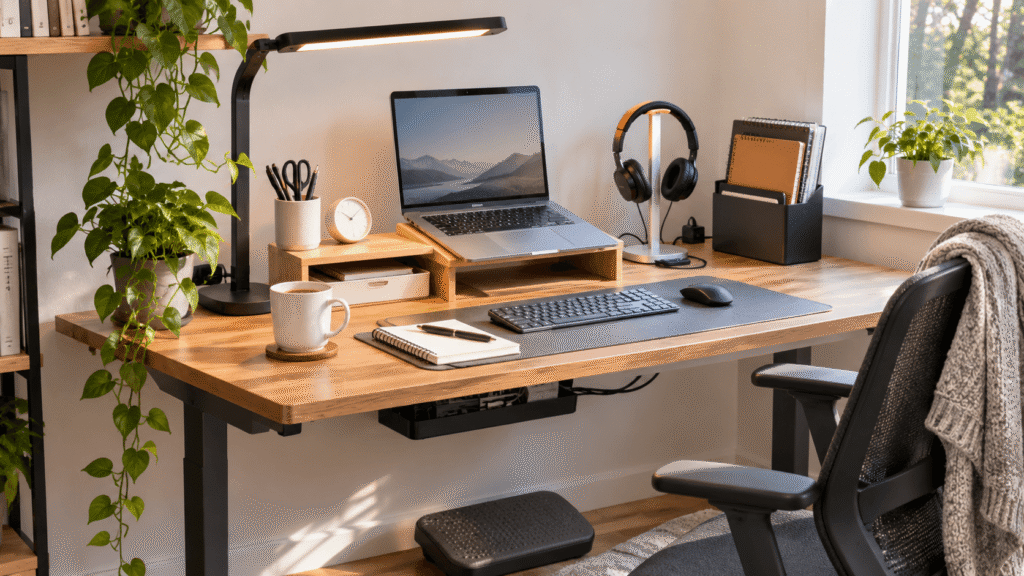
Working from home sounds comfortable until your desk starts creating little frustrations throughout the day. Your screen sits too low, cables get tangled, important notes disappear under paperwork, and your workspace never feels quite organized.
The good news? You don’t need an expensive desk or a complete office makeover to fix these problems.
Some of the best home office upgrades for 2027 are surprisingly simple. Better lighting, smarter storage, or more comfortable seating can change how your workspace feels without requiring much money or extra room.
The trick is choosing improvements that solve problems you actually experience.
Whether you’re working remotely, studying, or using a compact desk in your bedroom, these ten practical upgrades can help you create a more comfortable and productive environment.
If you’re considering a bigger workspace change, our guide to budget-friendly standing desk alternatives offers additional ideas without requiring a complete office makeover.
Quick Picks
- Best Overall: ComfiLife Seat Cushion — Adds cushioning to an existing chair for more comfortable everyday seating.
- Best Budget Option: Aothia Leather Desk Pad — Creates a more organized working surface at an accessible price.
- Best for Small Desks: OMOTON Vertical Laptop Stand — Stores a laptop upright to free up valuable desktop space.
Prices are approximate and may change. Ratings and review counts reflect current product data.
Comfort and Ergonomic Upgrades Worth Considering
1. Urmust Portable Monitor and Tablet Stand

Working with a tablet or portable monitor positioned too low can make your desk feel awkward, especially during longer sessions. Finding a more comfortable viewing angle helps make the setup easier to use.
The Urmust Portable Monitor and Tablet Stand offers an adjustable mounting solution for portable monitors up to 18.5 inches and compatible tablets.
Unlike a conventional desktop monitor riser, this stand is designed for portable displays and tablets, making it more relevant to flexible workspaces.
Students using tablets for reference material and remote workers with portable secondary screens may find it particularly useful.
Imagine keeping a document visible on a raised tablet while working on your main computer. The Urmust Portable Monitor and Tablet Stand can help create that arrangement without relying on a stack of books.
Check your device’s size and mounting requirements before choosing it.
Price: ~$36.99
Rating: 4.5 ⭐
Reviews: 1,525+
2. ComfiLife Seat Cushion

An uncomfortable chair becomes difficult to ignore during long meetings or study sessions. Unfortunately, replacing an entire office chair isn’t always realistic.
Sometimes improving the seat you already own is a more practical starting point.
The ComfiLife Seat Cushion combines gel and memory foam cushioning for use with office chairs and other seating.
It’s easy to focus on desks and monitors while forgetting how much time you spend sitting.
Remote workers using basic dining chairs or older office chairs may appreciate the additional cushioning.
Imagine settling into an afternoon meeting without immediately thinking about your uncomfortable seat. The ComfiLife Seat Cushion is worth considering when your existing chair needs extra padding.
Remember that a cushion won’t necessarily correct poor chair height or replace proper back support.
Price: ~$45.95
Rating: 4.4 ⭐
Reviews: 109,610+
3. Airlonv LED Desk Lamp with Clamp

Late-afternoon work sessions can become frustrating when your workspace gets darker. Overhead lighting may create shadows, while a bright monitor alone doesn’t illuminate paperwork.
Better task lighting makes reading, writing, and organizing documents easier.
The Airlonv LED Desk Lamp with Clamp offers stepless dimming, adjustable color temperature from 2700K to 6500K, and a flexible gooseneck.
Its clamp design also avoids the need for a traditional lamp base on your desktop.
Students, evening workers, and anyone handling physical documents may find this particularly helpful.
For example, positioning the light above a notebook can make handwritten notes easier to see during evening study sessions.
The Airlonv LED Desk Lamp with Clamp is especially worth exploring when you want adjustable lighting without sacrificing desk space.
Price: ~$19.91
Rating: 4.5 ⭐
Reviews: 8,519+
For additional lighting options, explore our guide to desk lamps for small home offices.
Organization Upgrades for Cleaner, Smaller Desks
4. Scanfield Under-Desk Cable Management Tray

Loose charging cables and power cords can make even a tidy workspace look unfinished.
Keeping those connections beneath your desk creates a cleaner appearance and makes everyday organization easier.
The Scanfield Under-Desk Cable Management Tray comes as a two-pack of 17-inch trays designed to hold power strips, chargers, and bundled cords.
Its adhesive installation avoids drilling, although the supplied product information specifies a 24-hour curing period.
This upgrade is particularly useful for setups with multiple connected devices.
Imagine looking beneath your desk and seeing organized cables rather than cords scattered across the floor.
The Scanfield Under-Desk Cable Management Tray offers a practical option for organizing those connections, provided your mounting surface is suitable for adhesive installation.
Keep power equipment accessible and properly ventilated.
Price: ~$31.95
Rating: 4.5 ⭐
Reviews: 6,784+
5. OMOTON Vertical Laptop Stand

A closed laptop can occupy a surprising amount of desk space, especially when you’re already using an external monitor.
Reclaiming that surface makes room for writing, studying, or moving your mouse more comfortably.
The OMOTON Vertical Laptop Stand holds compatible laptops upright instead of flat. Its adjustable design accommodates different laptop sizes, with stated support for devices up to 17.3 inches.
People often overlook vertical storage because keeping a laptop flat feels natural.
It’s particularly useful for compact home offices where every inch matters.
After connecting your laptop to an external display, you can place it vertically beside the monitor and recover valuable working space.
The OMOTON Vertical Laptop Stand is a practical choice for anyone trying to make a smaller desktop feel less crowded.
Check your laptop’s ventilation requirements before using it closed.
Price: ~$23.99
Rating: 4.8 ⭐
Reviews: 9,222+
If you’re comparing different ways to position your computer, our guide to budget laptop stands for small desks covers more possibilities.
6. Marbrasse Expandable Desk Drawer Organizer

Searching through a drawer for a pen, USB drive, or sticky note wastes time and interrupts concentration.
A little structure makes everyday essentials easier to find.
The Marbrasse Expandable Desk Drawer Organizer features a mesh tray design with ten adjustable compartments and five dividers.
This flexibility helps accommodate different collections of office supplies.
Hidden clutter is easy to ignore until you need something quickly.
Students and remote workers who regularly use stationery or small accessories may appreciate having dedicated storage spaces.
Instead of digging through a drawer before a meeting, you can immediately find the item you need.
The Marbrasse Expandable Desk Drawer Organizer is worth considering when your drawer has enough room but lacks useful organization.
Measure the drawer before purchasing.
Price: ~$20.99
Rating: 4.6 ⭐
Reviews: 1,682+
7. Aothia Leather Desk Pad

A desk covered with scattered accessories can feel visually busy, even when everything technically has a place.
Creating a defined working area helps the setup feel more intentional.
The Aothia Leather Desk Pad provides a 23.6-by-13.7-inch surface made from non-slip PU leather, with a waterproof design intended for everyday desk use.
Many people think of desk mats as decorative, overlooking their practical purpose.
They’re particularly useful for protecting a desk surface and creating a consistent area for everyday work.
Imagine placing your keyboard and mouse on one defined surface instead of spreading everything across the desktop.
The Aothia Leather Desk Pad offers an affordable way to make that arrangement feel more cohesive.
Check the dimensions against your desk and preferred mouse space.
Price: ~$9.99
Rating: 4.6 ⭐
Reviews: 79,895+
Productivity and Everyday Convenience Upgrades
8. ComfiLife Adjustable Foot Rest

When your feet don’t rest comfortably on the floor, sitting for long periods can feel awkward.
Supporting your feet can help create a more comfortable seated position.
The ComfiLife Adjustable Foot Rest uses memory foam and offers adjustable height for under-desk use.
It’s frequently overlooked because attention usually goes toward the chair itself.
This upgrade may be especially useful when your desk and chair height make it difficult to keep your feet comfortably supported.
During a long video meeting, having somewhere to rest your feet can make your seating arrangement feel more natural.
The ComfiLife Adjustable Foot Rest is worth considering when your current setup leaves your feet unsupported.
Check your available legroom and choose a position that doesn’t force your knees upward.
Price: ~$39.99
Rating: 4.6 ⭐
Reviews: 14,135+
9. Quartet Glass Desktop Whiteboard

Important reminders can disappear among browser tabs, phone notifications, and digital to-do lists.
Keeping a few priorities visible throughout the day can reduce unnecessary checking.
The Quartet Glass Desktop Whiteboard provides an 18-by-6-inch dry-erase writing surface with storage and an included marker.
It’s easy to underestimate because digital productivity apps seem more sophisticated.
Students, freelancers, and remote workers juggling multiple responsibilities may find it particularly useful.
For example, writing your three priorities before starting work gives you a simple visual reference whenever distractions appear.
The Quartet Glass Desktop Whiteboard offers a convenient place for those reminders without requiring another digital app.
Keep the board focused on current tasks rather than filling it with every possible reminder.
Price: ~$29.76
Rating: 4.8 ⭐
Reviews: 9,945+
10. APPHOME Foldable Headphone Holder

Headphones left on a desk take up space and can get tangled with charging cables.
Giving them a dedicated location keeps the workspace clearer and makes them easier to grab.
The APPHOME Foldable Headphone Holder uses an aluminum clamp-style design for under-desk headphone storage.
Its foldable construction also makes it a practical option when you want the holder out of the way.
Remote workers attending frequent calls and students using headphones daily may appreciate the convenience.
Imagine finishing a meeting and hanging your headphones underneath the desk instead of leaving them beside your keyboard.
The APPHOME Foldable Headphone Holder is a small organizational improvement that can become part of your everyday routine.
Check the available mounting space and make sure the holder won’t interfere with your knees.
Price: ~$16.99
Rating: 4.8 ⭐
Reviews: 8,937+
What to Look For Before Buying
Before choosing home office upgrades, identify the problems that actually affect your daily routine.
Desk size matters. Measure your available surface and under-desk clearance before adding accessories. Compact products are usually more practical for smaller workspaces.
Prioritize comfort. Seating accessories and ergonomic improvements should fit your body, chair, and working position rather than relying on universal comfort claims.
Consider storage needs. Choose organizers based on what you regularly use, not simply how many compartments they offer.
Think about cable management. Make sure cables remain accessible, connections aren’t strained, and electrical equipment has adequate ventilation.
Check durability. Stable construction, secure mounting, and materials suited to daily use matter more than appearance alone.
Keep usability simple. An accessory that requires constant adjustment or gets in your way probably won’t improve your routine.
Also, remember that listed prices and customer ratings can change. Compare the current product details before making a decision.
The best upgrade isn’t necessarily the most expensive. It’s the one that removes a recurring frustration.
Conclusion
Improving your home office in 2027 doesn’t have to involve replacing furniture or redesigning your entire room.
Small, thoughtful upgrades can make a noticeable difference in comfort, focus, and organization.
Start by identifying what bothers you most. Maybe your chair needs additional cushioning, your cables are disorganized, or your desk simply needs more breathing room.
Choose one improvement that directly addresses that problem, then see how it fits into your everyday routine.
If you’re planning a broader workspace refresh, exploring affordable standing desk alternatives can help you consider other practical changes without overspending.
A better home office isn’t about having more accessories. It’s about creating a space that makes everyday work easier.