
Disclosure: As an Amazon Associate I earn from qualifying purchases.
Introduction
A desk that worked perfectly a year ago might not feel quite as comfortable or practical today. Maybe your laptop sits too low, cables keep getting in the way, or your workspace feels crowded before you’ve even started working.
The good news? Improving your setup doesn’t require replacing your desk or spending a fortune.
Some of the best desk upgrades for 2027 are surprisingly simple. A small adjustment to your screen position, better lighting, or smarter storage can make everyday work and study sessions noticeably easier.
The key is choosing upgrades that solve problems you actually experience, rather than filling your workspace with accessories you’ll rarely use.
And if you’re shopping for someone else’s workspace, our guide to useful Christmas gifts under $20 offers more affordable ideas.
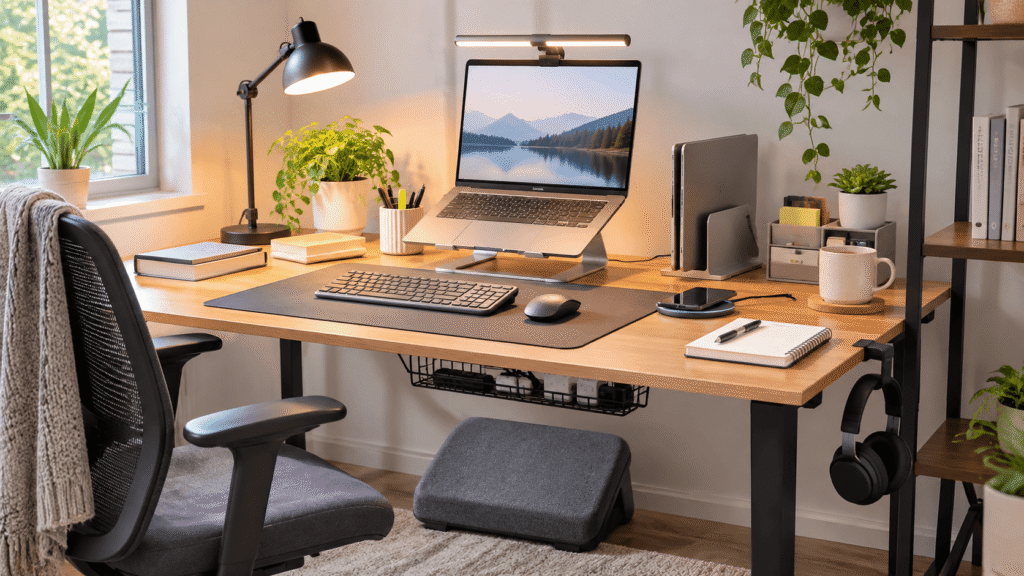
Below are 10 practical upgrades worth considering, whether you’re working remotely, studying for exams, or simply trying to create a more comfortable home office.
Quick Picks
- Best Overall: Lamicall Adjustable Laptop Stand — Raises your laptop screen and folds away when needed.
- Best Budget Option: Yootech Wireless Charging Pad — An affordable way to simplify everyday phone charging.
- Best for Small Desks: Vaydeer Vertical Laptop Stand — Stores laptops vertically to free up desktop space.
Prices are approximate and may change. Ratings and review counts reflect current product data.
Comfort and Ergonomic Desk Upgrades
1. Lamicall Adjustable Laptop Stand

Working on a laptop for several hours often means looking downward at the screen. Over time, that position can become uncomfortable, especially when you’re switching between typing, reading, and video calls.
The Lamicall Adjustable Laptop Stand raises your laptop to a more comfortable viewing position, with an adjustable, foldable design that makes it useful for different workspaces.
Screen height is something people often overlook when arranging their desks.
Remote workers and students who spend long periods reading or attending online meetings may find this particularly helpful.
For example, raising your laptop during an online class can make reading slides easier without constantly leaning forward.
The Lamicall Adjustable Laptop Stand is worth considering when you want better screen positioning without replacing your existing desk.
Price: ~$29.99
Rating: 4.7 ⭐
Reviews: 10,571+
2. Everlasting Comfort Memory Foam Seat Cushion

Even a decent office chair can become uncomfortable during a long afternoon.
Before replacing the entire chair, consider whether the seat itself needs improvement.
The Everlasting Comfort Memory Foam Seat Cushion adds a layer of memory foam cushioning to your existing seat, making it a practical option for improving sitting comfort.
Chair accessories are often overlooked because most people focus on their monitors, keyboards, and desks first.
Students using basic chairs and remote workers who aren’t ready to invest in new furniture may appreciate this upgrade.
Imagine working through a lengthy assignment without constantly searching for a more comfortable sitting position.
The Everlasting Comfort Memory Foam Seat Cushion offers a way to improve your current chair before considering a complete replacement.
Price: ~$47.98
Rating: 4.4 ⭐
Reviews: 106,047+
3. Quntis Monitor Light Bar

Late-night work can feel frustrating when your desk is poorly illuminated, especially if you’re reading handwritten notes or working with documents.
The Quntis Monitor Light Bar provides adjustable LED task lighting with automatic dimming and touch controls.
Unlike lighting that requires additional desktop space, this design mounts on your monitor.
It’s an upgrade people sometimes overlook because they assume their room’s existing lighting is sufficient.
Students who study in the evening and remote workers using compact desks may find it particularly convenient.
Picture reviewing handwritten notes beside your keyboard while adjusting the brightness to suit your surroundings.
The Quntis Monitor Light Bar is a practical choice when better lighting matters but available desk space is limited.
Price: ~$39.95
Rating: 4.6 ⭐
Reviews: 13,952+
4. ComfiLife Adjustable Footrest

Sitting comfortably isn’t only about your chair. When your feet don’t rest properly on the floor, maintaining a relaxed seated position can become difficult.
The ComfiLife Adjustable Footrest provides a memory foam surface beneath your desk, with adjustable height for different seating arrangements.
Foot positioning is easy to forget because most workspace improvements happen above the desktop.
Shorter users and people working with desks that feel slightly too high may benefit from additional foot support.
During a long workday, having a comfortable place to rest your feet can make your seating arrangement feel more natural.
The ComfiLife Adjustable Footrest is worth exploring when your chair feels reasonably comfortable but your feet lack proper support.
Price: ~$39.99
Rating: 4.6 ⭐
Reviews: 14,132+
Organization and Space-Saving Desk Upgrades
5. Scanfield Under-Desk Cable Management Tray

A messy collection of charging cables and power cords can make even a clean desk feel unfinished.
The Scanfield Under-Desk Cable Management Tray helps gather power strips, chargers, and bundled cords beneath your work surface.
The supplied two-pack uses adhesive installation rather than screws, although the adhesive requires a 24-hour curing period.
Cable clutter tends to accumulate gradually, making this an easy improvement to postpone.
Remote workers with several connected devices may especially appreciate having fewer cords spread across their workspace.
Imagine cleaning your desktop without constantly moving tangled cables out of the way.
The Scanfield Under-Desk Cable Management Tray offers a practical way to keep everyday connections organized and less visible.
Price: ~$31.95
Rating: 4.5 ⭐
Reviews: 6,784+
6. Vaydeer Vertical Laptop Stand

A laptop sitting flat on your desk can occupy valuable space even when you’re not using it.
This becomes particularly frustrating in smaller workspaces where every inch matters.
The Vaydeer Vertical Laptop Stand provides adjustable vertical laptop storage with two slots and a space-saving design.
Unlike traditional desk organizers, this accessory focuses specifically on storing laptops and compatible devices.
It’s especially useful for remote workers who connect their laptops to external monitors or students who want more room for notebooks.
For example, storing a closed laptop vertically can free up space for writing or other everyday tasks.
The Vaydeer Vertical Laptop Stand makes sense when you need to reclaim desktop space without changing your entire setup.
Price: ~$13.86
Rating: 4.6 ⭐
Reviews: 3,154+
7. Aothia Leather Desk Pad

A desk covered with separate accessories can sometimes feel visually disconnected, even when everything is reasonably organized.
The Aothia Leather Desk Pad creates a defined working surface for your keyboard, mouse, and everyday essentials.
Made with PU leather, it features a non-slip design and a waterproof surface intended to help protect your desktop.
Desk mats are sometimes dismissed as purely decorative, but a consistent surface can also make a workspace feel more intentional.
Students switching between typing assignments and taking notes may appreciate having a dedicated work area.
The Aothia Leather Desk Pad is a useful finishing touch when you want your desk to feel more organized without adding complicated accessories.
Price: ~$15.99
Rating: 4.6 ⭐
Reviews: 79,867+
8. APPHOME Foldable Headphone Hanger

Headphones are convenient until they start occupying the same space as your notebook, keyboard, or coffee mug.
The APPHOME Foldable Headphone Hanger gives your headset a dedicated storage location beneath your desk.
Its aluminum design uses a clamp-style mount and a foldable hook, making it particularly relevant for workspaces where surface space is limited.
People often overlook headphone storage because leaving a headset on the desk seems harmless.
But for remote workers attending regular meetings or students using headphones for studying, that extra clutter adds up.
Imagine finishing a video call and hanging your headphones beneath the desk instead of leaving them beside your mouse.
The APPHOME Foldable Headphone Hanger is a small organizational upgrade that makes resetting your workspace easier.
Price: ~$16.99
Rating: 4.8 ⭐
Reviews: 8,937+
Everyday Productivity and Convenience Upgrades
9. Yootech Wireless Charging Pad

Reaching for a charging cable whenever your phone needs power can become unnecessarily annoying during a busy workday.
The Yootech Wireless Charging Pad creates a dedicated charging spot for compatible devices, with wireless charging support up to 10W.
It’s an easy convenience upgrade to overlook because traditional charging cables already get the job done.
Remote workers who keep their phones nearby for messages, calls, or authentication codes may find it especially useful.
For example, you can place your phone on the charging pad when starting work and pick it up whenever needed.
Keep in mind that an AC adapter isn’t included.
The Yootech Wireless Charging Pad is worth considering when you want to simplify everyday charging without changing your entire setup.
Price: ~$12.99
Rating: 4.3 ⭐
Reviews: 177,571+
10. BONTEC Foldable Desk Extender

Sometimes your desk feels almost comfortable enough, but your arms don’t have quite the support you’d like while typing or using a mouse.
The BONTEC Foldable Desk Extender provides an additional support surface for your wrist and elbow area.
Its clamp-on design attaches to a desk, while the foldable construction allows the support to move out of the way when it’s not needed.
This type of accessory is often overlooked because people usually associate desk upgrades with storage or electronics.
Remote workers who spend hours using a computer may find the additional arm support worth exploring.
Picture working through a long spreadsheet with an extra surface available to support your arm.
The BONTEC Foldable Desk Extender is a practical option when your desk needs more arm support rather than additional general storage.
Price: ~$29.99
Rating: 4.5 ⭐
Reviews: 1,822+
What to Look For Before Buying Desk Upgrades
Before choosing any accessory, think about the problems you encounter most frequently.
Desk size: Measure your available workspace before buying. Accessories that look compact in photos can still occupy valuable room.
Comfort: Prioritize upgrades that improve your everyday working position, particularly if you spend several hours seated.
Storage needs: Think about what actually takes up space. A vertical laptop holder solves a different problem than a cable management tray.
Cable management: Consider where your devices connect and whether accessories will interfere with cords, outlets, or charging equipment.
Durability: Look for stable construction, practical materials, and designs suited to regular use.
Ease of use: An upgrade should simplify your routine, not introduce extra steps. Pay attention to mounting requirements, compatibility, and maintenance.
For smaller accessories that make useful presents, our guide to stocking stuffers for desk setups offers additional inspiration.
Conclusion
The best desk upgrades for 2027 aren’t necessarily the most expensive or technologically advanced.
They’re the ones that make your workspace more comfortable, organized, and easier to use every day.
Whether you’re improving screen positioning, creating extra storage, or simplifying charging, even a small change can make daily work feel smoother.
Start with the problem that bothers you most and explore the upgrade that addresses it directly.
And if you’re putting together a workspace-themed gift, you can also explore our recommendations for small Christmas gifts for coworkers.
A better desk setup doesn’t have to happen all at once. Sometimes one carefully chosen improvement is enough to make your workspace feel noticeably more practical.