
Disclosure: As an Amazon Associate I earn from qualifying purchases.
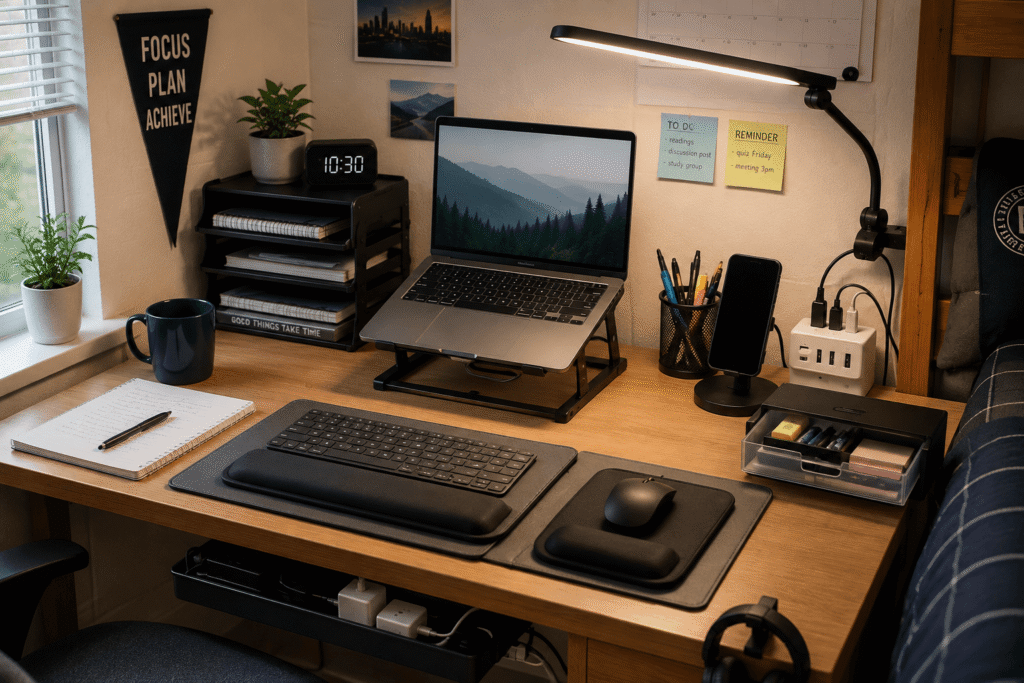
Anyone who has tried to study or work from a dorm room knows how tricky it can be. Space is tight, desks are usually small, and you’re constantly sharing outlets with your roommate. It doesn’t take much for your workspace to start feeling cluttered and stressful, which is the last thing you need when you have assignments piling up. The right accessories can completely change how your desk feels without requiring a major overhaul. A few practical upgrades can help you keep things organized, reduce neck strain, and make better use of your limited space. If you are working with a smaller desk setup, there are plenty of ways to make the most of every inch you have. For more ideas on maximizing compact workspaces, check out our guide to the best small home office accessories. By the end of this guide, you will have a clear list of practical products that can help your dorm desk work better for you, no matter what your day looks like.
Quick Picks
Best Overall: Amazon Basics Adjustable Laptop Stand – A sturdy, portable riser that brings your screen to a comfortable height for studying and streaming.
Best Budget Option: Voncerus Clip-On LED Desk Lamp – Focused, adjustable lighting that saves precious desk surface space.
Best for Small Desks: Aothia Leather Desk Pad – A protective, roll-up mat that keeps your workspace clean and can be stored away when not in use.
Prices are approximate and may change. Ratings and review counts reflect current product data.
Lighting and Ergonomics
Voncerus Clip-On LED Desk Lamp

Problem: Dorm lighting is rarely great. Overhead lights can be harsh, and relying on them often leaves your desk in shadow when you are studying late at night.
Desired outcome: Having consistent, comfortable light that helps you stay focused without creating glare or eye fatigue.
Why overlooked: Many people just assume their desk lighting is good enough and do not realize how much a dedicated lamp can help.
Product: The Voncerus Clip-On LED Desk Lamp attaches directly to the edge of your desk or shelf, pointing light exactly where you need it. It offers three lighting modes and ten brightness levels, along with a memory function that remembers your preferred settings.
Why it works: Clip-on lamps take up no surface space and have a flexible goose-neck design that lets you aim the light toward your notebooks or keyboard. The eye-caring LED technology helps reduce strain during late-night study sessions. With a 4.6 ⭐ rating from over 8,900 reviews and an average price of ~$16.98, it has earned its Overall Pick badge.
Who benefits most: Anyone who studies after dark, shares a room, or needs extra light for detailed work like reading or drawing.
Scenario: You are up late finishing a paper while your roommate sleeps. This lamp gives you just enough light to read your notes without lighting up the entire room or disturbing anyone.
Takeaway: One of the simplest ways to make your workspace feel more comfortable and study-friendly, especially when you cannot control the overhead lighting situation.
Gimars Keyboard and Mouse Wrist Rest Set

Problem: Typing for hours on a laptop or keyboard can leave your wrists feeling achy and tired, especially when you are cramming for midterms.
Desired outcome: A more relaxed typing posture that reduces discomfort and helps you keep going when you have a lot of work to finish.
Why overlooked: Most people focus on the keyboard itself and ignore how their wrists are positioned while typing.
Product: The Gimars Keyboard and Mouse Wrist Rest Set provides padded support for both your keyboard and mouse hand, helping you maintain a more natural wrist angle. It features a silky, gel-infused memory foam surface that conforms to your hands for comfortable support.
Why it works: By keeping your wrists straight, you reduce unnecessary tension in your hands and forearms. The non-slip base keeps the rests firmly in place while you type. With a 4.5 ⭐ rating from over 40,000 reviews and a price of ~$13.90, it’s a popular choice among students and remote workers alike.
Who benefits most: Students who type frequently, remote workers, and anyone who has experienced wrist fatigue during long study sessions.
Scenario: You have three hours of writing ahead of you. With these wrist rests, you are less likely to feel that familiar ache in your hands, which means fewer breaks and more productive time.
Takeaway: A small improvement that often has a bigger impact than expected. Once you get used to the support, it becomes hard to go back to typing without it.
Amazon Basics Adjustable Laptop Stand

Problem: Looking down at your laptop screen for long periods can make your neck and shoulders feel stiff.
Desired outcome: Raising your screen closer to eye level can make long work sessions much more comfortable.
Why overlooked: A lot of students assume a laptop is fine as-is and do not think about posture until discomfort sets in.
Product: The Amazon Basics Adjustable Laptop Stand elevates your screen and allows you to adjust the height to a comfortable viewing angle. Its ventilated design helps keep your laptop cool during extended use, and it folds flat for easy storage.
Why it works: Raising your laptop reduces the angle at which your neck bends downward. The open design also improves airflow underneath the device, which can help it run cooler during marathon study sessions. With a 4.6 ⭐ rating from over 3,600 reviews and a price of ~$29.99, this Amazon’s Choice pick has earned its reputation.
Who benefits most: Anyone who spends several hours a day on their laptop, including students, remote workers, and content creators.
Scenario: You are working on a group project over Zoom and also typing notes simultaneously. This stand keeps the camera at a better angle, helps you sit up straighter, and makes the call feel more natural.
Takeaway: One of those upgrades most people do not think about until they try it. The difference is noticeable from the first study session.
Organization and Storage
Marbrasse Expandable Desk Drawer Organizer

Problem: Small items like pens, sticky notes, earbuds, and chargers tend to scatter across your desk, making it hard to find what you need quickly.
Desired outcome: A clean surface where everything has a designated spot, making your workspace feel calmer and more efficient.
Why overlooked: Many students rely on random cups or pencil holders and never consider a more structured system.
Product: The Marbrasse Expandable Desk Drawer Organizer features a mesh design with adjustable compartments that let you customize the layout to fit your supplies. It comes with five dividers so you can create the perfect arrangement for your pens, sticky notes, and other small essentials.
Why it works: You can adjust the compartments to fit exactly what you need, from pens to sticky notes to earbuds. The expandable design means it adapts to different drawer sizes. With a 4.6 ⭐ rating from over 1,500 reviews and a price of ~$20.99, it’s a popular Amazon’s Choice pick.
Who benefits most: Students with limited drawer space, people who like to see everything at a glance, and anyone who wants a neater desk without overcomplicating things.
Scenario: You have a morning exam and you need a fresh pen. Instead of rummaging through a messy pouch, you grab one from the organizer and get started without the extra stress.
Takeaway: A practical improvement that’s easy to appreciate once it becomes part of your routine. It is one of the simplest ways to maintain a neat desk.
REFLYING Under Desk Cable Management Tray

Problem: Dorm desks rarely have enough built-in storage, and things like notebooks and folders often pile up in stacks that take over the surface.
Desired outcome: A way to keep essential materials within reach without sacrificing your workspace.
Why overlooked: People usually only think about what sits on top of the desk instead of what can go underneath.
Product: The REFLYING Under Desk Cable Management Tray attaches to the underside of your desk and provides a convenient spot for storing cables, power strips, and other accessories. Its no-drill clamp design means you can install it easily without damaging your desk.
Why it works: The tray keeps cables and small items accessible but out of sight, reducing clutter on your work surface. The sturdy steel construction holds up to daily use. With a 4.7 ⭐ rating from over 5,400 reviews and a price of ~$16.99, this Amazon’s Choice pick is a practical solution for dorm setups.
Who benefits most: Anyone with a small desk, shared spaces, or limited shelving.
Scenario: You need to switch between a textbook and your laptop. Your charger and other essentials live in the tray so they are always nearby but never in your way.
Takeaway: Easy to ignore until you experience the difference. It is a great example of working with your space instead of against it.
Alex Tech Cable Management Sleeve
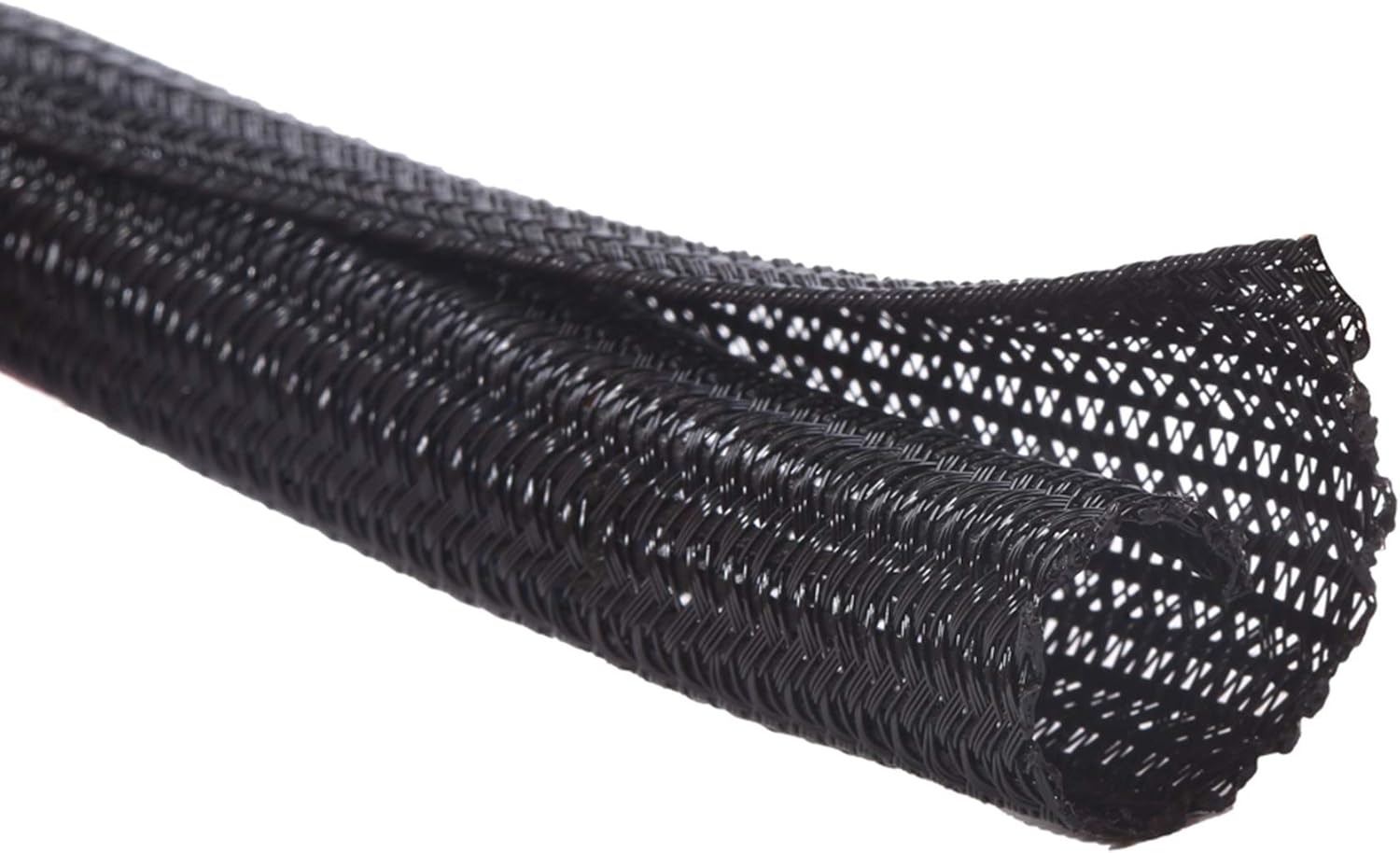
Problem: Multiple chargers and cables can turn a small desk into a tangled mess that is frustrating to look at and difficult to organize.
Desired outcome: A clean desk where cables stay neat and charging is simple and hassle-free.
Why overlooked: Cable clutter seems minor until you have to unplug something and find yourself pulling on the wrong cord.
Product: The Alex Tech Cable Management Sleeve wraps around your cords to keep them together and prevent tangling. This split sleeve design makes it easy to add or remove cables as your setup changes, and the 25-foot length gives you plenty to work with.
Why it works: This simple sleeve keeps cables organized along the back of your desk and can be cut to your desired length. It takes just a few minutes to set up but immediately makes a visible difference in how your desk looks. With a 4.7 ⭐ rating from over 84,000 reviews and a price of ~$14.99, this Overall Pick is clearly a crowd favorite.
Who benefits most: People who charge multiple devices, students with limited outlets, and anyone who appreciates a tidy appearance.
Scenario: You are packing up to go to the library. Instead of untangling headphones, a phone cord, and a laptop charger, you just grab the bundle and go.
Takeaway: A simple upgrade that saves time and frustration every single day.
EVOOMI Monitor Stand

Problem: Desks in dorms are often flat and featureless, meaning your screen sits directly on the surface and limits your storage options.
Desired outcome: Raising your monitor or laptop while creating extra space underneath for storage.
Why overlooked: A lot of people use laptops as their main screen and never consider that a small shelf could make their space more functional.
Product: The EVOOMI Monitor Stand is a sturdy steel platform that elevates your screen while creating valuable storage space underneath. It comes in a convenient two-pack and includes cable ties to keep your cords organized.
Why it works: The stand creates a second layer on your desk. You can slide a keyboard, notebooks, or a phone underneath while keeping your screen at an ergonomic height. The anti-skid hexagonal design ensures stability, and the pack of two means you can use one for your monitor and another for additional items. With a 4.8 ⭐ rating from over 5,600 reviews and a price of ~$23.99, this Amazon’s Choice pick offers excellent value.
Who benefits most: Anyone with limited desk space, students who want to keep things tidy, and people who want their screen at a better eye level.
Scenario: You have a textbook open next to your laptop and a notebook underneath for quick reference. This stand gives you room to keep both without stacking them awkwardly.
Takeaway: A small change that adds both function and comfort to your setup. For more organization ideas, you can also explore other simple desk setup improvements like the best desk shelves for small spaces.
Productivity and Comfort
zobirez 10-Port USB Charging Station

Problem: Running out of battery on your phone, tablet, or laptop during a study session is frustrating and forces you to hunt for available outlets.
Desired outcome: A single dedicated spot where all your devices charge at once without a cluttered mess.
Why overlooked: Many people just charge devices one at a time or use random extension cords, which is inefficient and messy.
Product: The zobirez 10-Port USB Charging Station lets you power multiple devices from one location. It features two 65W USB-C ports for laptops, along with additional ports for phones, tablets, and accessories. Ten cables are included so you can start using it right away.
Why it works: Consolidating your chargers into one block reduces cable clutter and keeps everything charged and ready. The smart charging technology detects your device and delivers the optimal power level. With a 4.5 ⭐ rating from over 1,700 reviews and a price of ~$39.99, it’s an Overall Pick for good reason.
Who benefits most: Students with multiple devices, people who share outlets, and anyone who dislikes searching for chargers.
Scenario: You are heading to a lecture and realize your phone is at 10 percent. You grab it from the charging station, knowing it has been charging all morning along with your tablet and headphones.
Takeaway: A simple way to make sure your devices are always ready to go. It removes the stress of low battery warnings.
Nulaxy Phone and Tablet Stand

Problem: Keeping your phone on your desk means it tends to slide around, get buried, or distract you during work.
Desired outcome: A dedicated spot for your phone or tablet that keeps it visible and accessible without taking over the surface.
Why overlooked: Some people just rest their phone against a book or prop it on their keyboard and do not realize how often it shifts.
Product: The Nulaxy Phone and Tablet Stand holds your device at a comfortable viewing angle while keeping it secure. The full aluminum construction is lightweight yet sturdy, and the anti-slip base prevents sliding.
Why it works: Your device stays in one place, which reduces distractions and keeps the screen visible for quick checks, FaceTime calls, or reference materials. The stand fits devices up to 18mm thick, making it compatible with most phones and tablets in cases. With a 4.7 ⭐ rating from over 80,000 reviews and a price of just ~$9.99, it’s an Amazon’s Choice pick and a clear student favorite.
Who benefits most: Students who use study apps, those who follow recipes or instructions on their phone, and anyone who wants to reduce screen time clutter.
Scenario: You are following along with a class recording on your phone while taking notes on your laptop. The stand keeps the phone upright and eye-level, making it easy to reference without picking it up.
Takeaway: A practical improvement that blends convenience and comfort.
Aothia Leather Desk Pad

Problem: Dorm desks are often worn, sticky, or just not pleasant to write or type on.
Desired outcome: A clean, smooth surface that protects the desk and makes it feel like yours.
Why overlooked: You may not realize how much a grimy desk affects your focus until you sit down and feel the difference.
Product: The Aothia Leather Desk Pad lays flat on your desk and can be easily rolled up and stored when not in use. This gray, waterproof mat measures 23.6 by 13.7 inches and provides a comfortable surface for both writing and mouse use.
Why it works: It covers imperfections, creates a consistent writing surface, and protects your desk from spills and scratches. The non-slip PU leather backing keeps it securely in place. With a 4.6 ⭐ rating from over 78,000 reviews and a price of ~$9.99, it’s the #1 Best Seller in mouse pads for good reason.
Who benefits most: Anyone using a shared or older desk, remote workers who want a clean daily space, and students who write by hand often.
Scenario: You are writing out flashcards before a big exam. The mat gives you a smooth, comfortable writing area that helps you focus instead of fighting with a sticky or uneven surface.
Takeaway: It’s a small improvement that often has a bigger impact than expected. If you want a cleaner home office setup, this is an excellent place to start.
What to Look For Before Buying
Before you purchase any dorm desk accessories, consider a few practical factors. Desk size is usually your biggest limitation, so measure your workspace and consider how much surface area each accessory will take up. Think about comfort as well—if you are spending hours studying, supportive items like wrist rests and laptop stands can make a noticeable difference. Storage needs are another key factor. Choose organizers that fit your actual daily habits rather than what looks nice in a photo. Cable management is also worth considering if you charge multiple devices. Durability matters since you will be moving these items in and out of dorm rooms. Finally, think about ease of use—if an accessory is hard to set up or takes up too much space, you are less likely to keep using it.
Conclusion
Your dorm desk can be much more than just a place to put your laptop. A few well-chosen accessories can help you stay comfortable, focused, and organized even when space is tight. Whether you add better lighting, storage solutions, or ergonomic supports, each upgrade has the potential to make your workspace feel more like your own. If you are trying to stay focused while working, small improvements like these can be surprisingly effective. For seasonal adjustments to your workspace, take a look at our recommendations for the best workspace accessories for warm weather. Take a moment to look at your current setup and think about which changes would make the biggest difference for your daily routine. With the right accessories, even the smallest desk can become a space that supports your productivity and comfort.