
Disclosure: As an Amazon Associate I earn from qualifying purchases.
Introduction
A cluttered desk, uncomfortable screen position, and constant distractions can make even simple tasks feel harder than they should. Whether you’re working from home, studying for exams, or spending hours at your computer, your workspace plays a bigger role in your daily routine than you might realize.
The good news? You don’t need an expensive desk makeover to make things better.
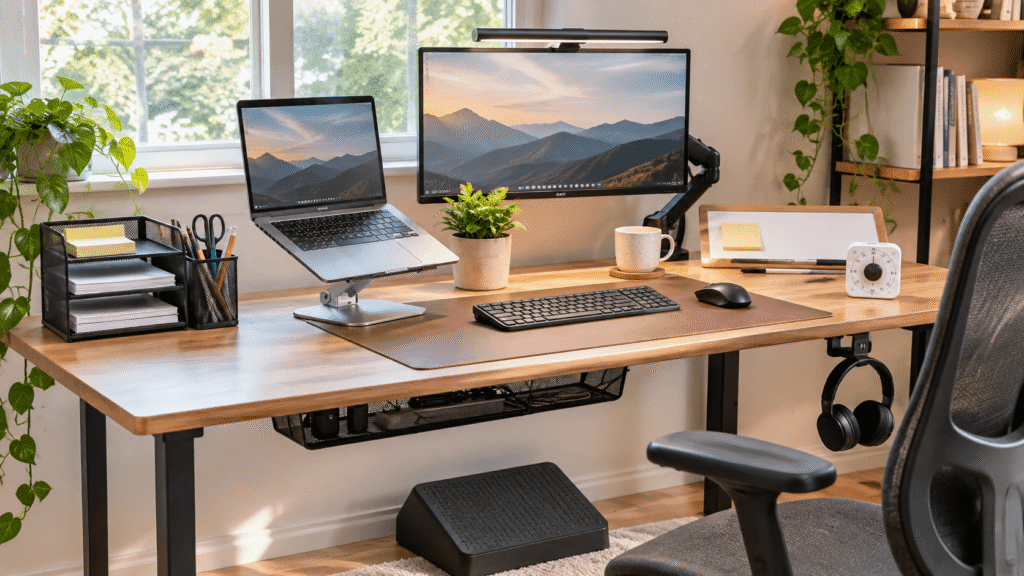
Some of the best desk accessories for productivity in 2027 focus on solving small, everyday frustrations. A better screen position, fewer tangled cables, or a dedicated place for your daily priorities can help you work more comfortably and stay organized.
And if you’re looking for affordable upgrades for someone else’s workspace, our guide to practical desk gifts under $30 for Christmas offers more ideas.
Below are 10 useful accessories worth considering, from inexpensive organizational tools to ergonomic improvements that can make long work sessions easier.
Quick Picks
- Best Overall: JOYEKY Rotating Laptop Stand — Adjustable height and viewing angles make it useful for everyday laptop setups.
- Best Budget Option: Aothia Leather Desk Pad — An affordable way to create a smoother, more organized working surface.
- Best for Small Desks: ErGear Single Monitor Arm — Adjustable monitor positioning helps free up valuable desktop space.
Prices are approximate and may change. Ratings and review counts reflect current product data.
Make Your Workspace More Comfortable
1. JOYEKY Rotating Laptop Stand

Working directly from a laptop often means looking down at your screen for hours. That position can become uncomfortable, especially during longer work sessions.
Raising your screen closer to eye level can make your setup feel more natural.
The JOYEKY Rotating Laptop Stand offers adjustable viewing angles, a 360-degree rotating base, and a foldable aluminum design. It supports laptops measuring 10–16 inches.
It’s particularly useful for remote workers and students who regularly switch between typing, reading, and video meetings.
Imagine adjusting your laptop before an afternoon writing session, then rotating the screen to share something with a colleague.
Pairing the JOYEKY Rotating Laptop Stand with an external keyboard and mouse can also help create a more comfortable typing arrangement.
Price: ~$35.98
Rating: 4.7 ⭐
Reviews: 2,975+
A better screen position is a small improvement you’ll appreciate during longer workdays.
2. WALI Desk File Organizer

Loose papers, pens, and office supplies can quickly turn a productive workspace into a frustrating mess.
Having dedicated storage makes it easier to find what you need without constantly rearranging your desk.
The WALI Desk File Organizer combines four paper trays, a drawer, and two pen holders in one desktop organizer.
That makes it especially useful for students handling assignments or remote workers who regularly deal with printed documents.
Picture finishing a project and immediately placing your paperwork into its designated tray instead of leaving everything scattered across your keyboard.
The WALI Desk File Organizer helps establish a simple storage routine without requiring additional furniture.
Price: ~$18.99
Rating: 4.5 ⭐
Reviews: 4,819+
A more organized desk means fewer small interruptions throughout your day.
3. Quntis Monitor Light Bar

Evening work becomes frustrating when your keyboard and paperwork are poorly lit, but turning on the overhead lights feels excessive.
Better task lighting can make your workspace more comfortable without adding another bulky item to your desk.
The Quntis Monitor Light Bar provides USB-powered LED lighting with adjustable brightness, automatic dimming, and touch controls.
Its monitor-mounted design also helps preserve desktop space.
For students studying after dark, this can be particularly convenient when switching between handwritten notes and computer work.
Imagine reviewing documents beside your keyboard while adjusting the lighting to suit the room.
The Quntis Monitor Light Bar is worth considering when you want focused desk illumination without adding another traditional lamp.
Price: ~$39.95
Rating: 4.6 ⭐
Reviews: 13,952+
Good lighting is easy to overlook until your evening workspace becomes noticeably easier to use.
4. ComfiLife Adjustable Footrest

Sitting comfortably becomes difficult when your feet don’t rest naturally on the floor.
A supportive surface beneath your desk can help you find a more relaxed seated position.
The ComfiLife Adjustable Footrest uses memory foam and offers adjustable height for different seating arrangements.
It’s especially relevant for people using taller desks or office chairs that don’t allow their feet to rest comfortably.
During a long video meeting, having somewhere supportive to place your feet may make sitting feel less awkward.
The ComfiLife Adjustable Footrest is a practical option for improving seated comfort without replacing your chair.
Price: ~$39.99
Rating: 4.6 ⭐
Reviews: 14,131+
Sometimes improving your workspace starts with the part of your setup you rarely think about.
Reduce Clutter and Everyday Distractions
5. Univivi Under-Desk Cable Management Tray

Tangled cables can make an otherwise tidy desk look chaotic. They also get in the way when you’re cleaning or rearranging your workspace.
Moving excess wiring beneath the desk creates a cleaner working area.
The Univivi Under-Desk Cable Management Tray offers a 36-inch fabric cable organizer with clamp or screw mounting options.
The clamp option is particularly appealing when you want to avoid drilling into your desk.
For example, keeping power cords and charging cables together can make it easier to maintain a neat workstation.
The Univivi Under-Desk Cable Management Tray is worth considering for setups with several connected devices.
Price: ~$37.99
Rating: 4.7 ⭐
Reviews: 958+
Once your cables have a dedicated place, keeping the rest of your workspace organized becomes easier.
6. Aothia Leather Desk Pad

A mouse that catches on the desk surface or a keyboard that shifts while typing can become surprisingly irritating.
Creating a consistent working surface can make everyday computer tasks feel smoother.
The Aothia Leather Desk Pad features a non-slip PU leather surface, waterproof construction, and a 31.5-by-15.7-inch working area.
It provides space for a keyboard, mouse, and other everyday essentials.
Students and remote workers who spend hours typing may appreciate having a defined area for their equipment.
The Aothia Leather Desk Pad also helps protect the underlying desk surface from everyday use.
Price: ~$13.99
Rating: 4.6 ⭐
Reviews: 79,789+
For a relatively inexpensive upgrade, it’s a practical way to make your workspace feel more consistent.
7. OORAII Rotating Productivity Timer

Staying focused can be difficult when you’re constantly checking the time or reaching for your phone.
A dedicated timer helps create clear boundaries between focused work and breaks.
The OORAII Rotating Productivity Timer offers preset 5-, 10-, 25-, and 50-minute intervals, along with countdown, stopwatch, vibration, and adjustable sound modes.
This makes it useful for students, remote workers, and anyone experimenting with structured work sessions.
Imagine starting a 25-minute writing session without opening another distracting app.
The OORAII Rotating Productivity Timer provides a physical way to manage your time while keeping your phone out of the process.
Price: ~$16.99
Rating: 4.6 ⭐
Reviews: 1,356+
A clear endpoint can make a demanding task feel much easier to approach.
8. APPHOME Foldable Headphone Hanger

Headphones frequently end up on keyboards, chairs, or whatever empty surface happens to be nearby.
Giving them a permanent storage location keeps your working area clearer.
The APPHOME Foldable Headphone Hanger uses an aluminum clamp-mounted design that positions headphones beneath the desk.
Its foldable construction is useful when you want the holder out of the way between uses.
Remote workers who frequently attend video calls and students who use headphones while studying may find it particularly convenient.
The APPHOME Foldable Headphone Hanger gives your headphones a dedicated place without requiring more desktop storage.
Price: ~$16.99
Rating: 4.8 ⭐
Reviews: 8,937+
It’s a small organizational improvement that can make your desk easier to keep tidy.
Create More Space for Focused Work
9. ErGear Single Monitor Arm

A traditional monitor stand can occupy valuable desk space, particularly when you’re working with a compact setup.
Lifting your screen off the desktop creates more room for notebooks, documents, and everyday essentials.
The ErGear Single Monitor Arm supports monitors measuring 13–34 inches and weighing between 4.84 and 19.8 pounds.
It features adjustable positioning, a tool-free VESA mounting system, and integrated cable management.
Imagine moving your monitor into a comfortable viewing position while keeping more of the desk available for actual work.
The ErGear Single Monitor Arm is particularly useful when both screen positioning and desktop space are ongoing frustrations.
Price: ~$29.99
Rating: 4.4 ⭐
Reviews: 9,420+
For smaller workspaces, reclaiming the area beneath your monitor can make a meaningful difference.
10. Quartet Glass Desktop Whiteboard

Important tasks can easily disappear into digital reminders, browser tabs, and lengthy to-do lists.
Keeping your immediate priorities visible can help you stay focused on what matters today.
The Quartet Glass Desktop Whiteboard provides an 18-by-6-inch dry-erase writing surface with built-in storage and an included marker.
It’s particularly useful for students managing assignments or remote workers balancing several projects.
Imagine writing your three main priorities each morning and erasing them as you finish.
The Quartet Glass Desktop Whiteboard offers a straightforward alternative to opening another productivity app.
Price: ~$29.76
Rating: 4.8 ⭐
Reviews: 9,945+
A visible reminder of your priorities can help make each workday feel more intentional.
What to Look For Before Buying Desk Accessories
Not every accessory will improve every workspace. Before choosing an upgrade, consider the problem you’re actually trying to solve.
- Desk size: Measure available space before purchasing organizers, desk pads, or monitor accessories. Larger isn’t always better.
- Comfort: Prioritize adjustable designs when improving screen positioning or seated support.
- Storage needs: Consider which supplies you use daily and which can stay out of sight.
- Cable management: Think about how many devices need power and whether you can safely route their cables beneath your desk.
- Durability: Look for sturdy construction and secure mounting methods, particularly for accessories supporting expensive equipment.
- Ease of use: Choose products that fit naturally into your routine rather than requiring constant adjustment.
It’s also worth checking whether an accessory solves a problem you actually experience.
A monitor arm might be valuable for someone with limited space, while a productivity timer could be more useful for someone who struggles with distractions.
If you’re choosing accessories as presents, our guide to useful Secret Santa gifts for the office offers additional practical inspiration.
Conclusion
Improving your workspace doesn’t require replacing everything you already own.
The best desk accessories for productivity in 2027 are the ones that address everyday frustrations, whether that’s an uncomfortable screen position, distracting clutter, or limited working space.
Start with the improvement that matches your biggest problem. A laptop stand may help with screen positioning, while a desk organizer or cable tray can make your workspace easier to maintain.
Over time, thoughtful upgrades can help create a setup that feels more comfortable, organized, and easier to focus in.
And if you’re planning to improve a coworker’s workspace too, explore our office Christmas gift ideas under $50 for more useful options.
The goal isn’t to fill your desk with accessories. It’s to make the space you already have work better for you.