
Disclosure: As an Amazon Associate I earn from qualifying purchases.
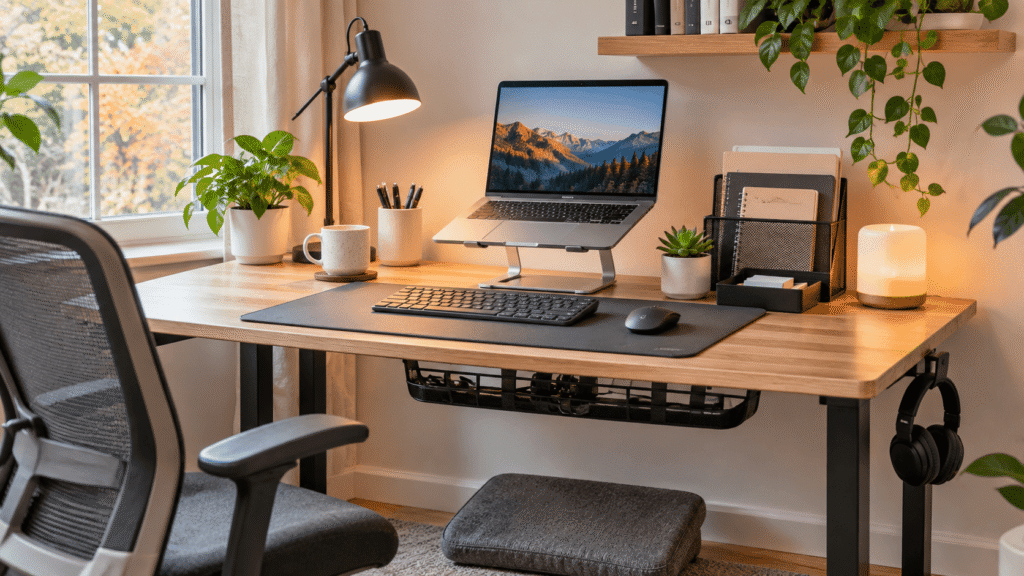
Working from home sounds comfortable until your desk starts creating little frustrations throughout the day. Your laptop sits too low, cables get tangled, and there never seems to be enough room for everything you need.
The good news? Improving your workspace doesn’t require replacing your entire setup.
Cyber Monday home office deals in 2026 could be a useful opportunity to pick up practical upgrades you’ve been considering, especially accessories that improve comfort, organization, and everyday productivity.
The trick is knowing which products are actually worth looking for. A discounted accessory isn’t necessarily a good purchase if it doesn’t solve a problem you regularly experience.
Whether you’re working from a small apartment desk, studying between classes, or spending full workdays at home, the right improvements can make your space easier to use.
And if you’re shopping for someone else, our guide to useful Christmas gifts for office workers offers more practical inspiration.
Below are 10 home office upgrades worth keeping on your Cyber Monday shopping list.
Quick Picks
- Best Overall: LOXP Adjustable Laptop Stand — A flexible option for improving laptop screen positioning.
- Best Budget Option: Aothia Leather Desk Pad — An affordable way to protect your desk and create a more consistent work surface.
- Best for Small Desks: OMOTON Dual Vertical Laptop Stand — A practical solution for storing laptops upright and reclaiming desk space.
Prices are approximate and may change. Ratings and review counts reflect current product data.
Main Article
Ergonomic Upgrades for a More Comfortable Workday
1. LOXP Adjustable Laptop Stand

Price: ~$27.99
Rating: 4.6 ⭐
Reviews: 2,564+
Looking down at a laptop for hours can leave your neck feeling uncomfortable. Ideally, your screen should sit closer to eye level without forcing you to hunch forward.
The LOXP Adjustable Laptop Stand helps raise your laptop display to a more comfortable viewing position.
Its adjustable design, rotating base, and foldable construction make it useful for workspaces where you frequently change how your laptop is positioned.
It’s especially helpful for remote workers who rely on laptops throughout the day. Pairing a raised screen with a separate keyboard and mouse can also support a more natural typing position.
Picture joining a morning video meeting without constantly leaning toward your screen.
The LOXP Adjustable Laptop Stand is worth considering when your current screen height makes everyday work uncomfortable.
2. ComfiLife Gel and Memory Foam Seat Cushion

Price: ~$45.95
Rating: 4.4 ⭐
Reviews: 107,017+
Even a decent office chair can feel uncomfortable after several hours. Replacing the entire chair isn’t always practical, especially when you’re working with a limited budget.
The ComfiLife Gel and Memory Foam Seat Cushion offers an alternative for improving your existing seating arrangement.
Its gel and memory foam construction is designed to provide cushioning and support while sitting. It can be used on office chairs and other seating surfaces.
Remote workers and students who spend extended periods sitting may find this particularly relevant.
Imagine working through a long afternoon of writing or studying with additional cushioning beneath you.
Although a cushion cannot correct every seating problem, the ComfiLife Gel and Memory Foam Seat Cushion could be a practical first step before considering a new chair.
3. Quntis Monitor Light Bar

Price: ~$39.95
Rating: 4.6 ⭐
Reviews: 13,921+
Late-night work becomes frustrating when your keyboard and paperwork are difficult to see.
The Quntis Monitor Light Bar provides desk-focused lighting without requiring the surface space of a traditional desk lamp.
Its USB-powered design includes adjustable brightness, automatic dimming, and touch controls, allowing you to adapt the lighting to your working conditions.
It’s particularly useful for evening students, writers, and anyone working in a dim room.
Imagine reviewing handwritten notes beside your monitor without relying entirely on overhead lighting.
For workspaces where lighting and desk space are both concerns, the Quntis Monitor Light Bar is an upgrade worth exploring.
4. ComfiLife Adjustable Footrest

Price: ~$39.99
Rating: 4.6 ⭐
Reviews: 14,130+
Your feet shouldn’t have to dangle just because your chair is positioned correctly for your desk.
The ComfiLife Adjustable Footrest provides a supportive surface beneath your desk when your feet cannot comfortably reach the floor.
Its memory foam construction and adjustable height help accommodate different seating arrangements.
This can be particularly useful for shorter users or anyone who needs to raise their chair to reach the keyboard comfortably.
During a long work session, stable foot support can help you maintain a more relaxed seated position.
The ComfiLife Adjustable Footrest addresses an ergonomic detail that’s easy to overlook until you notice how much your seating position depends on it.
Organization and Productivity Upgrades
5. Marbrasse 6-Tier Paper Organizer

Price: ~$19.99
Rating: 4.7 ⭐
Reviews: 5,491+
Loose documents, notebooks, and printed assignments can quickly take over your desk.
The Marbrasse 6-Tier Paper Organizer gives paperwork a dedicated storage area instead of leaving everything in scattered piles.
Its six-tier mesh design accommodates letter-size and A4 documents, while the integrated handle makes it easier to reposition.
Students handling assignments and remote workers managing printed materials may find it particularly useful.
Imagine separating current projects, reference documents, and completed paperwork into different trays.
The Marbrasse 6-Tier Paper Organizer is a sensible choice when paper clutter regularly interrupts your workflow.
6. ULSOU Wireless Keyboard and Mouse Combo

Price: ~$34.95
Rating: 4.2 ⭐
Reviews: 2,367+
A cramped typing position and cables running across your desk can make an otherwise functional setup feel awkward.
The ULSOU Wireless Keyboard and Mouse Combo gives you more flexibility when arranging your everyday computer accessories.
The full-size keyboard features wave-shaped keys and a wrist rest, while the accompanying mouse offers three adjustable DPI levels.
Its 2.4GHz wireless connection also helps reduce the number of cables running across your work surface.
Imagine moving your keyboard aside to open a textbook, then bringing it back without rearranging connected wires.
For people who want a more flexible typing setup, the ULSOU Wireless Keyboard and Mouse Combo offers several useful everyday features.
7. Scanfield Under-Desk Cable Management Tray

Price: ~$31.95
Rating: 4.5 ⭐
Reviews: 6,776+
Power cords, adapters, and charging cables can quickly turn the area beneath your desk into a tangled mess.
The Scanfield Under-Desk Cable Management Tray provides a dedicated place for organizing cables and related accessories away from the main work surface.
This two-pack uses an adhesive installation system rather than screws, with a specified 24-hour curing period.
The trays are designed to accommodate power strips, chargers, and bundled cords.
Imagine being able to clean beneath your desk without constantly moving loose cables out of the way.
For workstations with multiple powered devices, the Scanfield Under-Desk Cable Management Tray can make cable organization easier to maintain. Check surface compatibility and installation requirements before purchasing.
8. Aothia Leather Desk Pad

Price: ~$13.99
Rating: 4.6 ⭐
Reviews: 79,681+
A keyboard that shifts slightly or a mouse moving across an inconsistent surface can become irritating during repetitive tasks.
The Aothia Leather Desk Pad creates a dedicated surface for everyday desk activities while helping protect the desktop beneath it.
Made from PU leather, it features a non-slip design and a water-resistant surface intended for writing, laptop use, and mouse movement.
Its larger surface area can accommodate several frequently used items together.
For example, a student can keep a keyboard and mouse on the pad while leaving another part of the desk available for notebooks.
The Aothia Leather Desk Pad is an inexpensive upgrade that can make a workspace feel more organized and consistent.
Space-Saving Upgrades for Compact Desks
9. OMOTON Dual Vertical Laptop Stand

Price: ~$24.99
Rating: 4.8 ⭐
Reviews: 10,666+
Small desks become crowded quickly when a laptop shares space with an external monitor and other essentials.
The OMOTON Dual Vertical Laptop Stand stores laptops upright, helping free valuable desktop space when they’re not being used directly.
Its aluminum construction and adjustable design support vertical laptop storage, with room for two devices.
It’s particularly useful for compact home offices, dorm rooms, and setups where an external display handles most of the work.
Imagine finishing a video call, closing your laptop, and placing it upright beside your monitor.
The OMOTON Dual Vertical Laptop Stand offers a practical way to reclaim desk space without adding more furniture.
10. HUANUO Monitor Riser with Storage

Price: ~$15.99
Rating: 4.8 ⭐
Reviews: 15,419+
When your desktop is already full, placing more supplies directly on the work surface often makes the problem worse.
The HUANUO Monitor Riser with Storage creates an elevated platform for a monitor or compatible device while leaving storage space underneath.
Its vented steel shelf is designed for desktop equipment, including monitors, laptops, and printers.
This makes it useful for people who want to improve screen positioning while organizing smaller supplies beneath their equipment.
Imagine keeping your monitor elevated while using the area below for everyday office essentials.
For compact workstations, the HUANUO Monitor Riser with Storage combines two practical needs: equipment placement and desktop organization.
What to Look For Before Buying
Cyber Monday discounts can be tempting, but practical fit matters more than the discount percentage.
- Desk size: Measure available space before choosing stands, mats, organizers, or risers.
- Comfort: Prioritize accessories that address discomfort you actually experience.
- Storage needs: Think about which items regularly clutter your workspace and whether you need paper storage, equipment storage, or both.
- Cable management: Consider how new accessories connect to your existing equipment and whether adhesive installation suits your desk.
- Durability: Look for sturdy construction, stable supports, and materials suited to daily use.
- Ease of use: Choose upgrades that fit naturally into your routine without adding unnecessary complexity.
It’s also worth comparing prices before Cyber Monday. The prices listed above are reference prices from the supplied product information, not verified Cyber Monday sale prices. Prices and availability may change.
If you’re buying for a colleague or supervisor rather than upgrading your own setup, our guides to professional desk gifts for your boss and office gifts for managers can help narrow down appropriate options.
Conclusion
The best Cyber Monday home office deals in 2026 won’t necessarily be the biggest discounts or the most impressive-looking accessories.
They’ll be the upgrades that solve problems you notice every day.
A better screen position can improve comfort. Organized supplies can reduce distractions. Thoughtful storage can make even a small desk feel more functional.
Start by identifying the biggest frustration in your current setup, then explore the product that addresses it.
Whether you’re improving ergonomics, organizing cables, or making room on a crowded desk, small and carefully chosen improvements can make your workspace more enjoyable to use.