
Disclosure: As an Amazon Associate I earn from qualifying purchases.
A desk can start feeling messy fast, especially when you work, study, charge devices, take notes, and keep random supplies in the same small space.
The good news is that you do not need a full desk makeover to make your setup look more polished. A few cheap desk accessories can make your workspace feel cleaner, more comfortable, and more intentional.
The key is choosing simple upgrades that solve real problems: cable clutter, poor lighting, uncomfortable typing, limited storage, and a setup that just feels unfinished.
If you are trying to build a cleaner workspace without overthinking every detail, these accessories are easy places to start. You can also use these alongside other simple desk setup ideas if you want a more focused work area overall.
Quick Picks
- Best overall: Aothia Leather Desk Pad
- Best budget option: EURPMASK Rotating Headphone Stand
- Best for small desks: Bostitch Konnect Under Desk Drawer
Prices are approximate and may change. Ratings and review counts reflect current product data.
Desk Accessories That Make Your Setup Look Cleaner
Aothia Leather Desk Pad

A desk pad is one of the easiest ways to make a workspace look more finished. A simple option like this creates one clean surface for your keyboard, mouse, laptop, notebook, and daily work items.
It is useful because it visually ties the desk together. Instead of having everything scattered across a plain surface, your main work zone feels more intentional.
This is best for remote workers, students, and anyone who wants a premium look without buying a new desk.
In real life, this works especially well if your desk looks messy even after you clean it. A desk pad gives the setup a clear center.
If you just want a quick upgrade, this type of desk accessory is simple, affordable, and easy to add without changing your whole setup.
A simple addition that makes your desk feel more organized right away.
Amazon Basics Monitor Stand Riser
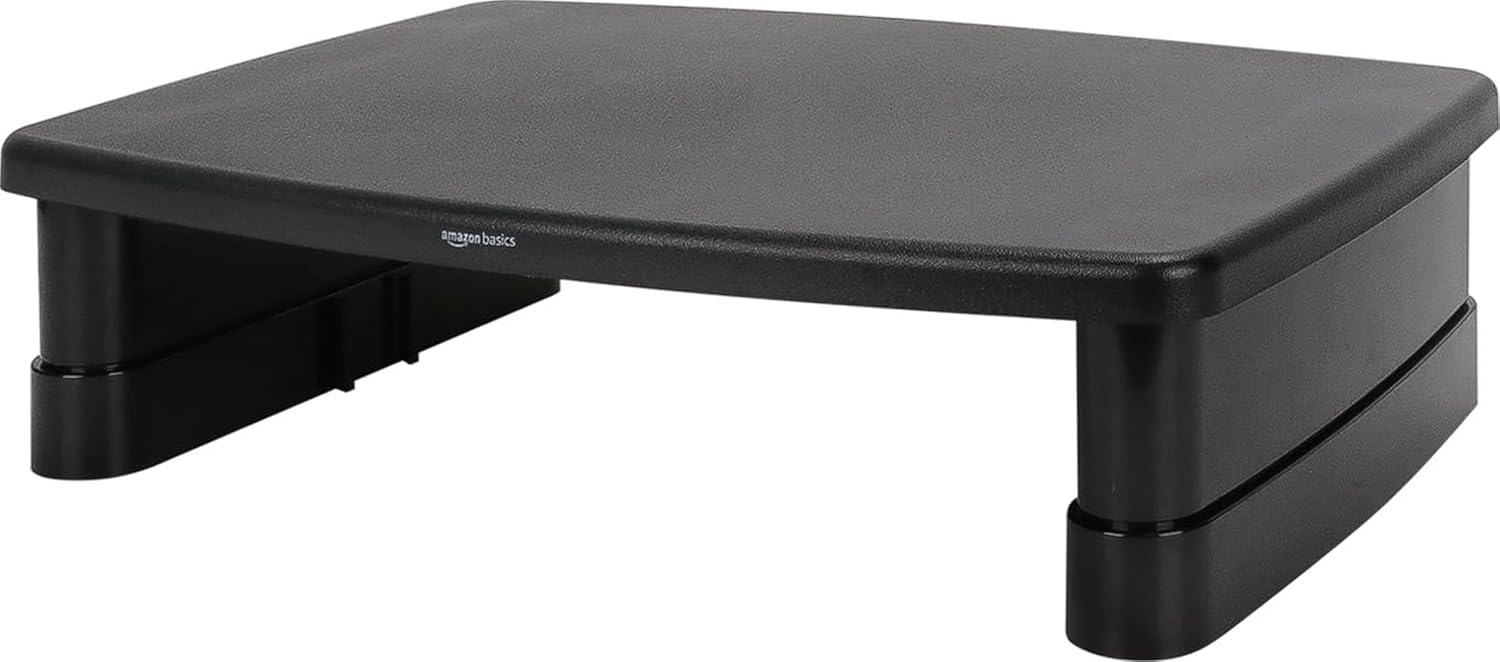
A monitor riser helps your setup look cleaner while also improving screen height. A tool like this can lift your monitor or laptop and create extra storage space underneath.
It is useful because it solves two problems at once: posture and clutter. You can place notebooks, small devices, or accessories under the stand instead of leaving them across your desk.
This is best for anyone using a monitor on a small or medium desk.
A real-life example is a student or remote worker who keeps pushing papers, chargers, and notebooks around just to make room. A riser gives those items a more natural place to go.
If you are working with limited space, something like this can make the desk feel less crowded almost immediately.
One of those upgrades you notice almost immediately.
D-Line Cable Management Box

Visible cords can make even a good desk setup look chaotic. A no-fuss option like this hides power strips, chargers, and extra cable length in one cleaner-looking box.
It is useful because cable clutter is one of the biggest reasons a workspace feels messy. Even if the top of your desk is clean, tangled wires under or behind it can ruin the look.
This is best for anyone with a monitor, lamp, laptop charger, phone charger, or multiple devices plugged in nearby.
For example, if your power strip is sitting on the floor with cables running in every direction, a cable box makes the whole setup look more controlled.
If you are trying to maintain a clean workspace, this type of upgrade is one of the simplest places to start.
Easy to add without changing your entire setup.
Amazon Basics Wireless Charger

A wireless charging pad gives your phone a dedicated spot while reducing loose cables on the desk. A simple option like this is especially helpful if your phone is always nearby while you work.
It is useful because it keeps charging simple. Instead of reaching for a cable, you place your phone down and continue working.
This is best for people who use their phone throughout the day for messages, calls, reminders, or two-factor authentication.
In a real setup, this can prevent your phone from floating around the desk and getting buried under notebooks or papers.
You do not need to overthink this. Something like this gives your phone a home and keeps your desk looking cleaner.
A solid, no-fuss addition to most desks.
Organization Accessories for a More Premium Workspace
SUPEASY 5-Tray Paper Organizer

Paper clutter can make a desk look messy even when everything else is organized. A simple organizer like this gives documents, notebooks, folders, and loose papers a proper place.
It is useful because it creates vertical storage. Instead of stacking papers in one messy pile, you can separate them by project, class, client, or priority.
This is best for students, teachers, home office users, and anyone who still works with printed materials.
A realistic scenario is having bills, notes, work papers, and random documents spread across the desk. A paper organizer keeps them visible without letting them take over.
If your desk gets messy quickly, this kind of desk organization tool can help you stay on top of it with less effort.
A simple addition that makes your desk feel more organized right away.
Bostitch Konnect Under Desk Drawer

An under-desk drawer adds hidden storage without taking up surface space. A tool like this is especially useful for small desks that do not have built-in drawers.
It is useful because it keeps small items close without leaving them visible. You can store pens, sticky notes, cables, earbuds, clips, or other everyday accessories.
This is best for small desk setups, dorm desks, minimalist workspaces, and shared home offices.
In real life, this helps when your desk surface is already full but you still need a place for small essentials.
If you are trying to declutter your desk step by step, something like this gives you extra storage without adding visual clutter.
Easy to add without changing your whole setup.
EURPMASK Rotating Headphone Stand

A headphone stand gives your headset a dedicated place instead of leaving it on the desk. A budget-friendly option like this keeps headphones accessible while freeing up surface space.
It is useful because headphones are awkward to store. They often end up on the keyboard, chair, monitor stand, or desk corner.
This is best for remote workers, students, gamers, and anyone who uses headphones daily.
A real-life example is finishing a call and dropping your headset wherever there is space. A clamp-on holder makes that habit cleaner.
For small setups, this type of upgrade is especially practical because it uses under-desk space instead of desktop space.
One of those upgrades you notice almost immediately.
Comfort and Productivity Upgrades That Still Look Clean
Amazon Basics Ergonomic Laptop Stand

A laptop stand can make a setup look more intentional while improving comfort. A simple option like this raises your laptop screen and helps create a better working position.
It is useful because working directly from a laptop for long hours can lead to poor posture. Raising the screen closer to eye level can make your desk feel more comfortable.
This is best for remote workers, students, and anyone who uses a laptop as their main computer.
In a real-life setup, pairing a laptop stand with an external keyboard and mouse can make your workspace feel closer to a proper home office.
If comfort matters but you do not want a complicated setup, this type of laptop stand is an easy upgrade.
A simple addition that makes your desk feel more professional.
Airlonv LED Desk Lamp

A good desk lamp can make your setup feel more premium while improving visibility. A tool like this adds focused light without relying only on harsh overhead lighting.
It is useful because lighting affects focus, comfort, and how your workspace feels. A dim or poorly lit desk can make work feel more tiring than it needs to be.
This is best for students, remote workers, readers, and anyone who works early in the morning or later in the evening.
A real-life scenario is trying to write, study, or work while the room lighting feels too weak or uneven. A clamp lamp adds light exactly where you need it.
If you want a more comfortable home office setup, something like this can make your desk feel better without taking up much room.
One of those upgrades you notice almost immediately.
GORILLA GRIP Memory Foam Wrist Rest

A wrist rest is a small comfort upgrade that can make long typing sessions feel easier. A no-fuss option like this adds support for your keyboard and mouse area without changing your whole setup.
It is useful because repetitive typing and mouse use can become uncomfortable over time. A wrist rest gives your hands and arms a softer place to settle.
This is best for writers, students, office workers, and anyone who spends hours at a keyboard.
In real life, this helps during long work blocks when your hands start feeling tired or unsupported.
If you just want a quick comfort upgrade, something like this is simple to add and easy to use every day.
A solid, no-fuss addition to most desks.
What to Look For Before Buying
Before buying cheap desk accessories that look premium, keep it simple.
Choose items that solve a real problem first. If your desk is messy, start with organization. If your setup feels uncomfortable, start with ergonomics. If your workspace looks unfinished, start with a desk pad or lamp.
Look for neutral colors and clean designs. Black, white, gray, wood tones, and simple metal finishes usually blend into most desk setups without making the space feel busy.
Pay attention to size. A product can look great online but feel annoying if it takes over your desk. This matters even more for small setups.
Try to avoid buying too many accessories at once. Two or three smart upgrades usually make a bigger difference than filling the desk with products you do not actually need.
Conclusion
The best cheap desk accessories that look premium are the ones that make your setup cleaner, more comfortable, and easier to use.
You do not need to redesign your entire workspace. A desk pad, cable box, monitor riser, under-desk drawer, lamp, or wrist rest can quickly improve how your desk looks and feels.
Start with the problem you notice most every day. If clutter bothers you, fix clutter first. If comfort is the issue, choose ergonomic upgrades. If your desk just looks plain, add one clean visual anchor.
Small changes can make your workspace feel more polished without making the process complicated. For more practical upgrades, you can also explore these desk organization ideas and build your setup one simple step at a time.