
Disclosure: As an Amazon Associate I earn from qualifying purchases.
Working at your desk late into the evening can be frustrating when your screen is bright but everything around it feels too dark. A regular desk lamp might help, but it can also take up valuable space, create distracting reflections, or leave your keyboard poorly lit.
That’s where monitor light bars become interesting.
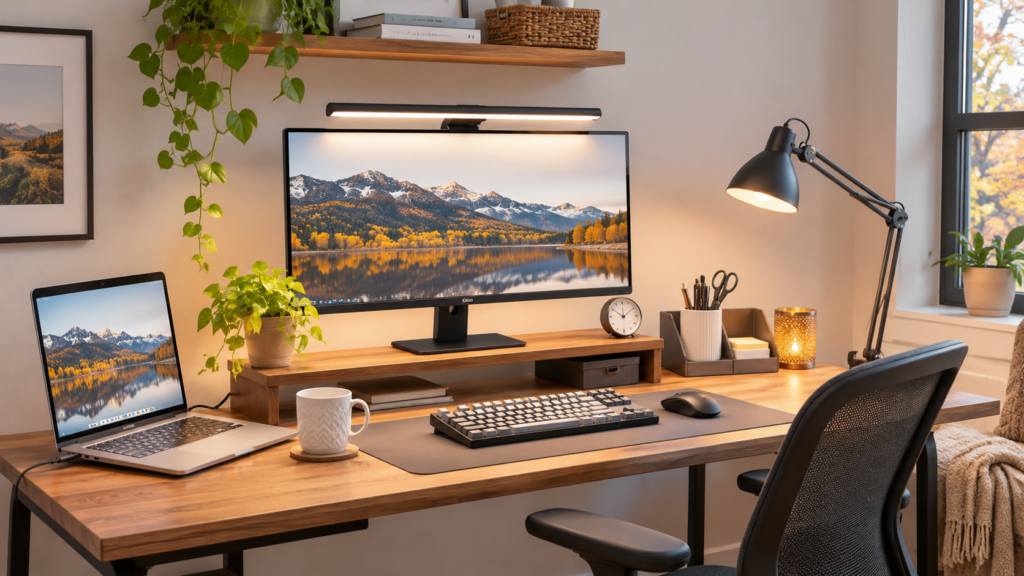
These compact lights sit above your monitor and direct illumination toward your workspace, helping you create a cleaner setup without another bulky lamp base.
With Black Friday approaching, it’s worth comparing different lighting designs and deciding which features actually matter.
The best Black Friday monitor light bar deals aren’t necessarily the biggest discounts. They’re the options that fit your monitor, lighting preferences, available space, and daily routine.
Whether you’re studying, working remotely, or upgrading a gaming setup, better desk lighting can make evening sessions more comfortable.
If you’re planning a larger workspace refresh, explore our Best Black Friday Desk Deals 2026 guide for more practical upgrades.
Quick Picks
- Best Overall: Quntis Computer Monitor Light Bar — Automatic dimming, touch controls, and glare-conscious lighting for everyday work.
- Best Budget Option: Colorpanda Monitor Light Bar — An affordable USB-powered option with touch controls and stepless dimming.
- Best for Curved Monitors: ONWAY Curved Monitor Light Bar — Designed for curved displays, with automatic dimming and wireless control.
Prices are approximate and may change. Ratings and review counts reflect current product data.
Best Black Friday Monitor Light Bars for Everyday Work
1. iQuincy Monitor Light Bar

Working under the same lighting conditions all day rarely feels ideal. Morning sunlight, cloudy afternoons, and late-night sessions create different lighting needs.
The iQuincy Monitor Light Bar offers adjustable brightness and five color temperature settings ranging from 3000K to 6500K.
Its asymmetrical lighting design is intended to illuminate your workspace while reducing unwanted screen glare.
That combination is particularly useful for remote workers who switch between documents, video calls, and general computer tasks.
For example, you might prefer brighter desk illumination while reviewing paperwork and softer lighting when answering emails at night.
The iQuincy Monitor Light Bar also includes touch controls and supports flat and curved monitors, making it worth considering for a flexible everyday setup.
Price: ~$24.98
Rating: 4.4 ⭐
Reviews: 15+
2. Pzloz LED Desk Lamp

Large workspaces can be difficult to illuminate evenly, especially when you’re using multiple screens or spreading documents across your desk.
The Pzloz LED Desk Lamp takes a different approach from a traditional monitor-mounted light bar.
It uses a clamp-mounted architect-style design with flexible positioning, 24W lighting, and five color settings.
This makes it especially relevant for people who need broader workspace illumination rather than light focused directly beneath a monitor.
Imagine reviewing printed notes on one side of your desk while keeping your keyboard and other materials visible.
The Pzloz LED Desk Lamp is worth exploring when your desk lighting needs extend beyond the immediate area in front of your screen.
Price: ~$46.47
Rating: 4.7 ⭐
Reviews: 3,638+
3. Quntis Computer Monitor Light Bar

Lighting changes throughout the day, but constantly adjusting your desk lamp isn’t something most people want to think about.
The Quntis Computer Monitor Light Bar includes automatic dimming, helping reduce the need for frequent manual adjustments.
It also offers touch controls, USB power, and a space-saving design intended to limit screen glare.
This combination makes it especially appealing for home offices near windows, where ambient lighting can change throughout the afternoon.
During a cloudy workday, automatic dimming can make maintaining suitable desk illumination more convenient.
For people who prefer a relatively hands-off lighting setup, the Quntis Computer Monitor Light Bar offers a useful balance of everyday features.
Price: ~$39.95
Rating: 4.6 ⭐
Reviews: 13,919+
4. Quntis Monitor Light Bar with Remote

Bright, cool lighting might feel appropriate while working through a spreadsheet, but it isn’t always what you want during a relaxed evening.
The Quntis Monitor Light Bar with Remote gives you adjustable brightness and color temperature, along with remote control.
That flexibility is useful when the same desk serves several purposes throughout the day.
Students, writers, and remote workers can adjust their lighting without reaching toward the top of the monitor.
Picture finishing an assignment and switching to a softer lighting setting before reading or watching a video.
The Quntis Monitor Light Bar with Remote is a practical choice when convenient adjustments matter as much as the light itself.
Price: ~$32.99
Rating: 4.4 ⭐
Reviews: 236+
Best Monitor Lighting for Different Screen Setups
5. ONWAY Curved Monitor Light Bar

Finding lighting that works comfortably with a curved monitor can be tricky. Some conventional light bars may not sit securely or direct light where you want it.
The ONWAY Curved Monitor Light Bar is designed with curved displays in mind.
It combines automatic dimming, wireless remote control, and a camera base with lighting intended to avoid screen glare.
This makes it particularly interesting for people using curved monitors for gaming, remote work, or everyday multitasking.
For example, someone working on a curved display could adjust their lighting from the desk without constantly reaching toward the monitor.
The ONWAY Curved Monitor Light Bar is worth a closer look when monitor shape and convenient controls are important considerations.
Price: ~$59.00
Rating: 4.5 ⭐
Reviews: 1,170+
6. YEELIGHT Monitor Light Bar

Seeing distracting reflections while trying to read small text can make ordinary desk lighting more frustrating than helpful.
The YEELIGHT Monitor Light Bar offers lighting designed to reduce glare, along with stepless dimming and touch controls.
Its listed 250-lumen output provides a useful specification to compare with other lighting options, although brightness alone doesn’t determine how well a desk is illuminated.
This model is intended for flat and curved monitors and uses USB power.
It’s particularly relevant for people who frequently switch between digital documents and physical notes.
Imagine reviewing paperwork beside your keyboard while keeping the monitor visible without an additional lamp base taking up space.
The YEELIGHT Monitor Light Bar is a sensible option for anyone prioritizing adjustable, glare-conscious desk illumination.
Price: ~$26.49
Rating: 4.5 ⭐
Reviews: 468+
7. Quntis USB Monitor Light Bar
An extra power adapter and another cable running toward the wall can make a compact workspace feel unnecessarily complicated.
The Quntis USB Monitor Light Bar offers a USB-powered approach to desk lighting.
Its supplied features include automatic dimming, touch controls, adjustable brightness, and a space-saving monitor light bar design.
This makes it useful for students and remote workers who want lighting without introducing a separate lamp base.
For instance, a student could use an appropriate USB power source while keeping limited desk space available for notebooks.
The Quntis USB Monitor Light Bar is especially worth comparing if you want USB convenience alongside automatic brightness adjustment.
Price: ~$39.95
Rating: 4.6 ⭐
Reviews: 13,919+
Best Monitor Lighting for Convenience and Compact Workspaces
8. Colorpanda Monitor Light Bar

Small buttons hidden behind a monitor can be frustrating when you’re trying to make quick lighting adjustments.
The Colorpanda Monitor Light Bar uses touch controls and stepless dimming, allowing you to adjust the lighting without a separate controller.
It also features USB power, a listed 250-lumen output, and compatibility with flat and curved monitors.
This makes it appealing for students and home office users who want straightforward lighting without spending heavily on additional features.
Imagine sitting down for an evening study session and adjusting your desk lighting with a quick touch.
At its supplied price, the Colorpanda Monitor Light Bar is one of the more affordable options in this comparison.
Price: ~$21.49
Rating: 4.5 ⭐
Reviews: 656+
9. LYMAX Monitor Light Bar

Reaching over a large monitor to change the lighting can interrupt your workflow, particularly when your desk is deep or crowded.
The LYMAX Monitor Light Bar includes a wireless controller, allowing lighting adjustments from your workspace.
It also offers dimmable illumination, USB power, and a space-saving design intended to avoid screen glare.
This makes it a practical option for people who want convenient lighting controls without placing another full-sized lamp on their desk.
For example, you could adjust the illumination while working through documents or switch to a softer setting during an evening computer session.
The LYMAX Monitor Light Bar deserves consideration when easy access to lighting controls is one of your main priorities.
Price: ~$36.99
Rating: 4.5 ⭐
Reviews: 133+
10. Airlonv LED Desk Lamp with Clamp

A crowded desk doesn’t leave much room for another lamp base, especially when you’re already working around a keyboard, notebook, and other essentials.
The Airlonv LED Desk Lamp with Clamp provides an alternative to a monitor-mounted light bar.
Its clamp-mounted design and 360-degree gooseneck allow you to position the lighting around your workspace.
It also offers stepless dimming, a 2700K–6500K color temperature range, and flicker-free lighting.
This approach is particularly useful for people who want to illuminate notebooks, study materials, or a workbench alongside their computer.
A student using a narrow desk, for example, could position the lamp above a reading area without sacrificing space to a traditional lamp base.
The Airlonv LED Desk Lamp with Clamp is worth considering when flexible positioning matters more than mounting the light directly on your screen.
Price: ~$19.92
Rating: 4.5 ⭐
Reviews: 8,440+
What to Look For Before Buying a Monitor Light Bar
Black Friday discounts can make extra features tempting, but choosing the right monitor light bar starts with your actual workspace.
- Desk size: Consider whether you need focused illumination over your keyboard or broader lighting for documents and other materials.
- Comfort: Look for adjustable brightness, suitable color temperature settings, and lighting designed to minimize distracting reflections.
- Monitor compatibility: Check whether the mounting design supports your screen’s thickness, shape, and curvature.
- Storage needs: Monitor-mounted designs can preserve desk space, while clamp-mounted lamps may offer more flexible positioning.
- Cable management: Check USB power requirements, cable placement, and whether you have a suitable connection available.
- Durability: Look for stable mounting, reliable controls, and construction that can withstand regular adjustments.
- Ease of use: Decide whether touch controls, wireless adjustment, or automatic dimming best fits your routine.
Also, compare the advertised Black Friday price with recent pricing when possible. A large percentage discount doesn’t automatically mean you’re getting exceptional value.
The prices and ratings listed above reflect the supplied product information and may change before or during Black Friday.
Conclusion
The best Black Friday monitor light bar deals are the ones that solve a real lighting problem in your workspace.
The Quntis Computer Monitor Light Bar offers useful automatic dimming for everyday work, while the Colorpanda option provides an affordable starting point. The ONWAY model is particularly interesting for curved monitor setups, and clamp-mounted alternatives can be more practical when you need broader desk illumination.
You don’t need every feature to create a comfortable workspace.
Choosing the right lighting can improve visibility, support focus, and help keep your desk more organized.
And if you’re looking for thoughtful workspace upgrades beyond your own desk, our Best Professional Desk Gifts for Your Boss guide offers additional ideas worth exploring.