
Disclosure: As an Amazon Associate I earn from qualifying purchases.
Introduction
A comfortable home office doesn’t have to involve an expensive desk, a premium chair, or a complete workspace makeover. Sometimes, the smallest frustrations make the biggest difference in how your workday feels.
Maybe your laptop sits too low, your charging cables constantly get tangled, or your desk feels crowded before you’ve even started working. These everyday annoyances can make it harder to focus, especially when you’re working with limited space.
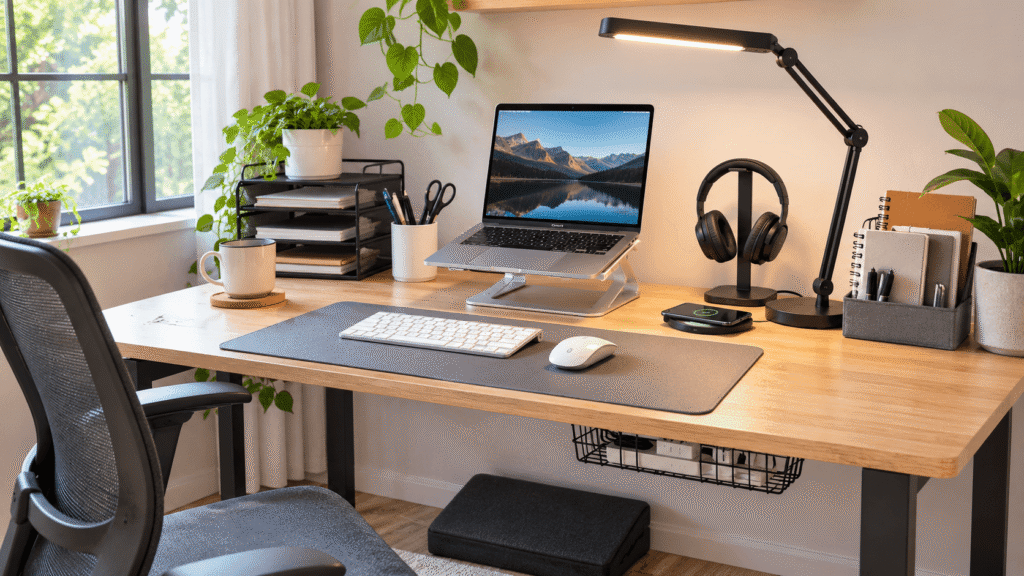
The good news? Some of the best affordable desk accessories for home offices solve these problems without requiring major changes.
A few thoughtful upgrades can help you organize your essentials, improve your working position, and make your desk more enjoyable to use.
And if you’re shopping for someone else’s workspace, our guide to the best home office gifts for him offers more practical inspiration.
Below are 10 useful upgrades worth considering, including a few that might surprise you with how helpful they become.
Quick Picks
- Best Overall: LOXP Adjustable Laptop Stand — Raises your laptop and offers adjustable positioning for a more comfortable workspace.
- Best Budget Option: Aothia Leather Desk Pad — An affordable way to protect your desk and create a smoother working surface.
- Best for Small Desks: OPNICE Monitor Stand Riser with Drawer — Combines screen elevation with convenient storage for everyday supplies.
Prices are approximate and may change. Ratings and review counts reflect current product data.
Affordable Desk Accessories for Better Comfort and Ergonomics
1. LOXP Adjustable Laptop Stand

Working on a laptop for several hours often means looking down at a screen that’s positioned too low. Over time, that can make your neck and shoulders feel uncomfortable.
A better screen position can make your workspace feel much more natural.
The LOXP Adjustable Laptop Stand raises your laptop and offers adjustable positioning, helping you find a more comfortable viewing height.
Its rotating base also makes it easier to reposition your laptop when sharing your screen with someone nearby.
It’s particularly useful for remote workers and students who spend long hours using laptops.
For example, pairing the raised laptop with a separate keyboard and mouse can create a more comfortable arrangement for writing, studying, or attending video meetings.
The LOXP Adjustable Laptop Stand is worth considering when you want more flexibility without replacing your existing desk.
Price: ~$27.99
Rating: 4.6 ⭐
Reviews: 2,588+
A small adjustment to your screen height can make your entire workspace feel more thoughtfully arranged.
2. Marbrasse 6-Tier Paper Organizer

Loose documents, notebooks, and printed assignments can quickly take over your desk.
When everything ends up in one pile, finding the right paper becomes an unnecessary interruption.
The Marbrasse 6-Tier Paper Organizer gives you six separate trays for sorting documents and keeping important paperwork accessible.
Its tiered arrangement is particularly useful when you need to organize several categories of papers without spreading them across your desktop.
Students can separate assignments by subject, while remote workers can organize invoices, notes, and project documents.
Imagine finishing a meeting and placing your notes into a designated tray instead of adding them to a growing stack.
The Marbrasse 6-Tier Paper Organizer also includes a handle, making it easier to reposition when needed.
Price: ~$19.99
Rating: 4.7 ⭐
Reviews: 5,509+
Better organization doesn’t have to mean hiding everything away. Sometimes, it simply means giving important papers a predictable place.
3. Aothia Leather Desk Pad

A bare desktop can feel uncomfortable when you’re typing, writing, or moving your mouse throughout the day.
Small annoyances, such as a slippery surface or a mouse that doesn’t glide smoothly, can interrupt your workflow.
The Aothia Leather Desk Pad creates a dedicated surface for everyday desk activities while helping protect the desktop underneath.
Made from PU leather, it features a non-slip design and a waterproof surface.
That makes it especially practical for people who regularly switch between computer work and handwritten notes.
Picture moving your mouse across your desk without constantly reaching the edge of a tiny mouse pad.
At approximately $10, the Aothia Leather Desk Pad is also one of the more accessible upgrades in this roundup.
Price: ~$9.99
Rating: 4.6 ⭐
Reviews: 79,789+
It’s an understated improvement that can make your workspace feel more comfortable and visually cohesive.
4. Airlonv LED Desk Lamp with Clamp

Even a bright room can leave your work surface poorly lit, especially during cloudy afternoons or evening study sessions.
Straining to read notes or see your keyboard isn’t ideal.
The Airlonv LED Desk Lamp with Clamp provides adjustable lighting without requiring a traditional lamp base to occupy your desktop.
Its flexible gooseneck allows you to direct light toward your work, while the dimming controls and adjustable color temperature help you adapt the lighting to different activities.
This is particularly helpful for students working late or remote workers using a desk in a shared room.
For example, you could direct the light toward a notebook while keeping the rest of the room relatively dim.
The clamp design also makes the Airlonv LED Desk Lamp with Clamp worth considering for smaller workspaces.
Price: ~$19.91
Rating: 4.5 ⭐
Reviews: 8,487+
Good lighting is easy to overlook until you experience how much more comfortable your desk feels with it.
Smart Desk Accessories for Organization and Productivity
5. Scanfield Under-Desk Cable Management Tray

Charging cables, power cords, and adapters can quickly create a tangled mess beneath your desk.
Besides looking untidy, loose cables can make cleaning and rearranging your workspace frustrating.
The Scanfield Under-Desk Cable Management Tray helps organize power strips, chargers, and bundled cords away from your main working surface.
This two-pack uses adhesive mounting rather than screws, making it an option for desks where you don’t want to drill mounting holes.
It’s particularly helpful for people using several computer accessories and charging devices.
Imagine being able to clean beneath your desk without constantly moving loose cables out of the way.
The Scanfield Under-Desk Cable Management Tray requires a 24-hour adhesive curing period, so plan the installation before loading it with accessories.
Price: ~$31.95
Rating: 4.5 ⭐
Reviews: 6,780+
A cleaner cable arrangement can make your workspace easier to maintain, especially when several devices share the same desk.
6. ComfiLife Adjustable Memory Foam Footrest

Sitting comfortably isn’t just about your chair.
When your feet don’t rest securely on the floor, maintaining a relaxed seated position can become difficult.
The ComfiLife Adjustable Memory Foam Footrest provides a cushioned surface beneath your feet, with adjustable height to accommodate different seating preferences.
This can be particularly useful for people whose desk height requires raising their chair.
For example, during a long afternoon of video meetings, having somewhere comfortable to rest your feet can make sitting feel less awkward.
The memory foam construction adds cushioning, although the ideal footrest height will depend on your chair and body proportions.
The ComfiLife Adjustable Memory Foam Footrest is worth considering when your feet need additional support during seated work.
Price: ~$39.99
Rating: 4.6 ⭐
Reviews: 14,131+
It’s a practical comfort improvement that works best alongside proper chair adjustment and regular movement breaks.
7. OPNICE Monitor Stand Riser with Drawer

A monitor positioned too low can encourage you to lean forward or look downward throughout the day.
At the same time, the space around your monitor often becomes crowded with pens, notes, and other small supplies.
The OPNICE Monitor Stand Riser with Drawer combines a raised screen platform with practical storage.
Its two-tier design includes a drawer and two pen holders, helping you organize everyday essentials without spreading them across your desk.
It’s particularly valuable for compact home offices where every inch matters.
You could keep stationery in the holders and smaller accessories in the drawer, leaving more room for your keyboard and mouse.
The OPNICE Monitor Stand Riser with Drawer is also described as suitable for laptops, making it a versatile option for different computer setups.
Price: ~$21.99
Rating: 4.7 ⭐
Reviews: 6,172+
Combining screen elevation with accessible storage makes this an especially practical upgrade for smaller desks.
8. Yootech Wireless Charging Pad

A phone charging cable constantly disappearing behind your desk can become surprisingly annoying.
Having a dedicated charging spot makes keeping your phone powered much simpler.
The Yootech Wireless Charging Pad lets you charge compatible phones and wireless earbuds without repeatedly connecting a charging cable.
It supports wireless charging up to 10W, depending on the device and charging setup.
This is convenient for remote workers who use their phones for authentication, messages, or occasional work calls.
Imagine setting your phone down beside your keyboard during the workday and picking it up when needed.
The Yootech Wireless Charging Pad doesn’t include an AC adapter, so check what charging equipment you already have before choosing it.
Price: ~$12.99
Rating: 4.3 ⭐
Reviews: 177,578+
The real benefit is convenience: one less small task interrupting your daily routine.
Space-Saving Desk Accessories for Everyday Convenience
9. KDD 4-in-1 Desk Cup Holder

Coffee mugs, water bottles, and small desk essentials can take up valuable room, particularly on narrow desks.
There’s also the occasional worry about accidentally knocking a drink toward your keyboard.
The KDD 4-in-1 Desk Cup Holder combines several storage functions in one clamp-on accessory.
It includes space for a drink, a phone, and pens, along with an under-desk headphone hanger.
That makes it useful for students, gamers, and remote workers who want to keep frequently used items accessible.
During a busy afternoon, you could keep your drink and phone nearby without squeezing them between your laptop and notebook.
The KDD 4-in-1 Desk Cup Holder also features a rotating headphone holder and detachable pen cup.
Price: ~$19.95
Rating: 4.6 ⭐
Reviews: 2,610+
It’s a clever way to organize several everyday essentials while reclaiming a little desktop space.
10. EURPMASK Rotating Headphone Holder

Headphones often end up lying across keyboards, hanging from monitors, or occupying an awkward corner of the desk.
That might seem harmless, but bulky headphones can consume more space than expected.
The EURPMASK Rotating Headphone Holder provides a designated storage spot beneath your desk while keeping your headphones within reach.
Its adjustable clamp allows it to attach to a suitable desk edge, while the 360-degree swivel design gives you flexibility in positioning the hook.
It’s especially useful for people who switch between video calls, focused work, and listening to music.
For example, after finishing a meeting, you can hang your headphones beneath the desk instead of leaving them beside your mouse.
The EURPMASK Rotating Headphone Holder also includes cable organization and soft rubber pads.
Price: ~$10.99
Rating: 4.7 ⭐
Reviews: 29,374+
A tiny organizational change like this can make a compact workspace noticeably easier to manage.
What to Look For Before Buying
Affordable doesn’t automatically mean useful. The best upgrades are the ones that address problems you actually experience.
Consider these factors before choosing:
- Desk size: Measure your available surface and the space beneath your desk, especially for clamp-on or under-desk accessories.
- Comfort: Prioritize upgrades that improve your working position or reduce everyday discomfort.
- Storage needs: Choose organizers that accommodate the items you regularly use rather than adding unnecessary compartments.
- Cable management: Look for solutions that keep wiring accessible, ventilated, and safely arranged.
- Durability: Consider construction, mounting stability, and supported weight limits where applicable.
- Ease of use: Accessories should simplify your routine rather than introduce extra steps.
It’s also worth thinking about how your workspace might change throughout the year. For example, our guide to the best Christmas desk decorations for a cozy holiday workspace explores seasonal touches that can complement an organized setup.
Start by identifying your biggest workspace frustration. Solving that problem first usually makes more sense than buying several accessories at once.
Conclusion
Creating a better home office doesn’t require expensive furniture or a complete redesign.
The right affordable desk accessories can make everyday work more comfortable, help reduce distractions, and keep your workspace organized.
Whether you choose a laptop stand for better screen positioning, a desk organizer for everyday essentials, or a compact storage accessory, focus on improvements that genuinely fit your routine.
These practical upgrades can also make thoughtful presents. If you’re looking for more inspiration, explore our selection of the best desk gifts for her.
Start with one problem, find an accessory that solves it, and build from there.